|
User Manual for Panasonic AV-HS60U2P Main Frame w Dual Power Supply for AV-HS6000 Switcher Click to enlarge the picture
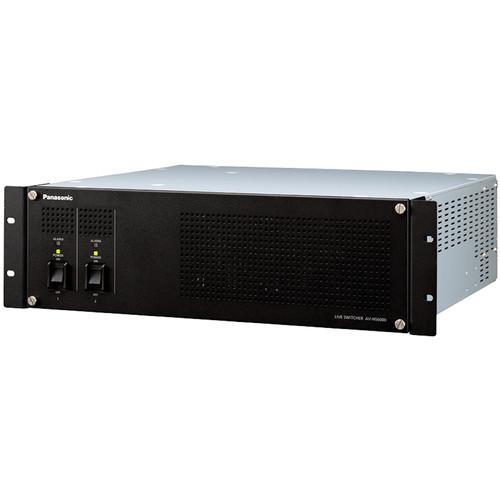 Contents of the user manual for the Panasonic AV-HS60U2P Main Frame w Dual
- Product category: Production Switchers Panasonic
- Brand: Panasonic
- Description and content of package
- Technical information and basic settings
- Frequently asked questions – FAQ
- Troubleshooting (does not switch on, does not respond, error message, what do I do if...)
- Authorized service for Panasonic Production Switchers
|
User manual for the Panasonic AV-HS60U2P Main Frame w Dual contain basic instructions
that need to be followed during installation and operation.
Before starting your appliance, the user manual should be read through carefully.
Follow all the safety instructions and warnings, and be guided by the given recommendations.
User manual is an integral part of any Panasonic product,
and if it is sold or transferred, they should be handed over jointly with the product.
Following the instructions for use is an essential prerequisite for protecting
health and property during use, as well as recognition of liability on the part of the manufacturer
for possible defects should you make a warranty claim. Download an official Panasonic user manual in which you will find instructions on how to install, use, maintain and service your product.
And do not forget – unsuitable use of a Panasonic product will considerably shorten its lifespan!
|
Product description The AV-HS60U2P Main Frame w/ Dual Power Supply for AV-HS6000 Switcher from Panasonic features the input and output connectors and processing engine that drives the AV-HS6000 2 M/E switcher. It features 32 HD-SDI inputs, along with two DVI-D (digital only) inputs for incorporating content from computer sources. It will support video resolutions up to 1080p at 10-bit, 4:2:2 in YUV color space, and up to 1080p 8-bit, 4:4:4 in RGB color space. Additionally, it will accept VESA computer resolutions up to 1600 x 1200 for 4:3 and 1920 x 1200 for 16:10.
It features 16 output channels, with each output channel mirrored on two SDI outputs. Not only can these outputs be used for an isolated, program, or aux feed, it is also possible to combine up to 16 ISO channels and send to one display using the MultiView function. Additional display arrangements are also possible, including a "squeeze mode" which reduces the image size to fit audio levels and other data around the outside. A total of 4 channels may be used in conjunction with the MultiView function.
The system features two mix and effects (M/E) buses with fades, transitions, and other effects possible. Additionally, the switcher features both upstream and downstream keyers (USK and DSK) for filling in black space, logo and graphic insertion, and compositing. Frequently used effects, setting, video clips, and still images can be save to the internal memory for later recall during a production.
The AV-HS60U2P is designed to be operated using the AV-HS60C1P/AV-HS60C1E or RAV-HS60C2P/AV-HS60C2E control panel. In addition, software plug-ins allow operation over an IP network or using certain Panasonic and third-party RS-422 serial devices. In addition, the AV-HS60C3G Menu Panel is required to access and change settings locally at the switcher.
This version of the AV-HS60U features dual redundant power supplies. This way , if the first power fails the second will instantly takeover so that there is no interruption in service. Connectivity - 32 HD-SDI and 2 DVI Inputs
- Despite being enclosed in a 3RU frame, the mainframe provides wide variety of inputs/outputs with frame synchronizer, format converter, and color correctors:
- Colors can be adjusted to correspond to different video source formats, camera properties, and displays
- All inputs feature a 10-bit frame synchronizer
- 8 inputs are equipped with color correctors
- 4 inputs are equipped with upconverters
- Signals can be delayed by up to 8 frames
- 16 SDI Outputs with 2 Outputs Per Channel
- Each output features two mirrored SDI connectors
- 4 outputs are equipped with color correctors
- 2 outputs are equipped with downconverters
- 4-Channel MultiViewer Function
- An independent 4-channel MultiViewer output function is provided that features a total of 9 patterns, and allowing up to 16 images to be displayed on one screen:
- MultiViewer can be selected from a total of 9 patterns, including: 4 split, 5 split (2 patterns), 6 split (2 patterns), 9 split, 10 split (2 patterns), and 16 split
- Source names, tallies, audio level meters, clock, and safety markers can be displayed
- Squeeze Mode can be selected to place the source name and level meter placed outside of the image
Mix and Effects (M/E) - Diverse DVE Transitions
- In addition to wipe, mix, and cut transitions, DVE (digital video effects) transitions with 2-channel 3D DVE, such as size reduction and sliding, can be performed. Image rendering effects such as mosaic or defocus are also possible
- 4 channels of 3D DVE and 2 channels of 2D DVE systems are provided to support background and keys for each M/E bus
- Multiple Keyers
- The system feature a variety of keyers to promote creative live content creation:
- Chroma Key: Thanks to the proprietary Primatte algorithm, real time and high quality key compositions are possible
- PinP (Picture-in-picture): 4 channels per M/E bus (8 channels total)
- Key Preset: The Key Preset function allows memorization and recall of the a key's particular settings. 4 settings for each channel of key and 4 settings for each channel of DSK (downstream key) can be registered
- Upstream Key (USK): 4 channels of USK are provided for applications such as adding the CG elements to fill the gap when inserting a 4:3 image in 16:9 frame
- Downstream Key (DSK): 4 channels DSK are available -- these can be assigned to PGM1 or PGM2 output
- Memory Functions
- The memory function allows mixer, video, and effects settings to be stored for later recall. It is designed to save time, allowing the operator to quickly engage frequently used settings and effects during a live broadcast where there is little or no margin for error
- Shot Memory: This function recalls background transition patterns or other video effects, including PinP size, position, border width, and key
- Event Memory: This function allows continuous image effects to be to registered and played back in a timeline
- Macro Memory: This function allows the recording and playback of a series of operations on the Control Panel. It can also record and playback setting information, such as input/output and keyers. Macro memories can be played back by assigning them to the cross point buttons, such as macro bus, PGM, and PST
- Video Memory: Moving image (Clip) and still image (Still) can be recorded for 4 channels each for later reuse as video sources. A maximum 60 seconds of moving images can be saved in standard mode, and Maximum 30 seconds in high image quality mode
- Intuitive Switching
-
- Multi-Selection Panel: A color panel that can display thumbnail images with high visibility
- Animation Wipe: With moving images (clip) and still images (still) recorded in video memory, it is possible to create animation wipes
System Scalability -
- 16 AUX buses are provided. MIX transition is available from the AUX1 to AUX4 buses
- The system can be operated remotely from a PC via a network connection
- Supports interoperability with various third-party software plug-ins and connectivity with other devices. In addition to pre-installed plug-in software, customized software solutions can be created using the SDK
- Included Plug-in Software
- Serial Control Software
This software controls switching and transition of crosspoint with GVG200-compliant external controllers and editors using an RS-422 serial interface -- external controllers and control software are available separately
IP Connected AUX Bus Control Software
This software controls switching from a VS-R45 remote operation panel to crosspoint via an IP network
Serial Tally Software
This software provides tally output and source names to an external tally display and I/F, and features UMD protocol v3.1 support. Tally is connected via an RS-422 serial interface In the Box Panasonic AV-HS60U2P Main Frame w/ Dual Power Supply for AV-HS6000 Switcher - Limited 1-Year Warranty
Table of Contents
|
Upload User Manual
Have you got an user manual for the Panasonic AV-HS60U2P Main Frame w Dual Power Supply for AV-HS6000 Switcher in electronic form? Please send it to us and help us expand our library of instruction manuals.
Thank you, too, on behalf of other users.
To upload the product manual, we first need to check and make sure you are not a robot. After that, your "Submit Link" or "Upload File" will appear.
Technical parametersPanasonic AV-HS60U2P Specs | SDI Input | Lines: 32
Connectors: 32 x BNC female
SDI channels 27, 28, 31, and 32 are equipped with up-converters
SDI channels 25 to 32 are equipped with color correctors
Signal Standards HD-SDI
SMPTE292M (BTA S-004) standard compliant
0.8 V (p-p) ±10% at 75 ohm
Automatic equalizer for runs more than 328' (100 m) -- when 1.5 Gbps/5C-FB cable is used
Signal Standards SD-SDI
SMPTE259M standard compliant
0.8 V (p-p) ±10% at 75 ohm
Automatic equalizer for runs more that 656' (200 m) -- when 5C-2V cable is used | | DVI Input | Lines: 2
Connectors: 2 x DVI-D
Supported Resolutions (Computer): XGA (1024 x 768), WXGA (1280 x 768), SXGA (1280 x 1024), WSXGA+ (1680 x 1050), UXGA (1600 x 1200), WUXGA (1920 x 1200)
Vertical Frequency (Computer): 60 Hz Supported Video Formats: 1080/59.94p, 1080/50p, 1080/59.94i, 1080/50i, 720/59.94p, 720/50p
Note:
Cable lengths up to 16.4' (5 m) are supported
A DVI-I cables are not supported
HDCP is not supported | | SDI Output | Lines: 16 -- two distributed outputs per line
Connectors: 32 x BNC female
Assignments: ME1PGM, ME1PVW, ME1CLN, ME1KEYPVW, ME2PGM, ME2PVW, ME2CLN, ME2KEYPVW, DSKPGM1, DSKPGM2, DSKPVW1, DSKPVW2, DSK1CLN, DSK2CLN, DSK3CLN, DSK4CLN, SEL KEYPVW, MV1 to MV4, and AUX1 to AUX16
Signal Standards HD-SDI
SMPTE292M (BTA S-004) standard compliant
0.8 V (p-p) ±10% at 75 ohm
Signal Standards SD-SDI
SMPTE259M standard compliant
0.8 V (p-p) ±10% at 75 ohm | | Video Formats | SD: 480/59.94i, 576/50i
HD: 1080/59.94i, 1080/50i, 720/59.94p, 720/50p, 1080/24PsF, 1080/23.98PsF, 1080/25PsF | | Signal Processing | Y: PB: PR: 4:2:2, 10-bit
R:G:B: 4:4:4: 8-bit | | Mix / Effect Buses | 2 ME | | | | Reference Input | Connectors: 2 x BNC female -- input with loop-through
Supports same field frequencies as those of the system formats supported:
In Genlock Mode: Black burst or tri-level sync (with loop-through)
Note:
If the loop-through output is not used, 75 ohm termination is required
In the 1080/24PsF and 1080/23.98PsF formats, only Genlock mode supported In the 1080/23.98PsF format, black burst signals with 10 Field ID (SMPTE318M compliant) or Tri-level Sync signals are supported
In the 1080/24PsF format, Tri-level sync signals supported
In internal sync mode black burst signal is output through both connectors | | LTC Input | Connector: BNC female
Impedance: 1 kohm
Level: 1 to 2 V (p-p) | | Video Delay | 1 Line (H): When the frame synchronizer is set to "Off" and the upconverter is set to "OFF"
1 Frame (H): When the frame syncronizer is set to "ON", or the upconverter is set to "ON"
Note:
When the signals have passed through PinP, DVE, MultiView, down-converter, or DVI-IN, a maximum delay of 1 frame is applied in each case | | | | LAN Terminal | Connector: 1 x RJ-45
Compatible with 100Base-TX and AUTO-MDIX -- for IP control
Supported Cable: CAT5E or better, up to 328' (100m) -- STP (Shielded Twisted Pair) cable recommended | | PANEL Terminal | Connector: RJ-45
Compatible with 100Base-TX and AUTO-MDIX -- for Control Panel (AV-HS60C1/AV-HS60C2) connection
Supported Cable: CAT5E or better, up to 328' (100m) -- STP (Shielded Twisted Pair) cable recommended | | Serial Interface | Connectors: 4 x D-sub 9-pin female
Terminals 1 to 3: For master connection to control external devices
Terminal 4: For master/slave connection to control external devices | | GPI In/Out | Connectors: 3x D-sub 25-pin female
Terminal 1
GPI Input: 18 inputs, general-purpose, photocoupler sensing
Alarm Output: 1 output, open collector output (negative logic)
Terminal 2 and 3
GPI Output: 48 outputs, selectable general purpose or tally -- open collector output | | | | Power Requirements | 100 to 240 VAC at 50 or 60 Hz | | Power Consumption | 110 W | | Operating Temperature | 32 to 104°F (0 to 40°C) | | Storage Temperature | 32 to 104°F (0 to 40°C) | | Operating Humidity | 10 to 90% RH, no condensation | | Storage Humidity | 10 to 90% RH, no condensation | | Dimensions | 19 x 5.2 x 16.5" (482 x 132 x 418 mm) | | Weight | 29.7 lb (13.5 kg) -- excluding accessories |
Rating80% users recommend this product to others. And what about you?

This product has already been rated by 97 owners. Add your rating and experience with the product.
Discussion
 Ask our technicians if you have a problem with your settings,
or if anything is unclear in the user manual you have downloaded.
You can make use of our moderated discussion.
The discussion is public and helps other users of our website who may be encountering similar problems.
Ask our technicians if you have a problem with your settings,
or if anything is unclear in the user manual you have downloaded.
You can make use of our moderated discussion.
The discussion is public and helps other users of our website who may be encountering similar problems.
The discussion is empty - enter the first post
Post a new topic / query / comment:
|
|
|
| Request for user manual |
You can’t find the operation manual you are looking for? Let us know and we will try to add the missing manual:
I’m looking for a manual / Request for manual
Current requests for instruction manuals:
Call Of Duty World War Two For Xbox...
controller stratus XL...
stratus XL...
smart whatch serie S11 42mm...
Allen & Heath SQ-6 manual...
|
| Discussion |
Latest contributions to the discussion:
AEW R 4100
Name: MAURICIO ANGARITA
Audio-Technica AEW-R4100 UHF Diversity Receiver for
AEW R 4100 has the mute function blocked and does not allow audio to pass. I tried several times to turn off the mute from the transmitter but it does nothing, the mute stays on. Solution?
Thank you...
Instructions for assembling the 2015 Forecast Image Master Consoles GC3-A
Name: mike elam
Forecast Consoles GC3-A ImageMaster Editing Console
Looking for instructions for assembling this console. ...
EMPTY TONER ERROR MESSAGE AFTER REPLACING TONER
Name: LINDA BAD YELLOW EYES
Brother TN223BK Standard-Yield Toner
I HAD TO CHANGE OUT ALL THREE TONERS DUE TO LEAKS IN THE YELLOW AND CYAN. AFTER I REPLACED THEM, THE MACHINE KEEPS GIVING ME AN EMPTY TONER ERROR MESSAGE. HELP!!...
PS480D 20/24 pin Switching 480W Power Supply
Name: swkargo
Logisys 480W Power Supply
This item states in can run -5vdc .It is NOT listed on the board or I beleive is r4 is missing the resitior. Any body have thid issue. Shawn
...
Help needed
Name: Ann Carter
SanDisk 1TB Extreme Portable USB 3.1
When I click the link to download the user manual for my Sandisk Extreme external hard drive, it gives me the manual for the LG Cricket. Can you please change the link so I can download the Sandisk manual and begin using this drive? Thank you....
|
|


