|
User Manual for Panasonic BT-4LH310 31" 4K Production Monitor Click to enlarge the picture
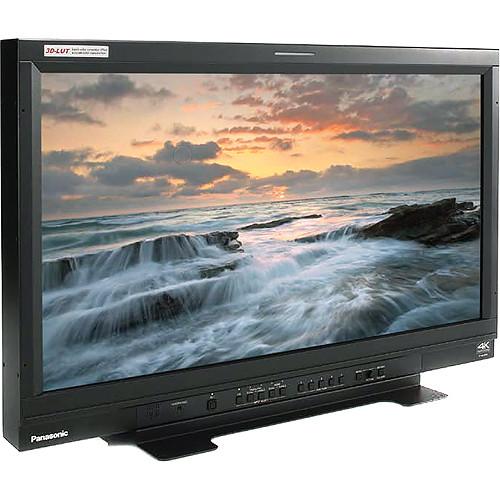 Contents of the user manual for the Panasonic BT-4LH310 31" 4K Production Monitor
- Product category: Production Monitors Panasonic
- Brand: Panasonic
- Description and content of package
- Technical information and basic settings
- Frequently asked questions – FAQ
- Troubleshooting (does not switch on, does not respond, error message, what do I do if...)
- Authorized service for Panasonic Production Monitors
|
User manual for the Panasonic BT-4LH310 31" 4K Production Monitor contain basic instructions
that need to be followed during installation and operation.
Before starting your appliance, the user manual should be read through carefully.
Follow all the safety instructions and warnings, and be guided by the given recommendations.
User manual is an integral part of any Panasonic product,
and if it is sold or transferred, they should be handed over jointly with the product.
Following the instructions for use is an essential prerequisite for protecting
health and property during use, as well as recognition of liability on the part of the manufacturer
for possible defects should you make a warranty claim. Download an official Panasonic user manual in which you will find instructions on how to install, use, maintain and service your product.
And do not forget – unsuitable use of a Panasonic product will considerably shorten its lifespan!
|
Product description The Panasonic BT-4LH310 31" 4K Production Monitor is suitable for a variety of production environments both in studio and out in the field. It features a 10-bit, 31" LCD panel that is LED backlit, and has a DCI-spec 4K (4096 x 2160) native resolution. It will accept 4K sources through SDI, HDMI, and DisplayPort. In addition to DCI 4K, it will accept QFHD/UHD 4K (3840 x 2160), 2K, and high definition video sources along with up to 16 channels of embedded audio.
The monitor features four 3G-SDI inputs. When used with 4K signals, the image is split into quadrants and all four inputs will be combined into one 4K image. It features two HDMI inputs. Depending on the frame rate, bit-depth, and chroma sub-sampling one or both inputs may be required for 4K signals. And it features two DisplayPort inputs. As with HDMI, one or both inputs may be require, depending on the bandwidth of the 4K signal. For all other resolutions up to 2K only a single input per image is required. This means that in non-4K applications the four SDI inputs can be used to create a "quadview image", displaying all four images on screen at once.
For local audio monitoring there is a stereo headphone jack as well as a 0.5W mono speaker. The monitor can be controlled remotely using RS-485, RS-232C, or GPI and has a tally port that will trigger red, green, or amber LED tally lights above the display. The monitor includes a removable desktop stand, and also features a VESA 200 x 200mm hole pattern on the back so that it can be attached to many standard monitor mounts. 10-Bit LED Backlit Panel - 4K Support
- The monitor supports 4K through four SDI, two HDMI, and two DisplayPort inputs. For HDMI and DisplayPort 4K sources one or both inputs may be required, depending on the bandwidth; for SDI all four inputs will always be used. Supported frame rates, bit-depths, and chroma sub-sampling ratios include:
3840 x 2160 (UHD)
- HDMI: Supports up to 60p at 8-bit, 4:4:4 when using two HDMI connections
- DisplayPort: Supports up to 60p at 10-bit, 4:4:4 when using two connections
- 3G-SDI: Supports up to 30p at 10-bit 4:4:4; 60p at 10-bit 4:2:2 - four connections always required
4096 x 2160 (DCI 4K)
- HDMI: Supports up to 60p at 8-bit, 4:4:4 when using two connections
- DisplayPort: Supports up to 60p at 10-bit, 4:4:4 when using two connections
- 3G-SDI: Supports up to 60p at 10-bit 4:2:2; 24 or 25p at 12-bit 4:4:4 - four connections always required
- In-Plane Switching Technology (IPS)
- The LCD panel features in-plane switching, designed to provide greater off-axis viewing angles before significant loss of image quality is experienced when compared to non-IPS panels
- Wide Color Gamut
- Covers 100% of BT709, EBU and SMPTE-C color gamut specifications for television applications, and covers 96% of the DCI (P3) color gamut specification for digital cinema applications
- LUT Upload Function
- Allows user-defined lookup tables (LUTs) to be imported, ensuring the same calibration parameters are adhered to when the footage is viewed, edited, or color-corrected across multiple monitors
- 3D-LUT and 6-Pole Color Correction
- Designed to eliminate color phase shifts (drift) in the LCD panel caused by luminance level differences. By providing a look-up table (LUT) for each luminance level and applying 12-bit image processing to each RGB color, it balances the six coordinate poles of the three primary colors (RGB) and their complementary colors (CMY). This is designed to help reproduce the intermediate shades of extremely fine colors
- Calibration Function
- The built-in calibration function can be used to automatically adjust the white balance, which can drift out of calibration over time, by using commercially available probe sensors and display analyzers. Compatible calibration devices include:
- Konica Minolta: PU32, PU35, PSU32, PSU35, CA 310
- Photo Research: PR 655
- Xrite: i1 Pro
Production Features - Focus Assist
- Equipped with two focus assist modes:
- Focus-In-Red: Overlays a red peaking outline over the parts of the image that are in focus
- Zoom (4K): Enlarges either the center section of the image or one of the quarter sections 4x and displays it on the full screen
- Y-Map, Zebra, and RGB Display Modes
-
- Y-Map: Creates a false color image by assigning each luminance step a discrete color and overlays a reference chart identifying the luminance value of each color
- Zebra: Similar to in-camera zebra overlays, generates 45° bands across parts of the image that exceed a certain, user-defined exposure level
- RGB Color: Allows you to selectively view only one or two RGB channels at a time
- Markers and Grids
-
- Aspect Marker: Capable of indicating an image area in one of up to eight aspect ratios: 16:9 (only when 17:9 is set), 4:3, 13:9, 14:9, CNSCO2.39, CNSCO2.35, 2:1 and VISTA
- Safe Area Marker: Within 17:9, 16:9, and 4:3 aspect ratios: 95%, 93%, 90%, 88%, 80%, USER, DOT / LINE, or VAR (user-defined)
- Center Marker: Designates the center of the image, and can be used with other markers enabled
- Cross Hatch Grid: A grid overlay to help determine if the camera is level on the horizon
- Quad Display (2K / HD)
- Taking advantage of 4K resolution when working with sub-4K video sources. The Quad Display function displays a waveform monitor (WFM) and a vector scope (VSC) as well as one of the Focus-in-Red, Y Map, or Zebra assist functions simultaneously with a full-pixel image from a 2K (2048 x 1080) or HD input source
- Frame Grab
- Allows a still image to be captured from video and temporarily displayed on the monitor. This function is useful for comparing camera angles or colors between takes or scenes
- Error Indication
- Transmission and other errors are detected in the SDI source, and the error status is displayed and logged
- Audio Level Meter
- The audio level meter can be overlaid on the displayed image. Up to eight channels can be simultaneously displayed, and a peak hold function is included. For 3G-SDI input, channels 1-8, or channels 9-16 can be selected
- Time Code and Closed Caption Display
- Can display either VTC or UB time code on one line, or both VTC and UB on two separate lines. From 2K and HD-SDI sources, can display EIA/CEA 708 closed captions
General Features - Aluminum Frame
- Designed to provide a robust enclosure for the LCD panel for added confidence when using the monitor in the field
- 28VDC Powerable
- Accepts 28VDC power to use in the field with professional battery systems. When both DC and AC are connected simultaneously, the AC source takes precedence
- Fanless Cooling
- Fanless, self-cooling design provides silent operation, for distraction-free use even in quiet editing rooms
- Mercury Free LED Backlight
- Backlight contains no mercury as an environmental protection measure
Additional Features -
- Tally lamp
- Speakers and headphone jack on front panel
- Includes detachable stand
- Key Lock function disables front panel controls, except for the power switch, menu operation and audio level adjustment
- Functions can be assigned to five function keys for one-touch operation
- Energy-saving Auto Power Down when there is no signal input or operation
UPC: 885170179202 In the Box Panasonic BT-4LH310 31" 4K Production Monitor - Limited 1-Year Warranty
Table of Contents
|
Upload User Manual
Have you got an user manual for the Panasonic BT-4LH310 31" 4K Production Monitor in electronic form? Please send it to us and help us expand our library of instruction manuals.
Thank you, too, on behalf of other users.
To upload the product manual, we first need to check and make sure you are not a robot. After that, your "Submit Link" or "Upload File" will appear.
Technical parametersPanasonic BT-4LH310 Specs | | | Panel Type | 10-bit, IPS | | Screen Size | 31.1" / 789 mm effective diagonal size | | Native Resolution | 4096 x 2160 | | Aspect Ratio | 17:9 | | Display Colors | Approximately 1,070,000,000 | | Viewing Angle | 178° horizontal and vertical - contrast > 10:1 | | Contrast Ratio | 1450:1 | | | | Inputs | 4 x SDI on BNC female - supports:
SMPTE ST424/425-1/274/296
HD-SDI with 8-channel, 48 kHz embedded audio
3G-SDI with 16-channel, 48 kHz embedded audio
2 x HDMI - supports HDPC and embedded audio
2 x DisplayPort - supports HDPC and embedded audio | | Outputs | 4 x SDI on BNC female - active through-out of SDI inputs
1 x Headphone on 3.5 mm stereo mini jack | | Remote Control | 1 x GPI on 9-pin D-sub
1 x RS-232C on 9-pin D-sub
2 x RS-485 (in / out) on RJ-45 | | | | Speaker | 0.5 W, monaural | | Tally | Red, green, amber tally lights | | | | Power Requirements | AC: 100 to 240 V, 50 or 60 Hz
DC: 28 V average - 23.4 to 30 V | | Power Consumption | AC: 1.7 to 0.7 A
DC: 4.6 A | | Operating Temperature | 41 to 95°F / 5 to 35°C - up to 6562' / 2000 m above sea level | | Storage Temperature | -4 to 140°F / -20 to 60°C | | VESA Hole Pattern | 200 x 200 mm | | Dimensions | With Stand: 30 x 19.5 x 10.2" / 758 x 495 x 258 mm
Without Stand: 30 x 18.7 x 5.2" / 758 x 474 x 132 mm | | Weight | With Stand: 44.1 lb / 20 kg
Without Stand: 40.8 lb / 18.5 kg | | | | Package Weight | 61.0 lb | | Box Dimensions (LxWxH) | 37.0 x 27.3 x 17.0" |
Rating70% users recommend this product to others. And what about you?

This product has already been rated by 98 owners. Add your rating and experience with the product.
Discussion
 Ask our technicians if you have a problem with your settings,
or if anything is unclear in the user manual you have downloaded.
You can make use of our moderated discussion.
The discussion is public and helps other users of our website who may be encountering similar problems.
Ask our technicians if you have a problem with your settings,
or if anything is unclear in the user manual you have downloaded.
You can make use of our moderated discussion.
The discussion is public and helps other users of our website who may be encountering similar problems.
The discussion is empty - enter the first post
Post a new topic / query / comment:
|
|
|
| Request for user manual |
You can’t find the operation manual you are looking for? Let us know and we will try to add the missing manual:
I’m looking for a manual / Request for manual
Current requests for instruction manuals:
Call Of Duty World War Two For Xbox...
controller stratus XL...
stratus XL...
smart whatch serie S11 42mm...
Allen & Heath SQ-6 manual...
|
| Discussion |
Latest contributions to the discussion:
AEW R 4100
Name: MAURICIO ANGARITA
Audio-Technica AEW-R4100 UHF Diversity Receiver for
AEW R 4100 has the mute function blocked and does not allow audio to pass. I tried several times to turn off the mute from the transmitter but it does nothing, the mute stays on. Solution?
Thank you...
Instructions for assembling the 2015 Forecast Image Master Consoles GC3-A
Name: mike elam
Forecast Consoles GC3-A ImageMaster Editing Console
Looking for instructions for assembling this console. ...
EMPTY TONER ERROR MESSAGE AFTER REPLACING TONER
Name: LINDA BAD YELLOW EYES
Brother TN223BK Standard-Yield Toner
I HAD TO CHANGE OUT ALL THREE TONERS DUE TO LEAKS IN THE YELLOW AND CYAN. AFTER I REPLACED THEM, THE MACHINE KEEPS GIVING ME AN EMPTY TONER ERROR MESSAGE. HELP!!...
PS480D 20/24 pin Switching 480W Power Supply
Name: swkargo
Logisys 480W Power Supply
This item states in can run -5vdc .It is NOT listed on the board or I beleive is r4 is missing the resitior. Any body have thid issue. Shawn
...
Help needed
Name: Ann Carter
SanDisk 1TB Extreme Portable USB 3.1
When I click the link to download the user manual for my Sandisk Extreme external hard drive, it gives me the manual for the LG Cricket. Can you please change the link so I can download the Sandisk manual and begin using this drive? Thank you....
|
|


