User Manual for Panasonic Lumix DC-G9 Mirrorless Micro Four Thirds Digital Camera with 12-60mm Lens and Accessories Kit Click to enlarge the picture
 Contents of the user manual for the Panasonic Lumix DC-G9 Mirrorless Micro Four
- Product category: Mirrorless System Cameras Panasonic
- Brand: Panasonic
- Description and content of package
- Technical information and basic settings
- Frequently asked questions – FAQ
- Troubleshooting (does not switch on, does not respond, error message, what do I do if...)
- Authorized service for Panasonic Mirrorless System Cameras
|
User manual for the Panasonic Lumix DC-G9 Mirrorless Micro Four contain basic instructions
that need to be followed during installation and operation.
Before starting your appliance, the user manual should be read through carefully.
Follow all the safety instructions and warnings, and be guided by the given recommendations.
User manual is an integral part of any Panasonic product,
and if it is sold or transferred, they should be handed over jointly with the product.
Following the instructions for use is an essential prerequisite for protecting
health and property during use, as well as recognition of liability on the part of the manufacturer
for possible defects should you make a warranty claim. Download an official Panasonic user manual in which you will find instructions on how to install, use, maintain and service your product.
And do not forget – unsuitable use of a Panasonic product will considerably shorten its lifespan!
|
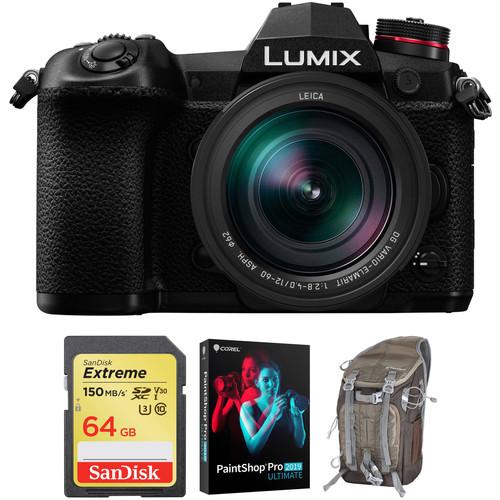
Product description A well-rounded bundle to get you started shooting, the Panasonic Lumix DC-G9 Mirrorless Micro Four Thirds Digital Camera with 12-60mm Lens and Accessories Kit from pairs the multimedia mirrorless body and standard zoom lens with a protective camera bag, a memory card, and a copy of Corel PaintShop Pro 2019 Ultimate editing software. - Panasonic Lumix DC-G9 Mirrorless Micro Four Thirds Digital Camera with 12-60mm Lens Panasonic has taken a different approach to camera development with the stills-focused DC-G9 Micro Four Thirds Mirrorless Camera, which has a variety of newly developed functions and features that will appeal to photographers. Central to the imaging process is the combination of a 20.3MP Live MOS sensor and the latest Venus Engine processor, enabling the capture of sharp images and video with sensitivities ranging up to ISO 25600. Extremely fast speeds are also made available with up to 60 fps continuous shooting with the electronic shutter function. If you want to shoot video along with stills the G9 is very accommodating, offering UHD 4K at up to 60p.
This improved speed is seen in many different aspects, including an enhanced Depth-from-Defocus autofocus system with 225 areas for fast, precise focusing across the frame. A rear joystick has been implemented as well for intuitive control over the current focus point. Another benefit of boosted processing is the inclusion of 6K PHOTO at 30 fps and 4K PHOTO at up to 60 fps, allowing users to capture 18MP or 8MP images, respectively, at exceptional frame rates. Beyond speed, the 5-axis sensor stabilization system supports Dual I.S. 2.0 and can compensate for up to six stops of camera shake. And a significant addition made possible with this new system is a multi-shot mode that captures eight separate images and compiles them into a single 80MP raw image.
It isn't just performance that has been optimized, as the G9 has a redesigned body that is splash, dust, and freezeproof. The body gains a top status LCD for quick access to essential settings without needing to check the LCD or viewfinder, which have also been improved. Most notably, the OLED viewfinder is improved with a 0.83x magnification and 3.68m-dot resolution. The EVF has a fast 120 fps refresh rate as well for lag-free viewing. Additionally, the LCD is now a 3.0" 1.04m-dot free-angle touchscreen for working intuitively and at odd angles. - 20.3MP Digital Live MOS Sensor and Venus Engine
- Optimized for high-speed high-resolution imaging, the G9 packs in both a 20.3MP Light MOS Micro Four Thirds sensor and an enhanced Venus Engine processor to create sharp, detailed stills and UHD 4K video. This configuration maximizes resolution while keeping noise to a minimum, permitting the use of sensitivities up to ISO 25600. It is also very fast, enabling continuous shooting rates of up to 60 fps with AF-S and 20 fps with AF-C when using the G9's electronic shutter or 12 fps for AF-S and 9 fps for AF-C using the mechanical shutter.
- UHD 4K Video Recording
- Supplementing the camera's stellar stills feature set is UHD 4K video recording at up to 60p. The G9 offers internal recording with an 8-bit color depth and 4:2:0 sampling using Long GOP compression to keep files sizes manageable. Users also have access to various frame rates, including 60p, 30p, and 24p in UHD 4K and 60p and 24p in Full HD. Slow motion video is available in the Creative Video Mode with support for 60 and 48 fps resolution in UHD 4K and up to 180 fps in Full HD.
In order to maximize image quality, the G9 features a full-size HDMI output for using an optional external recorder to receive 8-bit 4:2:2 footage at all resolutions up to UHD 4K at 30p. Also, both a 3.5mm headphone jack and 3.5mm microphone input are available for improving audio capture. - 6K and 4K PHOTO
- Utilizing the G9's video recording capabilities, a trio of still shooting modes are available for recording continuous 8MP stills at a 60 or 30 fps shooting rate or 18MP stills at a 30 fps shooting rate:
- Burst: This mode will allow you to continuously record, making it ideal for instances where you need a fast frame rate in order to capture the best moment.
- Pre-Burst: This mode is ideal for times when you're unsure of the critical moment to press the shutter button and will record images one second prior to and one second after pressing the shutter button in order to give you 60 frames to choose from.
- Burst (S/S): This mode most closely follows the video recording process, and allows you to playback your video, pause at the chosen moment, and use the shutter button to mark a chosen frame from the video and save it as a single 8 or 18MP frame.
- Dual I.S. 2
- Helping to achieve the utmost sharpness when photographing handheld, Dual I.S. 2 combines the G9's sensor-shift image stabilization technology with lens-based image stabilization to compensate for a broader range of movement types to render sharper, clearer imagery. Dual I.S. 2 requires the use of compatible Lumix lenses featuring O.I.S. This stabilization system is able to compensate for approximately six stops of camera shake.
- Body Design and Built-In Wi-Fi
-
- A large OLED Live View Finder has an impressive 3.86m-dot resolution and 0.83x magnification for eye-level composition. This viewfinder also has a maximum refresh rate of 120 fps for clear, lag-free imagery.
- A larger means for image composition and playback, the 3.0" 1.04m-dot rear LCD monitor has a free angle, tilt and swivel design to support viewing from a variety of angles. It is also a touchscreen, which permits intuitive menu navigation and settings control.
- A backlit top status LCD provides immediate access to current settings without needing to raise the camera to eye level.
- Dual UHS-II SD card slots are present, which provides settings such as Relay Recording to automatically switch cards when one is full; Backup Recording, which records the same data to both cards simultaneously; and Allocation Recording, which lets you save certain files to each card for easier organization.
- Constructed from magnesium alloy with a die-cast frame, the G9 features a durable design that also incorporates extensive sealing at each joint, dial, and button to render it both splash- and dust-proof as well as freezeproof to 14°F.
- A joystick is available on the rear of the camera to make changing many settings easier and more intuitive, such as changing a focus point.
- The sleek flat-body profile incorporates both front and rear dials for intuitive control over aperture and shutter speed settings. Multiple assignable function buttons are also available, including a function lever.
- Built-in 5 GHz Wi-Fi connectivity with NFC and Bluetooth 4.2 Low Energy allows for wireless image sharing and remote camera control from linked smartphones and tablets. Bluetooth LE also enables a constant connection to your mobile device, allowing for functions such as geolocation and automatic image transfer.
- Leica DG Vario-Elmarit 12-60mm f/2.8-4 ASPH. POWER O.I.S. Lens
- Included with the camera body is the Leica DG Vario-Elmarit 12-60mm f/2.8-4 ASPH. POWER O.I.S. lens; a 24-120mm equivalent zoom spanning wide-angle to short telephoto perspectives. This versatile optic, which has been designed in collaboration with Leica, features a series of aspherical and extra-low dispersion elements to greatly reduce spherical and chromatic aberrations throughout the zoom range. Its linear motor offers quick and quiet autofocus performance while the POWER Optical Image Stabilizer system helps to minimize the appearance of camera shake. Additionally, matching the camera body's design, the lens is also splash, dust, and freeze-proof to enable its use in trying environmental conditions.
- 225-Area Advanced Depth-From-Defocus AF System
- For accelerated autofocus performance, and Advanced DFD (Depth-From-Defocus) technology is employed to quickly calculate the distance to subjects and adjust the focusing position in as little as 0.04 seconds, which enables continuous shooting up to 20 fps with continuous AF. This contrast-detection type focus method benefits both still and video recording modes, as well as subject tracking applications where subject color, size, and motion vectors are used to intelligently lock-onto the moving subjects and ensure precise focus. The sensitivity and speed can be adjusted to further improve performance with certain subjects. It also features 225 AF areas, which provide excellent control over where the camera will focus. Additionally, supporting working in low-light conditions, a Starlight AF feature enables accurate AF performance down to -4 EV.
Benefitting manual focus operation, focus peaking is available that highlights bright edges of contrast with a colored outline for quickly recognizing your focus point, as well as Touch MF Assist for touch-to-focus operation. Other AF features include an AF Point Scope setting that temporarily magnifies the subject by 3x to 10x for confirmation of the focus position and a custom selectable AF zone for Multi AF / Custom Multi AF. - 80MP High Resolution Mode
- By using sensor-shift stabilization technology the G9 can use a High Resolution Mode to capture and compile eight separate images to create a single 80MP raw file. This system creates a more highly detailed and color accurate image than a single shot alone can produce and can create an image with a 10368 x 7776 resolution.
- Other Camera Features
-
- A mechanical focal plane shutter enables a fast maximum shutter speed of 1/8000 sec, as well as a top flash sync speed of 1/250 sec. An electronic shutter function also avails a top shutter speed of 1/32,000 sec to better enable working in bright conditions and with wider aperture settings. This shutter is rated for approximately 200,000 actuations.
- A Night Mode will automatically adjust brightness of the EVF and LCD for comfortable viewing in low-light conditions.
- An optional external USB power pack can be used to supply power to the camera via its micro-USB port.
- Depending on the lens in use, the included DMW-BLF19 battery provides approximately 380 shots per charge when using the rear monitor, or 360 with the electronic viewfinder.
- Photo Style modes: Standard, Vivid, Natural, Monochrome, L. Monochrome, Scenery, Portrait, Custom, Cinelike D, and Cinelike V.
- Creative Control modes: Expressive, Retro, Old Days, High Key, Low Key, Sepia, Monochrome, Dynamic Monochrome, Rough Monochrome, Silky Monochrome, Impressive Art, High Dynamic, Cross Process, Toy Effect, Toy Pop, Bleach Bypass, Miniature Effect, Soft Focus, Fantasy, Star Filter, One Point Color, and Sunshine.
UPC: 885170334212 - SanDisk 64GB Extreme UHS-I SDXC Memory Card Designed for SD devices that can capture Full HD, 3D, and 4K video, as well as raw and burst photography, the 64GB Extreme UHS-I SDXC Memory Card from SanDisk has a capacity of 64GB, is compatible with the UHS-I bus, and features a speed class rating of V30, which guarantees minimum write speeds of 30 MB/s. If your device does not support the V30 standard, this card also supports the U3 standard, which likewise guarantees minimum write speeds of 30 MB/s. Read speeds are supported up to 150 MB/s and write speeds max out at 60 MB/s. A built-in write-protect switch helps to safeguard against the accidental erasure of card data.
While this card has been designed for cameras that are UHS-I / V30 / U3 compatible, it may be used in devices that do not support UHS-I / V30 / U3. However, bear in mind that this card will then default to your device's speed class and bus rating, such as UHS-I and U1, which supports minimum write speeds of 10 MB/s, or Class 10, which also supports minimum write speeds of 10 MB/s. UPC: 619659170684 - Corel PaintShop Pro 2019 Ultimate (DVD with Download Card) Corel PaintShop Pro 2019 Ultimate is a comprehensive photo editing, image management, and graphic design software, along with a bonus pack of four additional programs—PhotoMirage Express, Painter Essentials 6, Perfectly Clear 3.5 SE, and AfterShot 3—for a thorough range of post-production capabilities. The 2019 version of this application sees updates to performance speeds, with faster, more intuitive, and versatile tools, as well as a simplified user experience and a greater range of creative capabilities. Individual tools have been optimized for greater control, including the Crop tool, which now has faster performance along with the ability to apply several enhancement features during the cropping process. Additionally, support has been added for 360° imagery along with new brushes, palettes, gradients, patterns, and picture tubes for a richer range of adjustments and effects you can apply to your photos.
- PaintShop Pro 2019
- Performance Enhancements:
- Faster Crop tool performance takes greater advantage of the computer's GPU for 5x more responsive cropping, rotating, and positioning.
- One-Step Photo Fix has been improved for faster processing times and the ability to automatically apply several corrections to an image at once.
- Improved support for 4K content and higher resolution monitors means user interface text will appear larger when necessary for easier navigation.
- Updated compatibility for the latest WinTab-aware graphics tablets as well as Windows Ink for more editing flexibility and control.
- Autosave has been enhanced for fewer interruptions, a more overall subtle experience, and the ability to control the frequency of autosaving.
Simplified User Experience:
- Seamless content and plug-in migration from previous versions lets you easily carry over your settings, plug-ins, brush tips, color palettes, gradients, patterns, textures, and effects via the Import Content from Previous Versions menu option.
- Some of the most often used enhancement features can now be used in conjunction with the Crop tool, including Instant Effects, One-Step Photo Fix, and Depth of Field options, to quicken your editing workflow.
- The user interface text size can now be adjusted, with Small or Large settings, to suit your needs.
Enhanced Creativity:
- Pic-to-Painting presets make use of Deep Neural Networks to analyze individual images and convert them into digital artworks with the ability to select from a variety of creative presets that mimic well-known painting styles.
- Photographs taken from 360° cameras can be edited, straightened with rotation, made to appear level, and you can easily remove and replace the tripod in the image using Magic Fill to produce unique planet-like effects.
- New brushes, color palettes, gradients, patterns, and picture tubes have been added to the 2019 edition for even greater creativity.
- Ultimate Bonus Pack
- Included with PaintShop Pro 2019 is a bonus quartet of additional applications to further round out your post-production capabilities.
- PhotoMirage Express lets you turn any image into an animation and then share them directly to social media for a more dynamic viewing experience.
- Painter Essentials 6 is a photo-painting software that transforms your photographs into illustrative-styled digital art. Alternatively, you can use a wide range of brushes and other tools to sketch, draw, and paint from scratch, as well as apply various painting styles and effects to your finished works.
- Perfectly Clear 3.5 SE helps to restore detail, color, and other details in a quick and efficient manner. Using a sophisticated set of presets, you can develop a custom look for your photos, comprised of multiple adjustments, and apply this look to groups of images in a single click.
- AfterShot 3 is a dedicated raw file processor for editing and enhancing your photo library. Image adjustments can be made to single files or an advanced batch processing function lets you apply corrections to large groups of photos at once.
- Photo Editing
- Enhancements:
- Using PaintShop Pro's Camera RAW Lab, you have complete processing control over your raw files, including the ability to see before and after views and work with a large preview option.
- Multiple exposures of the same scene can be blended using HDR tools for extending the apparent dynamic range and gaining greater shadow and highlight detail.
- Lens Correction tools can be automatically or manually applied to correct distortions, vignetting, and chromatic aberrations introduced by many lenses.
- Scripts allow you to automate repetitive tasks for a faster, more efficient workflow.
Quick Fixes:
- Makeover tools help to eliminate red-eye, blemishes, and unwanted lines, as well as smooth wrinkles, whiten teeth, and even-out skin tones.
- Batch Processing lets you apply the same adjustment to several files at once.
- One Step Photo Fix is a single-click method to automatically apply corrections and Smart Photo Fix lets you apply automatic adjustments with one click, too, but with the ability to fine-tune the suggested settings.
- Crop photos using the range of new compositional guides and also re-orient crooked photos or straighten perspectives.
Creative Effects:
- Instant, Preset Effect can be quickly applied and have been organized into style categories, such as Artistic, Film Styles, Black & White, and Landscape, for easy access.
- Retro Lab helps to achieve desirable vintage-looking photos by applying color and contrast effects to mimic a lo-fi retro look.
- A Graduated Filter tool lets you quickly and easily add unique color gradient effects.
- The Depth of Field tool lets you apply bokeh effects to mimic the subject isolating look of a shallow depth of field image.
Retouch and Restore:
- Several Selection Tools are available to quickly and easily select various subjects for adjusting, retouching, or copying elements of an image.
- Content-aware editing tools, like Magic Move and Magic Fill, automatically fill-in empty areas of the image once an object has been moved or removed. Object Remover and Clone Brush can also be used to get rid of undesirable imperfections.
- The Fade Correction tool helps to restore the color and contrast from faded photos while a Scratch Remover tool can be used to repair cracks or marks from scans of old prints or negatives.
- A Red Eye tool lets you quickly remove unsightly red-eye effects and replace it with a natural-looking dark gray color.
- Graphic Design
-
- A variety of Drawing and Painting tools let you apply a range of illustration effects to your images. Besides the 30 new brushes, you can also import your favorite Adobe Photoshop brushes. Additionally, vector illustration tools also allow you to draw with preset shapes and pens.
- Layers allow you to work in a non-destructive manner and create more complicated photo compositions.
- Text can be added to any image using a range of typography tools, along with the ability to adjust fonts, size, style, alignment, leading, kerning, and apply effects to creatively adjust the look of your text.
- Start and Learn
-
- A step-by-step guided virtual tour can be used to familiarize yourself with the new features and how best to use them in your editing workflow.
- Helpful video tutorial libraries are accessible in the updated Welcome tab, as well as a Leaning Page for additional assistance.
- Share Your Photos
-
- Integrated social media sharing allows you to post your photos and designs directly to Facebook, SmugMug, Flickr, and Google+ accounts from within PaintShop Pro.
- Facial recognition technology helps to identify and tag individuals in your photos for easier photo management.
- Using location tags, you can map your photos to places on a map and share them online.
UPC: 735163153354 In the Box - Lumix DC-G9 Mirrorless Micro Four Thirds Digital Camera with 12-60mm Lens acrduxqqydtfassqedv
- Leica DG Vario-Elmarit 12-60mm f/2.8-4 ASPH. POWER O.I.S. Lens
- DMW-BLF19 Rechargeable Lithium-Ion Battery Pack (7.2V, 1860mAh)
- DMW-BTC13 Battery Charger
- Body Cap
- USB Cable
- Shoulder Strap
- Cable Holder
- Limited 1-Year Warranty
- SanDisk - 64GB Extreme UHS-I SDXC Memory Card
- Corel - PaintShop Pro 2019 Ultimate (DVD with Download Card)
Table of Contents
|
Upload User Manual
Have you got an user manual for the Panasonic Lumix DC-G9 Mirrorless Micro Four Thirds Digital Camera with 12-60mm Lens and Accessories Kit in electronic form? Please send it to us and help us expand our library of instruction manuals.
Thank you, too, on behalf of other users.
To upload the product manual, we first need to check and make sure you are not a robot. After that, your "Submit Link" or "Upload File" will appear.
Technical parameters - Panasonic Lumix DC-G9 Mirrorless Micro Four Thirds Digital Camera with 12-60mm Lens
| | | Lens Mount | Micro Four Thirds | | Camera Format | Micro Four Thirds (2x Crop Factor) | | Pixels | Actual: 21.77 Megapixel
Effective: 20.3 Megapixel | | Maximum Resolution | 5184 x 3888 | | Aspect Ratio | 1:1, 3:2, 4:3, 16:9 | | Sensor Type | MOS | | Sensor Size | 17.3 x 13 mm | | Image File Format | JPEG, RAW | | Image Stabilization | Sensor-Shift, 5-Axis | | | | ISO Sensitivity | Auto, 200 to 25600 (Extended: 100 to 25600) | | Shutter Speed | Electronic Front Curtain Shutter
1/8000 to 60 Seconds
1 to 30 Minutes in Bulb Mode
Electronic Shutter
1/32000 to 1 Second
1/16000 to 1/25 Second in Movie Mode | | Metering Method | Center-Weighted Average, Multiple, Spot | | Exposure Modes | Aperture Priority, Manual, Program, Shutter Priority | | Exposure Compensation | -5 to +5 EV (1/3 EV Steps) | | Metering Range | 0 to 18 EV | | White Balance | Auto, Cloudy, Color Temperature, Daylight, Flash, Incandescent, Shade, White Set | | Continuous Shooting | Up to 9 fps at 20.3 MP
Up to 12 fps at 20.3 MP
Up to 20 fps at 20.3 MP
Up to 60 fps at 20.3 MP
Up to 30 fps at 18 MP
Up to 60 fps at 8 MP | | Interval Recording | Yes | | Self Timer | 2/10-Second Delay | | | | Recording Modes | MP4 4:2:0 8-Bit
UHD 4K (3840 x 2160) at 59.94p [150 Mb/s]
UHD 4K (3840 x 2160) at 23.976p/29.97p/59.94p [100 Mb/s]
Full HD (1920 x 1080) at 59.94p [28 Mb/s]
Full HD (1920 x 1080) at 29.97p/180p [20 Mb/s]
AVCHD
Full HD (1920 x 1080) at 59.94p [28 Mb/s]
Full HD (1920 x 1080) at 59.94i [17 to 24 Mb/s]
Full HD (1920 x 1080) at 23.976p [24 Mb/s] | | External Recording Modes | 4:2:2 8-Bit
UHD 4K (3840 x 2160)
Full HD (1920 x 1080) | | Recording Limit | Up to 29 Minutes, 59 Seconds | | Video Encoding | NTSC | | Audio Recording | Built-In Microphone (Stereo)
External Microphone Input | | Audio File Format | AAC, Dolby Digital 2ch, Linear PCM | | | | Focus Type | Auto and Manual Focus | | Focus Mode | Continuous-Servo AF (C), Flexible (AFF), Manual Focus (M), Single-Servo AF (S) | | Autofocus Points | Contrast Detection: 225 | | Autofocus Sensitivity | -4 to +18 EV | | | | Viewfinder Type | Electronic | | Viewfinder Resolution | 3,680,000 Dot | | Viewfinder Eye Point | 21 mm | | Viewfinder Coverage | 100% | | Viewfinder Magnification | Approx. 0.83x | | Diopter Adjustment | -4 to +3 m | | Monitor Size | 3" | | Monitor Resolution | 1,040,000 Dot | | Monitor Type | Articulating Touchscreen LCD | | | | Built-in Flash | None | | Flash Modes | Auto, Auto/Red-Eye Reduction, Forced On, Forced On/Red-Eye Reduction, Off, Slow Sync, Slow Sync/Red-Eye Reduction | | Maximum Sync Speed | 1/250 Second | | Flash Compensation | -3 to +3 EV (1/3 EV Steps) | | Dedicated Flash System | TTL | | External Flash Connection | Hot Shoe, PC Terminal | | | | Memory Card Slot | 2 x SD/SDHC/SDXC | | Connectivity | 3.5mm Headphone, 3.5mm Microphone, 2.5mm Sub-Mini, HDMI A (Full Size), USB 3.0 | | Wireless | Wi-Fi
Bluetooth | | GPS | None | | | | Operating Temperature | 14 to 104°F / -10 to 40°C | | Operating Humidity | 10 to 80% | | | | Battery | 1 x DMW-BLF19 Rechargeable Lithium-Ion, 7.2 VDC, 1860 mAh | | Dimensions (W x H x D) | 5.4 x 3.8 x 3.6" / 136.9 x 97.3 x 91.6 mm | | Weight | 1.27 lb / 579 g (Body Only) | | | | Focal Length | 12 to 60mm (35mm Equivalent Focal Length: 24 to 120mm) | | Maximum Aperture | f/2.8 to 4 | | Minimum Aperture | f/22 | | Angle of View | 84
Rating100% users recommend this product to others. And what about you?

This product has already been rated by 37 owners. Add your rating and experience with the product.
Discussion
 Ask our technicians if you have a problem with your settings,
or if anything is unclear in the user manual you have downloaded.
You can make use of our moderated discussion.
The discussion is public and helps other users of our website who may be encountering similar problems.
Ask our technicians if you have a problem with your settings,
or if anything is unclear in the user manual you have downloaded.
You can make use of our moderated discussion.
The discussion is public and helps other users of our website who may be encountering similar problems.
The discussion is empty - enter the first post
Post a new topic / query / comment:
|
|
|
| Request for user manual |
You can’t find the operation manual you are looking for? Let us know and we will try to add the missing manual:
I’m looking for a manual / Request for manual
Current requests for instruction manuals:
Call Of Duty World War Two For Xbox...
controller stratus XL...
stratus XL...
smart whatch serie S11 42mm...
Allen & Heath SQ-6 manual...
|
| Discussion |
Latest contributions to the discussion:
AEW R 4100
Name: MAURICIO ANGARITA
Audio-Technica AEW-R4100 UHF Diversity Receiver for
AEW R 4100 has the mute function blocked and does not allow audio to pass. I tried several times to turn off the mute from the transmitter but it does nothing, the mute stays on. Solution?
Thank you...
Instructions for assembling the 2015 Forecast Image Master Consoles GC3-A
Name: mike elam
Forecast Consoles GC3-A ImageMaster Editing Console
Looking for instructions for assembling this console. ...
EMPTY TONER ERROR MESSAGE AFTER REPLACING TONER
Name: LINDA BAD YELLOW EYES
Brother TN223BK Standard-Yield Toner
I HAD TO CHANGE OUT ALL THREE TONERS DUE TO LEAKS IN THE YELLOW AND CYAN. AFTER I REPLACED THEM, THE MACHINE KEEPS GIVING ME AN EMPTY TONER ERROR MESSAGE. HELP!!...
PS480D 20/24 pin Switching 480W Power Supply
Name: swkargo
Logisys 480W Power Supply
This item states in can run -5vdc .It is NOT listed on the board or I beleive is r4 is missing the resitior. Any body have thid issue. Shawn
...
Help needed
Name: Ann Carter
SanDisk 1TB Extreme Portable USB 3.1
When I click the link to download the user manual for my Sandisk Extreme external hard drive, it gives me the manual for the LG Cricket. Can you please change the link so I can download the Sandisk manual and begin using this drive? Thank you....
|
|


