User manual Panasonic Lumix DMC-LX10 Digital Camera Deluxe
Search your instruction manual in PDF to download
User Manual for Panasonic Lumix DMC-LX10 Digital Camera Deluxe Kit
Click to enlarge the picture Contents of the user manual for the Panasonic Lumix DMC-LX10 Digital Camera Deluxe
Product category: Point & Shoot Cameras Panasonic
Brand: Panasonic
Description and content of package
Technical information and basic settings
Frequently asked questions – FAQ
Troubleshooting (does not switch on, does not respond, error message, what do I do if...)
Authorized service for Panasonic Point & Shoot Cameras
User manual for the Panasonic Lumix DMC-LX10 Digital Camera Deluxe contain basic instructions
that need to be followed during installation and operation.
Before starting your appliance, the user manual should be read through carefully.
Follow all the safety instructions and warnings, and be guided by the given recommendations.
User manual is an integral part of any Panasonic product,
and if it is sold or transferred, they should be handed over jointly with the product.
Following the instructions for use is an essential prerequisite for protecting
health and property during use, as well as recognition of liability on the part of the manufacturer
for possible defects should you make a warranty claim. Download an official Panasonic user manual in which you will find instructions on how to install, use, maintain and service your product.
And do not forget – unsuitable use of a Panasonic product will considerably shorten its lifespan!
Product description
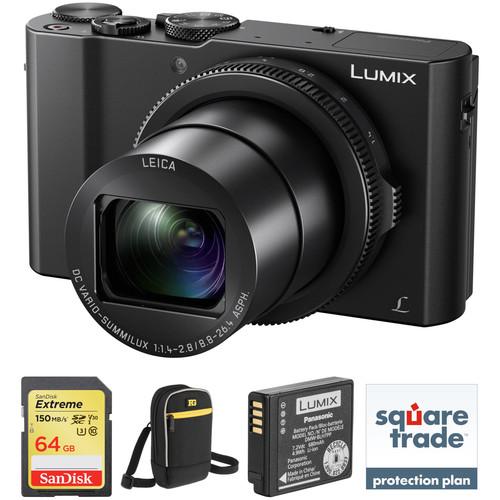
Comprising the essential components needed to begin shooting, the Panasonic Lumix DMC-LX10 Digital Camera Deluxe Kit from B&H bundles the compact, 4K-capable point-and-shoot with a 64GB SDXC memory card, a spare rechargeable lithium-ion battery, and a camera pouch. An extended two-year drops and spills warranty is also included for further protection to your equipment.
Panasonic Lumix DMC-LX10 Digital Camera
Lumix LX10 San Francisco Impressions YouTube
Panasonic LUMIX DMC-LX10 Post Focus Stacking
Panasonic LUMIX DMC-LX10 Display Settings
Panasonic LUMIX DMC-LX10 Touchscreen
Panasonic LUMIX DMC-LX10 Custom Setting
A pocket-sized powerhouse, Panasonic's Lumix DMC-LX10 Digital Camera offers outstanding performance through the use of a 20.1MP High Sensitivity MOS Sensor that can deliver sharp stills, UHD 4K video, and more. Combine this with a compact design that offers a 3" LCD touchscreen that tilts up 180° for selfies, and you have an almost ideal camera for everyday carry.
In order to provide sharp, richly detailed images, the LX10 features a fast Leica DC Vario-Summilux f/1.4-2.8 lens with a versatile 3x zoom range. This optic features a 35mm equivalent wide-angle to telephoto range of 24-72mm, making it useful in a range of different situations. Also, the 20.1MP sensor furthers the camera's abilities with an extended sensitivity range up to ISO 25600 and continuous shooting at up to 50 fps with an electronic shutter and 10 fps with the mechanical shutter.
The LX10 is equipped with a 5-axis HYBRID O.I.S.+ system for shake-free images and a 49-area autofocus system that will make sure your images are tack sharp. Hybrid shooters will appreciate the inclusion of high-quality UHD 4K video recording in the LX10. It can record at 30 or 24 fps at 100 Mbps using the MP4 format. Also, Panasonic leverages the power of this technology to provide advanced 4K PHOTO and 4K Post Focus features.
Looking at the svelte metal exterior, users will appreciate an ergonomic grip and design. The LX10 has a physical lens control ring to help provide more tactile control over certain settings. Shooters who are always on the go can charge up their camera through the USB port. The camera is also boosted by the inclusion of numerous other features, such as focus stacking and Wi-Fi connectivity, making this a very capable imaging tool.
20.1MP 1" High Sensitivity MOS Sensor
The large 20.1MP 1" High Sensitivity MOS Sensor enables high-resolution still image and 4K video recording with native sensitivity to ISO 12800, which can be further expanded to ISO 25600. The two technologies also contribute to a marked reduction in noise through the use of Multi Process NR, Random Filter, and Aperture Filter systems to realize consistent color fidelity and image clarity. The sensor and processor combination also avail notable speed throughout the camera, including the ability to record up to 50 fps using an electronic shutter, 10 fps with a mechanical shutter, or 6 fps with a mechanical shutter and continuous AF. Benefitting a hybrid workflow, users can switch between recording 4K movies and still imagery instantly and there is also the ability to make in-camera 8MP screen grabs from 4K movies.
Leica DC Vario-Summilux f/1.4-2.8 Zoom Lens
In order to capture sharp, detailed images in a vast variety of shooting conditions, the LX10 is equipped with a Leica DC Vario-Summilux lens that has a versatile wide-angle to telephoto 24-72mm equivalent zoom range. This lens features an 11 element in 9 group design that incorporates 4 aspherical lenses with dual-sided aspherical surfaces, two aspherical ED lenses, and one UHR lens to minimize aberrations and maximize performance. The lens also features a fast maximum aperture of f/1.4-2.8 that allows photographers to create images with a shallow depth of field and work more effectively in low light. Additionally, it has optical image stabilization to reduce the impact of camera shake.
UHD 4K Video Recording
Benefitting from the 1" MOS image sensor, The LX10 is able to record UHD 4K (3840 x 2160) video at 30p with a high bit rate of 100 Mbps in the MP4 file format. Full HD 1080 video can also be recorded—at 60p, 30p, 24p, or 60i—in the AVCHD format, as well as Full HD and HD formats in the MP4 format. When recording 4K video, use of a UHS-3 memory card is recommended and continuous recording up to 15 minutes is possible. For Full HD 60p recording users can record continuously for up to 29 minutes and 59 seconds while Full HD 30p video can be recorded without a time limit. A built-in stereo microphone records audio in either AAC or Dolby formats. Users can also use the micro-HDMI port to output 4K video to an external monitor or recorder.
4K PHOTO Capabilities
Besides video, the 4K capabilities also permit recording 8MP stills at 30 fps in a trio of ways:
4K Burst: Just as with video recording, this mode will allow you to continuously record 8MP images at 30 fps for up to 15 minutes, making it ideal for instances where you need a fast frame rate in order to capture the best moment.
4K Pre-Burst: This mode is ideal for times when you're unsure of the critical moment to press the shutter button and will record 8MP images at 30 fps one second prior to and one second after pressing the shutter button in order to give you 60 frames to choose from.
4K Burst (S/S): This mode most closely follows the 4K video recording process, and allows you to playback your video, pause at the chosen moment, and use the shutter button to mark a chosen frame from the video and save it as a single 8MP frame.
Post Focus and Focus Stacking
Another attribute of the 4K capabilities is a unique focusing method called Post Focus. This function records imagery as a 4K MP4 file at 30 fps and shifts the specific point of focus throughout the burst shooting in order to offer a range of distinct focusing ranges to choose from. During playback, via the camera's touchscreen, you can then tap the specific region of the image you wish to be in focus and an 8MP JPEG file will be created. Multiple individual files with different points of focus can be created from the original burst, and focusing assist functions can also be used to gain even more precise control over the specific in-focus region.
A built-in focus stacking feature lets you program the capture of a sequence of photos with shifting focus. This technique allows you to utilize the highest performing aperture as well as increase the depth of field in your final image.
5-Axis HYBRID Optical Image Stabilization+
Helping to compensate for camera shake when recording HD movies, 5-axis HYBRID O.I.S.+ is an advanced image stabilization system that minimizes the appearance of blur when shooting one-handed video. It corrects for five types of camera shake that commonly affect more dynamic movement types that occur while moving when recording.
Body Design and Built-In Wi-Fi
The 3" 1.04m-dot rear touchscreen LCD can tilt upwards 180° for taking self-portraits.
Physical lens control ring provides tactile control over some commonly used settings.
A physical aperture ring allows for direct control over a critical camera setting.
The top of the camera features a dedicated record button as well as a control dial for quickly changing settings.
Built-in Wi-Fi allows you to pair the LX10 with smartphones or tablets running the Panasonic Image App for wireless image transferring and remote camera control.
Other Camera Features
A mechanical shutter enables a maximum shutter speed of 1/4000 sec and an electronic shutter function avails a top shutter speed of 1/16000 sec to better enable working in bright conditions and with wider aperture settings.
Creative Panorama mode allows you to create seamless panoramic imagery by simply panning about the scene to capture wide-field views.
A built-in pop-up flash can be used to provide additional illumination to scenes.
The included lithium-ion battery provides approximately 260 shots per charge when using the rear LCD monitor.
Creative Control modes: Expressive, Retro, Old Days, High Key, Low Key, Sepia, Monochrome, Dynamic Monochrome, Rough Monochrome, Silky Monochrome, Impressive Art, High Dynamic, Cross Process, Toy Effect, Toy Pop, Bleach Bypass, Miniature Effect, Soft Focus, Fantasy, Star Filter, One Point Color, and Sunshine.
Still image Scene Guide modes: Clear Portrait, Silky Skin, Backlit Softness, Clear in Backlight, Relaxing Tone, Sweet Child's Face, Distinct Scenery, Bright Blue Sky, Romantic Sunset Glow, Vivid Sunset Glow, Glistening Water, Clear Nightscape, Cool Night Sky, Warm Glowing Nightscape, Artistic Nightscape, Glittering Illuminations, Handheld Night Shot, Clear Night Portrait, Soft Image of a Flower, Appetizing Food, Cute Dessert, Freeze Animal Motion, Clear Sports Shot, and Monochrome.
Designed for SD devices that can capture Full HD, 3D, and 4K video, as well as raw and burst photography, the 64GB Extreme UHS-I SDXC Memory Card from SanDisk has a capacity of 64GB, is compatible with the UHS-I bus, and features a speed class rating of V30, which guarantees minimum write speeds of 30 MB/s. If your device does not support the V30 standard, this card also supports the U3 standard, which likewise guarantees minimum write speeds of 30 MB/s. Read speeds are supported up to 150 MB/s and write speeds max out at 60 MB/s. A built-in write-protect switch helps to safeguard against the accidental erasure of card data.
While this card has been designed for cameras that are UHS-I / V30 / U3 compatible, it may be used in devices that do not support UHS-I / V30 / U3. However, bear in mind that this card will then default to your device's speed class and bus rating, such as UHS-I and U1, which supports minimum write speeds of 10 MB/s, or Class 10, which also supports minimum write speeds of 10 MB/s. UPC: 619659170684
Ruggard Lyra 40 Camera Pouch (Black)
Lumix LX10 San Francisco Impressions YouTube
Panasonic LUMIX DMC-LX10 Post Focus Stacking
Panasonic LUMIX DMC-LX10 Display Settings
Panasonic LUMIX DMC-LX10 Touchscreen
Panasonic LUMIX DMC-LX10 Custom Setting
Store, transport and protect your digital small point & shoot camera from moisture, dirt and dust with the black Lyra 40 Camera Pouch from Ruggard. The pouch features an easy access, zippered, clamshell opening, and an interior SD memory card pocket. Soft, padded, interior nylon helps protect your camera from impact, scratches and abrasion. This protection is complemented by a weather-resistant nylon exterior. Carry the pouch with the handy belt loop with touch-fasten tabs, or with the removable shoulder strap. The bright yellow interior makes it easier to locate stored items in low light.
Durable, weather-resistant nylon exterior for protection from moisture, dirt, and dust
Thick foam padding to protect against bumps and impact
Soft nylon interior to prevent lens and screen scratches and abrasions
Interior SD card pocket for storing extra photos and video
Zippered front pocket for added cards, lens cloth, spare battery and other small items
The DMW-BLH7 Rechargeable Lithium-Ion Battery Pack from Panasonic is compatible with select Lumix digital cameras. It has 7.2V of output power, a capacity of 680mAh, and a rating of 4.9Wh. This battery is included with compatible cameras, and is offered here as a spare or replacement part.
Compatible Cameras
Panasonic:
Lumix DMC-GM1
UPC: 885170168282
In the Box
Lumix DMC-LX10 Digital Camera sbwfsqwcwccvtywfuqbweqwtfcbcyycw
Have you got an user manual for the Panasonic Lumix DMC-LX10 Digital Camera Deluxe Kit in electronic form? Please send it to us and help us expand our library of instruction manuals.
Thank you, too, on behalf of other users.
To upload the product manual, we first need to check and make sure you are not a robot. After that, your "Submit Link" or "Upload File" will appear.
Technical parameters
Panasonic Lumix DMC-LX10 Digital Camera
Pixels
Actual: 20.9 Megapixel Effective: 20.1 Megapixel
Sensor
1" MOS
File Formats
Still Images: JPEG, RAW Movies: AVCHD 2.0, MP4
Max Resolution
20 MP: 5472 x 3648
Aspect Ratio
1:1, 3:2, 4:3, 16:9
Image Stabilization
Optical & Digital, 5-Way
Lens
Lumix DC Vario, 11 Elements in 9 Groups 4 Aspherical, 2 ED Effective Focal Length: 8.8 to 26.4mm (35 mm Equivalent: 24 to 72mm) Aperture: f/1.4 (W) to f/2.8 (T) to f/11
Filter Thread
None
Zoom
Optical: 3x Digital: 4x Intelligent Zoom: 6x
Focus Range
Normal: 11.81" to Infinity / 30 cm to Infinity Wide: 1.18" to Infinity / 3 cm to Infinity Telephoto: 11.81" to Infinity / 30 cm to Infinity
ISO Sensitivity
Auto, 125 to 12800 (Extended Mode:Auto, 80 to 25600)
Shutter
Type: Mechanical Speed: 60 to 1/4000 Second Type: Electronic Speed: 1 to 1/16000 Second Type: Mechanical Speed: 120 Seconds in Time Mode Type: Electronic Speed: 1/30 to 1/16000 Second in Movie Mode
Exposure Metering
Center-Weighted, Multi, Spot
Exposure Modes
Modes: Aperture Priority, Creative Control, Intelligent Auto, Manual, Panorama Shot, Program, Scene Modes, Shutter Priority Compensation: -5 EV to +5 EV (in 1/3 EV Steps)
White Balance
Auto, Cloudy, Color Temperature, Daylight, Flash, Incandescent, Shade, White Set 1, White Set 2, White Set 3, White Set 4
Continuous Shooting
Up to 50 fps at 20 MP Up to 10 fps at 20 MP
Self-Timer
2, 10 Sec
Flash Modes
Auto Auto/Red-Eye Reduction Forced On Forced On/Red-Eye Reduction Off Slow Sync Slow Sync/Red-Eye Reduction
Built-In Flash
Yes
Effective Flash Range
Wide:1.6 to 39.7' / 0.5 to 12.1 m Telephoto:1.0 to 19.7' / 0.3 to 6.0 m
External Flash Connection
None
Built-In Memory
None
Memory Card Type
SD SDHC SDXC
Video Recording
Yes, NTSC
Resolution
3840 x 2160p: 30 fps, 24 fps 1920 x 1080p: 60 fps, 30 fps, 24 fps 1920 x 1080i: 60 fps 1280 x 720p: 30 fps
Audio Recording
Built-In Mic: With Video (Stereo)
Viewfinder Type
None
Screen
3" LCD Rear Touchscreen Tilt (1,040,000 Pixels)
Screen Coverage
100%
Connectivity
HDMI D (Micro), USB 2.0 Micro-B
Wi-Fi
Yes, Wi-Fi 4 (802.11n) Built In
GPS
No
Battery
1 x Rechargeable Lithium-Ion Battery Pack, 7.2 VDC, 680 mAh
Dimensions (W x H x D)
4.2 x 2.4 x 1.7" / 105.5 x 60.0 x 42.0 mm
Weight
10.94 oz / 310 g with battery and memory card
Box Dimensions (LxWxH)
5.3 x 5.1 x 2.6"
SanDisk 64GB Extreme UHS-I SDXC Memory Card
Card Type
SDXC
Storage Capacity
64 GB
Bus Type
UHS-I
Speed Class
10
UHS Speed Class
U3
Video Speed Class
V30
Data Transfer
Read Speed: 150 MB/s Maximum (Burst) Write Speed: 60 MB/s Maximum (Burst) Write Speed: 30 MB/s Minimum
50% users recommend this product to others. And what about you?
This product has already been rated by 00 owners. Add your rating and experience with the product.
Discussion
Ask our technicians if you have a problem with your settings,
or if anything is unclear in the user manual you have downloaded.
You can make use of our moderated discussion.
The discussion is public and helps other users of our website who may be encountering similar problems.
Call Of Duty World War Two For Xbox...controller stratus XL...stratus XL...smart whatch serie S11 42mm...Allen & Heath SQ-6 manual...
Discussion
Latest contributions to the discussion:
AEW R 4100 Name: MAURICIO ANGARITA Audio-Technica AEW-R4100 UHF Diversity Receiver for AEW R 4100 has the mute function blocked and does not allow audio to pass. I tried several times to turn off the mute from the transmitter but it does nothing, the mute stays on. Solution?
Thank you...Instructions for assembling the 2015 Forecast Image Master Consoles GC3-A Name: mike elam Forecast Consoles GC3-A ImageMaster Editing Console Looking for instructions for assembling this console. ...EMPTY TONER ERROR MESSAGE AFTER REPLACING TONER Name: LINDA BAD YELLOW EYES Brother TN223BK Standard-Yield Toner I HAD TO CHANGE OUT ALL THREE TONERS DUE TO LEAKS IN THE YELLOW AND CYAN. AFTER I REPLACED THEM, THE MACHINE KEEPS GIVING ME AN EMPTY TONER ERROR MESSAGE. HELP!!...PS480D 20/24 pin Switching 480W Power Supply Name: swkargo Logisys 480W Power Supply This item states in can run -5vdc .It is NOT listed on the board or I beleive is r4 is missing the resitior. Any body have thid issue. Shawn
...Help needed Name: Ann Carter SanDisk 1TB Extreme Portable USB 3.1 When I click the link to download the user manual for my Sandisk Extreme external hard drive, it gives me the manual for the LG Cricket. Can you please change the link so I can download the Sandisk manual and begin using this drive? Thank you....
PDF User Manuals
We regularly supplement and update our library. Latest instruction manuals added for download:
Peter Morgan: "Thanks for this website! With help from your instructions I’ve got my dishwasher working again."
Nick Jackson: "Your site’s been a massive help because the user manual didn’t come with the product. Thanks a lot."
Leslie Scott: "I finally found the user's guide with you that I couldn’t find anywhere else! Totally happy!"
Take a look through our user manuals in our on-line library, with instruction manuals and service handbooks downloadable in PDF format. Our instructions database is constantly updated and supplemented with new products. Looking for instruction manuals? Ask us!
SEARCH-MANUAL.com Sitemap.xml




 Ask our technicians if you have a problem with your settings,
or if anything is unclear in the user manual you have downloaded.
You can make use of our moderated discussion.
The discussion is public and helps other users of our website who may be encountering similar problems.
Ask our technicians if you have a problem with your settings,
or if anything is unclear in the user manual you have downloaded.
You can make use of our moderated discussion.
The discussion is public and helps other users of our website who may be encountering similar problems.