|
User Manual for Panasonic PT-DW830ULW WXGA 1-Chip DLP Projector Click to enlarge the picture
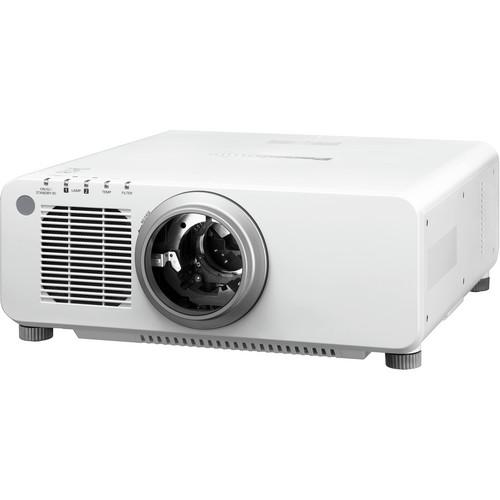 Contents of the user manual for the Panasonic PT-DW830ULW WXGA 1-Chip DLP Projector
- Product category: Multimedia Projectors Panasonic
- Brand: Panasonic
- Description and content of package
- Technical information and basic settings
- Frequently asked questions – FAQ
- Troubleshooting (does not switch on, does not respond, error message, what do I do if...)
- Authorized service for Panasonic Multimedia Projectors
|
User manual for the Panasonic PT-DW830ULW WXGA 1-Chip DLP Projector contain basic instructions
that need to be followed during installation and operation.
Before starting your appliance, the user manual should be read through carefully.
Follow all the safety instructions and warnings, and be guided by the given recommendations.
User manual is an integral part of any Panasonic product,
and if it is sold or transferred, they should be handed over jointly with the product.
Following the instructions for use is an essential prerequisite for protecting
health and property during use, as well as recognition of liability on the part of the manufacturer
for possible defects should you make a warranty claim. Download an official Panasonic user manual in which you will find instructions on how to install, use, maintain and service your product.
And do not forget – unsuitable use of a Panasonic product will considerably shorten its lifespan!
|
Product description The white Panasonic PT-DW830ULW WXGA 1-Chip DLP Projector is ideally suited for fixed installations and public display venues including independent cinema, live events, educational institutions, entertainment and as the hub of cutting-edge home theater applications.8500 ANSI lumens is enough power to overwhelm most ambient light. The 10,000:1 contrast achieved by the Dynamic Iris delivers WXGA (1280 x 800) imagery that leaps off the screen. And don't worry if your source material was compressed. Detail Clarity Processor 3 restores any subtle details that may have been lost during the compression process. Exclusive to Panasonic, this image-processing circuit analyzes the video signal frequency range for each scene by extracting data on the distribution of high, mid, and low-frequency components, and brings out fine details accordingly. The resulting images have a more natural, three dimensional appearance with crisp, clear detail.The projector ensures minimal image degradation and a quick response that eliminates afterimages. It's for mission-critical environments such as 24-hour a day command and control centers thanks to the dual 420W lamp system, which employs a Lamp Relay Mode to cycle each lamp on and off during 24/7 scenarios.Other features include a built-in clock to schedule projector functions, PIP, and DICOM simulation mode. Digital Imaging and Communications in Medicine (DICOM) allows educators to display subtle nuances and grayscale subtleties in X-rays, radiography or MRIs.The PT-DW830ULW ships without a lens. You have a wide range of lenses to choose from. - Dual Lamp System
- Panasonic's Dual Lamp System eliminates interruptions due to lamp failure (in Dual Lamp operation mode). The Lamp Relay Mode also operates the lamps alternately to enable 24/7 projection. Operation is possible in temperatures up to 113°F/45°C. A dust-resistant optical block is also employed. These features combine to ensure high reliability
- 10,000:1 Contrast Ratio
- The Dynamic Iris achieves a high contrast ratio of 10,000:1
- Vivid Color Control
- This technology optimizes the use of the color wheel segments. It increases the brightness of each RGB color by minimizing the unallocated portions between the colors
- Dynamic RGB Booster
- Panasonic's RGB Booster achieves high image quality with levels of color reproduction and brightness that make each color stand out. It combines Panasonic's proprietary Vivid Color Control technology with a Lamp Modulation Drive System for a 1-chip DLP projector that produces bright colors
- Rec. 709 Mode for HDTV Projection
- Optimal color reproduction can be achieved by selecting this mode, compliant with ITU-R Recommendation BT.709, when images from an HDTV source are projected
- Waveform Monitor Function
- When the output level of the source device fluctuates due to the performance of the device or its cable connections, the original black and white levels of the image content cannot be reproduced correctly. With the projector you can view the waveforms on the screen and adjust the settings either automatically or manually as you prefer
- Detail Clarity Processor 3
- Exclusive to Panasonic, this image-processing circuit analyzes the video signal frequency range for each scene by extracting data on the distribution of high, mid, and low-frequency components, and brings out fine details accordingly. The resulting images have a more natural, three dimensional appearance with crisp, clear detail
- A Wide Selection of Lenses Available
- Choose from a wide lineup of lenses for your system, including short-throw, long-throw zoom and fixed-throw lenses for rear projection use (not included)
- System Daylight View 2
- System Daylight View 2 enhances perceived brightness and contrast for remarkable detail. It includes a built-in ambient light sensor that automatically detects room brightness and adjusts operation accordingly
- DICOM Simulation Mode
- Digital Imaging and Communications in Medicine (DICOM) simulation mode allows medical educators to display high-resolution images with exceptional detail and clarity. This helps train technologists and others to recognize and understand the subtle grayscale differences visible on digital radiography, computed tomography and magnetic resonance
- Flexible Design
- A lens-centered design, a wide range of optional lenses, powered H/V-lens shift, and flexible vertical 360-degree installation enable smooth flexibility for use in various locations
- Advanced Technologies
- 3D color management system
Full 10-bit image processing
Progressive cinema scan (3:2 pulldown)
Dynamic sharpness control
Digital noise reduction
IP conversion
AI scene control
2:2 pulldown mode
sRGB compatibility - Multi Projector Monitoring & Control Software
- Panasonic's freeware Multi Projector Monitoring & Control Software allows the user to control and monitor multiple projectors at the same time over a wired LAN. When a problem occurs, an alarm message is sent to the monitoring/controlling PC
- Direct Power Off
- The cooling fan continues to operate even when the main power switch is turned off after projection is finished. This also allows the power to be turned off by directly switching off the room's main breaker for systems, such as ceiling mounted systems, where the main power switch cannot be reached
- Multi-Screen Support System Seamlessly Connects Multiple Screens
- Edge Blending: The edges of adjacent screens can be blended and their luminance controlled
Color Matching: This function corrects for slight variations in the color reproduction range of individual projectors. The PC software assures easy, accurate control
Multi-Screen Processor: The projector can project large, multi-screen images without any additional equipment. Up to 100 (10 x 10) units can be edge-blended at a time - Scheduling Function
- A scheduling function enables timed operation via a built-in clock to program the projectors to turn on or off at specific hours during the day
- PJLink Compatibility
- The LAN terminals support PJLink class 1 connection. Control with the same specifications is also possible when used in a multi-projector system with projectors of another brand
- PiP
- Picture in Picture lets you flexibly control the layout of two windows for a wide variety of presentations
- Eco-Friendly
- Environment-friendly, low standby power consumption of 0.3W when set to Eco
- Web Browser Control
- The projector can be easily operated remotely over a LAN network, because it is all done using the computer's familiar Web browser. Furthermore, the projector sends an e-mail message to notify the operator when an error has occurred, or a lamp needs to be replaced
- DIGITAL LINK
- Equipped with a DIGITAL LINK terminal, the projector allows transmission of HDMI, uncompressed HD digital video, audio, and control signals (Ethernet, RS-232C) for up to 328' through a single CAT5e (STP) cable or higher. This simplifies cabling and system upgrades, making it ideal for ceiling-mounted and other permanent installations
- Art-Net Compatible
- The projector is compatible with the Art-Net protocol for lighting management. Art-Net compatibility lets you connect the projector to the lighting console, and operate functions such as shutter on/off, input change, and power on/off, together with the light control
- Optional ET-YFB100G Digital Interface Box
- Used together with the ET-YFB100G Digital Interface Box, or other compatible equipment, the installation of this projector is easier than ever, without any need for external receivers. The input signal can also be easily switched from control panel or remote control of the projector to enable attractive presentations or lessons using multimedia content
- Filter-Less Optical Engine
- An optical cooling system featuring a heat pipe block suppresses temperature rises inside the projector and allows stable operation up to an ambient temperature of 113°F (45°C). The use of this heat-pipe cooling system also achieves quiet operation, enabling viewers to concentrate on the presentation or on quiet movie scenes
- Dust Resistant Optical Block
- The optical block is sealed to resist the effects of dust and other particles in the air, which makes it possible to remove the air filters for optics. It also contributes to the low TCO
- Multi-Unit Brightness Control
- This function automatically corrects the brightness fluctuations that occur over time in the individual projectors of a multi-screen system. Up to eight projectors can be controlled by connecting to each other via a hub, and this can be increased to a maximum of 2048 projectors by using the Multi Projector Monitoring and Control Software.
- Flexible Installation
- The wide adjustment range of the powered horizontal/vertical lens shift function can be easily adjusted with the remote control. The unit can also be rotated 360 degrees vertically, to accommodate various installation conditions. The lens-centered design contributes to easy installation
- Easy Lamp Replacement
- For easier maintenance, you can replace the lamp from the rear. This makes it easy to replace a lamp unit while the projector is still in the mounting bracket or dual stacked
- Portrait Mode Capability (Optional)
- Portrait projection is possible by mounting the optional ET-LAD120P or ET-LAD120PW lamp units, updating the projector's firmware, and installing the projector with its terminal side surface facing downward
- Remote Control
- Power Supply: 3 V DC (AA type battery x 2)
Operation Range: 98' (30 m) when operated from directly in front of the signal receptor
Dimensions: 1.9 x 5.7 x 1.1" (48 x 145 x 27 mm)
Weight: 3.6 oz (102 g) - Ecology-Conscious Design
- No halogenated flame retardants are used in the cabinet
Lead-free solder is used to mount components to the printed circuit boards
Auto power save activates standby mode when no signal is input - Additional Features
- Anti-theft features with chain opening
Control device setup function
ID assignment for up to 64 units
Built-in test pattern
Optical Axis Shift: Vertical: +60% (powered), horizontal: ±10% (powered)
RoHS Directive compliant UPC: 885170123373 In the Box Panasonic PT-DW830ULW WXGA 1-Chip DLP Projector (White) 9.8' Power Cord with Security Lock Lens Mount Cover Wireless/Wired Remote Control Unit 2 x R03/AAA Type Batteries for Remote Control Software CD-ROM (Logo Transfer Software, Multi Projector Monitoring & Control Software) Limited 3-Year Warranty on Projector Limited 90-Day Warranty on Lamp Table of Contents
|
Upload User Manual
Have you got an user manual for the Panasonic PT-DW830ULW WXGA 1-Chip DLP Projector in electronic form? Please send it to us and help us expand our library of instruction manuals.
Thank you, too, on behalf of other users.
To upload the product manual, we first need to check and make sure you are not a robot. After that, your "Submit Link" or "Upload File" will appear.
Technical parametersPanasonic PT-DW830ULW Specs | | | Display System | 1-Chip 0.65" DLP | | Native Chip Resolution | 1280 x 800 (WXGA) | | Max Brightness | 8500 Lumens
6800 Lumens
4250 Lumens
3400 Lumens The two higher lumens (8500/6800) are for the dual lamps and the two lower lumens (4250/3400) are for single mode | | Uniformity | 90% | | Aspect Ratio | 16:10 | | Contrast Ratio | 10000:1 Full on / Full off, in Dynamic Iris 3 Mode | | DLP Link 3D | Yes | | Color Wheel | 4-Segment (R, G, B, W) | | Scan | Horizontal: 15 - 100 kHz
Vertical: 24 - 120 Hz | | | | Keystone Correction | Vertical: ± 40° | | Picture-in-Picture | Yes | | Ceiling Mountable | Yes | | Rear Screen Projection | Yes | | Built-In Speaker | None | | | | Inputs/Outputs | 1 x HDMI Audio/Video (Input)
1 x VGA (DE-15) Video (Input)
1 x DVI-D Video (Input)
1 x Composite (BNC) Video (Input)
1 x Composite (BNC) Video (Input/Output)
1 x Composite (BNC) Video (Output)
1 x RS-232C (Unspecified Connector) Control (Input)
1 x Unspecified Signal (DE-9) Control
1 x RS-232C (Unspecified Connector) Control (Output)
1 x M3 Remote (Input)
1 x M3 Control (Output)
1 x Ethernet (RJ45) LAN
1 x 5BNC Video | | Wireless LAN / Wi-Fi | None | | | | Light Source | Lamp (2 x UHM) | | Lamp Power | 420 W | | Expected Lamp Life | Medium Brightness: 3000 Hours
Low Brightness: 4000 Hours Single: Normal: 6000 hours
Single: Eco: 8000 hours | | Fan Noise | Medium Brightness: 40 dB
Low Brightness: 37 dB | | Security | Cable Lock Slot | | Supported Languages | English
French
German
Italian
Japanese
Korean
Portuguese
Russian
Spanish
Traditional Chinese | | AC Input Power | 120 to 240 VAC, 50 / 60 Hz | | Heat Dissipation | 3516 BTU Without light: 3400 BTU/hour | | Power Consumption | Medium Brightness: 1030 W
Standby Mode (Lamp Off): 3 W
Standby Mode (Lamp Off): 0.3 W | | Max Operating Altitude | 8858' / 2699 m | | Temperature | Operating
32 to 113°F (0 to 45°C)
Humidity: 10 - 80% | | Dimensions (W x H x D) | 19.6 x 7.9 x 21.9" / 497.8 x 200.7 x 556.3 mm With Lens and Legs at Shortest Position | | Weight | 40.3 lb / 18.3 kg With Lens and Legs at Shortest Position | | | | Package Weight | 51.0 lb | | Box Dimensions (LxWxH) | 28.0 x 26.0 x 14.0" |
Rating80% users recommend this product to others. And what about you?

This product has already been rated by 17 owners. Add your rating and experience with the product.
Discussion
 Ask our technicians if you have a problem with your settings,
or if anything is unclear in the user manual you have downloaded.
You can make use of our moderated discussion.
The discussion is public and helps other users of our website who may be encountering similar problems.
Ask our technicians if you have a problem with your settings,
or if anything is unclear in the user manual you have downloaded.
You can make use of our moderated discussion.
The discussion is public and helps other users of our website who may be encountering similar problems.
The discussion is empty - enter the first post
Post a new topic / query / comment:
|
|
|
| Request for user manual |
You can’t find the operation manual you are looking for? Let us know and we will try to add the missing manual:
I’m looking for a manual / Request for manual
Current requests for instruction manuals:
Call Of Duty World War Two For Xbox...
controller stratus XL...
stratus XL...
smart whatch serie S11 42mm...
Allen & Heath SQ-6 manual...
|
| Discussion |
Latest contributions to the discussion:
AEW R 4100
Name: MAURICIO ANGARITA
Audio-Technica AEW-R4100 UHF Diversity Receiver for
AEW R 4100 has the mute function blocked and does not allow audio to pass. I tried several times to turn off the mute from the transmitter but it does nothing, the mute stays on. Solution?
Thank you...
Instructions for assembling the 2015 Forecast Image Master Consoles GC3-A
Name: mike elam
Forecast Consoles GC3-A ImageMaster Editing Console
Looking for instructions for assembling this console. ...
EMPTY TONER ERROR MESSAGE AFTER REPLACING TONER
Name: LINDA BAD YELLOW EYES
Brother TN223BK Standard-Yield Toner
I HAD TO CHANGE OUT ALL THREE TONERS DUE TO LEAKS IN THE YELLOW AND CYAN. AFTER I REPLACED THEM, THE MACHINE KEEPS GIVING ME AN EMPTY TONER ERROR MESSAGE. HELP!!...
PS480D 20/24 pin Switching 480W Power Supply
Name: swkargo
Logisys 480W Power Supply
This item states in can run -5vdc .It is NOT listed on the board or I beleive is r4 is missing the resitior. Any body have thid issue. Shawn
...
Help needed
Name: Ann Carter
SanDisk 1TB Extreme Portable USB 3.1
When I click the link to download the user manual for my Sandisk Extreme external hard drive, it gives me the manual for the LG Cricket. Can you please change the link so I can download the Sandisk manual and begin using this drive? Thank you....
|
|


