User Manual for Panasonic WJ-GXE100 1-Channel H.264 Real-Time Network Video Encoder Click to enlarge the picture
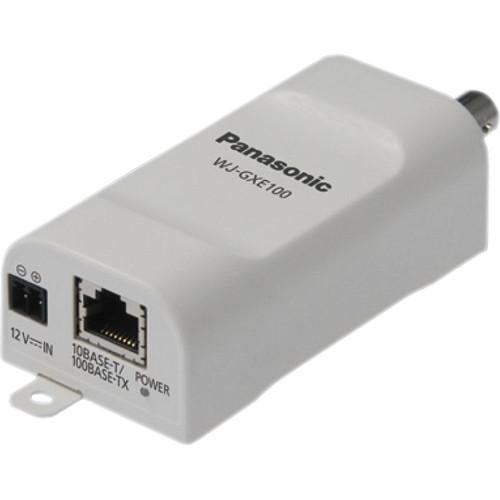 Contents of the user manual for the Panasonic WJ-GXE100 1-Channel H.264 Real-Time Network
- Product category: Video Encoders & Decoders Panasonic
- Brand: Panasonic
- Description and content of package
- Technical information and basic settings
- Frequently asked questions – FAQ
- Troubleshooting (does not switch on, does not respond, error message, what do I do if...)
- Authorized service for Panasonic Video Encoders & Decoders
|
User manual for the Panasonic WJ-GXE100 1-Channel H.264 Real-Time Network contain basic instructions
that need to be followed during installation and operation.
Before starting your appliance, the user manual should be read through carefully.
Follow all the safety instructions and warnings, and be guided by the given recommendations.
User manual is an integral part of any Panasonic product,
and if it is sold or transferred, they should be handed over jointly with the product.
Following the instructions for use is an essential prerequisite for protecting
health and property during use, as well as recognition of liability on the part of the manufacturer
for possible defects should you make a warranty claim. Download an official Panasonic user manual in which you will find instructions on how to install, use, maintain and service your product.
And do not forget – unsuitable use of a Panasonic product will considerably shorten its lifespan!
|
Product description Encode and transmit up to three video outputs simultaneously with the WJ-GXE100 1-Channel H.264 Real-Time Network Video Encoder from Panasonic. Using both H.264 and JPEG encoding, users will be able to provide the best output for their needs at resolutions up to 720 x 480 with a maximum frame rate of 30 fps. Along with this, the camera has a motion adaptive interlace/progressive conversion for maximize the clarity of each individual frame.
Furthering usage, the encoder has an open command conversion table to RS485 so that users can control their PTZ cameras via a browser. The images can also be set up to a 20-character title display so you know exactly what feed you are currently viewing. The power is simple with IEEE802.3af compliant PoE support, as well as a 12 VDC option. It is quite compact as well, able to fit within certain outdoor housings with a camera.
Other features are packed into this model, including alarm sources that include Video Motion Detector (VMD), command alarm, and video loss. The VMD setting is programmable with 4 detection areas. Also, it has an Internet mode that can transmit H.264 images over HTTP and a multi-language GUI. Other benefits are support for IPv4 and IPv6 protocols and the fact that it is ONVIF compliant. UPC: 885170107335 In the Box Panasonic WJ-GXE100 1-Channel H.264 Real-Time Network Video Encoder Code Label 2 x Cable Ties Power Cord Software CD Limited 1-Year Warranty Table of Contents
|
Upload User Manual
Have you got an user manual for the Panasonic WJ-GXE100 1-Channel H.264 Real-Time Network Video Encoder in electronic form? Please send it to us and help us expand our library of instruction manuals.
Thank you, too, on behalf of other users.
To upload the product manual, we first need to check and make sure you are not a robot. After that, your "Submit Link" or "Upload File" will appear.
Technical parametersPanasonic WJ-GXE100 Specs | | | Compression Format | H.264 (constant bit rate, frame rate priority, best effort)
JPEG (10 levels of quality) | | Resolution | 720 x 480
640 x 360
640 x 480
320 x 180
320 x 240 | | Frame Rate | Up to 30 fps | | Video Streaming | Up to 3 outputs (2 x H.264, 1 x JPEG) | | Supported Protocols | IPv6: TCP/IP, UDP/IP, HTTP, HTTPS, RTP, FTP, SMTP, DNS, NTP, SNMP, DHCPv6, MLD, ICMPv6
IPv4: TCP/IP, UDP/IP, HTTP, HTTPS, RTSP, RTP, RTP/RTCP, FTP, SMTP, DHCP, DNS, DDNS, NTP, SNMP, UPnP, IGMP, ICMP, ARP | | Video Input | 1 x BNC composite | | Video Output | 1 x RJ-45 10Base-T/100Base-TX Ethernet | | PTZ Control | Pan, tilt, zoom, focus, preset positions, autofocus, brightness | | Alarm | Source: VMD, command alarm, video loss alarm
Actions: Email notification, indication on browser, FTP image transfer, Panasonic protocol output | | RS485 | 1 x Input (4 wire/2 wire, full/half duplex) | | Web Browser Access | Internet Explorer 6-9 | | Simultaneous Client Access | 14 | | Multiple Camera Views | Yes, 3 | | Network Interface | 1 x RJ-45 | | Power Requirements | 12 VDC, 200 mA
PoE: 48 V, 75 mA | | Operating Temperature | 14 to 122°F (-10 to 50°C) | | Dimensions | 1.8 x 1.2 x 3.5" (45.0 x 29.5 x 88.0 mm) | | Weight | 0.24 lb (110 g) | | | | Package Weight | 0.75 lb | | Box Dimensions (LxWxH) | 6.6 x 5.9 x 4.1" |
Rating100% users recommend this product to others. And what about you?

This product has already been rated by 44 owners. Add your rating and experience with the product.
Discussion
 Ask our technicians if you have a problem with your settings,
or if anything is unclear in the user manual you have downloaded.
You can make use of our moderated discussion.
The discussion is public and helps other users of our website who may be encountering similar problems.
Ask our technicians if you have a problem with your settings,
or if anything is unclear in the user manual you have downloaded.
You can make use of our moderated discussion.
The discussion is public and helps other users of our website who may be encountering similar problems.
The discussion is empty - enter the first post
Post a new topic / query / comment:
|
|


