User Manual for Panasonic WJ-GXE500 4-Channel Real-Time Network Video Encoder Click to enlarge the picture
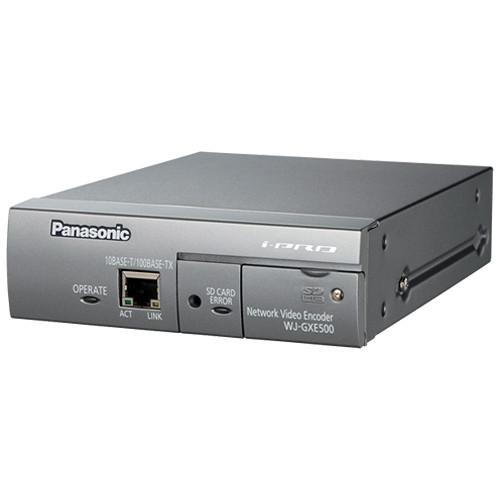 Contents of the user manual for the Panasonic WJ-GXE500 4-Channel Real-Time Network Video
- Product category: Video Encoders & Decoders Panasonic
- Brand: Panasonic
- Description and content of package
- Technical information and basic settings
- Frequently asked questions – FAQ
- Troubleshooting (does not switch on, does not respond, error message, what do I do if...)
- Authorized service for Panasonic Video Encoders & Decoders
|
User manual for the Panasonic WJ-GXE500 4-Channel Real-Time Network Video contain basic instructions
that need to be followed during installation and operation.
Before starting your appliance, the user manual should be read through carefully.
Follow all the safety instructions and warnings, and be guided by the given recommendations.
User manual is an integral part of any Panasonic product,
and if it is sold or transferred, they should be handed over jointly with the product.
Following the instructions for use is an essential prerequisite for protecting
health and property during use, as well as recognition of liability on the part of the manufacturer
for possible defects should you make a warranty claim. Download an official Panasonic user manual in which you will find instructions on how to install, use, maintain and service your product.
And do not forget – unsuitable use of a Panasonic product will considerably shorten its lifespan!
|
Product description Integrate up to 4 analog cameras with your network surveillance system using the WJ-GXE500 4-Channel Real-Time Network Video Encoder from Panasonic. This encoder provides full frame H.264 video transmissions for all four channels, and it allows dual streaming in H.264 and JPEG formatting in both VGA and D1 image sizes. Equipped with motion interlace and progressive conversion, the encoder ensures that each frame is clear, even when the camera's subject is moving. Additionally, the device compensates for picture degradation caused by long-distance cabling, maintaining clear pictures over long transmission distances.
The encoder supports PTZ control of Panasonic cameras via coax, and you can also control other PTZ cameras with the RS-485 connection. Motion detection can be programmed in up to four different areas, and the encoder will trigger an alarm when motion is detected, when there is video loss, or when the camera's alarm is triggered. An SD/SDHC memory card slot provides manual, alarm, and backup upon network failure recording options. There is a selectable microphone and line input, providing full duplex bi-directional audio for interactive communication. This device supports PoE technology for data transfer and power over LAN cabling, and it can be rack-mounted when used with mounting brackets (available separately). - Full frame H.264 transmission for all 4 channels
- Dual streams of H.264 (high profile) and JPEG at VGA/D1 image size
- Motion adaptive interlace/progressive conversion allows every frame to be clear, even when the subject is moving
- Compensates for picture degradation caused by long-distance cable, thereby maintaining clear pictures
- Coaxial communication ensures control of Panasonic PTZ cameras via coaxial cable
- Open command conversion table for RS-485 ensures control of PTZ cameras from various manufacturers
- SD/SDHC memory card slot for manual recording, alarm recording, and backup upon network failure (JPEG)
- Camera title displayed in up to 16 alphanumeric characters embedded in the image
- Full duplex bi-directional audio allows interactive communication
- PoE capability allows power to be supplied by simply connecting a LAN cable
- Compact housing allows for rack mounting with mounting brackets (not included)
- Alarm sources include 3 terminal inputs, VMD, camera site alarm, video loss, and Panasonic alarm
- Video Motion Detector (VMD) with 4 programmable detection areas
- Internet mode enables H.264/MPEG-4 images to be transmitted by HTTP protocol
- Multi-language GUI and setup menu for versatile use
- IPv4 and IPv6 protocols supported
UPC: 791871507346 In the Box Panasonic WJ-GXE500 4-Channel Real-Time Network Video Encoder Software CD Code Label Limited 1-Year Warranty Table of Contents
|
Upload User Manual
Have you got an user manual for the Panasonic WJ-GXE500 4-Channel Real-Time Network Video Encoder in electronic form? Please send it to us and help us expand our library of instruction manuals.
Thank you, too, on behalf of other users.
To upload the product manual, we first need to check and make sure you are not a robot. After that, your "Submit Link" or "Upload File" will appear.
Technical parametersPanasonic WJ-GXE500 Specs | | | Video Input | NTSC:
4x 1.0 V p-p / 75 Ohms NTSC composite video inputs (BNC)
Multiplexed control data and cable compensation compatible: 1 to 4 channels
PAL:
4x 1.0 V p-p / 75 Ohms PAL composite video inputs (BNC)
Multiplexed control data and cable compensation compatible: 1 to 4 channels | | Microphone/Line Input | Mic IN and Line IN are selectable
1/8" / 3.5 mm stereo mini jack (monaural input)
Applicable Microphone: Plug-in power type
Supply Voltage: 2.5 V ±0.5 V
Input Impedance: Approximately 2 kOhms | | Audio Output | 1/8" / 3.5 mm stereo mini jack (monaural output) line level | | | | Camera Control | Pan / tilt / zoom / focus / preset positions / auto focus | | Display Mode | Spot, Quad: Image from 16 cameras can be displayed in 4 different quad screens (JPEG only)
20-character camera title | | Unit Title | Up to 20 characters | | Camera Title (OSD) | Up to 16 characters, On / Off | | Clock Display | Time: 12/24 H
Date: 5 formats on the browser, Summer time (manual) | | Alarm Control | Reset | | One Shot Capture | A still picture will be displayed in a newly opened window | | Audio | Mic (Line) Input: On / Off
Volume Adjustment: Low / Middle / High
Audio Output: On/Off
Volume Adjustment: Low / Middle / High | | SD Memory Data Download | Still or motion images recorded in the SD/SDHC memory card can be downloaded | | GUI/Setup Menu Language | NTSC: English, French (installation required for French) PAL: English, French, Italian, Spanish, German, Russian (installation required except for English) | | System Log | Up to 100 (internal)
Up to 4,000 (SD memory when the recording format is set to JPEG) error logs | | Supported OS | Microsoft Windows 8, 7, Vista, XP SP3 | | Supported Web Browsers | Windows Internet Explorer 10.0 (32 bit), 9.0 (32 bit), 8.0 (32 bit), 7.0 (32 bit), 6.0 SP3 | | | | Network IF | RJ45 10Base-T / 100Base-TX | | Image Resolution | NTSC:
VGA Mode: VGA (640 x 480), QVGA (320 x 240)
D1 Mode: D1 (720 x 576)
PAL:
VGA Mode: VGA (640 x 480), QVGA (320 x 240)
D1 Mode: (720 x 576) | | H.264 / MPEG-4 | Transmission Mode: Constant bit rate / frame rate priority
NTSC Frame Rate: 1 /3 / 5 / 7.5 / 10 / 15 / 20 / 30 fps
PAL Frame Rate: 1 / 3.1 / 4.2 / 6.25 / 8.3 / 12.5 / 20 / 25 fps
Bit Rate Client: 64 / 128 / 256 / 384 / 512 / 768 / 1,024 / 1,536 / 2,048 / 3,072 / 4,096 kbps / Unlimited
Image Quality: Low / Normal / Fine
Refresh Interval: 0.2 / 0.33 / 0.5 / 1 / 2 / 3 / 4 / 5 seconds
Transmission Type: Unicast / Multicast | | JPEG | Image Quality: 10 steps
NTSC Refresh Interval: 0.1 fps to 30 fps
PAL Refresh Interval: 0.08 to 25 fps
JPEG frame rate will be restricted when displaying both JPEG and H.264 / MPEG-4 images
Transmission Type: Pull / Push | | Audio Compression | G.726 (ADPCM), 32 kbps / 16 kbps, channel 1 only | | Audio Mode | Off / Mic (line) input / audio output / interactive (half duplex) / Interactive (full duplex) | | Authentication for Audio | Level 1 only / level 2 higher / all users | | Total Bit Rate | 64 / 128 / 256 / 384 / 512 / 768 / 1,024 / 2,048 / 4,096 / 8,192 kbps / Unlimited | | Supported Protocols | IPv6: TCP/IP, UDP/IP, HTTP, RTP, FTP, SMTP, DNS, NTP, SNMP
IPv4: TCP/IP, UDP/IP, HTTP, RTSP, RTP, RTP/RTCP, FTP, SMTP, DHCP, DNS, DDNS, NTP, SNMP | | FTP Client | Periodic image transfer, alarm image transfer (when the FTP transmission has failed, backup on an optional SDHC/SD memory card is available) | | Number of Users | Up to 14 users (depends on network conditions) | | Storage | Alarm Recording / backup upon network failure / manual recording (JPEG only)
Compatible SD (SDHC) Card: Panasonic 256 MB, 512 MB, 1 GB, 2 GB, 4 GB, 8 GB, 16 GB, 32 GB | | | | Alarm Source | 3 terminal inputs, VMD, command alarm, camera site alarm, video loss alarm | | Alarm Actions | SDHC/SD memory recording, email notification, alarm terminal output, indication on browser, FTP image transfer, Panasonic protocol output | | Alarm Log | With SDHC/SD Memory Card: 5,000 logs
Without SDHC/SD Memory Card: 1,000 logs | | | | Terminal | Terminal 1: Alarm input
Terminal 2: Alarm input / alarm output
Terminal 3: Alarm input / alarm output / AUX output | | RS-485 | 1 x RS-485 (RJ11, 4 wire / 2 wire, full / half duplex) | | | | Safety/EMC Standard | NTSC: UL (UL60065), FCC (Part 15 Class A), C-UL (CAN/CSA C22.2 No.60065), DOC (ICES003 Class A)
CE (EN55022, Class B, EN55024) | | Power Source and Consumption | 12 VDC: 500 mA
PoE (IEEE 802.3af): 6 W (Class 0 device) | | Ambient Operating Temperature | 14 to 122 °F (-10 to 50°C) | | Ambient Operating Humidity | 90% or less (without condensation) | | Dimensions | 5.51 x 1.73 x 7.28" (140 x 44 x 185 mm), excluding rubber feet and projections | | Weight | Approximately 2.21 lb (1 kg) | | | | Package Weight | 2.55 lb | | Box Dimensions (LxWxH) | 10.8 x 9.0 x 6.3" |
Rating50% users recommend this product to others. And what about you?

This product has already been rated by 80 owners. Add your rating and experience with the product.
Discussion
 Ask our technicians if you have a problem with your settings,
or if anything is unclear in the user manual you have downloaded.
You can make use of our moderated discussion.
The discussion is public and helps other users of our website who may be encountering similar problems.
Ask our technicians if you have a problem with your settings,
or if anything is unclear in the user manual you have downloaded.
You can make use of our moderated discussion.
The discussion is public and helps other users of our website who may be encountering similar problems.
The discussion is empty - enter the first post
Post a new topic / query / comment:
|
|


