User Manual for Panasonic WV-CS584 650 TVL PTZ Dome Camera Click to enlarge the picture
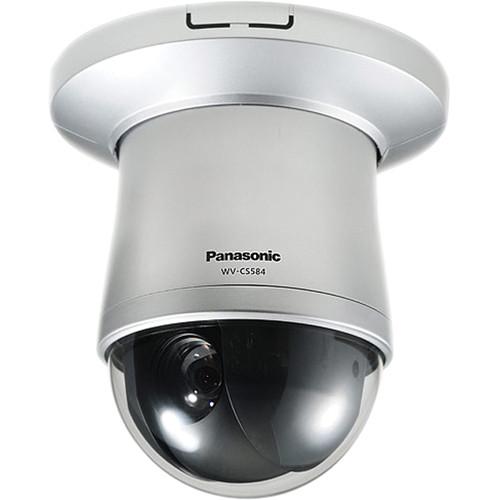 Contents of the user manual for the Panasonic WV-CS584 650 TVL PTZ Dome
- Product category: Wired Analog & HD Cameras Panasonic
- Brand: Panasonic
- Description and content of package
- Technical information and basic settings
- Frequently asked questions – FAQ
- Troubleshooting (does not switch on, does not respond, error message, what do I do if...)
- Authorized service for Panasonic Wired Analog & HD Cameras
|
User manual for the Panasonic WV-CS584 650 TVL PTZ Dome contain basic instructions
that need to be followed during installation and operation.
Before starting your appliance, the user manual should be read through carefully.
Follow all the safety instructions and warnings, and be guided by the given recommendations.
User manual is an integral part of any Panasonic product,
and if it is sold or transferred, they should be handed over jointly with the product.
Following the instructions for use is an essential prerequisite for protecting
health and property during use, as well as recognition of liability on the part of the manufacturer
for possible defects should you make a warranty claim. Download an official Panasonic user manual in which you will find instructions on how to install, use, maintain and service your product.
And do not forget – unsuitable use of a Panasonic product will considerably shorten its lifespan!
|
Product description Featuring a 1/4" interline transfer CCD image sensor, the WV-CS584 650 TVL PTZ Dome Camera from Panasonic offers up to 650 TVL resolution for high-quality video surveillance in both day and night lighting conditions. Equipped with a 3.3-119mm varifocal auto-iris lens, this camera provides a 36x optical zoom for use with wide and tele applications, enabling you to use the lens in a variety of scenarios. Furthermore, the camera can be endlessly panned 360° and tilted -5 to 185° for choosing the field of view you would like to monitor.
Super Dynamic 6 technology provides a wide dynamic range, enabling you to capture clear images when there are multiple lighting conditions in the same frame. An auto image stabilizer reduces blur in windy or vibrating settings, and adaptive 2D- and 3D-DNR ensures noise reduction in a variety of conditions. There is motion detection, scene change detection, and privacy masking for customizing your field of view. When motion or a scene change are detected, alarm actions such as camera positioning will occur.
Communication can be achieved over coax cable or by an RS-485 (Pelco P/D protocol) connection. There are four alarm inputs and two alarm output terminals, enabling you to expand your surveillance system for a full setup. The camera title can be displayed using up to 16 alphanumerical characters, and the menu is multi-language for versatile use. - 1/4" interline transfer CCD sensor for high-quality 650 TVL resolution
- Super Dynamic 6 technology delivers a high wide dynamic range
- Day/Night function allows the camera to capture images at a minimum illumination of 0.04 lux
- 3.3-119mm varifocal lens provides a 1.7 to 60.2° horizontal field of view
- 36x optical zoom allows you to focus on distant objects
- 360° endless panning allows users to precisely capture almost any object surrounding the camera
- Pan/Tilt speed of up to 400°/s in preset mode and 0.065°/s super fine control in manual mode
- Auto tracking will automatically pan and tilt the camera to keep the subject in the center of the image
- 256 preset positions that can be activated from the system controller using a switcher or recorder
- Integration of 2D- and 3D-DNR (noise reduction) ensures noise reduction in various conditions
- Auto Image Stabilizer removes distortion in the image caused by vibration or wind
- Video motion detection and scene change detection
- Privacy masking to protect up to 8 private areas, such as entrances and exits
- Four alarm inputs and two output terminals for expanding your surveillance system
- Alarm actions include terminal output, camera positioning, auto pan, patrol, auto track, and command output
- 16 alphanumerical characters can be used to display the camera title
- Multi-language menu provides versatility of use
- Coax cable communication or RS-485 (Panasonic, Pelco P/D Protocol) data communication
UPC: 885170026278 In the Box Panasonic WV-CS584 650 TVL PTZ Dome Camera Decorative Cover Dust Protection Sheet Limited 3-Year Warranty Table of Contents
|
Upload User Manual
Have you got an user manual for the Panasonic WV-CS584 650 TVL PTZ Dome Camera in electronic form? Please send it to us and help us expand our library of instruction manuals.
Thank you, too, on behalf of other users.
To upload the product manual, we first need to check and make sure you are not a robot. After that, your "Submit Link" or "Upload File" will appear.
Technical parametersPanasonic WV-CS584 Specs | | | Image Sensor | 1/4" interline transfer CCD | | Effective Pixels (H x V) | NTSC : 976 x 494
PAL : 976 x 582 | | Scanning Mode | 2:1 interlace | | Scanning Area | NTSC : 3.66 x 2.74 mm
PAL : 3.66 x 2.73 mm | | Scanning Frequency | NTSC:
Horizontal: 15.734 kHz
Vertical: 59.94 Hz
PAL:
Horizontal: 15.625 kHz
Vertical: 50 Hz | | Horizontal Resolution | 650 lines | | Minimum Illumination | Color: 0.5 lux, B&W: 0.04 lux | | Signal to Noise Ratio | 52 dB minimum (AGC: Off) | | White Balance | AWC (2,000 to 10,000K), ATW1 (2,700 to 8,000K), ATW2 (2,400 to 8,000K) | | Light Control | ALC (Adjustable Open/Close output target level) / Manual | | Automatic Gain Control | On (Low, Mid, High) / Off | | Super Dynamic 6 | On / Off | | Dynamic Range | NTSC: 52 dB typical (Super Dynamic 6: ON)
PAL: 54 dB typical (Super Dynamic 6: ON) | | Electronic Shutter | NTSC: OFF (1/60), AUTO, 1/100, 1/250, 1/500, 1/1,000, 1/2,000, 1/4,000, 1/10,000
PAL: OFF (1/50), AUTO, 1/120, 1/250, 1/500, 1/1,000, 1/2,000, 1/4,000, 1/10,000 | | Electronic Sensitivity UP | Auto: 32x maximum
Fix: 512x maximum | | Digital Noise Reduction (DNR) | High / Low | | Black and White Mode | Auto / On / Off | | Scene File | 10 patterns (Shutter, AGC, Sens UP, White balance, VMD) | | Scene | Indoor (L), Indoor (H), Outdoor (L), Outdoor (H) | | Video Motion Detection | Off, Motion Detection, Scene Change | | Privacy Zone | On / Off, Up to 8 zones | | Auto Image Stabilizer | On / Off | | Camera Titles | Up to 16 alphanumeric characters | | Auto Focus Modes | Manual / Auto (Pan, Tilt, Zoom linked) | | Synchronization | NTSC: Internal (INT), Multiplexed Vertical Drive (VD2)
PAL: Internal (INT) | | | | Focal Length | 3.3-119mm | | Zoom Ratio | 36x (Approximately 720x with digital zoom) | | Zoom Speed | Approximately 6 seconds (Tele to Wide) in manual mode | | Angular Field of View | Horizontal: 1.7 (Tele) to 60.2° (Wide)
Vertical: 1.3 (Tele) to 46° (Wide) | | Maximum Aperture Ratio | 1:1.4 (Wide) to 4.2 (Tele) | | Focusing Range | 5.9' (1.8 m) to infinity | | Aperture Range | f/1.4 to 22, Close | | | | Panning Range | 360° endless | | Tilting Range | -5 to 185° (horizontal-vertical-horizontal, according to the tilt angle) | | Pan/Tilt Speed | Panning Speed:
Manual: Approximately 0.065° to 120°/s, 8, 16, 64 steps
Preset: Approximately 400°/s
Tilting Speed:
Manual: Approximately 0.065 to 120°/s, 8, 16, 64 steps
Preset: Approximately 400°/s | | Proportional Pan & Tilt | On / Off | | Preset Positions | 256 | | Auto Mode | Off / Sequence / Sort / Auto pan / Patrol / Auto track | | Auto Tracking | Standard Auto Track | | Patrol | Stop / Play / Learn | | Image Hold | On / Off | | Digital Flip | On / Off | | Area Title | Up to 8 area titles, 16 characters/area | | Preset Alarm | On / Off | | | | Alarm Source | Terminal input, VMD, Command alarm | | Alarm Actions | Preset position 1 to 4, Patrol 1 to 4, Auto track 1 to 4, Seq, Sort, Auto pan, B&W | | | | Video Output | NTSC: 1.0 V p-p / NTSC composite 75 / BNC
PAL: 1.0 V p-p / PAL composite 75 / BNC | | Controller Interface Type | Coaxial Multiplex System, RS-485 | | External I/O Terminals | 4 x Inputs (ALARM IN 1 to ALARM IN 4)
2 x Outputs (ALARM / AUX1, BW / AUX2) | | | | Setup Method | OSD setup menu | | Password Lock | All menus | | Language | English, Russian, German, French, Italian, Spanish, Portuguese, Chinese, Japanese | | Safety/EMC Standard | NTSC: UL (6500), FCC (Part 15 Class A), C-UL (E60065)
PAL: CE (EN60065, EN55022 Class B, EN55024), GOST (GOST R 51558) | | Power Source and Consumption | NTSC: 24 VAC, 60 Hz, 4.3 W
PAL: 24 VAC, 50 Hz, 4.3 W | | Operating Temperature | 14 °F to 122 °F (-10 °C to +50 °C) | | Operating Humidity | 90% or less (without condensation) | | Dimensions | Ø5.375 x 8" (Ø135 x 202 mm) | | Weight | 3.74 lb (1.7 kg) | | | | Package Weight | 5.9 lb | | Box Dimensions (LxWxH) | 14.0 x 11.5 x 9.7" |
Rating100% users recommend this product to others. And what about you?

This product has already been rated by 15 owners. Add your rating and experience with the product.
Discussion
 Ask our technicians if you have a problem with your settings,
or if anything is unclear in the user manual you have downloaded.
You can make use of our moderated discussion.
The discussion is public and helps other users of our website who may be encountering similar problems.
Ask our technicians if you have a problem with your settings,
or if anything is unclear in the user manual you have downloaded.
You can make use of our moderated discussion.
The discussion is public and helps other users of our website who may be encountering similar problems.
The discussion is empty - enter the first post
Post a new topic / query / comment:
|
|


