User Manual for Panasonic WV-SFN480 i-PRO ULTRA 360° Indoor Network Dome Camera with with 1.38mm Fisheye Lens Click to enlarge the picture
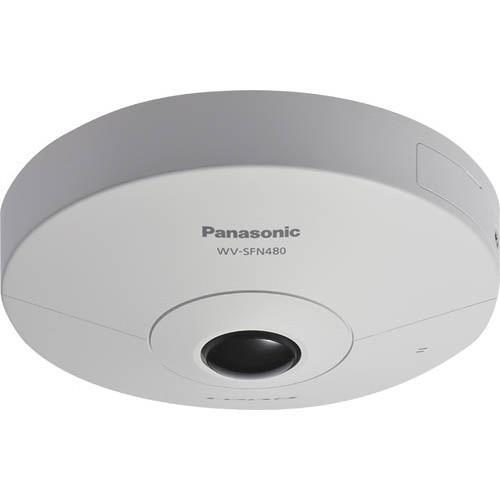 Contents of the user manual for the Panasonic WV-SFN480 i-PRO ULTRA 360° Indoor
- Product category: Wired IP Cameras Panasonic
- Brand: Panasonic
- Description and content of package
- Technical information and basic settings
- Frequently asked questions – FAQ
- Troubleshooting (does not switch on, does not respond, error message, what do I do if...)
- Authorized service for Panasonic Wired IP Cameras
 |
User manual for the Panasonic WV-SFN480 i-PRO ULTRA 360° Indoor contain basic instructions
that need to be followed during installation and operation.
Before starting your appliance, the user manual should be read through carefully.
Follow all the safety instructions and warnings, and be guided by the given recommendations.
User manual is an integral part of any Panasonic product,
and if it is sold or transferred, they should be handed over jointly with the product.
Following the instructions for use is an essential prerequisite for protecting
health and property during use, as well as recognition of liability on the part of the manufacturer
for possible defects should you make a warranty claim. Download an official Panasonic user manual in which you will find instructions on how to install, use, maintain and service your product.
And do not forget – unsuitable use of a Panasonic product will considerably shorten its lifespan!
|
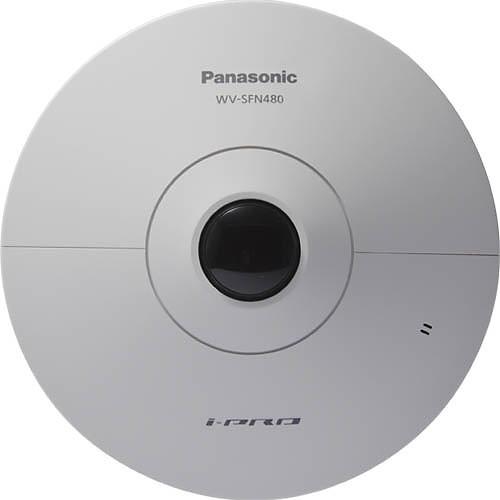
Product description The WV-SFN480 i-PRO ULTRA 9 MP 360° Indoor Network Dome Camera from Panasonic is built on Panasonic's 12MP 4K ULTRA HD engine. The camera produces a 9MP 3K x 3K fisheye image at 15fps and a 4MP fisheye image at 30fps in H.264 for high resolutions at standard frame rates, ensuring bright images under any lighting condition. In addition, its Ultra 4K HD engine allows multiple levels of zooming without resolution loss. The camera's 1/2" 12MP image sensor and F1.9 large diameter lens provides sharp and natural color reproduction with strong low light performance, less than 0.3 lux in color and black-and-white.The ULTRA 360 camera is designed to be highly flexible supporting various display modes such as fish-eye, single panorama, double panorama, single PTZ, quad PTZ, and quad stream modes. The camera supports simultaneous streaming of both fish-eye and dewarped images so that the system can allow the full image to be recorded while concurrent users can utilize additional streams with different display configurations. The camera supports multi-user virtual pan, tilt, and zoom in quad PTZ mode. This means that multiple users can pan, tilt, and zoom different views of the full image at the same time on live streams or while playing back recorded video further increasing flexibility.The camera's advanced analytics capabilities providing business owners with valuable insights into the movements of their customers and employees. Its heat mapping capabilities can aggregate a history of movement in a scene and overlay a color heat map indicating both traffic patterns and dwell time in a single easy-to-understand view. Additional analytics include a 12-virtual-line, bi-directional people counting function to assist in quantifying the movement of people in a scene. The camera's MOR (Moving Object Removal) video analytics can mask moving objects to identify a background change. This Intelligent Video Motion Detection software is suitable for locations where privacy is a concern. - 360° monitoring with a wide variety of transmission modes : Panorama, Double Panorama, Quad PTZ, Single PTZ, and Quad streams (H.264)
- VIQS (Variable Image Quality on Specified area) technology allows the designated eight areas to retain higher image quality while the excluded area will have a decreased image quality, which enables the use of a lower image file size and bit rate 1
Please Note: Only for fisheye image. close - Multiple H.264 (High profile) streams and JPEG streams ensure simultaneous real time monitoring and high resolution recording by the 4K ULTRA HD engine
- Smooth PTZ operation without mechanical action
- Built-in distortion correction function
- A fisheye lens control function realizes intelligible screen operation intuitively
- Smartphone monitoring : Direct camera control from smartphone
- Wide dynamic range and ABS (Adaptive Black Stretch) technologies deliver wider dynamic range
- High sensitivity with Day/Night (Electrical) function : 0.3 lx (Color), 0.2 lx (B/W) at F1.9
- Built-in ABF enables automatic focus adjustment for sharp image, and corrects the focus shift that caused by temperature difference
- You can install the camera even in the environment having drastic changes in temperature without focal blur
- Digital Noise Reduction: 3D-DNR ensures noise reduction in various conditions
- Progressive scan ensures clear images with less motion blur and no tearing even when the subject is moving
- Superior color reproduction by primary (RGB) color filter
- Electronic sensitivity enhancement: Auto (Up to 16x) / OFF
- Selectable light control modes : Indoor scene (50 Hz) / Indoor scene (60 Hz) / ELC (maximum exposure time)
- Indoor scene (50 Hz/60 Hz): Flicker caused by fluorescent lightning will be automatically compensated
- ELC (maximum exposure time) : The lighting control will be automatically performed by adjusting shutter speed in the range of ELC
- VMD (Video Motion Detector) with 4 programmable detection areas, 15 steps sensitivity level and 10 steps detection size
- Privacy Zone can mask up to 8 private areas, such as house windows and entrances/exits 2
Please Note: Configurable only on the fisheye image close - Camera title display: Up to 20 alphanumeric characters on the browser
- Alarm sources including 3 terminal input, VMD and Panasonic alarm command can trigger actions such as SDXC/ SDHC/SD memory recording, FTP image transfer, E-mail notification, Indication on browser, Alarm terminal output, HTTP notification, and Panasonic protocol output
- Full duplex bi-directional audio allows interactive communication between camera site and monitoring site
- Prioritized stream control: One of the video streams can be prioritized when multiple recorders or client PCs are accessing the camera so that the recorder or the client PC can maintain the frame rate
- SDXC/SDHC/SD memory card slot for manual recording (H.264 / JPEG), alarm recording (H.264 / JPEG) and backup upon network failure (JPEG)
- Intelligent extension software in addition to built-in VMD (Video Motion Detection), alarm function
- Intelligent function (Extension software) such as Intruder / Loitering / Scene change / Object / Cross line detection, People Count (Cross line), MOR(Moving Object Remover) Function, Heat map (High Traffic Zone / Long-stay Zone)
- Super Chroma Compensation function realizes a better color
- H.264 maximum bit rate / client and total bit rate control allows flexible network traffic management
- Frame rate priority mode controls bit rate and compression ratio to provide the specified frame rate
- H.264 images can be transmitted over HTTP protocol
- IPv4/IPv6 protocol supported
- Supports SSL, DDNS (viewnetcam, RFC2136)
- Still images (JPEG) can be viewed on mobile phones via Internet
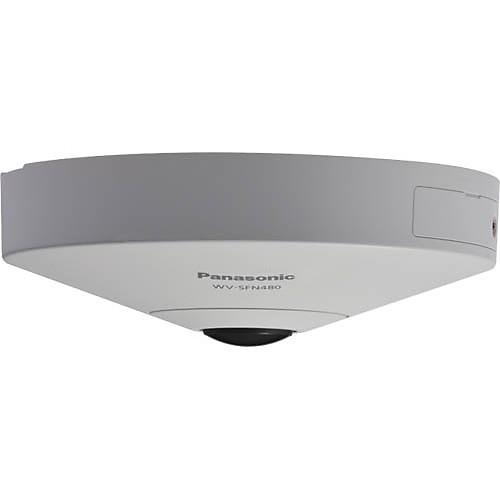
- Low profile design for discrete installation
UPC: 885170218079 In the Box Panasonic WV-SFN480 i-PRO ULTRA 360° Indoor Network Dome Camera with with 1.38mm Fisheye Lens Attachment Plate Template A Power Cord Plug External I/O Terminal Plug Audio Cable 2 x Cable Tie Safety Wire Lug Desktop Cover Safety Wire Washer Spring Washer Software CD Code Label Mounting Hardware Limited 3-Year Warranty Brochure PDF 2.8mb Table of Contents
|
Upload User Manual
Have you got an user manual for the Panasonic WV-SFN480 i-PRO ULTRA 360° Indoor Network Dome Camera with with 1.38mm Fisheye Lens in electronic form? Please send it to us and help us expand our library of instruction manuals.
Thank you, too, on behalf of other users.
To upload the product manual, we first need to check and make sure you are not a robot. After that, your "Submit Link" or "Upload File" will appear.
Technical parametersPanasonic WV-SFN480 Specs | | | Image Sensor | 1/2 type MOS image sensor, built-in primary color filter | | Effective Pixels | Approximately 12.4 MP | | Scanning Mode | Progressive scan | | Scanning Area (H x V) | 0.21 x 0.21" (5.54 x 5.54 mm) | | Minimum Illumination | Color: 0.3 lux (F1.9, Maximum Shutter: Off (1/30 sec), AGC: High)
Color: 0.02 lux (F1.9, Maximum Shutter: maximum 16/30 sec, AGC: High)(Converted value)
BW: 0.2 lux (F1.9, Maximum Shutter: Off (1/30 sec), AGC: High)
BW: 0.01 lux (F1.9, Maximum Shutter: maximum 16/30 sec, AGC: High)(Converted value) | | White Balance | AWC (2000 to 10000 K), ATW1 (2700 to 6000 K), ATW2 (2000 to 6000 K) | | Light Control Mode | Indoor scene (50/60 Hz) / ELC | | Shutter Speeds | 1/10000, 1/4000, 1/2000, 1/1000, 1/500, 1/250, 1/120, 1/100, 2/120, 2/100, 3/120, 3/100, 1/30, 2/30, 4/30, 6/30, 10/30, and 16/30 | | Wide Dynamic Range | On / Off | | Adaptive Black Stretch | On / Off (Only at Super Dynamic Off) | | Automatic Gain Control | On (low, mid, high) / Off | | Day/Night Mode | Electrical Off/ Auto | | Digital Noise Reduction (DNR) | High / Low | | Video Motion Detection | On/ Off, 4 areas available | | Number of Preset Positions | 16 (Preset can only be used when the image type is Quad PTZ or Single PTZ) | | Auto Mode | Auto pan/ Preset sequence, (Auto mode can only be used when the image type is Quad PTZ or Single PTZ) | | Self Return | 10, 20, 30 sec / 1, 2, 3, 5, 10, 20, 30, 60 minutes (Self return can only be used when the image type is Quad PTZ or Single PTZ) | | Privacy Zone | On / Off (Up to 8 zones) | | VIQS | On/Off (Up to 8 zones) Only for fisheye image. | | Camera Title (OSD) | On/Off, Up to 20 characters (alphanumeric characters, marks) You can specify characters to be displayed on each of the four screens when Quad streams is selected | | Back Focus | Auto back focus/ Focus/ Adjusting method (Auto/ Preset/ Fix) | | Video Analytics | Optional Alarm: Intruder detection, Object detection, Cross line detection, Loitering detection, Scene change detection
Others: Heat map, People count, MOR (Moving Object Remover) Alarm and other video analytics can not be used simultaneously | | Rotation | Mechanical : -45 to 45°
Electrical: Panorama/Double Panorama (90°,180°, 270°) | | | | Focal Length | 0.062" (1.342 mm) | | Angular Field of View | Horizontal/Vertical: 180° | | Maximum Aperture Ratio | 1:1.9 | | Adjusting Angle | ±45° | | Image Rotation | Mechanical Image rotation, about every 3.3° | | | | Camera Control | Brightness, AUX On / Off | | Display Mode | Spot, Quad: Image from 16 cameras can be displayed in 4 different quad screens or 16 split screen (JPEG only). 20 characters camera title available. | | Zoom | Electronic zoom | | Camera Titles | Up to 20 alphanumeric characters | | Clock Display | Time: 12 hours / 24 hours
Date: 5 formats on the browser
Summer time (Manual) | | Alarm Control | Reset | | One Shot Capture | A still picture will be displayed on a newly opened window | | Audio | Mic (Line) Input: On / Off
Volume Adjustment: Low / Middle / High
Audio Output: On / Off
Volume Adjustment: Low / Middle / High | | SD Memory Data Download | Still or motion images recorded in the SDXC/SDHC/SD memory card can be downloaded Memory card not included. | | GUI Language | English, Italian, French, German, Spanish, Portuguese, Russian, Chinese, and Japanese | | System Log | Up to 100 (Internal)
Up to 4,000 (SDXC/SDHC/SD memory when the recording format is set to JPEG) error logs | | Supported OS | Microsoft Windows 8.1, 8, 7, and Vista | | Supported Web Browsers | Windows Internet Explorer 11 (32 bit), 10 (32 bit), 9 (32 bit), 8 (32 bit), 7 (32 bit) | | | | Network I/F | 10Base-T / 100Base-TX, RJ-45 connector | | Resolution | Ceiling & Wall
9M Fisheye mode (Factory default mode) maximum15 fps 2992 x 2992 / 1280 x1280 / 640 x 640 / 320 x 320
4M Fisheye Mode: maximum30 fps 2048 x 2048 / 1280 x 1280 / 640 x 640 / 320 x 320
Ceiling
Double Panorama Mode: maximum15 fps 2560 x 1440 / 1920 x 1080 / 1280 x 720 / 640 x 360 / 320 x 180
Quad PTZ / Single PTZ Mode: maximum 15 fps 2560 x 1920 / 2048 x 1536 / 1600 x 1200 / 1280 x 960 / 800 x 600 / 640 x 480 / 320 x 240
8M Fisheye + Double Panorama Mode: maximum7.5 fps (Fisheye) 2816 x 2816 / 1280 x 1280 / 640 x 640 / 320 x 320 (Double Panorama) / 1280 x 720 / 640 x 360
4M Fisheye + Double Panorama Mode: maximum 15 fps (Fisheye) 2048 x 2048 / 1280 x 1280 / 640 x 640 / 320 x 320 (Double Panorama) / 1280 x 720 / 640 x 360
8M Fisheye + Quad PTZ Mode: maximum 7.5 fps (Fisheye) 2816 x 2816 / 1280 x 1280 / 640 x 640 / 320 x 320 (Quad PTZ) / 1280 x 960 / 800 x 600 / 640 x 480
4M Fisheye + Quad PTZ Mode: maximum 15 fps (Fisheye) / 2816 x 2816 / 1280 x 1280 / 640 x 640 / 320 x 320 (Quad PTZ) / 1280 x 960 / 800 x 600 / 640 x 480
Quad Streams Mode (H.264 only) (Ch1 to Ch4) 1280 x 960 / 800 x 600 / 640 x 480 / 320 x 240 maximum 15 fps (Quad PTZ) / 2560 x 1920 / 2048 x 1536 / 1280 x 960 /800 x 600 / 640 x 480 / 320 x 240 maximum 5 fps
Wall
Panorama Mode: maximum 15 fps 2560 x 1440 / 1920 x 1080 / 1280 x 720 / 640 x 360 / 320 x 180
Quad PTZ / Single PTZ Mode: maximum 15 fps 2560 x 1920 / 2048 x 1536 / 1600 x 1200 / 1280 x 960 / 800 x 600 / 640 x 480 / 320 x 240
8M Fisheye + Panorama Mode: maximum 7.5 fps (Fisheye) 2816 x 2816 / 1280 x 1280 / 640 x 640 / 320 x 320 (Panorama) 1280 x 720 / 640 x 360
4M Fisheye + Panorama Mode: maximum 15 fps (Fisheye) 2048 x 2048 / 1280 x 1280 / 640 x 640 / 320 x 320 (Panorama) 1280 x 720 / 640 x 360 | | Image Compression | H.264, JPEG (MJPEG) Transmission for 2 streams can be individually set | | Transmission mode | Constant bit rate / VBR / Frame rate / Best effort / Advanced VBR | | Frame Rate | When VBR / Frame rate / Advanced VBR is selected
1 fps / 3 fps / 5 fps / 7.5 fps / 10 fps / 12 fps / 15 fps / 20 fps / 30 fps
Frame rate is limited to bit rate | | Maximum Bit Rate | 64, 128, 256, 384, 512, 768, 1024, 1536, 2048, 3072, 4096, 6144, 8192, 10240, 12288, 14336, 16384, 20480, 24576, 30720 kb/s The available range of the H.264 bit rate varies depending on the setting selected for image capture size. | | Image Quality | When Constant bit rate / Best effort is selected: Low / Normal / Fine
| | Transmission Type | H.264: Unicast / Multicast
JPEG (MJPEG): Pull / Push | | Image Quality | 0 Super Fine / 1 Fine / 2 / 3 / 4 / 5 Normal / 6 / 7/ 8 / 9 Low (10 steps : 0 to 9) | | Transmission | 0.1 to 30 fps (JPEG frame rate will be restricted when displaying both JPEG and H.264 images.) | | Audio Compression Format | G.726 (ADPCM) 32 kb/s / 16 kb/s, G.711 64 kb/s / AAC-LC 64 kb/s / 96 kb/s / 128 kb/s When recording audio on an SD memory card, only AAC-LC (Advanced Audio Coding - Low Complexity) can be used. | | Total Bit Rate | Unlimited / 64 / 128 / 256 / 384 / 512 / 768 / 1024 / 2048 / 4096 / 8192 kb/s | | Supported Protocols | IPv6: TCP/IP, UDP/IP, HTTP, HTTPS, RTP, FTP, SMTP, DNS, NTP, SNMP, DHCPv6, MLD, ICMP, ARP
IPv4: TCP/IP, UDP/IP, HTTP, HTTPS, RTSP, RTP, RTP/RTCP, FTP, SMTP, DHCP, DNS, DDNS, NTP, SNMP, UPnP, IGMP, ICMP,ARP | | FTP Client | Alarm image transmission, FTP periodic transmission (When the FTP transmission is failed, backup on an optional SD memory card is available.) | | Number of Users | Up to 14 simultaneous users (depends on network conditions) | | SD Card Slot | SD (SDHC/SDXC) card up to 64 GB | | Cellular Phone Compatibility | JPEG image, AUX control (by access level) | | Mobile Terminal Compatibility | iPad, iPhone, iPod touch (iOS 4.2.1 or later), Android mobile terminals | | | | Alarm Source | 3 terminals input, VMD, Command alarm | | Alarm Actions | SDXC/SDHC/SD memory recording, email notification, HTTP alarm notification Indication on browser, FTP image transfer, Panasonic protocol output | | Alarm Log | With SDXC/SDHC/SD Memory Card: Up to 50,000 logs for each SD memory card | | Schedule | Alarm / VMD / Access permission / H.264 recording / Scene file | | | | Monitor Output | VBS: 1 Vpp / 75 Ω
composite, ø3.5 mm mini jack (monaural)
An NTSC or PAL monitor can be connected to the camera (the monitor type can be changed by the software). Audio out or monitor out can be selected for the audio/monitor output plug. | | Microphone/Line Input | Built-in microphone or ø3.5 mm stereo mini jack
Microphone Input: Recommended applicable microphone : Plug-in power type
Supply Voltage: 2.5 V ±0.5 V
Recommended Sensitivity of Microphone: -48 dB ±3 dB (0 dB= 1 V/Pa, 1 kHz)
Line Input: Input level : Approximately -10 dBV | | Audio Output | ø3.5 mm stereo mini jack
Output Impedance: Approximately. 600 Ω (unbalanced)
Output Level: -20 dBV | | External I/O Terminals | Alarm In 1, Alarm In 2 (Alarm Out), Alarm In 3 (Aux Out) | | | | Mounting Method | Ceiling/Wall/Camera Mount bracket/Desktop/Tripod | | Approvals | Safety: UL (UL60950-1), C-UL (CAN/CSA C22.2 No.60950-1), CE, IEC60950-1
EMS: FCC (Part15 ClassA), ICES003 ClassA, EN55022 ClassB, EN55024 | | Power Source | 12 VDC, PoE (IEEE802.3af compliant) | | Power Consumption | 12 VDC: 910 mA / Approximately 10.9 W
PoE 48 VDC: 200 mA / Approximately 9.6 W (Class 0 device) | | Ambient Operating Temperature | Ceiling / Wall / Camera Mount Bracket: 14 to 122°F (-10 to 50°C)
Desktop / Tripod: 14 to 104°F (-10 to 40°C) | | Ambient Operating Humidity | 10 to 90% (no condensation) | | Finish | Main body : ABS resin, sail white | | Dimensions (Ø x H) | When using the attachment plate: 5.9 x 2.1" (15.0 x 5.2 cm)
When using the desktop cover: 5.9 x 2.4" (15.0 x 6.3 cm) | | Weight | When using the camera and attachment plate: Approximately: 1.1 lb (0.5 kg)
When using the camera and desktop cover: Approximately: 0.9 lb (0.4 kg) | | | | Package Weight | 2.35 lb | | Box Dimensions (LxWxH) | 8.6 x 8.3 x 6.9" |
Rating90% users recommend this product to others. And what about you?

This product has already been rated by 33 owners. Add your rating and experience with the product.
Discussion
 Ask our technicians if you have a problem with your settings,
or if anything is unclear in the user manual you have downloaded.
You can make use of our moderated discussion.
The discussion is public and helps other users of our website who may be encountering similar problems.
Ask our technicians if you have a problem with your settings,
or if anything is unclear in the user manual you have downloaded.
You can make use of our moderated discussion.
The discussion is public and helps other users of our website who may be encountering similar problems.
The discussion is empty - enter the first post
Post a new topic / query / comment:
|
|


