User Manual for Panasonic WV-SW175 H.264 Outdoor Pan & Tilt Network Camera Click to enlarge the picture
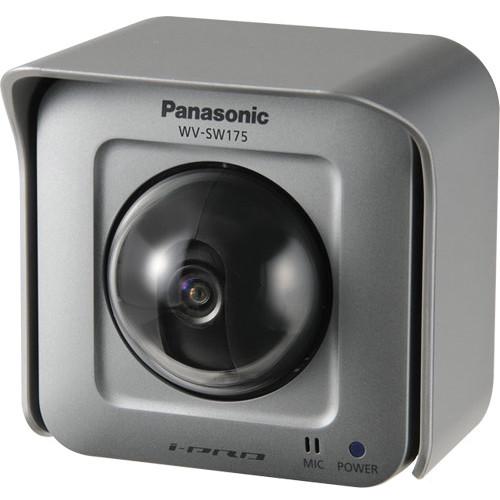 Contents of the user manual for the Panasonic WV-SW175 H.264 Outdoor Pan &
- Product category: Wired IP Cameras Panasonic
- Brand: Panasonic
- Description and content of package
- Technical information and basic settings
- Frequently asked questions – FAQ
- Troubleshooting (does not switch on, does not respond, error message, what do I do if...)
- Authorized service for Panasonic Wired IP Cameras
|
User manual for the Panasonic WV-SW175 H.264 Outdoor Pan & contain basic instructions
that need to be followed during installation and operation.
Before starting your appliance, the user manual should be read through carefully.
Follow all the safety instructions and warnings, and be guided by the given recommendations.
User manual is an integral part of any Panasonic product,
and if it is sold or transferred, they should be handed over jointly with the product.
Following the instructions for use is an essential prerequisite for protecting
health and property during use, as well as recognition of liability on the part of the manufacturer
for possible defects should you make a warranty claim. Download an official Panasonic user manual in which you will find instructions on how to install, use, maintain and service your product.
And do not forget – unsuitable use of a Panasonic product will considerably shorten its lifespan!
|
Product description The Panasonic WV-SW175 H.264 Outdoor Pan & Tilt Network Camera (NTSC) offers high-quality 24-hour video surveillance in both day and night time lighting conditions.
Designed for day/night surveillance, this network camera captures clear images at F/2.2 even in locations with a minimum illumination of 0.5 lux (B&W). The Adaptive Black Stretch technology increases visibility of subjects in dark areas of a video scene without compromising the image quality of brighter areas. The face wide dynamic range technology offers blur-free images of the human face. The pan & tilt functionality and preset map shot function allow wide area monitoring (Horizontal 180°, Vertical 123°). Furthermore, with the progressive scan technology, you can be sure to obtain blur-free images even when the object is in motion. In addition, the UniPhier LSI chip enables this network camera to simultaneously stream real-time imagery in HD resolution of 1280 x 960 at 30 fps. The electronic sensitivity enhancement function Auto (up to 16x) increases the quantity of light stored on the sensor, making the image brighter.
Equipped with Digital Noise Reduction technology, the camera filters signals that could result in grainy images. When any movement is detected, alarm sources, including VMD and Panasonic alarm command, trigger actions such as FTP image transfer and e-mail notification. The camera comes with SD/SDHC memory card slot that provides easy way for data backup upon any network failure. As the WV-SW175 camera is Power over Ethernet (PoE) compatible, it can be installed almost anywhere without the need for an additional power supply. Furthermore, the IP55 rated water and dust-resistant housing allows this camera to be installed outdoors even in harsh weather conditions. - 1.3 MP high-sensitivity MOS sensor delivers clear images of up to 1280 x 960 pixels
- Full frame (up to 30 fps) transmission at HD resolutions of up to 1280 x 960
- Adaptive Black Stretch technology improves the visibility of subjects in dark areas without compromising on image quality in brighter areas
- Progressive scan ensures clear images with minimal blur even when the object is in motion
- UniPhier LSI chip allows the camera to stream multiple H.264 videos and JPEG images for simultaneous real-time monitoring
- High-sensitivity with day/night (electrical) function: 0.6 lux (color), 0.5 lux (B&W) at F2.2
- Face detection function ensures blur-free images of the human face
- 2-way audio with built-in microphone allows interactive communication between camera and the PC 1
Please Note: Speaker is not included close - Video Motion Detection feature triggers alarm when activity is detected in the 4 programmable zones
- Electronic sensitivity enhancement function increases the quantity of light stored on the sensor, making the image brighter
- Prioritized stream control allows one of the video streams to be prioritized when multiple recorders or client PCs are accessing the camera, so the prioritized recorder or client PC can maintain the frame rate
- 8x digital zoom controlled by browser
- SDHC/SD memory card slot provides backup in case of network failure
- Privacy masking feature allows concealment of up to 2 private areas, such as entrances and exits
- Integrated digital noise reduction ensures clear image reproduction by filtering signals that could result in grainy images
- H.264 images can be transmitted over HTTP protocol
- IP55 rated water & dust resistant housing ensures that the camera can be installed outdoors even in harsh weather conditions
- Power over Ethernet (PoE) capability allows the camera to be installed almost anywhere without the need for an additional power supply
UPC: 885170066939 In the Box Panasonic WV-SW175 H.264 Outdoor Pan & Tilt Network Camera (NTSC) Installation Guide CD-ROM Code Label Flexible Stand Connector Cover Sunshade Foam Strip Power Cable Plug Limited 3-Year Warranty Table of Contents
|
Upload User Manual
Have you got an user manual for the Panasonic WV-SW175 H.264 Outdoor Pan & Tilt Network Camera in electronic form? Please send it to us and help us expand our library of instruction manuals.
Thank you, too, on behalf of other users.
To upload the product manual, we first need to check and make sure you are not a robot. After that, your "Submit Link" or "Upload File" will appear.
Technical parametersPanasonic WV-SW175 Specs | | | Image Sensor | 1/4 type MOS sensor | | Effective Pixels | Approximately 1.3 megapixels | | Scanning Mode | Progressive scan | | Scanning Area | H x V: 3.52 x 2.64 mm | | Minimum Illumination | Color: 0.6 lux, B&W: 0.5 lux at F2.2 (Shutter: 1/30 s, AGC: High)
Color: 0.038 lux, B&W: 0.031 lux at F2.2 (Shutter: 16/30 s, AGC: High) | | White Balance | AWC (2,000 to 10,000 K), ATW1 (2,700 to 6,000 K), ATW2 (2,000 to 6,000 K) | | Light Control Mode | Indoor scene (50 / 60 Hz) / ELC | | Shutter Speed | ELC 1/30, 3/100, 3/120, 2/100, 2/120, 1/100, 1/120, 1/250, 1/500, 1/1,000, 1/2,000, 1/4,000, 1/10,000 s | | Wide Dynamic Range | On / Off | | Face Wide Dynamic Range | On / Off | | Adaptive Black Stretch | On / Off | | Automatic Gain Control | On (Low, Mid, High ) / Off | | Electronic Sensitivity UP | Off / Auto (2x (2/30 s), 4x (4/30 s), 6x (6/30 s), 10x (10/30 s), 16x (16/30 s) Maximum | | Simple Day/Night Mode | Auto / Off | | Dynamic Range | 24 dB typical (WDR: On, Light Control: ELC) | | Digital Noise Reduction (DNR) | High / Low | | Video Motion Detection | On / Off, 4 areas available | | Privacy Zone | Up to 2 zones, gray | | Camera Title (OSD) | Up to 20 alphanumeric characters, On / Off | | | | Focal Length | 1.95 mm | | Zoom Ratio | Extra zoom: 2x (at VGA resolution) | | Angular Field of View | Horizontal: 85°, Vertical: 68° | | Maximum Aperture Ratio | 1 : 2.2 | | Focusing Range | 0.5 m to ∞ | | | | Panning Range | -47.5 to +47.5° | | Pan/Tilt Speed | Manual: Approximately 5 to 80°/s, Preset: Up to approximately 80°/s | | Tilting Range | -45 to +10° | | Preset Positions | 64 | | PTZ Position Display | On / Off | | Self Return | 10 / 20 / 30 s / 1 / 2 / 3 / 5 / 10 / 20 / 30 / 60 min | | Map Shot | Preset map-shot | | | | Camera Control | Brightness, Aux On / Off | | Display Mode | Spot, Quad: Image from 16 cameras can be displayed in 4 different quad screens or 16 split screen (JPEG only) | | Zoom | Extra zoom (1 to 2x) and electronic zoom (higher zoom factors, up to 16x) | | Camera Title | Up to 20 alphanumeric characters | | Clock Display | Time: 12 / 24H, Date: 5 formats on the browser, Daylight Savings Time (Manual) | | Alarm Control | Reset | | One Shot Capture | A still picture will be displayed on a newly opened window | | Audio | Mic (Line) Input: ON / OFF Volume adjustment: Low / Middle / High
Audio Output: ON / OFF Volume adjustment: Low / Middle / High | | SD Memory Data Download | Still or motion images recorded on the SDHC/SD memory card can be downloaded | | GUI/Setup Menu Language | English, Japanese, Italian, French, German, Spanish, Chinese, Russian | | System Log | Up to 100 (Internal)
Up to 4,000 (SDHC/SD memory when the recording format is set to JPEG) error logs | | Supported OS | Microsoft Windows 7
Microsoft Windows Vista
Microsoft Windows XP SP3 | | Supported Web Browsers | Windows Internet Explorer 9.0 (32 bit)
Windows Internet Explorer 8.0 (32 bit)
Windows Internet Explorer 7.0 (32 bit)
Microsoft Internet Explorer 6.0 SP3 | | | | Network IF | 10Base-T / 100Base-TX, RJ-45 connector (female) | | Aspect Ratio | 4:3
H.264: 1,280 x 960 / VGA (640 x 480) / QVGA (320 x 240), up to 30 fps
JPEG: 1,280 x 960 / VGA (640 x 480) / QVGA (320 x 240), up to 30 fps
16:9
H.264: 1,280 x 720 / 640 x 360 / 320 x 180, up to 30 fps
JPEG: 1,280 x 720 / 640 x 360 / 320 x 180, up to 30 fps | | Transmission mode | Constant bitrate / Best effort | | Frame Rate H.264 | 1 / 3 / 5 / 7.5 / 10 / 12 / 15 / 20 / 30 fps | | Bit Rate/Client | 64 / 128 / 256 / 384 / 512 / 768 / 1,024 / 1,536 / 2,048 / 3,072 / 4,096 / 8,192 kbps | | Image Quality | Low / Normal / Fine | | Refresh Interval | H.264: 1 to 30 fps | | Transmission Types | Unicast / Multicast | | Image Quality | JPEG : 10 steps | | Refresh Interval | JPEG : 0.1 to 30 fps | | Transmission Types | JPEG : Pull / Push | | Audio Compression | G.726 (ADPCM) 32 / 16 kbps, G.711 64 kbps | | Audio Mode | Off / Mic (Line) input / Audio output / Interactive (Half duplex) / Interactive (Full duplex) | | Authentication for Audio | Level 1 only / Level 2 higher / All users | | Total Bit Rate | 64 / 128 / 256 / 384 / 512 / 768 / 1,024 / 2,048 / 4,096 / 8,192 kbps / Unlimited | | Supported Protocols | IPv6: TCP/IP, UDP/IP, HTTP, RTP, FTP, SMTP, DNS, NTP, SNMP, DHCPv6, ICMPv6
IPv4: TCP/IP, UDP/IP, HTTP, RTSP, RTP, RTP/RTCP, FTP,SMTP, DHCP, DNS, DDNS, NTP, SNMP, UPnP, IGMP, ICMP, ARP | | FTP Client | Alarm image transmission, FTP periodic transmission | | Maximum Concurrent Access Number | Up to 14 users Depends on network conditions | | Memory Card | Manufactured by Panasonic
SDHC memory card: 4 , 8 , 16 , 32 GB
SD memory card: 256 , 512 MB , 1 , 2 GB except miniSD card and microSD card | | Cellular Phone Compatibility | JPEG image, panning/tilting/zoom control, AUX control (by access level) | | Mobile Terminal Compatibility | iPad, iPhone, iPod touch (iOS 4.2.1 or later) | | Face Detection | On / Off | | | | Alarm Source | VMD, Command alarm | | Alarm Actions | SDHC/SD memory recording, E-mail notification, Indication on browser, FTP image transfer, Panasonic protocol output | | Alarm Log | With SDHC/SD memory card: 5,000 logs, without SDHC/SD memory card: 1,000 logs | | Schedule | VMD | | | | Monitor Output | VBS: 1.0 V (p-p)/75 Ω, NTSC composite, ø3.5 mm mini jack | | Microphone/Line Input | ø3.5 mm monaural mini jack, Input impedance: Approx. 2.2 kΩ
For microphone input: Applicable microphone: Plug-in power type, Supply voltage: 3.3 ±0.5 V
For line input: Input level: Approximately -10 dBV | | Audio Output | ø3.5 mm stereo mini jack (monaural output),Output impedance: approximately 560 Ω, Line level | | External I/O Terminals | Alarm In 1 / Alarm In 2 / Alarm Out, Alarm In 3 / Aux Out, GND. 12 VDC | | | | Safety/EMC Standard | DOC (ICES003 Class A) | | Power Source and Consumption | PoE (IEEE802.3af compliant), 12 VDC
PoE: 130 mA (Class 2 device), 12 VDC: 430 mA For UL listed model(s), only connect 12 VDC class 2 power supply | | Ambient Operating Temperature | -4 to 122°F (-20 to +50°C) | | Ambient Operating Humidity | 90 % or less (without condensation) | | Water and Dust Resistance | Camera: IP55 (IEC60529) | | Dimensions (W x H x D) | 3.94 x 3.94 x 2.92" (100 x 100 x 74 mm) excluding projection | | Weight | 0.77 lb (350 g) | | | | Package Weight | 2.2 lb | | Box Dimensions (LxWxH) | 10.25 x 6.25 x 5.9" |
Rating54% users recommend this product to others. And what about you?

This product has already been rated by 26 owners. Add your rating and experience with the product.
Discussion
 Ask our technicians if you have a problem with your settings,
or if anything is unclear in the user manual you have downloaded.
You can make use of our moderated discussion.
The discussion is public and helps other users of our website who may be encountering similar problems.
Ask our technicians if you have a problem with your settings,
or if anything is unclear in the user manual you have downloaded.
You can make use of our moderated discussion.
The discussion is public and helps other users of our website who may be encountering similar problems.
The discussion is empty - enter the first post
Post a new topic / query / comment:
|
|


