User Manual for Panasonic WV-X6531N i-PRO Extreme 3MP Outdoor 40x PTZ Network Dome Camera Click to enlarge the picture
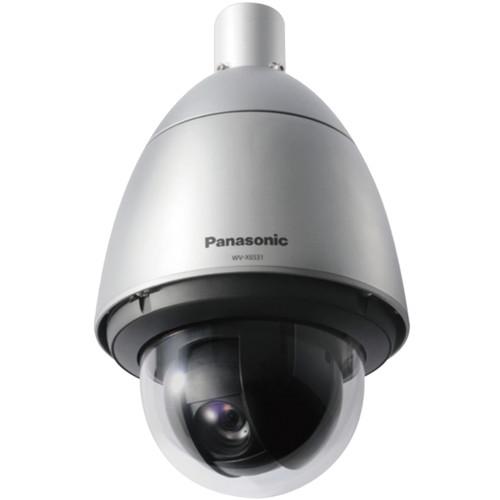 Contents of the user manual for the Panasonic WV-X6531N i-PRO Extreme 3MP Outdoor
- Product category: Wired IP Cameras Panasonic
- Brand: Panasonic
- Description and content of package
- Technical information and basic settings
- Frequently asked questions – FAQ
- Troubleshooting (does not switch on, does not respond, error message, what do I do if...)
- Authorized service for Panasonic Wired IP Cameras
|
User manual for the Panasonic WV-X6531N i-PRO Extreme 3MP Outdoor contain basic instructions
that need to be followed during installation and operation.
Before starting your appliance, the user manual should be read through carefully.
Follow all the safety instructions and warnings, and be guided by the given recommendations.
User manual is an integral part of any Panasonic product,
and if it is sold or transferred, they should be handed over jointly with the product.
Following the instructions for use is an essential prerequisite for protecting
health and property during use, as well as recognition of liability on the part of the manufacturer
for possible defects should you make a warranty claim. Download an official Panasonic user manual in which you will find instructions on how to install, use, maintain and service your product.
And do not forget – unsuitable use of a Panasonic product will considerably shorten its lifespan!
|
Product description The silver WV-X6531N i-PRO Extreme 3MP Outdoor 40x PTZ Network Dome Camera from Panasonic features a 1/2.8" MOS image sensor and 4.25-170mm varifocal lens for capturing images at a maximum resolution of 2048 x 1536 at 30 fps. Enclosed in an IP66-rated and IK10-rated housing, the camera can be used for both indoor and outdoor applications in areas where vandalism is a concern. The camera comes with 40x zoom stabilization to increase visibility and decrease blurring. The iA (Intelligent Auto) feature monitors scene dynamics and motion to adjust camera settings automatically in real time to reduce distortion caused by motion blur from moving objects. The camera features H.265 Smart Coding technology, which helps in minimizing overall bandwidth usage. - 40x zoom lens and zoom stabilization for pole mounting the camera on roadways
- Intelligent Auto (iA) and ClearSight coating for capturing images of fast moving vehicles
- Low-light performance in true color with low noise for night-time applications
- Super Dynamic range of 144 dB to capture images for backlit situation by headlights and shadows on the streets at night
- IP66-rated and IK10-rated weather-resistant housing
- Wide operating temperature range of -58 to 140°F
- Region of Interest (ROI) encoding (Auto VIQS) detects motion areas and captures clear images of vehicles and humans while minimizing the bandwidth usage
- Suitable for use in traffic and safety applications, railways, critical infrastructure locations, airports, and stadiums
In the Box Panasonic WV-X6531N i-PRO Extreme 3MP Outdoor 40x PTZ Network Dome Camera Limited 1-Year Warranty Table of Contents
|
Upload User Manual
Have you got an user manual for the Panasonic WV-X6531N i-PRO Extreme 3MP Outdoor 40x PTZ Network Dome Camera in electronic form? Please send it to us and help us expand our library of instruction manuals.
Thank you, too, on behalf of other users.
To upload the product manual, we first need to check and make sure you are not a robot. After that, your "Submit Link" or "Upload File" will appear.
Technical parametersPanasonic WV-X6531N Specs | Image Sensor | Approx. 1/2.8" MOS image sensor | | Illumination | Color: 0.015 lux, B&W: 0.006 lux (f/1.6, Maximum Shutter: 1/30 sec, AGC: 11)
Color: 0.001 lux, B&W: 0.0004 lux (f/1.6, Maximum Shutter: 16/30 sec, AGC: 11) | | Intelligent Auto | On / Off | | Shutter Speed | 1/30 to 1/10,000 sec
(1/30 to 2/120 fix is available during 30 fps mode only)
(1/60 fix is available during 60 fps mode only) | | Super Dynamic | On / Off, the level can be set in the range of 0 to 31, 60 fps mode | | Dynamic Range | 144 dB (Super Dynamic: On) | | Image Settings | Gain (AGC), White balance | | Compensation | Image Compensation: Adaptive black stretch, BLC (Backlight compensation), Fog compensation, HLC (High light compensation), Digital noise reduction | | Day/Night | With IR cut filter
Off / On / Auto1 (Normal) / Auto2 (IR Light) / Auto3 (SCC) | | Video Motion Detection | On / Off, 4 areas available | | Image Stabilizer | On / Off (available only in the 30 fps mode) | | Privacy Zone | Filling / Pixelate / Off (up to 32 zones available) | | Camera Title | On / Off up to 20 characters (alphanumeric characters, marks) | | Optical Zoom | 40x | | Digital Zoom | 16x | | Focal Length | 4.25-170mm | | Maximum Aperture Ratio | Wide: 1:1.6
Tele: 1:4.95 | | Focus Range | 9.8' to infinity (3 m to infinity) | | Angular Field of View | 16:9 Mode
Horizontal: 2.1 (tele) to 65° (wide)
Vertical: 1.2 (tele) to 39°(wide)
4:3 Mode
Horizontal: 1.6 (tele) to 51° (wide)
Vertical: 1.2 (tele) to 39° (wide) | | Panning Range | 360° endless panning | | Panning Speed | Manual: Approx. 0.065 to 120°/s
Preset: Up to 300°/s | | Tilting Range | Operational Range: -15 to 195° (level - downward - level)
Recommended Range: 0 to 180°
Selectable Tilting Angle: 10/5/3/0/-3/-5/-10/-15°
Note: If 0, -3, -5, -10, or -15° is selected, the area hidden by the camera housing may increase when the tilt angle of the camera is almost level. When -15° is selected for tilt angle, the upper half of images will be hidden. | | Tilting Speed | Manual: Up to approximately 0.065 to 120°/s
Preset: Up to approximately 300°/s | | Preset Positions | 256 positions | | Auto Mode | Auto track / Auto pan / Preset sequence / Patrol | | Self Return | 10 sec / 20 sec / 30 sec / 1 minute / 2 minutes / 3 minutes / 5 minutes / 10 minutes / 20 minutes / 30 minutes / 60 minutes | | Camera Control | Pan/Tilt, Zoom, Focus, Auto mode, Brightness, Preset, AUX, Rec. on SD, Log, Viewer software | | Audio | Mic (Line) Input: On / Off
Volume Adjustment: Low / Middle / High
Audio Output: On / Off
Volume Adjustment: Low / Middle / High | | GUI | English, Italian, French, German, Spanish, Portuguese, Russian, Chinese, Japanese | | Network IF | 10Base-T/100Base-TX, RJ45 connector | | Image Resolution | 2 MP [16:9] (30/60 fps), 1920 x 1080, 1280 x 720, 640 x 360, 320 x 180
3 MP [4:3] (30 fps mode), 2048 x 1536, 1280 x 960, 800 x 600, VGA, 400 x 300, QVGA | | Transmission mode | H.265/H.264: Constant bit rate / VBR / Frame rate / Best effort
Note: For H.264, transmission for 4 streams can be individually set | | Transmission Type | Unicast / Multicast | | Image Quality | 10 steps | | Smart Codec | Smart Facial Coding: On (Smart Facial Coding)/ On (AUTO VIQS)/ Off
Note: Smart Facial Coding is only available with Stream 1
GOP (Group of pictures) Control: On (Advanced) / On (Low) / On (Mid) / Off
Note: On (Advanced) is only available with H.265 | | Audio Compression | G.726 (ADPCM): 16 kbps / 32 kbps
G.711: 64 kbps
AAC-LC: 64 kbps / 96 kbps / 128 kbps
Note: Advanced Audio Coding: Low complexity (AAC-LC) when recording audio on an SD memory card | | Audio Transmission Mode | Off / Mic (Line) input / Audio output / Interactive (Half duplex) / Interactive (Full duplex) | | Supported Protocols | IPv6: TCP/IP, UDP/IP, HTTP, HTTPS, RTP, FTP, SMTP, DNS, NTP, SNMP, DHCPv6, MLD, ICMP, ARP, IEEE 802.1X, DiffServ
IPv4: TCP/IP, UDP/IP, HTTP, HTTPS, RTSP, RTP, RTP/RTCP, FTP, SMTP, DHCP, DNS, DDNS, NTP, SNMP, UPnP, IGMP, ICMP, ARP, IEEE 802.1X, DiffServ | | Number of Simultaneous Users | Up to 14 users (depends on network conditions) | | Memory Card | H.265 / H.264 Recording: Manual REC / Alarm REC (Pre/Post) / Schedule REC / Backup upon network failure
JPEG Recording: Manual REC / Alarm REC (Pre/Post) / Backup upon network failure
Compatible SD (SDHC/SDXC) Card: Panasonic 2 GB, 4 GB, 8 GB, 16 GB, 32 GB, 64 GB, 128 GB, 256 GB models
Note: Supports SDHC cards, SDXC cards (except miniSD cards and microSD cards) | | Mobile Terminal Compatibility | iPad / iPhone, Android mobile terminals | | Alarm Source | 3 x terminals input, VMD alarm, Command alarm, Audio detection alarm, Auto track alarm | | Alarm Actions | SDXC/SDHC/SD memory recording, email notification, HTTP alarm notification, Indication on browser, FTP image transfer, Panasonic protocol output | | Microphone/Line Input | 3.5 mm stereo mini jack (monaural input) (Applicable Microphone: Plug-in power type)
Supply voltage: 4 ±0.5 V | | Audio Output | 3.5 mm stereo mini jack (monaural output)
Output Impedance: Approximately 600 Ohms (unbalanced) | | External I/O Terminals | 1 x ALARM IN 1 (day / night in, auto time adjustment)
1 x ALARM IN 2 (alarm out)
1 x ALARM IN 3 (aux out) | | Power | 24 VAC: 3.4 A, approximately 55 W
PoE+: 54 VDC/470 mA, approximately 25 W (IEEE 802.3at)
Tested POE Injector (60 W): 54 VDC 1.0 A, approximately 50 W | | Operating Temperature | -58 to +140°F (-50 to 60°C) using 24 VAC / tested PoE injector (60 W)
-22 to +140°F (-30 to +60°C) using PoE+ device
Power On range: -22 to +140°F (-30 to 60°C) | | Operating Humidity | 10 to 100 % (no condensation) | | Certification | IP66 (IEC60529), Type 4X (UL50), NEMA 4X | | Shock Resistance | IK10 (IEC62262) | | Finish | Main Body: Aluminum die-cast,
Sunshields: ABS+PC resin coating
Outer Fixing Screws: SUS (Corrosion-resistant treatment)
Dome Cover: Polycarbonate resin (with ClearSight coating / rain wash coating), clear | | Dimensions (Ø x H) | 9 x 15.5" (229 x 393 mm) | | Weight | Approx. 11.47 lb (5.2 kg) |
Rating70% users recommend this product to others. And what about you?

This product has already been rated by 58 owners. Add your rating and experience with the product.
Discussion
 Ask our technicians if you have a problem with your settings,
or if anything is unclear in the user manual you have downloaded.
You can make use of our moderated discussion.
The discussion is public and helps other users of our website who may be encountering similar problems.
Ask our technicians if you have a problem with your settings,
or if anything is unclear in the user manual you have downloaded.
You can make use of our moderated discussion.
The discussion is public and helps other users of our website who may be encountering similar problems.
The discussion is empty - enter the first post
Post a new topic / query / comment:
|
|


