|
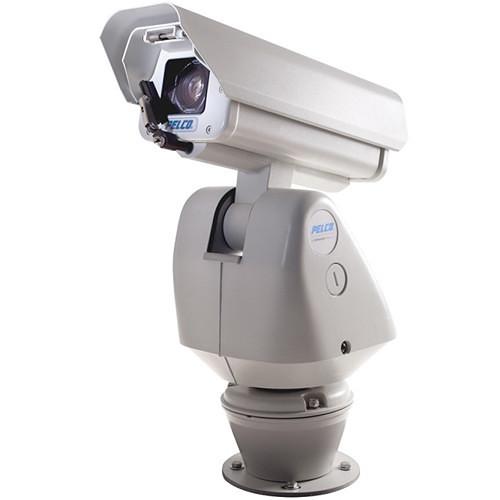
User Manual for Pelco Esprit HD Series ES5230-12WP Wall Mount IP Positioning System with Pressurized Integrated Optics Cartridge & Wiper Click to enlarge the picture
 Contents of the user manual for the Pelco Esprit HD Series ES5230-12WP Wall
- Product category: Wired IP Cameras Pelco
- Brand: Pelco
- Description and content of package
- Technical information and basic settings
- Frequently asked questions – FAQ
- Troubleshooting (does not switch on, does not respond, error message, what do I do if...)
- Authorized service for Pelco Wired IP Cameras
|
User manual for the Pelco Esprit HD Series ES5230-12WP Wall contain basic instructions
that need to be followed during installation and operation.
Before starting your appliance, the user manual should be read through carefully.
Follow all the safety instructions and warnings, and be guided by the given recommendations.
User manual is an integral part of any Pelco product,
and if it is sold or transferred, they should be handed over jointly with the product.
Following the instructions for use is an essential prerequisite for protecting
health and property during use, as well as recognition of liability on the part of the manufacturer
for possible defects should you make a warranty claim. Download an official Pelco user manual in which you will find instructions on how to install, use, maintain and service your product.
And do not forget – unsuitable use of a Pelco product will considerably shorten its lifespan!
|
Product description The Pelco Esprit HD Series ES5230-12WP Wall Mount IP Positioning System (NTSC) features a pan/tilt motor and a pressurized Integrated Optics Cartridge (IOC) with wiper in a wall mount type enclosure. The optics package features a 1/2.8" CMOS sensor and 30x zoom lens to deliver clear, live streaming images over the Internet using a standard Web browser. The system supports High-Profile H.264 video compression. The enclosure features an integrated window wiper that does not interfere with the viewing range of the system. The wiper can be configured to delay between wipes and to automatically shut off after a specified period. Its blade can be easily replaced.This system's Integrated Optics Cartridge contains dry nitrogen pressurized to 10 psig, which protects the environment inside the cartridge, eliminating internal condensation and corrosion. Sensors strategically placed in the cartridge send an alert message if changes in pressure, temperature, and humidity are beyond factory-set acceptable limits. The sensors also allow for instant on-screen display of temperature, pressure, and dew point. The optics cartridge is factory assembled and installed in the system eliminating all labor intensive procedures of setting up the camera, lens, and charging the unit with dry nitrogen.The positioning system features a motor capable of achieving variable pan and tilt speeds ranging from 0.1 to 40°/sec in manual pan mode and 0.1 to 20°/sec in manual tilt. Pan preset and turbo speeds are 100°/sec in wind speeds of 50 mph and 50°/sec in the 90 mph wind-speed profile, and the tilt preset speed is 30°/sec. The system's Electronic Image Stabilization (EIS) mode compensates for some frequencies of vibration affecting image quality. Window blanking is used to conceal user-defined privacy areas that will be viewed by an operator. Up to 32 blanked windows are supported and any blanked area will appear on the screen as a solid gray window.The camera system is Endura Enabled to record, manage, configure, and view multiple live streams. When connected to an Endura HD network-based video security system, it has access to EnduraStor and EnduraView for optimized image quality and bandwidth efficiency. It is also compatible with the Digital Sentry NVs (DS NVs), full-featured video management software. In addition, open architecture connectivity for third-party software recording solutions allows integration into any IP-based HD system.Powder-coated aluminum construction makes the camera system suitable for both indoor and outdoor applications. It has an absolute operating temperature range of 50 to 122°F (45 to 50°C). Within 2 hours after power-up, the entire unit can de-ice and be operational from a temperature of -13°F (-25°C). A built-in heater, window defroster/defogger, sun shroud, and insulation blanket are standard and the enclosure also has an open collector auxiliary output to control external devices. The system features selectable input voltage of 120 / 230VAC and has a power-up recovery mode that allows you to specify what operation it will resume when the power is cycled.Built-in Pelco Analytics enhance the flexibility and performance of Esprit HD. Nine Pelco behaviors are preloaded and included as standard features: Abandoned Object, Adaptive Motion Detection, AutoTracker, Camera Sabotage, Directional Motion, Loitering Detection, Object Counting, Object Removal, and Stopped Vehicle. Pelco behaviors can be configured and enabled using a standard Web browser and are compatible with Endura or a third-party system that supports alarms using Pelco's API. Multiple Pelco behaviors can be scheduled to work during a certain time or condition. The system is capable of running up to three behaviors at the same time. For each behavior, you can create several custom profiles that contain different camera settings. With these profiles, you can set up different scenarios for the behavior, which will automatically detect and trigger alarms when specific activity is detected. Note: Although EIS can reduce the impact of vibration on image quality, it cannot correct for all levels of vibration. Other measures should be taken to isolate the camera from the source of the vibration or to seek a more rigid mounting location.
The number of behaviors is limited to the available processing power of the camera and the type of analytic being used, which is determined by the settings for compression standards, resolution, image rate, bit rate, and analytic configuration. Camera Highlights - Pan/tilt assembly and pressurized Integrated Optics Cartridge (IOC) in a wall mount enclosure
- Up to 1920 x 1080 resolution
- 16:9 aspect ratio; 1080p at 30 ips
- 2MP resolution, 30x optical zoom, 12x digital zoom, Wide Dynamic Range (WDR) camera
- Ability to control and monitor video over IPv4 and IPv6 networks
- Built-in analytics including Autotracker and Adaptive Motion Detection
- 2 Simultaneous video streams; dual H.264 or H.264 and scalable MJPEG
- 360° Continuous pan rotation at 100°/sec
- Supports TCP/IP, UDP/IP (Unicast, Multicast IGMP), UPnP, DNS, DHCP, RTP, RTSP, NTP, and more protocols
- Electronic Image Stabilization (EIS)
- Proportional pan/tilt continually decreases pan/tilt speeds in proportion to depth of zoom
- 16 preset tours, 256 presets, 32 window blanks 1
Please Note: Using the maximum number of window blanks in a single view can affect camera performance and could interrupt certain camera functions. close - Integrated window wiper with configurable delay and shut-off
- ONVIF Profile S conformant
- Multilingual menu including English, Spanish, Portuguese, Italian, German, French, Russian, Turkish, Arabic, Chinese, and Korean
Pelco Analytics - Abandoned Object
- Abandoned Object detects objects placed within a defined zone and triggers an alarm if the object remains in the zone longer than the user-defined time allows. An airport terminal is a typical installation for this behavior. This behavior can also detect objects left behind at an ATM, signaling possible card skimming.
- Adaptive Motion Detection
- Adaptive Motion Detection detects and tracks objects that enter a scene and then triggers an alarm when the objects enter a user-defined zone. This behavior is primarily used in outdoor environments with light traffic to reduce the number of false alarms caused by environmental changes.
- AutoTracker
- AutoTracker detects and tracks movement in the field of view. When the AutoTracker behavior is configured, the system automatically pans and tilts to follow the moving object until the object stops or disappears from the monitored area.
- Camera Sabotage
- Camera Sabotage detects contrast changes in the field of view. An alarm is triggered if the lens is obstructed by spray paint, a cloth, or a lens cap. Any unauthorized repositioning of the camera also triggers an alarm.
- Directional Motion
- Directional Motion generates an alarm in a high traffic area when a person or object moves in a specified direction. Typical installations for this behavior include an airport gate or tunnel where cameras can detect objects moving in the opposite direction of the normal flow of traffic or an individual entering through an exit door.
- Loitering Detection
- Loitering Detection identifies when people or vehicles remain in a defined zone longer than the user-defined time allows. This behavior is effective in real-time notification of suspicious behavior around ATMs, stairwells, and school grounds.
- Object Counting
- Object Counting counts the number of objects that enter a defined zone. This behavior can be used to count the number of people at a store entrance/exit or inside a store where the traffic is light. This behavior is based on tracking and does not count people in a crowded setting.
- Object Removal
- Object Removal triggers an alarm if an object is removed from a user-defined zone. This behavior is ideal for customers who want to detect the removal of high value objects, such as a painting from a wall or a statue from a pedestal.
- Stopped Vehicle
- Stopped Vehicle detects vehicles stopped near a sensitive area longer than the user-defined time allows. This behavior is ideal for airport curbside drop-offs, parking enforcement, suspicious parking, traffic lane breakdowns, and vehicles waiting at gates.
UPC: 700880333563 In the Box Pelco Esprit HD Series ES5230-12WP Wall Mount IP Positioning System with Pressurized Integrated Optics Cartridge & Wiper (NTSC, 24 VAC) Limited 2-Year Warranty Table of Contents
|
Upload User Manual
Have you got an user manual for the Pelco Esprit HD Series ES5230-12WP Wall Mount IP Positioning System with Pressurized Integrated Optics Cartridge & Wiper in electronic form? Please send it to us and help us expand our library of instruction manuals.
Thank you, too, on behalf of other users.
To upload the product manual, we first need to check and make sure you are not a robot. After that, your "Submit Link" or "Upload File" will appear.
Technical parametersPelco ES523012WP Specs | | | Sensor Type | 1/2.8" Exmor CMOS | | Zoom | Optical: 30x
Digital: 12x | | Maximum Resolution | 1920 x 1080 | | Lens | 4.3 to 129.0 mm (wide to tele), f/1.6 to 4.7 | | Horizontal Angle of View | 59.5° (wide) to 2.1° (tele) | | Aspect Ratio | 16:9 | | Light Sensitivity | Color:
0.65 lux (33 ms)
0.07 lux (250 ms)
Mono:
0.20 lux (33 ms)
0.015 lux (250 ms) Sensitivity in lux for 90% reflectance, f/1.6 (wide angle), 28 dB gain at 30 IRE (30% of signal level) with Sensitivity Boost off; 4x improvement to sensitivity with Sensitivity Boost on. | | Day/Night | Yes with IR cut filter | | Wide Dynamic Range | 80 dB | | Iris Control | Auto iris with manual override | | Adjustments | Backlight Compensation
Automatic Gain Control
Active Noise Filtering
Electronic Image Stabilization (EIS) | | | | Type | Pressurized Integrated Optics Cartridge (IOC) | | Pressure Level | Pressurized to 10 psig, nominal (sea level, 70°F [21°C]) | | Sensor | Internal sensor for low pressure alarm | | | | Video Encoding | H.264 high, main, or base profile and MJPEG | | Video Streaming | Up to 2 simultaneous streams; the second stream is variable based on the setup of the primary stream | | Frame Rate | Up to 30, 25, 24, 15, 12.5, 12, 10, 8, 7. 5, 6, 5, 4, 3, 2, 1 (dependent upon coding, resolution, and stream configuration) | | Available Resolutions | H.264 High Profile:
2.07 MP, (W x H) 1920 x 1080, Aspect Ratio: 16:9
Recommended Bit Rate: 3.5 Mb/s, (maximum 30 ips)
0.92 MP, (W x H) 1280 x 720, Aspect Ratio: 16:9
Recommended Bit Rate: 2.9 Mb/s, (maximum 30 ips)
0.36 MP, (W x H) 800 x 448, Aspect Ratio: 16:9
Recommended Bit Rate: 1.8 Mb/s, (maximum 30 ips)
0.23 MP, (W x H) 640 x 352, Aspect Ratio: 16:9
Recommended Bit Rate: 1.15 Mb/s, (maximum 30 ips)
0.13 MP, (W x H) 480 x 272, Aspect Ratio: 16:9
Recommended Bit Rate: 0.75 Mb/s, (maximum 30 ips)
0.06 MP, (W x H) 320 x 176, Aspect Ratio: 16:9
Recommended Bit Rate: 0.35 Mb/s, (maximum 30 ips) | | Supported Protocols | TCP/IP, UDP/IP (Unicast, Multicast IGMP), UPnP, DNS, DHCP, RTP, RTSP, NTP, IPv4, IPv6, SNMP v2c/v3, QoS, HTTP, HTTPS, LDAP (client), SSH, SSL, SMTP, FTP, and 802.1x (EAP) Supports mixed IPv4 and IPv6 installations, but not IPv6-only deployments. | | Users | Unicast: Up to 20 simultaneous users depending on resolution settings (2 guaranteed streams)
Multicast: Unlimited users H.264 | | Security Access | Password protected | | Software Interface | Web browser view and setup | | Pelco System Integration | Endura 2.0 (or later)
Digital Sentry 7.3 (or later)
Open API: Pelco API or ONVIF Profile S | | | | Processor | Intel Core i3 processor, 2.4 GHz | | Operating System | Windows 7 (32- and 64-bit) with DirectX 11, Windows XP Service Pack 3 with DirectX 9.0c, or Mac OS X 10.4 (or later) | | Memory | 4 GB RAM | | Network Card | 100 Megabits or greater | | Monitor Resolution | Minimum of 1024 x 768 resolution, 16- or 32-bit pixel color resolution | | Web Browser | Microsoft Internet Explorer 8.0 (or later) or Mozilla Firefox 3.5 (or later) Internet Explorer 8.0 (or later) is recommended for configuring analytics. | | Media Player | Pelco Media Player or QuickTime 7.6.5 for Windows XP and Windows 7, or QuickTime 7.6.4 for Mac OS X 10.4 (or later) Pelco Media Player is recommended for control, smoothness, and reduced latency as compared to QuickTime. | | | | System Requirement | Required Systems for Pelco Analytics Pelco Interface: WS5200 Advanced System Management Software on an Endura 2.0 (or later) system
Open API: Pelco API can transmit behavior alarm data to third-party applications Required System for Object Video Suites: OV ready-compliant system with OV Ready video management system | | | | Variable Speed | 0.1° to 100° | | Preset Accuracy | ±0.1° | | Pan Movement | 360° Continuous pan rotation | | Vertical Tilt | Unobstructed +36° to -85° | | Manual Pan/Tilt Speeds | Pan: 0.1° to 40°/sec manual operation
Tilt: 0.1° to 30°/sec manual operation | | Preset Speeds | Pan: 100°/sec
Tilt: 30°/sec | | | | Input Voltage | 24 VAC, 50/60 Hz | | Input Voltage Range | ±10% | | Power Consumption | Maximum 70 VA per system | | Heater/Defroster | Thermostatically controlled | | Connections | Screw terminals for power and open collector auxiliary output
RJ-45 connector for data | | AUX 2 | Open collector output with 2-second activation The connected relay must require no more than 32 VDC and 40 mA to energize relay coil; wire length between Esprit and relay must be less than 9.84' (3 m). | | | | Construction | Die-cast, extruded and sheet aluminum; stainless steel hardware | | Operating Temperature | -50 to 122°F (-45 to 50°C) for sustained system operation or 140°F (60°C) absolute maximum; within two hours after power-up, the entire unit can de-ice and be operational from a temperature of -13°F (-25°C) | | Operating Environment | Will remain operational in 90 mph (145 kph) wind conditions; withstands 130 mph (209 kph) | | Certifications | Camera:
CE, Class A
FCC, Class A
UL/cUL Listed
C-Tick
Meets NEMA Type 4X and IP66 Standards
ONVIF Profile S
Cisco Medianet Media Services Proxy 2.0 compatible
Pressurized Integrated Optics Cartridge:
Designed to IP67 standards
U.S. Patent D472,260 | | Overall Dimensions | 7.7 x 17.5 x 13.3" (19.7 x 44.3 x 33.9 cm) | | Weight | 24.0 lb (11.0 kg) | | | | Package Weight | 31.9 lb | | Box Dimensions (LxWxH) | 23.0 x 21.5 x 11.5" |
Rating90% users recommend this product to others. And what about you?

This product has already been rated by 96 owners. Add your rating and experience with the product.
Discussion
 Ask our technicians if you have a problem with your settings,
or if anything is unclear in the user manual you have downloaded.
You can make use of our moderated discussion.
The discussion is public and helps other users of our website who may be encountering similar problems.
Ask our technicians if you have a problem with your settings,
or if anything is unclear in the user manual you have downloaded.
You can make use of our moderated discussion.
The discussion is public and helps other users of our website who may be encountering similar problems.
The discussion is empty - enter the first post
Post a new topic / query / comment:
|
|
|
| Request for user manual |
You can’t find the operation manual you are looking for? Let us know and we will try to add the missing manual:
I’m looking for a manual / Request for manual
Current requests for instruction manuals:
Call Of Duty World War Two For Xbox...
controller stratus XL...
stratus XL...
smart whatch serie S11 42mm...
Allen & Heath SQ-6 manual...
|
| Discussion |
Latest contributions to the discussion:
AEW R 4100
Name: MAURICIO ANGARITA
Audio-Technica AEW-R4100 UHF Diversity Receiver for
AEW R 4100 has the mute function blocked and does not allow audio to pass. I tried several times to turn off the mute from the transmitter but it does nothing, the mute stays on. Solution?
Thank you...
Instructions for assembling the 2015 Forecast Image Master Consoles GC3-A
Name: mike elam
Forecast Consoles GC3-A ImageMaster Editing Console
Looking for instructions for assembling this console. ...
EMPTY TONER ERROR MESSAGE AFTER REPLACING TONER
Name: LINDA BAD YELLOW EYES
Brother TN223BK Standard-Yield Toner
I HAD TO CHANGE OUT ALL THREE TONERS DUE TO LEAKS IN THE YELLOW AND CYAN. AFTER I REPLACED THEM, THE MACHINE KEEPS GIVING ME AN EMPTY TONER ERROR MESSAGE. HELP!!...
PS480D 20/24 pin Switching 480W Power Supply
Name: swkargo
Logisys 480W Power Supply
This item states in can run -5vdc .It is NOT listed on the board or I beleive is r4 is missing the resitior. Any body have thid issue. Shawn
...
Help needed
Name: Ann Carter
SanDisk 1TB Extreme Portable USB 3.1
When I click the link to download the user manual for my Sandisk Extreme external hard drive, it gives me the manual for the LG Cricket. Can you please change the link so I can download the Sandisk manual and begin using this drive? Thank you....
|
|


