|
User Manual for Pelco Evolution 360 EVO0-5NCD 5 MP Concealed Camera with Fisheye Lens Click to enlarge the picture
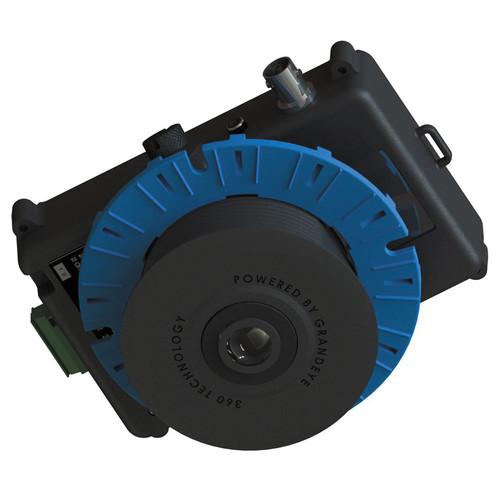 Contents of the user manual for the Pelco Evolution 360 EVO0-5NCD 5 MP
- Product category: Wired IP Cameras Pelco
- Brand: Pelco
- Description and content of package
- Technical information and basic settings
- Frequently asked questions – FAQ
- Troubleshooting (does not switch on, does not respond, error message, what do I do if...)
- Authorized service for Pelco Wired IP Cameras
|
User manual for the Pelco Evolution 360 EVO0-5NCD 5 MP contain basic instructions
that need to be followed during installation and operation.
Before starting your appliance, the user manual should be read through carefully.
Follow all the safety instructions and warnings, and be guided by the given recommendations.
User manual is an integral part of any Pelco product,
and if it is sold or transferred, they should be handed over jointly with the product.
Following the instructions for use is an essential prerequisite for protecting
health and property during use, as well as recognition of liability on the part of the manufacturer
for possible defects should you make a warranty claim. Download an official Pelco user manual in which you will find instructions on how to install, use, maintain and service your product.
And do not forget – unsuitable use of a Pelco product will considerably shorten its lifespan!
|
Product description The Evolution 360° EVO0-5NCD 5 MP Concealed Camera from Pelco features a 5 MP 1/2.5" CMOS sensor and no moving parts. The camera provides total situational awareness over a 360° field of view, generating a number of video streams at a choice of resolutions as well as configurable privacy zones and video motion detection within defined areas of interest. This camera fully supports IEEE802.3af Class 2 Power-over-Ethernet for installation convenience. It is designed for quick and easy installations and is suitable for ceiling, wall, or table mounted applications. - Vandal Resistant 360° IP Camera with 5 MP Sensor and No Moving Parts
-
- Constant 360° surveillance; no blind spots
- Silent operations as there are no mechanical parts
- No moving parts means no regular maintenance due to wear and tear
- Easy Installation
-
- Fully supports IEEE802.3af Class 2 Power over Ethernet (PoE)
- Quick and easy installation
- Professional and rugged enclosure to withstand a range of harsh and humid environments
- Minimum illumination 0.2 lux, providing clarity in low lights
- Convenient surface-mounting enclosure
- Suitable for ceiling, wall or table mounted applications
- A range of mounting accessories allows for ceiling, wall, pole and pendant mounting
- Onboard SD Card and Advanced Event Management
-
- Onboard SD card for future local recording feature and advanced event management
- Configurable privacy regions
- Video Motion Detection within defined areas of interest
- Local alarm digital input and output
- Audio microphone input
- Fully Integrated with Multiple VMS Platforms to Provide Live and Retrospective Dewarping
-
- Utilizes Oncam Grandeye 3D dewarping software
- Camera features are accessible via VMS platforms
- Optimizes bandwidth and storage utilization
- Simultaneous multiple video streams
- Video streams in multiple resolutions from 528 x 480 to 2144 x 1944
- 10 fps typical for full resolution and up to 15 fps for all other resolutions
- H.264/MJPEG streaming with multiple quality levels
- Configurable password protection
- Intuitive web-based interface for viewing and configuration
- Integrated with Digital Sentry version 7.5 and other leading VMS platforms
UPC: 700880329894 In the Box Pelco Evolution 360 EVO0-5NCD 5 MP Concealed Camera with Fisheye Lens Limited 3-Year Warranty Brochure PDF 269.7kb Table of Contents
|
Upload User Manual
Have you got an user manual for the Pelco Evolution 360 EVO0-5NCD 5 MP Concealed Camera with Fisheye Lens in electronic form? Please send it to us and help us expand our library of instruction manuals.
Thank you, too, on behalf of other users.
To upload the product manual, we first need to check and make sure you are not a robot. After that, your "Submit Link" or "Upload File" will appear.
Technical parametersPelco EVO05NCD Specs | | | Video Streams | Streams 1 & 2:
Codec: H.264 High, Level 5 / MJPEG (both streams configurable)
Compression Level: Multi-levels of compression adjustment
Pixel Resolution: Fisheyes at 0.25 MP (528 x 480), 1 MP (1056 x 960), 2 MP (1488 x 1360), 4 MP (2144 x 1944)
Stream 3:
Codec: MJPEG
Compression Level: Multi-levels of compression and frame rate adjustment (maximum 15 fps)
Pixel Resolution: Fisheye at 0.25 MP (528 x 480) | | Image Controls | Settings: brightness/contrast/saturation/exposure compensation; compression quality; wall/ceiling/table mount | | Image Enhancement | Wide Dynamic range; greater than 90 db | | VMS Software | Integrated with Digital Sentry version 7.5 and other leading VMS platforms | | Web Browser | Internet Explorer IE9 (with ActiveX plug-in, supplied); Firefox 23 ; Chrome 29; using QuickTime, minimum version 7 | | Number of Users | Unicast: Up to 20 simultaneous users depending on the resolutions settings | | Bit Rate | Selectable options; constant bit rate control, capped bit rate control, constant quality control | | | | Image Sensor | 5 MP (H x V: 2592 x 1944); array format (active); 1/2.5" CMOS Sensor | | Field of View | 360° | | Angle of View | 180° hemisphere | | Lens | 185°; 1.6 mm; f/2.0 | | Minimum Illumination | 0.2 lux; 50 IRE, f/2.0 (6500 K) | | Frame Rate | 10 fps typical at maximum resolution and up to 15 fps for all other resolutions | | Video Motion Detection | 12 regions of interest; VMD; configurable response; adjustable characteristics | | Storage | H.264:
@4 MP (2144 x 1944); 10 fps; constant bit rate (5 Mb/s): 54 GB
@2 MP (1488 x 1360); 15 fps; constant bit rate (3 Mb/s): 40 GB
@1 MP (1056 x 1056); 15 fps; constant bit rate (1.5 Mb/s): 16 GB
@0.25 MP (528 x 480); 15 fps; constant bit rate (0.8 Mb/s): 8 GB
MJPEG:
@4 MP (2144 x 1944); 10 fps; average file size: 640 kB, average bit rate: 52.4 Mb/s: 552.96 GB
@2 MP (1488 x 1360); 15 fps; average file size: 350 kB, average bit rate: 43.0 Mb/s: 453.60 GB
@1 MP (1056 x 1056); 15 fps; average file size: 188 kB, average bit rate: 23.1 Mb/s: 243.65 GB
@0.25 MP (528 x 480); 15 fps; average file size: 62 kB, average bit rate: 7.6 Mb/s: 80.35 GB All recordings are assumed to be 24 hours long and are based on the same scene, with constant average light conditions | | External | 1 x contact input
1 x contact output | | Security | Configurable password protection | | Advanced Event Management | Triggered by motion, external input or HTTP event, result configurable; external output, FTP/SMTP upload, (local recording, future feature via firmware update) | | Networking | TCP/IP, HTTP, DHCP, DNS, NTP, FTP, SMTP, RSTP, uPNP | | Privacy | 10 configurable privacy regions | | SD Card | Built-in SD Card slot (future feature via firmware update) | | Audio Connections | Audio in; microphone input via 3.5 mm jack; via RTSP using G711 codec (µ law - 8k sample rate); via ONVIF S | | Analog Video Out | BNC connection - selectable between PAL or NTSC (used for test only) | | Signal-to-Noise Ratio | 45 dB | | Auto White Balance Range | Auto white balance (range = approximately 2500 to 8000 K) | | Supports | Oncam Grandeye SDK integration pack, Evolution accessories, IP Configuration tool, 360° viewer, OnVu360 Mobile Apps (iOS, Android) | | | | Processor & Memory | Computer with 1 GHZ 32-bit (x86) or 64-bit (x64) processor and with minimum of 512 MB | | Operating System | Windows Vista 32-bit with service pack 2 (SP2) of higher / 64-bit with service pack (SP2) of higher | | Hard Drive Space | Windows Vista 32-bit = minimum 70 MB
Windows Vista 64-bit = minimum 120 MB | | Display | Super VGA (800 x 600) of higher-resolution monitor with 256 colors | | Peripherals Supported | 100 Mb or greater network connection, mouse or compatible pointing device, keyboard | | | | Ports | RJ45 for 100Base-TX; 2.1 mm DC Input jack; 6-pin 1.5 mm Phoenix for external I/O, BNC for test video output | | Network Cable Type | CAT5 or better for 100Base-TX | | Power Input | 12 V, 1 A (minimum) "LPS or NEC Class 2" power supply or Power over Ethernet (PoE), IEEE standard 802.3af | | Power Consumption | 8 W maximum | | | | Approvals | IEEE802.3af Class 2; EMC: (CISPR Class A) FCC; CE; ICES-003; KCC; SASO; GOST; S-MARK; C-TICK; UL and cUL-UL60950 | | Shock and Vibration | In accordance with BS EN 60068-2-64 and BS EN 60068-2-27 | | Ingress protection | IP66-rated | | Impact Resistance | IK10-rated | | Camera Mount | Surface mount (or with a range of mounting accessories for mounting to a pole / wall / pendant) | | Enclosure | Aluminum die-cast base enclosure with clear polycarbonate dome bubble and cover trim plate | | Operating Temperature Range | -40 to 131°F (-40 to 55°C) | | Storage Temperature Range | -40 to 158°F (-40 to 70°C) | | Operating Humidity | Up to 98% (in accordance with BS EN 60068-2-30) | | Dimensions | 6.97 x 6.22 x 3.86" (17.70 x 15.79 x 9.80 cm) | | Weight | 2.03 lb (0.92 kg) | | | | Package Weight | 1.4 lb | | Box Dimensions (LxWxH) | 9.9 x 6.3 x 5.1" |
Rating70% users recommend this product to others. And what about you?

This product has already been rated by 38 owners. Add your rating and experience with the product.
Discussion
 Ask our technicians if you have a problem with your settings,
or if anything is unclear in the user manual you have downloaded.
You can make use of our moderated discussion.
The discussion is public and helps other users of our website who may be encountering similar problems.
Ask our technicians if you have a problem with your settings,
or if anything is unclear in the user manual you have downloaded.
You can make use of our moderated discussion.
The discussion is public and helps other users of our website who may be encountering similar problems.
The discussion is empty - enter the first post
Post a new topic / query / comment:
|
|
|
| Request for user manual |
You can’t find the operation manual you are looking for? Let us know and we will try to add the missing manual:
I’m looking for a manual / Request for manual
Current requests for instruction manuals:
Call Of Duty World War Two For Xbox...
controller stratus XL...
stratus XL...
smart whatch serie S11 42mm...
Allen & Heath SQ-6 manual...
|
| Discussion |
Latest contributions to the discussion:
AEW R 4100
Name: MAURICIO ANGARITA
Audio-Technica AEW-R4100 UHF Diversity Receiver for
AEW R 4100 has the mute function blocked and does not allow audio to pass. I tried several times to turn off the mute from the transmitter but it does nothing, the mute stays on. Solution?
Thank you...
Instructions for assembling the 2015 Forecast Image Master Consoles GC3-A
Name: mike elam
Forecast Consoles GC3-A ImageMaster Editing Console
Looking for instructions for assembling this console. ...
EMPTY TONER ERROR MESSAGE AFTER REPLACING TONER
Name: LINDA BAD YELLOW EYES
Brother TN223BK Standard-Yield Toner
I HAD TO CHANGE OUT ALL THREE TONERS DUE TO LEAKS IN THE YELLOW AND CYAN. AFTER I REPLACED THEM, THE MACHINE KEEPS GIVING ME AN EMPTY TONER ERROR MESSAGE. HELP!!...
PS480D 20/24 pin Switching 480W Power Supply
Name: swkargo
Logisys 480W Power Supply
This item states in can run -5vdc .It is NOT listed on the board or I beleive is r4 is missing the resitior. Any body have thid issue. Shawn
...
Help needed
Name: Ann Carter
SanDisk 1TB Extreme Portable USB 3.1
When I click the link to download the user manual for my Sandisk Extreme external hard drive, it gives me the manual for the LG Cricket. Can you please change the link so I can download the Sandisk manual and begin using this drive? Thank you....
|
|


