User Manual for Pelco Optera IMM Series 12MP Panoramic In-Ceiling Dome Camera with SureVision 2.0 Click to enlarge the picture
 Contents of the user manual for the Pelco Optera IMM Series 12MP Panoramic
- Product category: Wired IP Cameras Pelco
- Brand: Pelco
- Description and content of package
- Technical information and basic settings
- Frequently asked questions – FAQ
- Troubleshooting (does not switch on, does not respond, error message, what do I do if...)
- Authorized service for Pelco Wired IP Cameras
|
User manual for the Pelco Optera IMM Series 12MP Panoramic contain basic instructions
that need to be followed during installation and operation.
Before starting your appliance, the user manual should be read through carefully.
Follow all the safety instructions and warnings, and be guided by the given recommendations.
User manual is an integral part of any Pelco product,
and if it is sold or transferred, they should be handed over jointly with the product.
Following the instructions for use is an essential prerequisite for protecting
health and property during use, as well as recognition of liability on the part of the manufacturer
for possible defects should you make a warranty claim. Download an official Pelco user manual in which you will find instructions on how to install, use, maintain and service your product.
And do not forget – unsuitable use of a Pelco product will considerably shorten its lifespan!
|
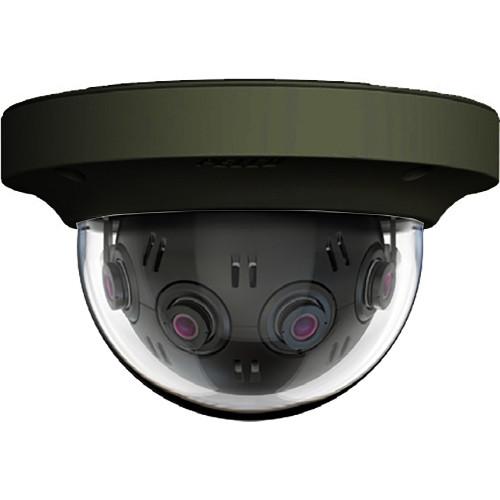
Product description The black Optera IMM Series 12MP Panoramic In-Ceiling Dome Camera from Pelco combines four 3MP imagers to provide a 12MP 180° panoramic view. It integrates video across all its sensors, presenting a seamless user experience from setup to viewing. It also enables you to zoom in for detail within multiple views from a VMS (Video Management System). The camera comes in a compact in-ceiling mount with a clear bubble lower dome. It features a tamper-resistant metal design with an IK10 rating for vandal resistance. It also features a back box that is plenum rated per 2008 NEC article 300.22(C)(2). The camera uses SureVision 2.0 technology provides low-light performance and true WDR (Wide Dynamic Range). With superior WDR, anti-bloom technologies, 3D noise filtering, and advanced tone mapping, SureVision 2.0 enables the camera to capture images in challenging lighting conditions. The camera supports multiple streams in H.264 and MJPEG compression formats and CVBR (Constrained Variable Bit Recording) to conserve video storage and bandwidth. It provides video footage at a frame rate of up to 12.5 fps at full resolution. This IP camera complies with PoE+ (Power over Ethernet plus), eliminating the need for separate power supplies and cabling and increasing camera availability through an uninterruptable power supply (UPS). The camera comes with eight Pelco video analytics behaviors applied across its wide field of view. Pelco behaviors include Abandoned Object Detection, Adaptive Motion Detection, Camera Sabotage Detection, Directional Motion Detection, Loitering Detection, Object Counting, Object Removal Detection, and Stopped Vehicle Detection. These behaviors enable operators to focus quickly on events and areas of interest. The IMM Series IP dome camera seamlessly connects to the Pelco VideoXpert and Digital Sentry systems. It can be integrated with third-party video management systems through the open Pelco API, Panomersive SDK, and through the ONVIF standard. Camera Highlights - Integrates four 3MP imagers to provide a total of 12MP resolution
- Provides a 180° panoramic view with images from individual imagers stitched and blended together
- Zoom with client-side dewarping
- Multiple immersive PTZ views at VMS (Video Management System)
- SureVision 2.0 Technology delivers WDR (Wide Dynamic Range) and low-light performance at the same time
- Frame rate of up to 12.5 fps at 12MP resolution
- Eight Pelco video analytic behaviors
- Supports up to 32 blanked windows
- microSD card slot for local storage
- ONVIF Profile S and Profile G
- Compatible with Pelco VideoXpert, VideoXpert Professional, Endura (in Tiled mode), Digital Sentry, and third-party VMS partners
- PoE+ (IEEE 802.3at, Class 4)
Software Features - 32 window blanks, configurable in size
- Snapshot with JPEG capture
- Text overlay metadata for camera name, time, date
- Multilingual User Interface: English, French, Italian, German, Spanish, Portuguese, Russian, Chinese, Turkish
Enclosure - Vandal-resistant in-ceiling mount
- Requires 3.25" space above ceiling
- 0.25 to 1.75" ceiling thickness
- 3/4" NPT or 25mm conduit attachments on side and top of back box
- Anodized aluminum construction with IK10 rating
UPC: 700880334997 In the Box Pelco Optera IMM Series 12MP Panoramic In-Ceiling Dome Camera with SureVision 2.0 (Clear Bubble, Black) Limited 3-Year Warranty Table of Contents
|
Upload User Manual
Have you got an user manual for the Pelco Optera IMM Series 12MP Panoramic In-Ceiling Dome Camera with SureVision 2.0 in electronic form? Please send it to us and help us expand our library of instruction manuals.
Thank you, too, on behalf of other users.
To upload the product manual, we first need to check and make sure you are not a robot. After that, your "Submit Link" or "Upload File" will appear.
Technical parametersPelco Optera IMM Specs | | | Sensor | 4 x 3 MP 1/3.2" CMOS | | Maximum Aperture | f/2 | | Lens Field of View | Horizontal: 180°
Vertical: 41° | | IR Cut Filter | Mechanical | | Day/Night | Yes | | Minimum Illumination | Color: 0.2 Lux
B&W: 0.14 Lux | | Camera Angle Adjustment | Horizontal: 0 to 360°
Vertical: 0 to 180° | | | | Streaming Resolution | 4290 x 2800 at 12.5 fps | | Supported Video Compression | H.264, MJPEG | | Multi-View Streaming | Yes | | | | Streaming | Two-Way | | Audio Formats | G.711, PCM | | External Audio Input | 3.5 mm | | External Audio Output | 3.5 mm | | | | Security | HTTPS, IEEE 802.1X, Password Protection | | Supported Protocols | ARP, DHCP, DNS, FTP, HTTP, ICMP, IGMP, IPv4/v6, NTP, QoS Layer 3 DiffServ, RTP, RTSP, SMTP, SNMP v1/v2c/v3 (MIB-II), SSH, SSL/TLS, TCP, UDP, UPnP | | | | Application Programming Interface (API) | Pelco, Panomersive SDK, ONVIF | | Analytics | 8 | | Event Trigger | Yes | | Event Action | Recording, Notification, Alarm | | | | Windows OS Support | Windows Vista, 7, 10 | | Mac OS Support | macOS 10.12, OS X 10.11, OS X 10.10, OS X 10.9 | | | | Recording Media | microSD | | Pan/Tilt | None | | Alarm I/O | 1 / 1 | | I/O Connections | 1 x RJ45
1 x Power | | Video Management Software | Web Browser | | Supported Languages | English
French
German
Italian
Portuguese
Russian
Spanish
Traditional Chinese
Turkish | | Certifications | C-Tick, FCC (Part 15 Class A), ICES-003 Class A, IEC 62676, KC, NEMA Type 4X, NTCIP 1205, REACH, RoHS, UL, cUL, as per Manufacturer | | Internal Storage | None | | External Storage Options | Local PC | | Power Source | DC, PoE 802.3at (30 W) | | Power Consumption | PoE+: 17 W
PoE+: 23 W (With Heater) | | Material of Construction | Aluminum | | Operating Temperature | 14 to 122°F / -10 to 50°C | | Storage Temperature | -40 to 140°F / -40 to 60°C | | Operating Humidity | 15 to 85% | | IK Rating | IK10 | | Dimensions | H: 3.9 x W: 6.4" / H: 9.8 x W: 16.1 cm | | Weight | 3.3 lb / 1.5 kg |
Rating100% users recommend this product to others. And what about you?

This product has already been rated by 45 owners. Add your rating and experience with the product.
Discussion
 Ask our technicians if you have a problem with your settings,
or if anything is unclear in the user manual you have downloaded.
You can make use of our moderated discussion.
The discussion is public and helps other users of our website who may be encountering similar problems.
Ask our technicians if you have a problem with your settings,
or if anything is unclear in the user manual you have downloaded.
You can make use of our moderated discussion.
The discussion is public and helps other users of our website who may be encountering similar problems.
The discussion is empty - enter the first post
Post a new topic / query / comment:
|
|


