User Manual for Pelco Sarix IMP Series IMP221-1IS 2MP Mini Dome Network Camera with 3-10.5mm Lens Click to enlarge the picture
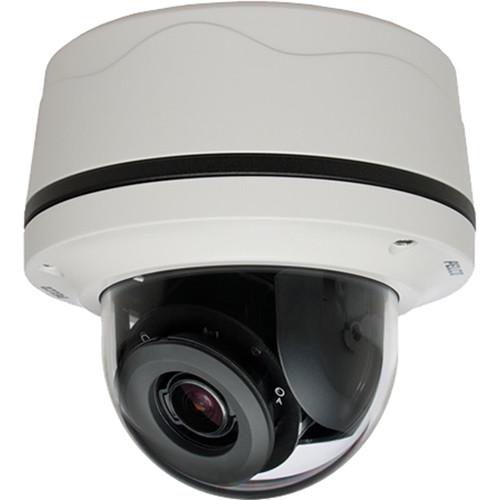 Contents of the user manual for the Pelco Sarix IMP Series IMP221-1IS 2MP
- Product category: Wired IP Cameras Pelco
- Brand: Pelco
- Description and content of package
- Technical information and basic settings
- Frequently asked questions – FAQ
- Troubleshooting (does not switch on, does not respond, error message, what do I do if...)
- Authorized service for Pelco Wired IP Cameras
|
User manual for the Pelco Sarix IMP Series IMP221-1IS 2MP contain basic instructions
that need to be followed during installation and operation.
Before starting your appliance, the user manual should be read through carefully.
Follow all the safety instructions and warnings, and be guided by the given recommendations.
User manual is an integral part of any Pelco product,
and if it is sold or transferred, they should be handed over jointly with the product.
Following the instructions for use is an essential prerequisite for protecting
health and property during use, as well as recognition of liability on the part of the manufacturer
for possible defects should you make a warranty claim. Download an official Pelco user manual in which you will find instructions on how to install, use, maintain and service your product.
And do not forget – unsuitable use of a Pelco product will considerably shorten its lifespan!
|
Product description The white Sarix IMP Series IMP221-1IS 2MP Day/Night Surface Mount Indoor Mini Dome IP Camera from Pelco features a 3-10.5mm remote-zoom autofocus lens for wide-angle or long-range surveillance needs. Autofocus capability ensures that the camera can be automatically refocused when needed. The camera features advanced color accuracy and a mechanical IR cut filter for increased sensitivity in low-light installations. This Sarix Professional range camera supports up to two simultaneous video streams and a third service stream. The two streams can be compressed with efficient H.264 High or Main profiles or MJPEG formats. The streams can be configured to a variety of frame rates and variable bit rates to optimize image quality with bandwidth and storage efficiency. The simple motion detection algorithm allows the camera to record or send an alarm when there is motion detected in a selected zone or within the entire scene. A camera sabotage alarm is triggered if the lens is obstructed or when the camera is repositioned. The camera uses a standard Web browser interface for easy remote setup and administration. Controls are optimized for convenient one-step camera configuration for features including color, exposure, flicker control, and streaming. The inclusion of a microSD card slot allows for recording video clips of varying lengths to be stored on the memory card (not included) upon alarm, or video can be written continuously to the microSD card in case of network outage. Video can be retrieved from the card through the FTP protocol. The mini dome IP camera can seamlessly connect to Pelco video management systems such as Endura version 2.0 (or later) and Digital Sentry version 7.3 (or later). In addition, it can integrate with major third-party video management systems through the Pelco API and other third-party software and systems through the open ONVIF Profile S and Profile G standard. - Up to 30 frames per second (fps) at 1920 x 1080
- Autofocus motorized remote zoom lens
- Accessible edge storage with microSD card
- Motion detection and camera sabotage detection
- Operating temperature up to 131°F / 55°C
- Compatible with Pelco and third-party video systems
- ONVIF Profile S and Profile G conformant
UPC: 700880338346 In the Box Pelco Sarix IMP Series IMP221-1IS 2MP Mini Dome Network Camera with 3-10.5mm Lens Limited 3-Year Warranty Specification PDF 1.1mb Table of Contents
|
Upload User Manual
Have you got an user manual for the Pelco Sarix IMP Series IMP221-1IS 2MP Mini Dome Network Camera with 3-10.5mm Lens in electronic form? Please send it to us and help us expand our library of instruction manuals.
Thank you, too, on behalf of other users.
To upload the product manual, we first need to check and make sure you are not a robot. After that, your "Submit Link" or "Upload File" will appear.
Technical parametersPelco Sarix IMP Specs | | | Sensor | 1/2.8" CMOS | | Sensor Resolution | 2.1 MP, 1920 x 1080 | | Imager Readout | Progressive scan | | Electronic Shutter Speed | 1/25,000 to 1/5 sec | | Wide Dynamic Range | 75 dB | | White Balance | 2000 to 10,000K | | 3D Noise Reduction | Yes (on/off selectable) | | Minimum Illumination | f/1.2, 33 ms: 0.25 lux color, 0.10 lux mono
f/1.2, 200 ms: 0.03 lux color, 0.02 lux mono | | Mechanical IR Cut Filter | Yes (Auto / manual selectable), with different set points on lux | | Signal to Noise Ratio | ≥ 50 dB | | Pan/Tilt Adjustment | Manual: 370° pan, 90° tilt, 355° rotate | | Mount Type | Surface mount | | | | Type | Built-in varifocal | | Focal Length | 3-10.5mm, f/1.2 | | Focus | Autofocus, motorized | | Zoom | Remote | | Auto Iris | DC drive lens | | Field of View | 16:9 Aspect Ratio:
Diagonal: 116° (W), 35° (T)
Horizontal: 100° (W), 31° (T)
Vertical: 54° (W), 17° (T) | | | | Video Streams | Up to 2 simultaneous streams, plus service stream; the secondary stream is variable based on the setup of the primary stream | | Video Overlay | Camera name, time, date, and customizable text with multiple supported languages | | Resolutions | 2.1 MP (1920 x 1080) | | Frame Rates | 30 (full), 20, 25, 16.67, 15, 12.5, 10, 7.5, 5, 3, 2, 1 fps | | Video Encoding | H.264 High or Main profiles, and MJPEG | | Bit Rate Control | Constant bit rate (CBR), constrained variable bit rate (CVBR) with configurable maximum value | | Stream Type | Service: 640 x 480 or 640 x 352; 2 fps, JPEG | | Window | Blanking: 8 configurable windows | | | | Streaming | Dual-channel | | Input | Line input and output | | Encoding | G.711 A-law/G.711 U-law | | | | Port | RJ45 connector for 100Base-TX | | Supported Protocols | TCP/IP, UDP/IP (unicast, multicast IGMP), ICMP, IPv4, IPv6, SNMP v2c/v3, HTTP, HTTPS, SSL, SSH, SMTP, FTP, RTSP, UPnP, DNS, NTP, RTP, RTCP, LDAP (client), QoS, GB28181 | | Users | Unicast: 1 administrator, up to 4 viewers
Multicast: Unlimited users H.264 | | Security Access | Multiple user access levels with password protection | | | | Input | 1 | | Output | 1; PhotoMOS relay (30 V, 1 A) | | Triggers | Unsupervised mode that detects switch closures (N.O. and N.C.) | | | | Video Management Software | VideoXpert; Endura 2.0 (or later); Digital Sentry 7.3 (or later); Third-party VMS through Pelco API, ONVIF Profile S, and ONVIF Profile G | | Mobile Application Support | Pelco Mobile | | Video Motion Detection | Simple motion detection and camera sabotage | | Local Storage | Capture 1-, 5-, or 10-sec video clips on camera sabotage, motion detection, or alarm input
Record video continuously in the case of network outage with the option to overwrite
Video access through FTP protocol and ONVIF Profile G | | Firmware Upgrade | Cameras discovered and firmware upgrade through Pelco Device Utility 2 version 2.2 or later and Pelco Utilities | | Web Browser Support | Microsoft Internet Explorer 9.0 and Apple Safari 7.0.6, Mozilla Firefox 31.0, Google Chrome 37.0.2062.124 m and later | | User Interface | Multilingual: English, French, German, Italian, Portuguese, Arabic, Russian, Spanish, Turkish, Korean, Simplified Chinese | | | | Input | PoE Class 2, 24 VAC nominal, 18 to 32 VAC range, 12 VDC | | Consumption | <6 W | | | | Certifications | CE - EN 55022 (Class A), EN 50130-4, EN 60950-1
FCC (Class A) - 47 CFR Part 15
UL and cUL Listed - UL 60950-1, CAN/CSA-C22.2 No. 60950-1-07
UL/IEC 60950-22
ICES-003 (Class A)
KC
ONVIF Profile S and Profile G conformant | | | | Temperature | Operating: 14 to 131°F / -10 to 55°C
Storage:-40 to 140°F / -40 to 60°C Thermostatically controlled heating provides ramped heating control between the initial heater on at 59°F / 15°C and full heating mode at -40°F / -40°C | | Humidity | Operating: 5 to 90%, RH condensing | | | | Finish | White, RAL 9003 | | Construction | Plastic body and trim ring, polycarbonate bubble | | Vandal Resistant | IK10 | | Dimensions | 5.5 x 2.9 x 5.4" / 13.9 x 7.4 x 13.7 cm | | Weight | 1.34 lb / 0.61 kg |
Rating80% users recommend this product to others. And what about you?

This product has already been rated by 72 owners. Add your rating and experience with the product.
Discussion
 Ask our technicians if you have a problem with your settings,
or if anything is unclear in the user manual you have downloaded.
You can make use of our moderated discussion.
The discussion is public and helps other users of our website who may be encountering similar problems.
Ask our technicians if you have a problem with your settings,
or if anything is unclear in the user manual you have downloaded.
You can make use of our moderated discussion.
The discussion is public and helps other users of our website who may be encountering similar problems.
The discussion is empty - enter the first post
Post a new topic / query / comment:
|
|


