|
User Manual for Pelco SD429-PG-E1 Spectra IV SE Integrated Dome Camera System Click to enlarge the picture
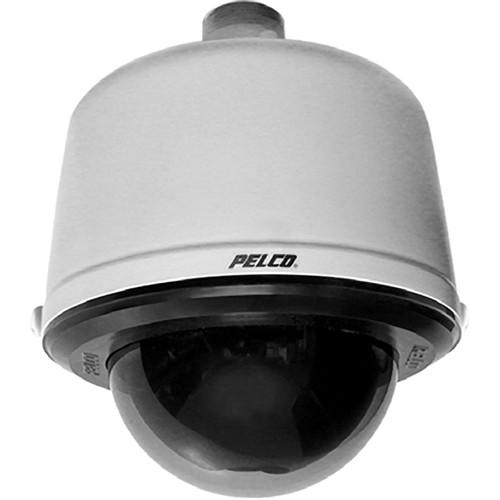 Contents of the user manual for the Pelco SD429-PG-E1 Spectra IV SE Integrated
- Product category: Wired Analog & HD Cameras Pelco
- Brand: Pelco
- Description and content of package
- Technical information and basic settings
- Frequently asked questions – FAQ
- Troubleshooting (does not switch on, does not respond, error message, what do I do if...)
- Authorized service for Pelco Wired Analog & HD Cameras
|
User manual for the Pelco SD429-PG-E1 Spectra IV SE Integrated contain basic instructions
that need to be followed during installation and operation.
Before starting your appliance, the user manual should be read through carefully.
Follow all the safety instructions and warnings, and be guided by the given recommendations.
User manual is an integral part of any Pelco product,
and if it is sold or transferred, they should be handed over jointly with the product.
Following the instructions for use is an essential prerequisite for protecting
health and property during use, as well as recognition of liability on the part of the manufacturer
for possible defects should you make a warranty claim. Download an official Pelco user manual in which you will find instructions on how to install, use, maintain and service your product.
And do not forget – unsuitable use of a Pelco product will considerably shorten its lifespan!
|
Product description The light gray SD429-PG-E1 Spectra IV SE Integrated Dome Camera System from Pelco is designed keeping in mind the ease of installation and maintenance. The dome system consists of 3 components: BB4-PG-E Pendant Environmental Light Gray Back Box, DD429 Dome Drive with integrated 29x Day/Night camera, and LDHQPB-1 Lower Dome with Clear Bubble. The dome drive and lower dome can be removed and replaced reducing maintenance time.
The included Spectra IV SE BB4-PG-E Pendant Environmental Light Gray Back Box features a built-in back box memory to store camera and location-specific dome settings, including labels, presets, patterns, and zones. A passive UTP circuit is located on the door assembly for convenient video transmission through twisted pair wire. For added flexibility, Pelco fiber modules can also be attached to the door assembly for transmission over single-mode or multimode fiber. The included Spectra IV SE LDHQPB-1 Lower Dome with Clear Bubble is designed to ensure that an optimal optical relationship between the lens and bubble is achieved, providing crystal clear video at long focal lengths.
The Spectra IV SE DD429 Dome Drive in this system features an integrated 36x Day/Night Camera allowing the system to produce high-quality videos in difficult environments. The camera features LowLight technology, which allows the camera to compensate for scenes where minimal light is present. Moreover, it also features built-in motion detection and 128x WDR that enables the system to compensate for scenes where dramatic contrasts in lighting are present. The Auto Sharpness feature enhances the picture detail by increasing the aperture gain of the camera and sharpening the edges in the picture.
The Spectra IV SE dome system features many software enhancements that increase the performance and makes configuration and operation easy. An internal scheduling clock allows for the scheduling of presets and patterns. Window blanking enables a user to configure up to 8, 4-sided, user-defined privacy areas. And a password protection feature prevents unauthorized users from changing the system settings. Configurable on-screen compass and tilt display provides positioning information when needed. .
Intuitive multilingual on-screen menus can be displayed in English, Spanish, Portuguese, Italian, French, German, Russian, Polish, Turkish, and Czech. The dome drive's variable speed capabilities range from a smooth, fast pan motion of 400°/sec to a smooth creep speed of 0.1°/sec. The system is capable of continuous 360° rotation and has an auto flip feature that allows the dome to rotate 180° and reposition itself for uninterrupted viewing of any subject that passes directly beneath the dome. .
With the Pelco TXB-N module (sold separately), you can add IP network capability at any time to this dome system without losing analog viewing and control. By snapping the TXB-N module into the back box, you can stream network video to a web browser, Endura, Digital Sentry, or third-party software recording solution allowing integration into virtually any IP-based system. - Dome System
-
- Autofocus, high-resolution integrated camera and optics pack with standard pendant black back box
- Day/Night, 540 TVL, 128x WDR (Wide Dynamic Range), and Motion Detection
- Autotracking
- Window blanking
- Camera title overlay, 20 user-definable characters
- Horizontal and zone blanking
- On-screen compass and tilt display
- Password protection
- Low lux noise reduction
- Built-in surge and limited lightning protection
- Sure Focus
- Integrated passive UTP (Unshielded Twisted Pair) circuit
- Internal scheduling clock
- Add IP network capability with TXB-N Module (sold separately)
- UL/cUL listed
- Dome Drive
-
- 256 presets, ±0.1° preset accuracy
- Multilingual Menus (English, Spanish, Portuguese, Italian, French, German, Russian, Polish, Turkish, and Czech)
- RJ-45 data port for software update and setup
- On-screen compass, tilt, and zoom display
- 400°/sec pan preset speed and 200°/sec tilt preset speed
- Rotating discreet liner with sealed fixed bubble
- Window Blanking: Up to 8, four-sided, user-defined shapes
- 8 zones, configurable in size, can be labeled with up to 20 characters each or set to output blank video
- 7 alarm inputs
- 1 Auxiliary (form C) relay output and 1 open collector auxiliary output (can be alternately configured to operate upon alarm)
- Configurable locations of labels and on-screen displays
- Action on Alarm: Alarms can be individually configured for 3 priority levels, to initiate a stored pattern, or to go to an associated preset when received
- Resume After Alarm: Allows the dome to return to a previously configured state after alarm acknowledgement or to its previous position before alarm
- Multiple park and power-up action
- Up to 8, on-screen, user-defined configurable patterns including pan, tilt, zoom, and preset functions
- Proportional Pan / Tilt: Continually decreases pan/tilt speeds in proportion to the depth of zoom
- Variable Scan Speed: Scan speed can be configurable between 1 to 40°/sec
- Pan motion allows 0.1 to 150°/sec pan speed
- Configurable limit stops for auto / random / frame scan modes
- Autosensing Protocol: Coaxitron, RS-422 Pelco P and Pelco D, Sensormatic, Vicon
- Digital position and zoom control and feedback through Pelco D protocol
- Built-in menu system for setup of configurable functions
- Auto Flip rotates dome 180° at bottom of tilt travel
- Configurable zoom speeds
- Low lux noise reduction reduces noise in low light
1 Please Note: The system accepts other control protocols with a translator card (sold separately) close - Pendant Environmental Back Box
-
- Built-in memory stores camera/dome settings
- Light gray finish
- Quick disconnect to dome drive
- Aluminum construction
- Includes sun shield, fan, and heater
- Integrated passive UTP
UPC: 700880315873 In the Box Pelco SD429-PG-E1 Spectra IV SE Integrated Dome Camera System (Light Gray, NTSC) DD436 Spectra IV SE Dome Drive (NTSC) BB4-PG-E Spectra IV SE Environmental Pendant Back Box (Gray) LDHQPB-1 Lower Dome with Clear Bubble Limited 3-Year Warranty Table of Contents
|
Upload User Manual
Have you got an user manual for the Pelco SD429-PG-E1 Spectra IV SE Integrated Dome Camera System in electronic form? Please send it to us and help us expand our library of instruction manuals.
Thank you, too, on behalf of other users.
To upload the product manual, we first need to check and make sure you are not a robot. After that, your "Submit Link" or "Upload File" will appear.
Technical parametersPelco SD429-PG-E1 Specs | | | Signal Format | NTSC | | Scanning System | 2:1 Interlace | | Image Sensor | 1/4" EXview HAD | | Effective Pixels | 768 (H) X 494 (V) | | Horizontal Resolution | >540 TVL | | Lens | Focal Length: 3.4 to 98.6 mm
Aperture: f/1.4 | | Zoom | 29x optical, 12x digital | | Zoom Speed | Optical Range: 3.2 / 4.6 / 6.6 sec | | Focus | Horizontal Angle of View:
55.8° at 3.4 mm wide zoom
1.7° at 98.6 mm telephoto zoom
Automatic with manual override | | Sensitivity | At 35 IRE NTSC/EIA (maximum)
Color: 0.55 lux at 1/60 sec and 0.018 lux at 1/2 sec
B&W: 0.00018 lux at 1/2 sec | | Sync System | Internal / AC line-lock, phase adjustable using remote control, V-Sync | | White Balance | Automatic with manual override | | Shutter Speed | Automatic (electronic iris) / Manual
1/2 to 1/30,000 | | Iris Control | Automatic iris control with manual override | | Gain Control | Automatic / off | | Video Output | 1 Vpp, 75 Ω | | Video Signal-to-Noise Ratio | >50 dB | | Wide Dynamic Range | 128x | | Sharpness Adjustment | Auto Sharpness: Integrated / selectable | | | | Pan Movement | 360° continuous pan rotation | | Vertical Tilt | Unobstructed +2 to -92° | | Manual Pan/Tilt Speeds | Pan: 0.1 to 80°/sec manual operation, 150°/sec Turbo
Tilt: 0.1 to 40°/sec manual operation | | Preset Speeds | Pan: 400°/sec
Tilt: 200°/sec For variable-speed operation, an appropriate controller is required (with non-variable speed control, Spectra IV SE pan/tilt speed is 20°/sec) | | | | Construction | Back Box: Aluminum
Dome Drive: Aluminum, thermo plastic
Bubble: Acrylic | | Light Attenuation | Zero light loss | | Cable Entry | Back Box: Through 1.5" NPT pendant mount | | | | Input Voltage | 18 to 32 VAC; 24 VAC nominal
22 to 27 VDC; 24 VDC nominal | | Input Power | 24 VAC: 23 VA nominal (without heater); 73 VA nominal (with heater)
24 VDC: 0.7 A nominal (without heater); 3 A nominal (with heater) Heater sold separately | | Fuse | 1.25 A | | Auxiliary Output | 2 | | Alarm Inputs | 7 | | Certifications | CE, Class B
FCC, Class B
C-Tick
S Mark for Argentina
Back box meets NEMA Type 4X, IP66 when installed properly
U.S. Patents 5,931,432; 6,793,415 B2; 6,802,656 B2; 6,821,222 B2; 7,161,615 B2 | | Effective Projected Area (EPA) | 20.5 sq in. without mount
47 sq in. with IWM Series mount (sold separately) | | Operating Temperature | Maximum: 140°F (60°C) absolute maximum; 122°F (50°C) sustained maximum
Minimum: -60°F (-51°C) absolute minimum; prevents icing at sustained minimum of -50°F (-45°C); de-ices 0.1" (2.5 mm) within 3 hours after power-up Assumes no wind chill factor. | | Overall Dimensions | 8.6 x 10.6" (21.8 x 26.9 cm) | | Weight | Pendant Environmental Back Box: 3.50 lb (1.59 kg)
Dome Drive: 3.30 lb (1.48 kg)
Pendant Lower Dome: 0.6 lb (0.27 kg) | | | | Package Weight | 11.37 lb | | Box Dimensions (LxWxH) | 26.0 x 12.0 x 10.0" |
Rating60% users recommend this product to others. And what about you?

This product has already been rated by 86 owners. Add your rating and experience with the product.
Discussion
 Ask our technicians if you have a problem with your settings,
or if anything is unclear in the user manual you have downloaded.
You can make use of our moderated discussion.
The discussion is public and helps other users of our website who may be encountering similar problems.
Ask our technicians if you have a problem with your settings,
or if anything is unclear in the user manual you have downloaded.
You can make use of our moderated discussion.
The discussion is public and helps other users of our website who may be encountering similar problems.
The discussion is empty - enter the first post
Post a new topic / query / comment:
|
|
|
| Request for user manual |
You can’t find the operation manual you are looking for? Let us know and we will try to add the missing manual:
I’m looking for a manual / Request for manual
Current requests for instruction manuals:
Call Of Duty World War Two For Xbox...
controller stratus XL...
stratus XL...
smart whatch serie S11 42mm...
Allen & Heath SQ-6 manual...
|
| Discussion |
Latest contributions to the discussion:
AEW R 4100
Name: MAURICIO ANGARITA
Audio-Technica AEW-R4100 UHF Diversity Receiver for
AEW R 4100 has the mute function blocked and does not allow audio to pass. I tried several times to turn off the mute from the transmitter but it does nothing, the mute stays on. Solution?
Thank you...
Instructions for assembling the 2015 Forecast Image Master Consoles GC3-A
Name: mike elam
Forecast Consoles GC3-A ImageMaster Editing Console
Looking for instructions for assembling this console. ...
EMPTY TONER ERROR MESSAGE AFTER REPLACING TONER
Name: LINDA BAD YELLOW EYES
Brother TN223BK Standard-Yield Toner
I HAD TO CHANGE OUT ALL THREE TONERS DUE TO LEAKS IN THE YELLOW AND CYAN. AFTER I REPLACED THEM, THE MACHINE KEEPS GIVING ME AN EMPTY TONER ERROR MESSAGE. HELP!!...
PS480D 20/24 pin Switching 480W Power Supply
Name: swkargo
Logisys 480W Power Supply
This item states in can run -5vdc .It is NOT listed on the board or I beleive is r4 is missing the resitior. Any body have thid issue. Shawn
...
Help needed
Name: Ann Carter
SanDisk 1TB Extreme Portable USB 3.1
When I click the link to download the user manual for my Sandisk Extreme external hard drive, it gives me the manual for the LG Cricket. Can you please change the link so I can download the Sandisk manual and begin using this drive? Thank you....
|
|


