User Manual for Pelco Spectra Enhanced Series S6230-EG0 30X Network Pendant Dome Camera Click to enlarge the picture
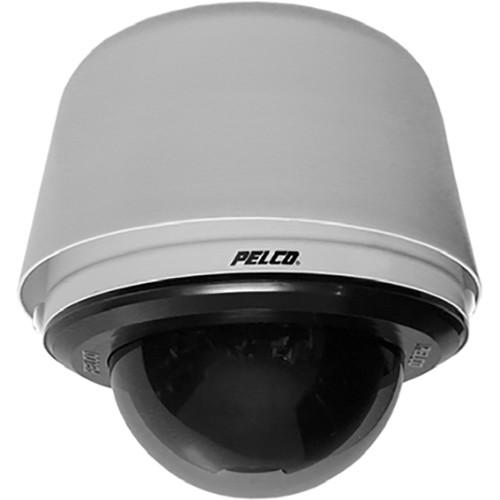 Contents of the user manual for the Pelco Spectra Enhanced Series S6230-EG0 30X
- Product category: Wired IP Cameras Pelco
- Brand: Pelco
- Description and content of package
- Technical information and basic settings
- Frequently asked questions – FAQ
- Troubleshooting (does not switch on, does not respond, error message, what do I do if...)
- Authorized service for Pelco Wired IP Cameras
|
User manual for the Pelco Spectra Enhanced Series S6230-EG0 30X contain basic instructions
that need to be followed during installation and operation.
Before starting your appliance, the user manual should be read through carefully.
Follow all the safety instructions and warnings, and be guided by the given recommendations.
User manual is an integral part of any Pelco product,
and if it is sold or transferred, they should be handed over jointly with the product.
Following the instructions for use is an essential prerequisite for protecting
health and property during use, as well as recognition of liability on the part of the manufacturer
for possible defects should you make a warranty claim. Download an official Pelco user manual in which you will find instructions on how to install, use, maintain and service your product.
And do not forget – unsuitable use of a Pelco product will considerably shorten its lifespan!
|
Product description The gray Spectra Enhanced Series S6230-EG0 30X Network Pendant Dome Camera from Pelco includes a B6-PG-E back box, LDHDPB-0, lower dome, and D6230 dome drive. The top tier dome provides images with a wide dynamic range (WDR) imaging system, 60 fps, electronic image stabilization, and various features that include image defog and Pelco's full suite of behavioral analytics. These features, along with a 130dB, WDR make the camera suitable for detecting and capturing details such as faces, license plate numbers, tattoos, and other features in varied lighting situation. Spectra Enhanced is compatible with Pelco's VideoXpert video management system while maintaining backward compatibility with Pelco's legacy Endura and Digital Sentry VMS platforms. Using High-Profile H.264 compression, Spectra Enhanced can store up to 32GB of still images or video on a compatible microSD card (not supplied) that is accessible through the ONVIF Profile G protocol or FTP. - Built-In Analytics
- Nine Pelco behaviors are preloaded as standard features including abandoned object, adaptive motion detection, auto-tracker, camera sabotage detection, directional motion detection, loitering detection, object counting, object removal, and stopped vehicle detection. Pelco behaviors can be configured and enabled using a standard web browser, and they are compatible with Endura or a third-party system that supports alarms using Pelco's API. The camera system also supports window blanking to conceal user-defined privacy areas that cannot be viewed by an operator. Spectra Enhanced supports up to 32 blanked windows.
- Video Systemization
- Spectra Enhanced easily connects to Pelco IP and hybrid systems such as VideoXpert, Endura version 2.0 (or later), and Digital Sentry version 7.3 (or later). The camera is also compatible with Digital Sentry NVS (DS NVS), which is available as a free download. DS NVS includes 4 free Pelco IP licenses and allows for the management of video from up to 64 cameras. Spectra Enhanced features open architecture connectivity to third-party software. Pelco offers an application programming interface (API) and software developer's kit (SDK) for interfacing with Pelco's IP cameras.
- Other Features
-
- Up to 1920 x 1080 resolution at up to 60 fps and 16:9 aspect ratio
- Wide dynamic range of 130dB
- 360° continuous pan rotation at 430° per second
- Low latency for improved pan and tilt drivability
- Configurable park with actions
- Password protection
- Defog mode provides three levels of fog removal within the image for improved image quality
- Vivid mode can be turned on/off to improve the image contrast and color saturation
- Auto Flip feature rotates dome 180° at bottom of tilt travel
- Electronic image stabilization
- 16 preset tours, 256 dome presets, 32 window blanks
- Proportional pan/tilt continually decreases pan/tilt speeds in proportion to depth of zoom
- Full suite of built-in analytics including autotracker, adaptive motion detection, abandoned object, and more
- Two simultaneous video streams dual H.264 or H.264 and scalable MJPEG
- ONVIF Profile S and Profile G
UPC: 700880333884 In the Box Pelco Spectra Enhanced Series S6230-EG0 30X Network Pendant Dome Camera (Smoked Dome, Gray) Sunshield Heater and Blower B6-PG-E Back Box LDHDPB-0 Lower Dome with Smoked Bubble D6220 Dome Drive Spec sheet PDF 1.1mb Table of Contents
|
Upload User Manual
Have you got an user manual for the Pelco Spectra Enhanced Series S6230-EG0 30X Network Pendant Dome Camera in electronic form? Please send it to us and help us expand our library of instruction manuals.
Thank you, too, on behalf of other users.
To upload the product manual, we first need to check and make sure you are not a robot. After that, your "Submit Link" or "Upload File" will appear.
Technical parametersPelco Spectra Enhanced Specs | | | Sensor Type | 1/2.8" type Exmor CMOS sensor | | Optical Zoom | 30X | | Digital Zoom | 12x | | Maximum Resolution | 1920 x 1080 | | Lens | 1.6-4.7 | | Focal Length | Wide to Tele: 4.3-129.0mm | | Horizontal Angle of View | Wide to Tele: 59.5 to 2.1° | | Aspect Ratio | 16:9 | | Light Sensitivity | Color:
33 ms: 0.20 lux
250 ms: 0.025 lux
Mono:
33 ms: 0.06 lux
250 ms: 0.008 lux Sensitivity in lux for 90% reflectance, f/1.6 (wide angle), 43 dB gain at 30 IRE (30% of signal level) with Sensitivity Boost OFF; 4X improvement to sensitivity with Sensitivity Boost ON | | Day/Night | Yes | | IR Cut Filter | Yes | | Wide Dynamic Range | 130 dB | | Iris Control | Auto iris with manual override | | | | Encoding | H.264 High, Main, or Base profiles, and MJPEG | | Streams | Up to 2 simultaneous streams; the second stream is variable based on the setup of the primary stream | | Frame Rate | Up to 60, 50, 30, 25, 15, 12.5, 10, 8.333, 7.5, 6, 5, 3, 2.5, 2, 1 (depending on the coding, resolution, and stream configuration) | | Bit Rate | 8 Mbps at 2.07 MP, 16:9, 60 fps
6.05 Mbps at 2.07 MP, 16:9, 30 fps
3 Mbps at 0.92 MP, 16:9, 30 fps
2 Mbps at 0.36 MP, 16:9, 30 fps
1.8 Mbps at 0.23 MP, 16:9, 30 fps | | | | Variable Speed | 0.1 to 80°/sec (manual pan speed) | | Preset Accuracy | ±0.1° | | Pan Movement | 360° continuous pan rotation | | Vertical Tilt | +1° to -90° | | Pan Speed | Maximum 450° per second | | Tilt Speed | Maximum 450° per second | | Manual Pan/Tilt Speeds | Pan: 0.1 to 80°/sec manual operation
Tilt: 0.1 to 45°/sec manual operation | | Preset Speeds | Pan: 450°/sec
Tilt: 450°/sec | | | | Supported Protocols | TCP/IP, UDP/IP (Unicast, Multicast IGMP), UPnP, DNS, DHCP, RTP, RTSP, NTP, IPv4, IPv6, SNMP v2c/v3, QoS, HTTP, HTTPS, LDAP (client), SSH, SSL, SMTP, FTP, and 802.1x (EAP) | | Users | Unicast: Up to 20 simultaneous users depending on resolution settings (2 guaranteed streams)
Multicast: Unlimited users H.264 | | Security Access | Password protected | | Software Interface | Web browser view and setup | | Pelco System Integration | Endura 2.0 (or later)
Digital Sentry 7.3 (or later) | | API Supported | Pelco API or ONVIF Profile G and Profile S | | Mobile Application Support | Integrated to Pelco Mobile App | | Video Motion Detection | Simple motion detection and camera sabotage | | Local Storage | Supports 32 GB microSD card | | | | Processor | Intel Core i3 Processor, 2.4 GHz | | Operating System | Windows 7 (32-bit and 64-bit) with DirectX 11, Windows XP Service Pack 3 with DirectX 9.0c, or Mac OS X 10.4 (or later) | | Memory | 4 GB RAM | | NIC Support | 100 megabits (or greater) | | Monitor | Minimum of 1024 x 768 resolution, 16- or 32-bit pixel color resolution | | Web Browser | Internet Explorer 8.0(or later) or Firefox 3.5 (or later); Internet Explorer 8.0 (or later) is recommended for configuring analytics | | Media Player | Pelco Media Player or QuickTime 7.6.5 for Windows XP and Windows 7; or QuickTime 7.6.4 for Mac OS X 10.4 (or later) | | | | Ports | RJ45 connector for 100Base-TX
Auto MDI/MDI-X
Autonegotiate/manual setting | | Cabling Type | Cat5e or better for 100Base-TX | | Input Voltage | 18 to 32 VAC; 24 VAC nominal
22 to 27 VDC; 24 VDC nominal | | Input Power | 24 VAC:
24 VA nominal (without heater and blower); 81 VA nominal (with heater and blower)
24 VDC:
1 VA nominal (without heater and blower); 3 VA nominal (with heater and blower)
PoE+:
18 W (with heater on)
HPoE:
60 W (with heater on) | | | | Input | 3.5 VDC maximum, 3.5 mA maximum | | Relay Output | ±32 VDC maximum, 150 mA maximum | | | | Input/Output | Line level/external microphone input; 600 Ohms differential, 1 V p-p maximum signal level | | Streaming | Embedded | | | | Construction | Dome Drive: Aluminum, thermo plastic
Lower Dome: Nylon
Bubble: Nylon, smoked | | Light Attenuation | f/0.5 light loss | | Cable Entry | Through 1.5" (4 cm) NPT pendant mount | | Temperature | Sustaining:
Maximum: 24 VAC/HPoE/PoE+ 122°F (50°C)
Minimum: 24 VAC/HPoE/PoE+ -49°F (-45°C)
Absolute:
Maximum: 24 VAC/HPoE/PoE+ 140°F (60°C)
Minimum: 24 VAC -60°F (-51°C)
Cold Start:
24 VAC: -40°F (-40°C)
HPoE: -31°F (-35°C)
PoE+: -14°F (10°C)
De-icing: 24 VAC/HPoE -22°F (-30°C) | | Operating Humidity | 10 to 100% RH (condensing) | | Certifications | CE, Class A, FCC, Class A, ICES-003, Class A, UL/cUL Listed, C-Tick, KC, ONVIF Profile S, ONVIF Profile G, Cisco® Medianet Media Services Proxy 2.0 compatible, Meet NEMA Type 4X and IP66 standards when installed properly | | Dimensions | 9.4 x 11.1 x 5.9" (24.0 x 28.2 x 15.0 cm) | | Weight | 8.2 lb (3.7 kg) |
Rating100% users recommend this product to others. And what about you?

This product has already been rated by 74 owners. Add your rating and experience with the product.
Discussion
 Ask our technicians if you have a problem with your settings,
or if anything is unclear in the user manual you have downloaded.
You can make use of our moderated discussion.
The discussion is public and helps other users of our website who may be encountering similar problems.
Ask our technicians if you have a problem with your settings,
or if anything is unclear in the user manual you have downloaded.
You can make use of our moderated discussion.
The discussion is public and helps other users of our website who may be encountering similar problems.
The discussion is empty - enter the first post
Post a new topic / query / comment:
|
|


