User Manual for Pianoteq 6 Standard Virtual Piano Plug-In Click to enlarge the picture
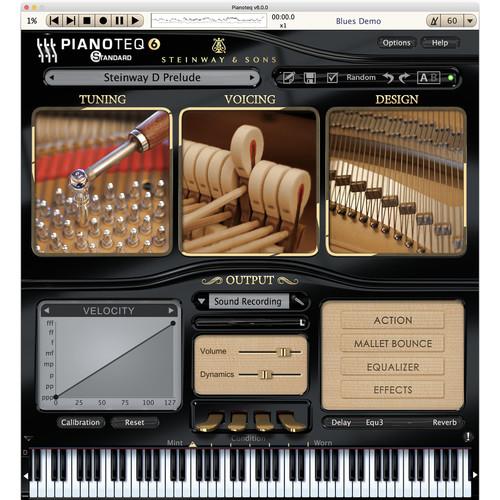 Contents of the user manual for the Pianoteq 6 Standard Virtual Piano Plug-In
- Product category: Virtual Instruments Pianoteq
- Brand: Pianoteq
- Description and content of package
- Technical information and basic settings
- Frequently asked questions – FAQ
- Troubleshooting (does not switch on, does not respond, error message, what do I do if...)
- Authorized service for Pianoteq Virtual Instruments
|
User manual for the Pianoteq 6 Standard Virtual Piano Plug-In contain basic instructions
that need to be followed during installation and operation.
Before starting your appliance, the user manual should be read through carefully.
Follow all the safety instructions and warnings, and be guided by the given recommendations.
User manual is an integral part of any Pianoteq product,
and if it is sold or transferred, they should be handed over jointly with the product.
Following the instructions for use is an essential prerequisite for protecting
health and property during use, as well as recognition of liability on the part of the manufacturer
for possible defects should you make a warranty claim. Download an official Pianoteq user manual in which you will find instructions on how to install, use, maintain and service your product.
And do not forget – unsuitable use of a Pianoteq product will considerably shorten its lifespan!
|
Product description Pianoteq 6 Standard from Pianoteq is a virtual piano that utilizes physical modeling to simulate the properties and behaviors of real acoustic pianos. With a load size of less than 50MB, installation is quick and easy, allowing the software to be used on any modern laptop with a MIDI controller keyboard.
Pianoteq 6 Standard offers a variety of tools to enhance and modify the piano sound, such as changing the unison width, hammer hardness, and string length. Up to five virtual microphones (from a choice of fifteen) can be placed around the instrument and external reverb impulse files loaded into the convolution reverb.
The software comes in three flavors with a choice of two when purchased. They include acoustic pianos (Steinway D and K2 grand pianos), electric instruments (MKI, MKII, W1, PIANET N & T, Electra, and Clavinet), and chromatic percussion (V-B and V-M vibes, xylophone and marimba). More optional instruments can be purchased at any time and loaded into the software. - What's New in Version 6
-
- Numerous engine and physical modeling refinements increase realism and acoustic presence on all modeled instruments (acoustic pianos, electro-acoustic pianos, historical instruments, and chromatic percussion)
- Sound and playability of Steinway Model D and Steinway Model B virtual instruments approved by Steinway & Sons
- VST3 format and ARM architecture (Linux version only, on Raspberry Pi 3 boards among others)
- Compatibility with the ARM architecture means that Pianoteq 6 can be used with RISC-based CPU's in smaller Linux-based consumer electronic devices
- Advanced tuning section provides new tools adapted for micro-tuning and other tuning experiments
- Standalone version now offers a MIDI playlist and an improved MIDI archive
- Load a set of MIDI files to be played back, as in a jukebox
- Everything you play on your keyboard is automatically recorded in MIDI format
- Improved MIDI mapping adds the option to save locally (current preset) or globally (all presets)
- Besides the WAV format, you can now export your audio files in the lossless compressed format FLAC and the lossy compressed format MP3
- In the standalone version, the virtual keyboard displays keys in color when you depress them on your keyboard
- Features
-
- Physically modeled virtual instrument
- Includes choice of two instrument packs (flavors)
- Unique adjustable physical parameters, such as unison width, octave stretching, hammer hardness, soundboard, string length, sympathetic resonance, duplex scale resonance
- Progressive variation of the timbre (uses all 127 MIDI velocities)
- Control of the dynamics in timbre and volume
- Polyphonic aftertouch
- Realistic sympathetic resonances, including duplex scale
- Microtuning supports Scala format
- Adjustable mechanical noises (sampled or modeled)
- Built-in graphic equalizer
- Built-in graphic curve for key velocity, note-off, and pedal
- Keyboard calibration assistant
- Ten types of pedals can be assigned to the four UI pedals - sustain, soft, harmonic, sostenuto, super sostenuto, rattle, buff stop, celeste, pinch harmonic, glissando
- Progressive sustain pedal, allowing partial-pedal effects
- Convolution reverb
- Effects include tremolo, wah-wah, fuzz, compressor, delay, flanger, chorus, compressor, amp, mini-EQ
- Mallet bounce (note repetition)
- Instrument condition (mint to worn)
- Variable lid position
- Five adjustable microphones
- Multichannel, up to five channels
- No quantization noise (32-bit internal computation)
- Installs and loads in seconds
- Small file size (less than 50MB)
- Ideal for use on modern laptops
- Extended key range (105 keys = 8 + 2/3 octaves) for Steinway D and K2 grand pianos
- Free instruments include KIViR historical instruments collection, bells and carillions
- Optional instruments are available separately including upright piano, grand pianos, rock piano, electric pianos, vibraphones, clavinet, celesta + glockenspiel, xylophone + marimba, and steelpans
Table of Contents
|
Upload User Manual
Have you got an user manual for the Pianoteq 6 Standard Virtual Piano Plug-In in electronic form? Please send it to us and help us expand our library of instruction manuals.
Thank you, too, on behalf of other users.
To upload the product manual, we first need to check and make sure you are not a robot. After that, your "Submit Link" or "Upload File" will appear.
Technical parametersPianoteq 12-41379 Specs | System Requirements | Mac OS X 10.7 or laterWindows 7 or laterLinux x86 and ARM | | Plug-In Compatibility | Audio Units, AAX Native, VST3, standalone |
Rating100% users recommend this product to others. And what about you?

This product has already been rated by 01 owners. Add your rating and experience with the product.
Discussion
 Ask our technicians if you have a problem with your settings,
or if anything is unclear in the user manual you have downloaded.
You can make use of our moderated discussion.
The discussion is public and helps other users of our website who may be encountering similar problems.
Ask our technicians if you have a problem with your settings,
or if anything is unclear in the user manual you have downloaded.
You can make use of our moderated discussion.
The discussion is public and helps other users of our website who may be encountering similar problems.
The discussion is empty - enter the first post
Post a new topic / query / comment:
|
|


