|
User Manual for Pioneer DJ DDJ-SZ2 - Flagship 4-Channel Controller for Serato DJ Click to enlarge the picture
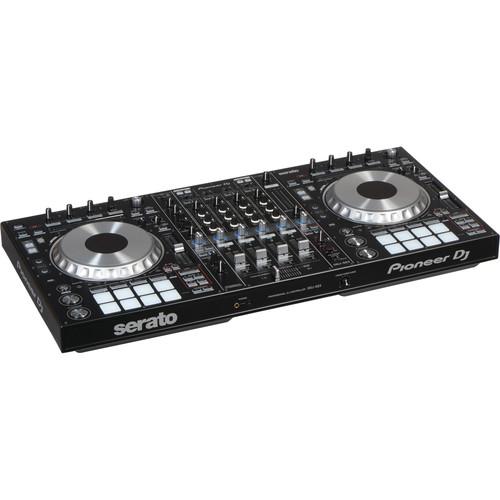 Contents of the user manual for the Pioneer DJ DDJ-SZ2 - Flagship 4-Channel
- Product category: DJ Controllers Pioneer DJ
- Brand: Pioneer DJ
- Description and content of package
- Technical information and basic settings
- Frequently asked questions – FAQ
- Troubleshooting (does not switch on, does not respond, error message, what do I do if...)
- Authorized service for Pioneer DJ DJ Controllers
 |
User manual for the Pioneer DJ DDJ-SZ2 - Flagship 4-Channel contain basic instructions
that need to be followed during installation and operation.
Before starting your appliance, the user manual should be read through carefully.
Follow all the safety instructions and warnings, and be guided by the given recommendations.
User manual is an integral part of any Pioneer DJ product,
and if it is sold or transferred, they should be handed over jointly with the product.
Following the instructions for use is an essential prerequisite for protecting
health and property during use, as well as recognition of liability on the part of the manufacturer
for possible defects should you make a warranty claim. Download an official Pioneer DJ user manual in which you will find instructions on how to install, use, maintain and service your product.
And do not forget – unsuitable use of a Pioneer DJ product will considerably shorten its lifespan!
|
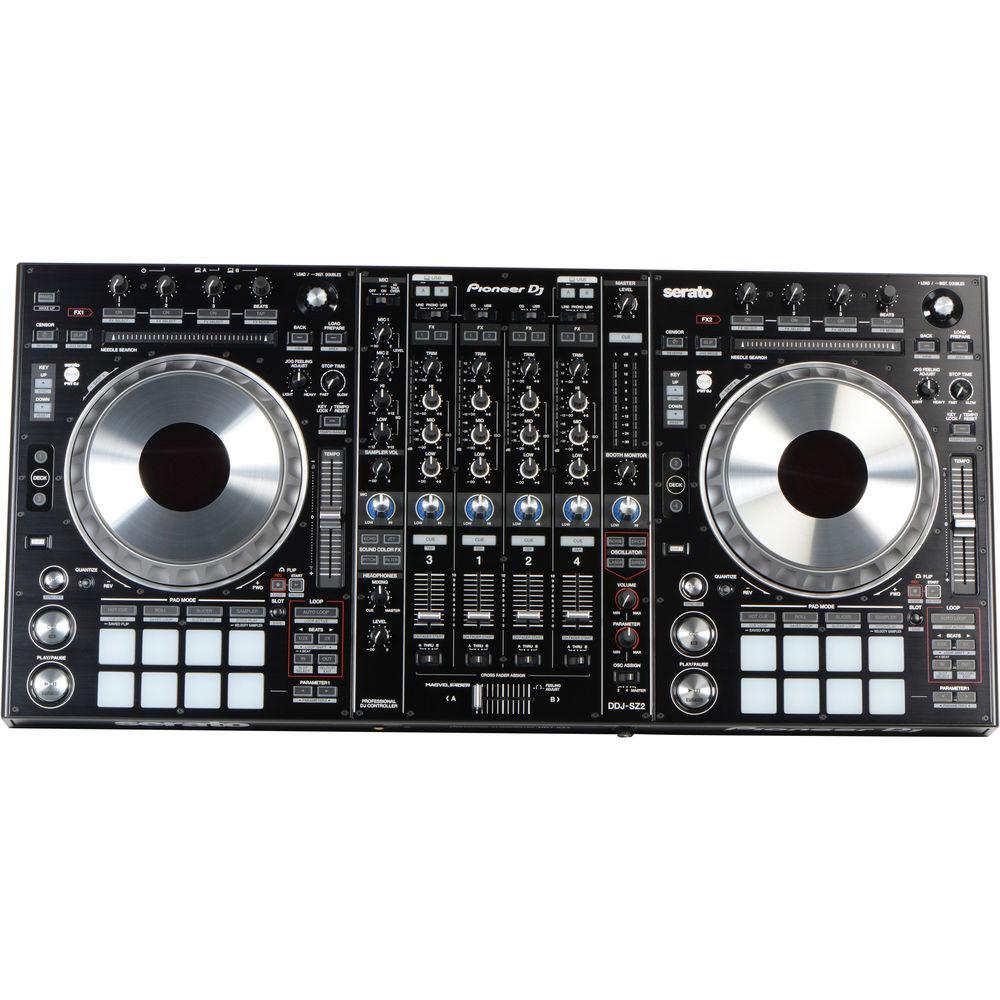
Product description Building upon the success of the DDJ-SZ, the 4-channel DDJ-SZ2 from Pioneer is the all-in-one flagship Serato DJ controller system designed for live performance applications such as at a party or in a club. This updated version is equipped to control the latest additions to Serato DJ including key shift, key sync, pitch play, and Serato flip. Additional updates include an improved jog-wheel with better latency to make scratching more responsive and precise. The controller features two decks styled after CDJs with large touch-capacitive jog-wheels and in-wheel track LCD displays, two banks of eight customizable LED-backlit performance pads which offer instant feedback on playing status and pad modes, and a 4-channel DJM-style mixer with two built-in USB 24-bit/44.1 kHz audio interfaces.
The two audio interfaces utilize Cirrus Logic DACs with a signal-to-noise ratio of 111 dB and enable two separate computers to be connected to the controller at the same time. The top of the mixer section features switches for assigning channels 1 & 3 and channels 2 & 4 to either USB A/B, allowing for seamless transitions between two DJs and their computers. Channels 3 and 4 offer dedicated switches for selecting CD/line input, turntable (phono) or USB, while channels 1 and 2 can be switched to either CD/line or USB inputs, providing a range of analog and digital connectivity.
Each of the two decks feature large aluminum touch-capacitive jog-wheel adapted from the CDJ-2000 Nexus. The wheels feature "On Jog" LCD-displays that show playback status and track position. The control load and continuous backspin time of the wheels can be adjusted for different scratch and playing styles. Pitch control sliders, cue and play controls, loop controls, and a needle search touch strip enable precise and flexible control over each track.
Each deck also features a bank of eight rubber LED-backlit performance pads. The pads can be used for hot cue, roll, slicer, and sampler controls within Serato. The color of each pad can also be customized from within Serato to color-code different cue points in tracks such as builds, drops, and breaks.
Each of the four channels in the mixer section feature a trim control, a 3-band EQ, a level fader, and a variable knob for applying echo, jet, pitch, and filter color effects. Effects can also be applied to the two microphone input channels with 2-band EQ as well as the master output channel. The echo effect can be synchronized to the BPM of the set. The mixer supports external digital vinyl system control and includes a Magvel contact-free magnetic crossfader with adjustable cross fader curve that is rated to over 10 million uses. An oscillator section allows for adding noise, siren, cymbal, and horn sound effects to the mix.
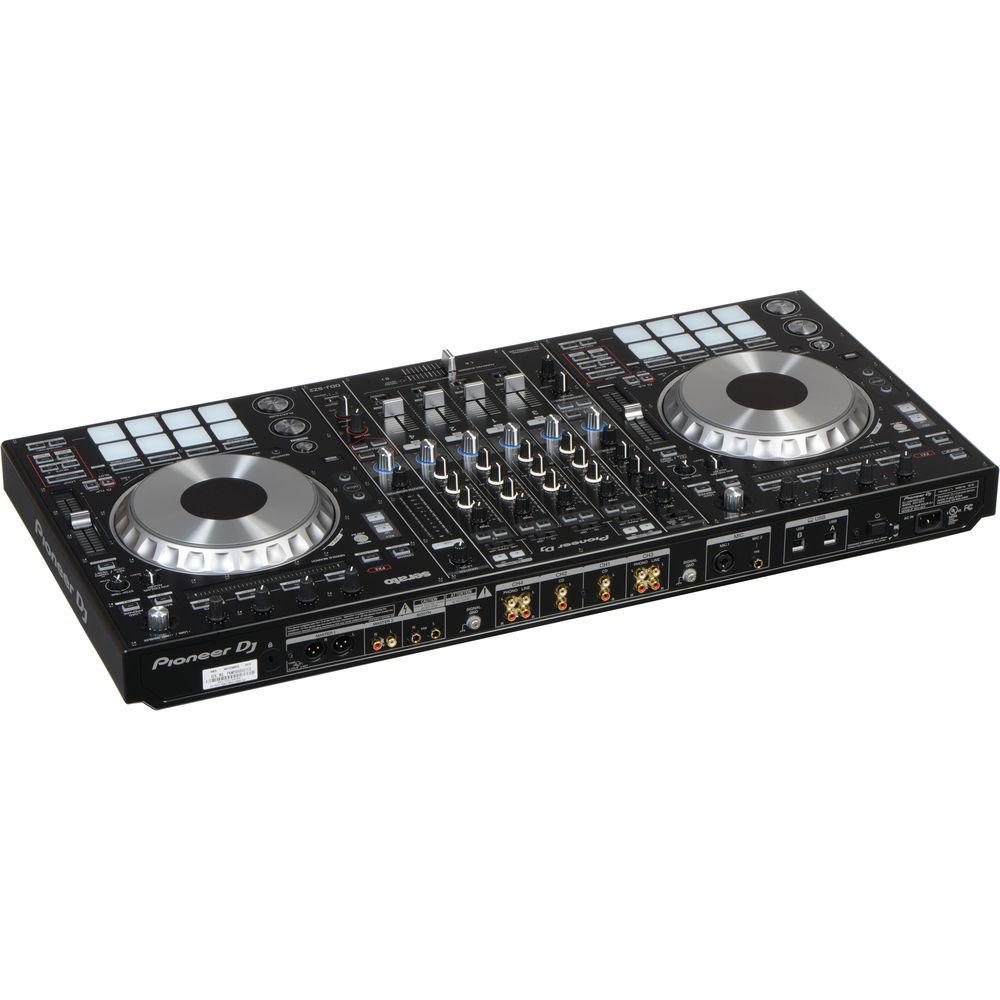
For I/O, the front of the controller features a 1/4" TRS and 1/8" mini headphone jack. The back of the unit features two phono RCA inputs with signal ground terminals, four Line/CD RCA inputs, a combo XLR-1/4" microphone input, a 1/4" microphone input, two USB type-B inputs, a pair of 1/4" booth outputs, an unbalanced pair of RCA master outputs, a balanced pair of XLR outputs, and a Kensington lock.
The unit is designed to work with and comes with a copy of Serato DJ. The software and controller combination supports 4-deck and sampler functions, slip mode for maintaining track position during effects, hot cues, loops, a suite of iZotope powered FX, eight cue points per deck, and a vertical display of the track waveforms. - Dedicated Controls
- Play with your keys and pitch, adjusting them while mixing with 3 updated Serato DJ functions embedded in your controller. Key shift, key sync and pitch play give you the power to play it by ear
- Play with Your Pitch
- Pitch Play grants you the freedom to hit your cues across a range of different keys. Use the Performance Pads to assign your Hot Cues and broaden the scope of your creativity at the touch of a button
- Serato Flip Connection
- Record Hot Cue combinations with 3 dedicated buttons, enabling you to play back your tracks, make custom edits or even skip or repeat selected sections on loop
- Large Aluminum Jogs
- The DDJ-SZ2's full-sized jog wheels are optimized for an ideal scratch response and you can use Jog Feeling Adjust to set your preferred resistance. The jogs have illuminated cue point markers and an accurate countdown for even greater precision
- Back-lit Performance Pads
- Instantly trigger Hot Cues, Roll, Slicer, Sampler, Cue Loop, Saved Loop, Slicer Loop and Pitch Play. The multi-colored back-lit LEDs give a visual reference to which modes are in play, and will reflect cue points you've pre-set in Serato DJ
- Sound Color FX
- Trigger Pitch, Echo, Jet and Filter FX and use the level/depth dial to manipulate the sound
- Dual USB Ports
- Two USB sound cards and ports mean you can hook-up two computers at the same time and use the top-loaded A/B switch for seamless DJ transitions.
- Robust Faders
- The robust Magvel Faders ensure smooth control over long-term use. Two metal shafts support the fader knobs, while the contact-free magnetic system is designed to endure millions of performances
- Clear and Powerful Sound
- A high-performance D/A converter made by Cirrus Logic, and low-jitter crystal oscillator ensure a faithful reproduction of sound sources and deliver a clear, powerful club sound
- Slip Mode
- Keep tracks playing muted during live edits such as loop, scratch or reverse. Release the jog wheel and the track comes back at exactly the right place
- Needle Search
- Needle search provides a touch strip for intuitive and fast searches
- Native Control of Serato DJ
- Get involved with plug-and-play control of Serato DJ with dedicated buttons for FX and advanced features such as Beat Jump, Slip mode and Quantize. Simply connect your PC/Mac and start playing
UPC: 841300100706 In the Box Pioneer DJ DDJ-SZ2 - Flagship 4-Channel Controller for Serato DJ Power Cord USB Cable Limited 1-Year Warranty Table of Contents
|
Upload User Manual
Have you got an user manual for the Pioneer DJ DDJ-SZ2 - Flagship 4-Channel Controller for Serato DJ in electronic form? Please send it to us and help us expand our library of instruction manuals.
Thank you, too, on behalf of other users.
To upload the product manual, we first need to check and make sure you are not a robot. After that, your "Submit Link" or "Upload File" will appear.
Technical parametersPioneer DJ DDJ-SZ2 Specs | | | Software | Serato DJ | | Display Resolution | 1,280 x 720 or higher | | Windows Requirements | Operating System:
Windows 10
Windows 8.1
Windows 7
Processor:
i3: 1.07 GHz (32-bit, 64-bit)
i5: 1.07 GHz (32-bit, 64-bit)
i7: 1.07 GHz (32-bit, 64-bit)
Memory (32-bit, 64-bit): 4 GB
USB: Available USB 2.0 port
Free HDD Space: 5 GB | | Mac Requirements | Operating System:
Mac OS X 10.12 (Sierra)
Mac OS X 10.11
Mac OS X 10.10
Mac OS X 10.9
Processor:
i3: 1.07 GHz (32-bit, 64-bit)
i5: 1.07 GHz (32-bit, 64-bit)
i7: 1.07 GHz (32-bit, 64-bit)
Memory (32-bit, 64-bit): 4 GB
USB: Available USB 2.0 port
Free HDD Space: 5 GB | | | | Number of Channels | Audio Channels: 4
Microphone Channels: 2 | | Input Connectors | Channel 1: 2 x RCA (CD)
Channel 2: 2 x RCA (CD)
Channel 3: 4 x RCA (2 x Phono / 2 x Line)
Channel 4: 4 x RCA (2 x Phono / 2 x Line)
Mic 1: Combo XLR-1/4" / 6.35 mm
Mic 2: 1/4" / 6.35 mm TRS
Ground Terminals: 2 | | Output Connectors | Master 1 (L/R): 2 x XLR
Master 2 (L/R): 2 x RCA
Booth (L/R): 2 x 1/4" / 6.35 mm
Headphone 1: 1/4" / 6.35 mm TRS
Headphone 2: 1/8" / 3.5 mm TRS | | Sound Card | 24-bit / 44.1 kHz | | Frequency Response | 20 Hz to 20 kHz | | S/N Ratio | USB: 111 dBA
CD/Line: 97 dBA
Phono: 90 dBA
Mic 1/2: 84 dBA | | Total Harmonic Distortion | USB: 0.002%
Line: 0.004% | | Input Level / Input Impedance | CD/Line: -12 dBu / 47 kOhms
Phono: -52 dBu / 47 kOhms
Mic 1/2: -52 dBu / 8.5 kOhms | | Output Level / Output Impedance | Standard Output Level / Load Impedance / Output Impedance
Master 1: +6 dBu / 10 kOhms / 390 Ohms or less
Master 2: +2 dBu / 10 kOhms / 820 Ohms or less
Booth: +6 dBu / 10 kOhms / 390 Ohms or less
Phones: +8 dBu / 32 kOhms / 10 Ohms or less
Rated Output Level / Load Impedance
Master 1: 24 dBu / 10 kOhms
Master 2: 20 dBu / 10 kOhms | | Crosstalk | CD/Line: 82 dB | | EQ Section | Channel EQ
Hi: -∞ to +6 dB (13 kHz)
Mid: -∞ to +6 dB (1 kHz)
Low: -∞ to +6 dB (70 Hz)
Mic EQ
Hi: -12 to +12 dB (10 kHz)
Low: -12 to +12 dB (100 Hz) | | Power | Power Requirements: 110 to 240 VAC, 50/60 Hz
Power Consumption: 30 W (0.4 W standby) | | Operating Temperature | 41 to 95°F / 5 to 35°C | | Humidity (Non-Condensing) | 5 to 85% | | Dimensions (W x D x H) | 34.3 x 16.5 x 3.9" / 870 x 420 x 98.4 mm | | Weight | 23.6 lb / 10.7 kg | | | | Package Weight | 30.5 lb | | Box Dimensions (LxWxH) | 37.9 x 20.8 x 8.4" |
Rating100% users recommend this product to others. And what about you?

This product has already been rated by 79 owners. Add your rating and experience with the product.
Discussion
 Ask our technicians if you have a problem with your settings,
or if anything is unclear in the user manual you have downloaded.
You can make use of our moderated discussion.
The discussion is public and helps other users of our website who may be encountering similar problems.
Ask our technicians if you have a problem with your settings,
or if anything is unclear in the user manual you have downloaded.
You can make use of our moderated discussion.
The discussion is public and helps other users of our website who may be encountering similar problems.
The discussion is empty - enter the first post
Post a new topic / query / comment:
|
|
|
| Request for user manual |
You can’t find the operation manual you are looking for? Let us know and we will try to add the missing manual:
I’m looking for a manual / Request for manual
Current requests for instruction manuals:
Call Of Duty World War Two For Xbox...
controller stratus XL...
stratus XL...
smart whatch serie S11 42mm...
Allen & Heath SQ-6 manual...
|
| Discussion |
Latest contributions to the discussion:
AEW R 4100
Name: MAURICIO ANGARITA
Audio-Technica AEW-R4100 UHF Diversity Receiver for
AEW R 4100 has the mute function blocked and does not allow audio to pass. I tried several times to turn off the mute from the transmitter but it does nothing, the mute stays on. Solution?
Thank you...
Instructions for assembling the 2015 Forecast Image Master Consoles GC3-A
Name: mike elam
Forecast Consoles GC3-A ImageMaster Editing Console
Looking for instructions for assembling this console. ...
EMPTY TONER ERROR MESSAGE AFTER REPLACING TONER
Name: LINDA BAD YELLOW EYES
Brother TN223BK Standard-Yield Toner
I HAD TO CHANGE OUT ALL THREE TONERS DUE TO LEAKS IN THE YELLOW AND CYAN. AFTER I REPLACED THEM, THE MACHINE KEEPS GIVING ME AN EMPTY TONER ERROR MESSAGE. HELP!!...
PS480D 20/24 pin Switching 480W Power Supply
Name: swkargo
Logisys 480W Power Supply
This item states in can run -5vdc .It is NOT listed on the board or I beleive is r4 is missing the resitior. Any body have thid issue. Shawn
...
Help needed
Name: Ann Carter
SanDisk 1TB Extreme Portable USB 3.1
When I click the link to download the user manual for my Sandisk Extreme external hard drive, it gives me the manual for the LG Cricket. Can you please change the link so I can download the Sandisk manual and begin using this drive? Thank you....
|
|


