|
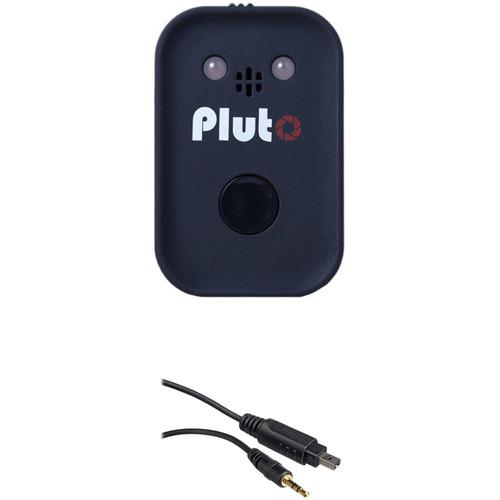
User Manual for Pluto Trigger with Shutter Release Cable Kit for Nikon D70s and D80 Cameras Click to enlarge the picture
 Contents of the user manual for the Pluto Trigger with Shutter Release Cable
- Product category: Camera Trigger Systems Pluto
- Brand: Pluto
- Description and content of package
- Technical information and basic settings
- Frequently asked questions – FAQ
- Troubleshooting (does not switch on, does not respond, error message, what do I do if...)
- Authorized service for Pluto Camera Trigger Systems
|
User manual for the Pluto Trigger with Shutter Release Cable contain basic instructions
that need to be followed during installation and operation.
Before starting your appliance, the user manual should be read through carefully.
Follow all the safety instructions and warnings, and be guided by the given recommendations.
User manual is an integral part of any Pluto product,
and if it is sold or transferred, they should be handed over jointly with the product.
Following the instructions for use is an essential prerequisite for protecting
health and property during use, as well as recognition of liability on the part of the manufacturer
for possible defects should you make a warranty claim. Download an official Pluto user manual in which you will find instructions on how to install, use, maintain and service your product.
And do not forget – unsuitable use of a Pluto product will considerably shorten its lifespan!
|
Product description Make sure you have the tools to finally capture the image you have been dreaming of with the programmable Pluto Trigger, which is made available here as a Kit that includes a Shutter Release Cable for Nikon D70s and D80 Cameras. Able to be connected to a smartphone app, users will have excellent control over various intervalometer and triggering modes as well as the ability to set up sensors for more elaborate photography setups. - Pluto Trigger Take the guesswork out of triggering a camera with the features of the Pluto Trigger. It has the ability to function as either a simple infrared remote or it can connect to a smartphone over Bluetooth 4.0 LE for programming and setup of advanced modes. This provides users with a plethora of options and sensors to help them record time lapses, fast-moving subjects, and much more. The Pluto Trigger features multiple built-in sensors, including light, sound, and infrared, as well as an aux port for attaching other sensors. This can dramatically speed up response times to certain subjects, allowing the capture of balloons popping, lightning strikes, and more. This is augmented by the various intervalometer settings for creating specific shooting settings for your scene and the ability to use the sensors of your phone to access other, more unique triggering modes.
The Pluto Trigger features a standard 2.5mm camera connection that allows users to pick up different cables to work with their cameras. Also, this port can be used to connect a flash with the included PC sync cord. Alongside these ports is a micro-USB connection, which is how users can charge the built-in rechargeable lithium-ion battery, which can run for about 20 hours with normal usage. - General Features
-
- Can trigger a camera via an infrared remote and the physical shutter release button or by using an optional connection cable.
- Connects to smart devices using the iOS/Android mobile app via Bluetooth 4.0 Low Energy with a range of about 66'.
- Status LED will alert you to the current settings, battery life, and connectivity strength.
- Built-in rechargeable lithium-ion battery offers a normal life of about 20 hours or 40 hours when Bluetooth is turned off.
- Offers a 2.5mm aux input for using optional sensors.
- The 2.5mm camera output can also be used to connect a flash via the included PC sync cable.
- Intervalometer Modes
-
- Shutter Release: For simple triggering of your camera, this mode offers a variety of options on how to trigger your camera. This includes single shot, focus (press to focus, release to take a photo), hold (press to open shutter, release to end exposure), lock (press to open shutter, press again to close shutter), bulb, burst, and timed.
- Time-Lapse: Set the Pluto Trigger to take a set number of photos with a preset time interval and an optional start delay. It can use either your camera settings or perform bulb-ramping for more advanced time lapses.
- HDR: Shoot up to 19 photos for an HDR sequence with exposure step values between 1/3 to 3 stops.
- Star Trail: Create long exposures of the night sky for clear images with star trails.
- Video: Use the Pluto Trigger to automatically start recording again once you hit your camera's recording time limit.
- Timer: Set the trigger to take photos or record video at a specific time each day for long-term projects.
- Pluto Sensors
-
- Laser: Using the included laser pointer in combination with the trigger's light sensor, users will be able to create a setting that will trigger the camera when the laser beam is broken. This has a response time of tens of microseconds.
- Sound: Trigger your camera upon hearing a sound, such as popping a balloon or breaking glass. This mode allows users to set sensitivity and delay for achieving the appropriate response time.
- Light: Triggers the camera when the light sensor notices an increase or decrease in ambient light.
- Lightning: Quickly triggers the camera when it senses a bright flash of light.
- Infrared: Triggers the camera when there is a change in infrared emissions, such as from a passing animal or person.
- Droplet: When the trigger is connected to the optional Valve Kit users can easily capture water droplets through a pre-programmed method.
- Aux: Users can attach various sensors to the trigger's 2.5mm aux port to trigger the camera with various other methods.
- Fusion: Combine various sensors together to create a more specialized setting for your specific shoot.
- Smart Sensors
-
- Sound: Users can use the microphone in their smartphone to trigger a camera when a sound is heard.
- Vibrate: Using the accelerometer of your phone, this mode will trigger the camera when vibration hits a pre-determined threshold.
- Motion: By using the camera of your smartphone users can create a setup that will trigger the camera when motion is detected in front of your smartphone's camera.
- Distance: This mode will capture photos as you travel over distance using your smartphone's GPS. This prevents unnecessary photos from being captured when you stop.
- Voice: Users can use the voice command "Pluto" regardless of ambient noise levels to trigger the camera remotely.
- Smile: Take selfies easily by using the camera of your smartphone to tell the trigger when you are smiling.
- Tools
-
- Depth of Field: This calculator will determine the hyperfocal distance based on the lens focal length, aperture, and camera type.
- Sun Position: Provides official and civil sunrise and sunset times based on your current location and local time. Two countdown clocks are available to shoe upcoming events.
- ND Filter Calculator: Calculate the correct exposure time when using neutral density filters. It uses the filter strength and current shutter speed to provide an accurate shutter speed.
- Starscape Rule: By selecting your camera model and actual focal length this tool will calculate the slowest shutter speed possible for sharp, pinpoint stars. Users can select Rule of 500 or Rule of 400 based on the speed of stars in their location.
UPC: 732240367543 - Vello 2.5mm Remote Shutter Release Cable for Nikon D70s & D80 Cameras The Vello Remote Shutter Release system works with a wide variety of camera models just by swapping out the camera release cable. This Vello 2.5mm Remote Shutter Release Cable will allow you to use your Vello FreeWave, FreeWave Plus, FreeWave Fusion, Wireless ShutterBoss, Captain, and MicroSync series remote with the following cameras:Nikon: D70s and D80 UPC: 847628029286
In the Box - Trigger uraxsutdu
- Laser Pointer
- PC Sync Cable
- Shoe Mount Adapter
- USB Cable
- Drawstring Bag
- Limited 1-Year Warranty
- Vello - 2.5mm Remote Shutter Release Cable for Nikon D70s & D80 Cameras
Table of Contents
|
Upload User Manual
Have you got an user manual for the Pluto Trigger with Shutter Release Cable Kit for Nikon D70s and D80 Cameras in electronic form? Please send it to us and help us expand our library of instruction manuals.
Thank you, too, on behalf of other users.
To upload the product manual, we first need to check and make sure you are not a robot. After that, your "Submit Link" or "Upload File" will appear.
Technical parameters - Pluto Trigger
| Range | Infrared: 9.8-23' / 3-7 m
Bluetooth: 32.8-65.6' / 10-20 m | | Connectivity | Bluetooth 4.0 LE
Micro-USB
2.5mm sensor port
2.5mm camera/flash connection port | | Power Source | Built-in rechargeable lithium-ion battery | | Battery Life | Normal: 20 hours
Bluetooth Off: 40 hours | | Recharge Time | 1.5 hours | | Operating Conditions | Temperature: -4 to 158°F / -20 to 70°C | | Dimensions | 2.4 x 1.6 x 0.7" / 60 x 40 x 19 mm | | Weight | 1.3 oz / 37 g | | | | Box Dimensions (LxWxH) | 6.4 x 4.1 x 2.7" | - Vello 2.5mm Remote Shutter Release Cable for Nikon D70s & D80 Cameras
| Length | Coiled: 1.5' (0.45 m)
Stretched: 4' (1.2 m) | | Remote Connection | 2.5mm Sub-mini | | | | Box Dimensions (LxWxH) | 4.5 x 3.0 x 0.25" |
Rating70% users recommend this product to others. And what about you?

This product has already been rated by 91 owners. Add your rating and experience with the product.
Discussion
 Ask our technicians if you have a problem with your settings,
or if anything is unclear in the user manual you have downloaded.
You can make use of our moderated discussion.
The discussion is public and helps other users of our website who may be encountering similar problems.
Ask our technicians if you have a problem with your settings,
or if anything is unclear in the user manual you have downloaded.
You can make use of our moderated discussion.
The discussion is public and helps other users of our website who may be encountering similar problems.
The discussion is empty - enter the first post
Post a new topic / query / comment:
|
|
|
| Request for user manual |
You can’t find the operation manual you are looking for? Let us know and we will try to add the missing manual:
I’m looking for a manual / Request for manual
Current requests for instruction manuals:
Call Of Duty World War Two For Xbox...
controller stratus XL...
stratus XL...
smart whatch serie S11 42mm...
Allen & Heath SQ-6 manual...
|
| Discussion |
Latest contributions to the discussion:
AEW R 4100
Name: MAURICIO ANGARITA
Audio-Technica AEW-R4100 UHF Diversity Receiver for
AEW R 4100 has the mute function blocked and does not allow audio to pass. I tried several times to turn off the mute from the transmitter but it does nothing, the mute stays on. Solution?
Thank you...
Instructions for assembling the 2015 Forecast Image Master Consoles GC3-A
Name: mike elam
Forecast Consoles GC3-A ImageMaster Editing Console
Looking for instructions for assembling this console. ...
EMPTY TONER ERROR MESSAGE AFTER REPLACING TONER
Name: LINDA BAD YELLOW EYES
Brother TN223BK Standard-Yield Toner
I HAD TO CHANGE OUT ALL THREE TONERS DUE TO LEAKS IN THE YELLOW AND CYAN. AFTER I REPLACED THEM, THE MACHINE KEEPS GIVING ME AN EMPTY TONER ERROR MESSAGE. HELP!!...
PS480D 20/24 pin Switching 480W Power Supply
Name: swkargo
Logisys 480W Power Supply
This item states in can run -5vdc .It is NOT listed on the board or I beleive is r4 is missing the resitior. Any body have thid issue. Shawn
...
Help needed
Name: Ann Carter
SanDisk 1TB Extreme Portable USB 3.1
When I click the link to download the user manual for my Sandisk Extreme external hard drive, it gives me the manual for the LG Cricket. Can you please change the link so I can download the Sandisk manual and begin using this drive? Thank you....
|
|


