|
User Manual for PNY Technologies Dual NVIDA Quadro K5200 Ultra-High Res Video Wall Kit Click to enlarge the picture
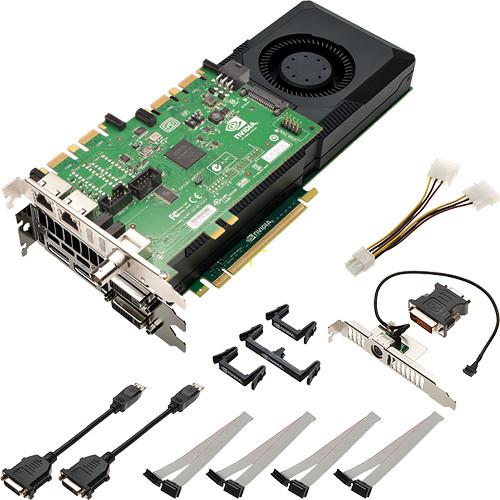 Contents of the user manual for the PNY Technologies Dual NVIDA Quadro K5200
- Product category: Graphic Display Cards PNY Technologies
- Brand: PNY Technologies
- Description and content of package
- Technical information and basic settings
- Frequently asked questions – FAQ
- Troubleshooting (does not switch on, does not respond, error message, what do I do if...)
- Authorized service for PNY Technologies Graphic Display Cards
 |
User manual for the PNY Technologies Dual NVIDA Quadro K5200 contain basic instructions
that need to be followed during installation and operation.
Before starting your appliance, the user manual should be read through carefully.
Follow all the safety instructions and warnings, and be guided by the given recommendations.
User manual is an integral part of any PNY Technologies product,
and if it is sold or transferred, they should be handed over jointly with the product.
Following the instructions for use is an essential prerequisite for protecting
health and property during use, as well as recognition of liability on the part of the manufacturer
for possible defects should you make a warranty claim. Download an official PNY Technologies user manual in which you will find instructions on how to install, use, maintain and service your product.
And do not forget – unsuitable use of a PNY Technologies product will considerably shorten its lifespan!
|
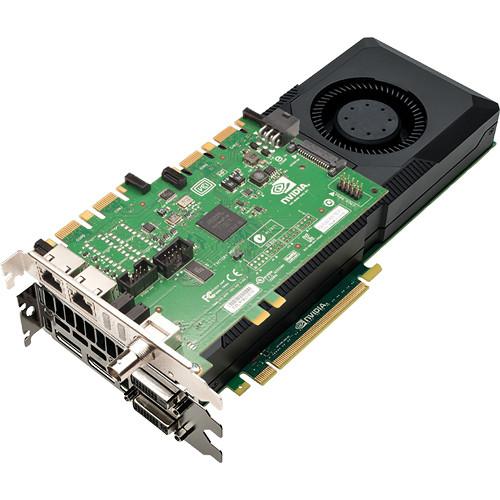
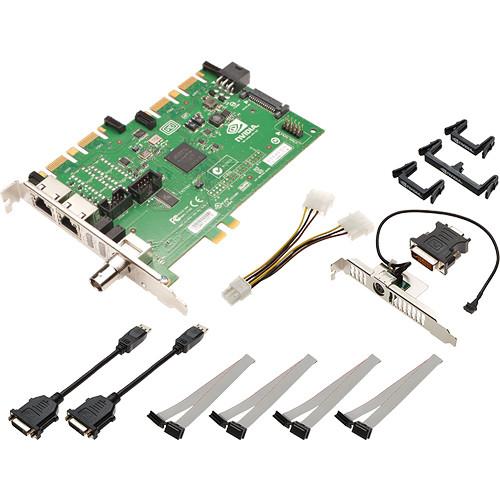
Product description The PNY Technologies Dual NVIDIA Quadro K5200 Ultra-High Res Video Wall Kit is a turnkey solution for driving a video wall with up to 8 displays. Included in the kit are two Quadro K5200 GPUs and an NVIDIA Sync Card. When connecting multiple displays to create a video wall, the sync card synchronizes the outputs to make sure the displays refresh simultaneously to prevent tearing and flickering. This discrete solution can be applied to 3D displays, video walls, multi-projector systems, and high-resolution devices driven by multiple inputs. The sync card can also work with up to four compatible graphics cards and synchronize their outputs to drive more displays. Each Quadro K5200 features 2304 CUDA Cores, which not only act as shaders for rendering display graphics but also allow API-enabled applications that support GPU acceleration to perform hundreds of computations simultaneously. To help move data to and from these mini processors as efficiently as possible, each chipset features 8GB of GDDR5 vRAM and a 256-bit memory interface with a memory bandwidth of 173 GB/s. For connecting displays, each Quadro K5200 is equipped with two DisplayPort 1.2 ports, a DVI-D (digital only) dual-link port, and a DVI-I dual-link port. DisplayPort DP 1.2 standard support means you can connect 4K displays or use an MST hub to connect multiple displays to one output.All the necessary cables and board connections for connecting your sync card to your graphics card are included. Sync Card Features - Multi-GPU Mosaic
- Software technology that abstracts multiple physical displays into a larger virtual display. When the virtual display spans across multiple GPUs, the Quadro Sync board synchronizes the GPUs to ensure all the displays stay aligned.
- Frame Lock
- Synchronize multiple displays from one machine or spread across multiple machines in a cluster. For Frame Lock, a single display is chosen as the timing master and all other displays in the cluster align to it. Frame Lock can be used with individual physical displays and single or multi-GPU Mosaic displays.
Quadro K5200 Features - Popular API Support
- Supports Shader Model 5.0, OpenGL 4.4, DirectX 11, CUDA, DirectComputer, OpenCL, and other APIs to provide software with direct, low-level access to the graphics processing and computational power of the card
- Supports DP 1.2 MST Technology
- Not only can the card support four directly connected displays, thanks to MST (Multi Stream Transport) technology it is possible to drive up to four displays through a single DisplayPort output when using separately available MST hubs or DP 1.2 compatible monitors with daisy-chaining capability
- Parallel Computing Capabilities
-
- SMX Architecture: a streaming multi-processor design that delivers greater processing power and efficiency than earlier architectures
- Support for all CUDA 6 features, including Unified Memory, Dynamic Parallelism and Dedicated Shared Memory
- Programming support for CUDA C, CUDA C++, DirectCompute 5.0, OpenCL, Python, and Fortran
- Professional 3D Support
- The included Stereo Connector Bracket features a 3-pin mini-DIN port for connecting the card to sync hardware used in conjunction with select professional active 3D technologies. In most cases, this port would be connected to an IR emitter used to trigger the shutters in active 3D glasses. In some cases it can also be hard-wired directly to the glasses. Both emitter and glasses are available separately
- NVIDIA Quadro Sync
- Allows multiple graphics cards - even ones installed in different computers - to be synchronized for broadcast applications or to create high-resolution "video walls". Can also be used in 3D systems where the "left" and "right" eye images each come from a separate projector
- 3D Graphics Architecture
-
- Hardware tessellation engine
- FXAA/TSAA dedicated antialiasing engine
- Bindless Textures
- Up to 16K x 16K texture and render processing
- Transparent multisampling and super sampling
- 16x angle independent anisotropic filtering
- 32-bit per component floating point texture filtering and blending
- Up to 64X full scene antialiasing (FSAA)
- Decode acceleration for MPEG-2, MPEG-4 Part 2 Advanced Simple Profile, H.264, MVC, VC1, DivX (version 3.11 and later), and Flash (10.1 and later)
- Dedicated H.264 encoder (requires application support)
- Blu-ray dual-stream hardware accelerating (supporting HD picture-in-picture playback)
- Quadro Boost: Automatically increases GPU engine throughput to maximize application performance
- NVIDIA Scalable Geometry Engine
- Improves geometry performance across a broad range of CAD, DCC, and medical applications, enabling you to work interactively with models and scenes that are much more complex than ever before
- Audio Support
- Supported via DisplayPort and HDMI (HDMI requires separately available DisplayPort to HDMI adapter):
- Dolby Digital (AC3), DTS 5.1, multi-channel (7.1) LPCM, Dolby Digital Plus (DD+), MPEG-2/MPEG-4 AAC, DTS-HD, and TrueHD
- Data rates of 44.1 kHz, 48 kHz, 88.2 kHz, 96 kHz, 176 kHz, and 192 kHz
- Word sizes of 16-bit, 20-bit, and 24-bit
- NVIDIA Parallel DataCache
- Supports a true cache hierarchy combined with on-chip shared memory. L1 and L2 caches drive exception throughput, accelerating features such as real-time ray tracing, physics, and texture filtering
- HD-SDI Capture and Output Compatible
- When combined with compatible HD-SDI I/O hardware it is possible to process video directly with the graphics card for better performance and lower latency than software-centric solutions that merely offload compute data to the GPU for accelerated processing
- Ultra-Quiet Cooling System
- Virtually silent cooling design enables lower acoustics for an ultra-quiet desktop environment
- Additional Features
-
- Unified driver architecture (UDA) for simplified deployment and management in an enterprise setting
- Enterprise management tools
- Supports HBR2: Allows the data from the DisplayPort output to travel at up to 5.4 GB/s
- Internal 400 MHz DAC DVI-I output supporting analog display up to 2048 x 1536 at 85 Hz
- Supports Quad buffered stereo 3D content for OpenGL-based 3D software
- Underscan/overscan compensation and hardware scaling
- Support for NVIDIA Quadro Mosaic, NVIDIA NVIEW multi-display technology, NVIDIA Enterprise Management Tools
- Supports Deep Color (12-bit per channel color)
- Supports multi GPU configurations when combined with other compatible NVIDIA-based devices
- PCI Express 3.0 Host Interface
- PCIe 3.0 doubles the bandwidth for a given interface width compared to PCIe 2.0. For example, an x8 slot in PCIe 3.0 is the equivalent of an x16 slot in PCIe 2.0
UPC: 751492576985 In the Box PNY Technologies Dual NVIDA Quadro K5200 Ultra-High Res Video Wall Kit 2 x 6-pin auxiliary power cable 2 x Stereo connector bracket 4 x DisplayPort to DVI-D SL adapters 2 x DVI-I to VGA adapter 8 x Ribbon connector clips 12 x Cable retention clips Limited 3-Year Warranty User Manual PDF 389.2kbxudxssyrazcu Table of Contents
|
Upload User Manual
Have you got an user manual for the PNY Technologies Dual NVIDA Quadro K5200 Ultra-High Res Video Wall Kit in electronic form? Please send it to us and help us expand our library of instruction manuals.
Thank you, too, on behalf of other users.
To upload the product manual, we first need to check and make sure you are not a robot. After that, your "Submit Link" or "Upload File" will appear.
Technical parametersPNY Technologies K5200 Specs | | | GPU | Quadro K5200 | | Stream Processors (CUDA Cores) | 2304 | | Memory | 8 GB | | Memory Type | GDDR5 | | Memory Interface | 256-bit | | Memory Bandwidth | 192 GB/s | | | | Outputs | 1 x DVI-I dual-link
1 x DVI-D dual-link
2 x DisplayPort (DP 1.2 and audio support)
1 x Stereo Connector on 3-pin mini-DIN (on separate bracket from video outputs) | | Maximum Resolution | DisplayPort (Direct Connection): 3840 x 2160 at 60 Hz
DVI-I DL: 2560 x 1600 at 60 Hz
DVI-I SL: 1920 x 1200 at 60 Hz
VGA (DVI to VGA Adapter Supplied): 2048 x 1536 at 85 Hz | | Number of Displays Supported | Direct: 4
MST: 4 through a single DisplayPort output using separately available MST hubs | | HDCP Support | Yes | | 3D Support | Via supplied stereo bracket | | Quadro Sync Support | Yes | | | | Software | Windows: 8.1, 8, 7, Vista, XP SP3
Linux
Solaris | | Hardware | 1 x Free PCIe expansion slot
2 x Free PCIe slots (physical), if Stereo Connector Bracket is used
2 GB RAM (8 GB or more recommended)
200 MB free disk space for driver installation
Blu-ray or DVD-ROM drive to install driver from disc
Internet connection to install driver as download | | | | Supported APIs | Graphics: Shader Model 5.0, OpenGL 4.4, DirectX 11
Compute: CUDA, DirectCompute, OpenCL | | NVIEW Support | NVIDIA Mosaic: Supported on Windows 8.1, 8, 7, and select Linux distributions
NVIDIA 3D Vision and 3D Vision Pro: Via USB connection to 3D Vision hub | | | | Host Interface | PCIe 3.0 x16 | | Thermal Solution | Active fansink | | Power Consumption | Maximum: 150 W | | Form Factor | Dual-Slot: Full-height, full-length | | Dimensions | 4.4 x 10.5" / 11.2 x 26.7 cm | | Weight | Not specified by manufacturer | | | | Package Weight | 7.25 lb | | Box Dimensions (LxWxH) | 15.75 x 14.0 x 13.0" |
Rating100% users recommend this product to others. And what about you?

This product has already been rated by 15 owners. Add your rating and experience with the product.
Discussion
 Ask our technicians if you have a problem with your settings,
or if anything is unclear in the user manual you have downloaded.
You can make use of our moderated discussion.
The discussion is public and helps other users of our website who may be encountering similar problems.
Ask our technicians if you have a problem with your settings,
or if anything is unclear in the user manual you have downloaded.
You can make use of our moderated discussion.
The discussion is public and helps other users of our website who may be encountering similar problems.
The discussion is empty - enter the first post
Post a new topic / query / comment:
|
|
|
| Request for user manual |
You can’t find the operation manual you are looking for? Let us know and we will try to add the missing manual:
I’m looking for a manual / Request for manual
Current requests for instruction manuals:
Call Of Duty World War Two For Xbox...
controller stratus XL...
stratus XL...
smart whatch serie S11 42mm...
Allen & Heath SQ-6 manual...
|
| Discussion |
Latest contributions to the discussion:
AEW R 4100
Name: MAURICIO ANGARITA
Audio-Technica AEW-R4100 UHF Diversity Receiver for
AEW R 4100 has the mute function blocked and does not allow audio to pass. I tried several times to turn off the mute from the transmitter but it does nothing, the mute stays on. Solution?
Thank you...
Instructions for assembling the 2015 Forecast Image Master Consoles GC3-A
Name: mike elam
Forecast Consoles GC3-A ImageMaster Editing Console
Looking for instructions for assembling this console. ...
EMPTY TONER ERROR MESSAGE AFTER REPLACING TONER
Name: LINDA BAD YELLOW EYES
Brother TN223BK Standard-Yield Toner
I HAD TO CHANGE OUT ALL THREE TONERS DUE TO LEAKS IN THE YELLOW AND CYAN. AFTER I REPLACED THEM, THE MACHINE KEEPS GIVING ME AN EMPTY TONER ERROR MESSAGE. HELP!!...
PS480D 20/24 pin Switching 480W Power Supply
Name: swkargo
Logisys 480W Power Supply
This item states in can run -5vdc .It is NOT listed on the board or I beleive is r4 is missing the resitior. Any body have thid issue. Shawn
...
Help needed
Name: Ann Carter
SanDisk 1TB Extreme Portable USB 3.1
When I click the link to download the user manual for my Sandisk Extreme external hard drive, it gives me the manual for the LG Cricket. Can you please change the link so I can download the Sandisk manual and begin using this drive? Thank you....
|
|


