|
User Manual for Polycom POVVX500TAA Click to enlarge the picture
 Contents of the user manual for the Polycom POVVX500TAA
- Product category: Telephones Polycom
- Brand: Polycom
- Description and content of package
- Technical information and basic settings
- Frequently asked questions – FAQ
- Troubleshooting (does not switch on, does not respond, error message, what do I do if...)
- Authorized service for Polycom Telephones
|
User manual for the Polycom POVVX500TAA contain basic instructions
that need to be followed during installation and operation.
Before starting your appliance, the user manual should be read through carefully.
Follow all the safety instructions and warnings, and be guided by the given recommendations.
User manual is an integral part of any Polycom product,
and if it is sold or transferred, they should be handed over jointly with the product.
Following the instructions for use is an essential prerequisite for protecting
health and property during use, as well as recognition of liability on the part of the manufacturer
for possible defects should you make a warranty claim. Download an official Polycom user manual in which you will find instructions on how to install, use, maintain and service your product.
And do not forget – unsuitable use of a Polycom product will considerably shorten its lifespan!
|
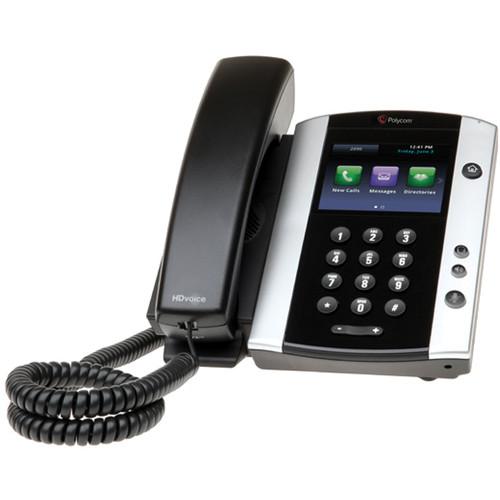
Product description The gesture based, multitouch-capable, capacitive touchscreen found on the VVX500 Media IP Phone makes it easy to streamline business operations. The 3.5" TFT LCD color display feature a 320 x 240 resolution along with a 4:3 aspect ratio making it easier to see the caller ID and other functions. With a WebKit-based browser and support for Microsoft Exchange Calendars, the ability to receive meeting reminders and alerts, access to the corporate directory and messaging services, and built-in web applications you can keep up with all of your tasks right from your phones display.
The Polycom VVX500 even comes equipped with the My Info Portal feature giving you access to stocks, news, sports, weather and other content available right on the color display. You can even control your VVX410 directly from your PC using your mouse and keyboard to streamline your workflow. This IP phone incorporates into existing IT infrastructure with support for open standards interoperability virtually eliminating the need to reconfigure your network. - Easy of Use
- The Polycom VVX 500 phone is a powerful, expandable office phone that keeps up with multitasking and schedule-juggling. Building on the behavior common to mobile phones, the multi-touch, gesture-based user interface of the Polycom VVX 500 phone makes navigation intuitive and easy
- Maximize Productivity
- Designed for a broad range of environments from small and medium businesses to large enterprises, the Polycom VVX 500 performance business media phone improves productivity, by complimenting the workplace applications on the user's computer. Users benefit from such capabilities as viewing their Outlook calendar on the phone and receiving meeting reminders while still having access to their corporate directory-all while waiting for their PCs to boot. Users can also extend their PC desktop to include the Polycom VVX 500 phone's screen, helping to enable simplified interactions and dialing using their PC's mouse and keyboard. Training and multipoint communication applications are complemented by the Polycom VVX 500 video playback capability for streaming content
- Improved Deployment and Administration
- The Polycom VVX 500 phone is an enterprise-grade, web-based IP phone featuring an intuitive configuration method giving administrators the ability to easily set up and maintain a large number of phones throughout the entire enterprise. The built-in, broad interoperability capabilities allow IT departments to leverage previous IT infrastructure investments and achieve easy integration with third-party UC and productivity applications
- Customizable and Expandable
- The Polycom VVX 500 phone provides personalized information at a glance, through built- in Web applications and even a digital photo frame. Polycom's "My Info Portal" serves up stocks, news, sports, weather, and other streamed content directly to the phone screen. The Polycom VVX 500 phone is ready for future expansion modules and accessories for applications such as video conferencing and even wireless networking
- Open Standards Interoperability
- Designed for enhanced interoperability, leveraging and complementing the other existing IT investments of any enterprise, the Polycom VVX 500 phone delivers HD voice, an enhanced UC experience bundled with business applications. With the broadest call server interoperability in the industry, the Polycom VVX 500 business media phone is a flexible foundation for any organization's unified communications strategy
In the Box Polycom POVVX500TAA (TAA Compliant) Handset with Handset Cord Network (LAN) Cable Limited 1-Year Manufacturer Warranty Table of Contents
|
Upload User Manual
Have you got an user manual for the Polycom POVVX500TAA in electronic form? Please send it to us and help us expand our library of instruction manuals.
Thank you, too, on behalf of other users.
To upload the product manual, we first need to check and make sure you are not a robot. After that, your "Submit Link" or "Upload File" will appear.
Technical parametersPolycom VVX-500 Specs | User Interface | • Gesture-based, multitouch-capable, capacitive touchscreen
• 3.5-in TFT LCD display at QVGA (320 x 240 pixel) resolution, 4:3 aspect ratio
• Screensaver and digital picture frame mode
• On-screen virtual keyboard
• Voicemail and videomail support
• Dual USB ports (2.0 compliant) for media and storage applications
• WebKit-based browser
• Adjustable base height
• Unicode UTF-8 character support multilingual user interface including Chinese, Danish, Dutch, English (Canada/ US/UK), French, German, Italian, Japanese, Korean, Norwegian, Polish, Portuguese, Russian, Slovenian, Spanish, and Swedish | | Audio Specifications | • Polycom HD Voice technology delivers life-like voice quality for each audio path handset, the hands-free speakerphone, and the optional headset
• Polycom Acoustic Clarity technology providing full-duplex conversations, acoustic echo cancellation and background noise suppression
- Type 1 compliant (IEEE 1329 full duplex)
• Frequency response: 100 Hz-20 kHz for handset, optional headset and hands-free speakerphone modes
• Codecs: G.711 (A-law and -law), G.729AB, G.722, G.722.1, G.722.1C
• Individual volume settings with visual feedback for each audio path
• Voice activity detection
• Comfort noise generation
• DTMF tone generation (RFC 2833 and in-band)
• Low-delay audio packet transmission
• Adaptive jitter buffers
• Packet loss concealment | | Compatibility | • Dedicated RJ-9 headset port
• Hearing aid compatibility ITU-T P.370 and TIA
• 504A standards
• Compliant with ADA Section 508 Subpart B 1194.23 (all)
• Hearing aid compatible (HAC) handset for magnetic coupling to hearing aids
• Compatible with commercially-available TTY Adapter equipment
• Support compatible USB Headsets | | Safety | • UL 60950-1
• CE Mark
• CAN/CSA-C22.2 No. 60950-1-03
• EN 60950-1
• IEC 60950-1
• AS/NZS60950-1 | | Call Functions | • 12 lines (registrations)
• Up to 24 simultaneous calls
• Shared call/bridged line appearance
• Flexible line appearance (one or more line keys can be assigned for each line extension)
• Distinctive incoming call treatment/ call waiting
• Call timer and call waiting
• Call transfer, hold, divert (forward), pickup
• Called, calling, connected party information
• Local three-way audio conferencing
• One-touch speed dial, redial
• Remote missed call notification
• Do not disturb function
• Electronic hook switch capable
• Local configurable digit map/dial plan | | Open Application Platform | • WebKit enabled full browser that supports HTML5, CSS, SSL security, and JavaScript
• Supports Polycom Apps SDK and API for third party business and personal applications
• Bundled with Polycom Productivity Suite:
- Corporate Directory Access using LDAP
- Local Voice Call Recording on USB flash drive
- Visual Conference Management | | Network and Provisioning | • SIP Protocol Support
• SDP
• IETF SIP (RFC 3261 and companion RFCs)
• Two-port Gigabit Ethernet switch
- 10/100/1000Base-TX across LAN and PC ports
- Conforms to IEEE802.3-2005 (Clause 40) for physical media attachment
- Conforms to IEEE802.3-2002 (Clause 28) for link
• Partner auto-negotiation
• Manual or dynamic host configuration protocol
• (DHCP) network setup
• Time and date synchronization using SNTP
• FTP/TFTP/HTTP/HTTPS server-based central provisioning for mass deployments
• Provisioning and call server redundancy supported
• QoS Support-IEEE 802.1p/Q tagging (VLAN), Layer 3 TOS, and DSCP
• VLAN-CDP, DHCP VLAN discovery, LLDP- MED for VLAN discovery
- Network Address Translation (NAT)- support for static configuration and "Keep-Alive" SIP signaling
• RTCP and RTP support
• Event logging
• Syslog
• Local configurable digit map/dial plan
• Hardware diagnostics
• Status and statistics reporting
• IPv4
• TCP
• UDP
• DNS-SRV | | Security | • 802.1X Authentication and EAPOL
• Media encryption via SRTP
• Transport Layer Security (TLS)
• Encrypted configuration files3
• Digest authentication
• Password login
• Support for URL syntax with password for boot server address
• HTTPS secure provisioning
• Support for signed software executables | | Power | • Built-in auto sensing IEEE 802.3 at Power over
• Ethernet (Class 4)
• Energy-saving smart motion detector enables the screen to go into power-save mode when no one is in the office
• External Universal AC Adapter (optional, 48 V 380 mA DC) | | Approvals | • FCC Part 15 (CFR 47) Class B
• ICES-003 Class B
• EN55022 Class B
• CISPR22 Class B
• VCCI Class B
• EN55024
• EN61000-3-2; EN61000-3-3
• NZ Telepermit
• Korea KC
• UAE TRA
• Russia GOST-R
• Brazil ANATEL
• Australia A&C Tick
• South Africa ICASA
• China CCC3
• South Africa ICASA
• Saudi Arabia CITC | | Operating Temperature | 32 to 104°F / 0 to 40°C | | Operating Humidity | 5 to 95% (non-condensing) | | Storage Temperature | -40 to 160°F / -40 to 70°C | | Dimensions | 7.5 x 6.0 x 7.0" / 19 x 15 x 18 cm | | Weight | 2.0 lb / 0.9 kg |
Rating70% users recommend this product to others. And what about you?

This product has already been rated by 48 owners. Add your rating and experience with the product.
Discussion
 Ask our technicians if you have a problem with your settings,
or if anything is unclear in the user manual you have downloaded.
You can make use of our moderated discussion.
The discussion is public and helps other users of our website who may be encountering similar problems.
Ask our technicians if you have a problem with your settings,
or if anything is unclear in the user manual you have downloaded.
You can make use of our moderated discussion.
The discussion is public and helps other users of our website who may be encountering similar problems.
The discussion is empty - enter the first post
Post a new topic / query / comment:
|
|
|
| Request for user manual |
You can’t find the operation manual you are looking for? Let us know and we will try to add the missing manual:
I’m looking for a manual / Request for manual
Current requests for instruction manuals:
Call Of Duty World War Two For Xbox...
controller stratus XL...
stratus XL...
smart whatch serie S11 42mm...
Allen & Heath SQ-6 manual...
|
| Discussion |
Latest contributions to the discussion:
AEW R 4100
Name: MAURICIO ANGARITA
Audio-Technica AEW-R4100 UHF Diversity Receiver for
AEW R 4100 has the mute function blocked and does not allow audio to pass. I tried several times to turn off the mute from the transmitter but it does nothing, the mute stays on. Solution?
Thank you...
Instructions for assembling the 2015 Forecast Image Master Consoles GC3-A
Name: mike elam
Forecast Consoles GC3-A ImageMaster Editing Console
Looking for instructions for assembling this console. ...
EMPTY TONER ERROR MESSAGE AFTER REPLACING TONER
Name: LINDA BAD YELLOW EYES
Brother TN223BK Standard-Yield Toner
I HAD TO CHANGE OUT ALL THREE TONERS DUE TO LEAKS IN THE YELLOW AND CYAN. AFTER I REPLACED THEM, THE MACHINE KEEPS GIVING ME AN EMPTY TONER ERROR MESSAGE. HELP!!...
PS480D 20/24 pin Switching 480W Power Supply
Name: swkargo
Logisys 480W Power Supply
This item states in can run -5vdc .It is NOT listed on the board or I beleive is r4 is missing the resitior. Any body have thid issue. Shawn
...
Help needed
Name: Ann Carter
SanDisk 1TB Extreme Portable USB 3.1
When I click the link to download the user manual for my Sandisk Extreme external hard drive, it gives me the manual for the LG Cricket. Can you please change the link so I can download the Sandisk manual and begin using this drive? Thank you....
|
|


