User Manual for PreSonus Faderport 16 - Mix Production Controller Click to enlarge the picture
 Contents of the user manual for the PreSonus Faderport 16 - Mix Production
- Product category: Control Surfaces PreSonus
- Brand: PreSonus
- Description and content of package
- Technical information and basic settings
- Frequently asked questions – FAQ
- Troubleshooting (does not switch on, does not respond, error message, what do I do if...)
- Authorized service for PreSonus Control Surfaces
|
User manual for the PreSonus Faderport 16 - Mix Production contain basic instructions
that need to be followed during installation and operation.
Before starting your appliance, the user manual should be read through carefully.
Follow all the safety instructions and warnings, and be guided by the given recommendations.
User manual is an integral part of any PreSonus product,
and if it is sold or transferred, they should be handed over jointly with the product.
Following the instructions for use is an essential prerequisite for protecting
health and property during use, as well as recognition of liability on the part of the manufacturer
for possible defects should you make a warranty claim. Download an official PreSonus user manual in which you will find instructions on how to install, use, maintain and service your product.
And do not forget – unsuitable use of a PreSonus product will considerably shorten its lifespan!
|
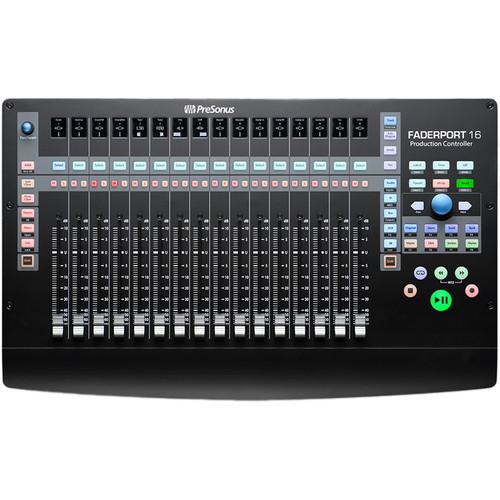
Product description The PreSonus Faderport 16 is a 16-channel mix production controller featuring 16 long-throw 100mm touch-sensitive, motorized faders and 16 digital scribble-strip displays. Navigation, automation, and channel controls make mixing and getting around your favorite DAW fast and easy with compatibility for virtually any DAW host for Mac OS X or Windows. The controller supports HUI and Mackie Control emulations plus native control of Studio One.Full transport controls are provided, as is footswitch functionality for start and stop (footswitch available separately). From general session operations—such as solo/mute clear to marker creation and locate functions—there are plenty of ways to speed up your workflow. Simply connect the supplied USB cable and external power supply to the Faderport 16, then power it up and never go back to mixing with a mouse. -
- 16 touch-sensitive, 100mm long-throw, motorized faders
- 16 high-definition digital scribble-strip displays
- Complete Transport Controls: Play, Stop, Fast Forward, Rewind, Record, Loop, and Return to Zero
- Drop Marker, Next/Prev Marker, Next/Prev Event
- General Session Controls: Undo/Redo, Arm All, Solo/Mute Clear, Track Management, Click On/Off with tap tempo
- Session Navigator provides quick control via Track Scroll, Channel Bank, Timeline Scroll, and much more
- Channel Controls: Level, Pan, Solo, Mute, Rec Arm
- Automation Controls: Touch, Latch, Trim, Write, Read, Off
- Optional Fader Functionality: Plug-In Edit, Bus Sends, Pan
- Compatible with Mac OS X and Windows
- Native Studio One support and HUI and Mackie Control Universal emulation
- Footswitch input for hands-free start/stop
- USB 2.0 connectivity
UPC: 673454006272 In the Box PreSonus Faderport 16 - Mix Production Controller USB Cable External Power Supply Limited 1-Year Warranty Table of Contents
|
Upload User Manual
Have you got an user manual for the PreSonus Faderport 16 - Mix Production Controller in electronic form? Please send it to us and help us expand our library of instruction manuals.
Thank you, too, on behalf of other users.
To upload the product manual, we first need to check and make sure you are not a robot. After that, your "Submit Link" or "Upload File" will appear.
Technical parametersPreSonus FADERPORT 16 Specs | System Requirements | Mac
OS X 10.8.5 or later (64-bit)
Intel Core 2 Duo processor (Intel Core i3 or faster recommended)
4 GB RAM (8 GB or more recommended)
USB 2.0 port
Internet connection for driver and bundled software installation
Windows
Windows 7 SP1, 8.1, or 10 (all 32-bit or 64-bit)
Intel Core 2 Duo processor (Intel Core i3 or faster recommended)
4 GB RAM (8 GB or more recommended)
USB 2.0 port
Internet connection for driver and bundled software installation
Note: 30 GB hard disk space and 1366 x 768 resolution monitor (high-dpi recommended) required for Studio One | | Host Application Compatibility | Native Mode: PreSonus Studio One 3.5.3
HUI Emulation: Pro Tools 12
Mackie Control Emulation: Logic 10.4, Cubase 9.4, Ableton 9.7+, Sonar, and more | | Faders | Quantity: 16
Throw: 3.9" / 100 mm
Type: Touch-sensitive and motorized
Resolution: 10-bit, 1024 steps | | Display | 16 x high-definition digital scribble-strip displays | | Transport Controls | Play, Stop, Fast Forward, Rewind, Record, Loop, Return to Zero | | Controls | Markers: Drop Marker, Next/Prev Marker, Next/Prev Event
General Session Controls: Undo/Redo, Arm All, Solo/Mute Clear, Timecode, Track Management, Click On/Off, four programmable User buttons, eight Function buttons, Macro, Parameter Link, Bypass
Session Navigation: Track Scroll, Channel Bank, Timeline Scroll, Horizontal Zoom, Vertical Zoom, Scrub, Nudge
Channel Controls: Level, Pan, Solo, Mute, Rec Arm
Automation Controls: Touch, Latch, Trim, Write, Read, Off
Optional Fader Functionality: Plug-In Edit, Bus Sends, Pan
Window View: Mix, Project, Transport, Undo
Console Management: Show/Hide: Audio Tracks, Inputs, MIDI Tracks, Buses, Outputs, VCAs, FX, Show All | | Footswitch Input | 1 x 1/4" jack | | USB | USB 2.0 Type-B | | Power Requirement | 12 VDC, 1.2 A external power supply (included) | | Dimensions (H x D x W) | 2.1 x 11.9 x 19.6" / 53.6 x 302.3 x 497.8 mm | | Weight | 8 lb / 3.6 kg | | | | Package Weight | 12.35 lb | | Box Dimensions (LxWxH) | 24.2 x 16.0 x 4.9" |
Rating80% users recommend this product to others. And what about you?

This product has already been rated by 95 owners. Add your rating and experience with the product.
Discussion
 Ask our technicians if you have a problem with your settings,
or if anything is unclear in the user manual you have downloaded.
You can make use of our moderated discussion.
The discussion is public and helps other users of our website who may be encountering similar problems.
Ask our technicians if you have a problem with your settings,
or if anything is unclear in the user manual you have downloaded.
You can make use of our moderated discussion.
The discussion is public and helps other users of our website who may be encountering similar problems.
Post new comment to PreSonus Faderport 16 - Mix Production Controller
| Subject: Faderport 16 Documentation | | Date: 18.04.2022 06:34:44 | Name: SCOTT C DYAR | | checking the type of AUX and Monitor Sends available | | Post reply |
Post a new topic / query / comment:
|
|


