User Manual for QNAP TS-431P 16TB 4-Bay NAS Enclosure Kit with Seagate NAS Drives Click to enlarge the picture
 Contents of the user manual for the QNAP TS-431P 16TB 4-Bay NAS Enclosure
- Product category: Network Attached Storage Drives QNAP
- Brand: QNAP
- Description and content of package
- Technical information and basic settings
- Frequently asked questions – FAQ
- Troubleshooting (does not switch on, does not respond, error message, what do I do if...)
- Authorized service for QNAP Network Attached Storage Drives
|
User manual for the QNAP TS-431P 16TB 4-Bay NAS Enclosure contain basic instructions
that need to be followed during installation and operation.
Before starting your appliance, the user manual should be read through carefully.
Follow all the safety instructions and warnings, and be guided by the given recommendations.
User manual is an integral part of any QNAP product,
and if it is sold or transferred, they should be handed over jointly with the product.
Following the instructions for use is an essential prerequisite for protecting
health and property during use, as well as recognition of liability on the part of the manufacturer
for possible defects should you make a warranty claim. Download an official QNAP user manual in which you will find instructions on how to install, use, maintain and service your product.
And do not forget – unsuitable use of a QNAP product will considerably shorten its lifespan!
|
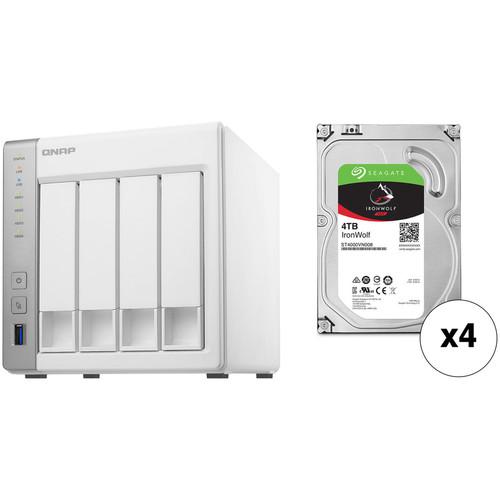
Product description This Kit combines the QNAP TS-431P 4-Bay NAS Enclosure with four Seagate 4TB IronWolf 5900 rpm SATA III 3.5" Internal NAS HDDs for a total storage capacity of 16TB. - QNAP TS-431P 4-Bay NAS Enclosure The TS-431P 4-Bay NAS Enclosure from QNAP is a powerful, yet affordable 4-bay NAS for middle-end small and home offices that can be used for backup, synchronization, remote access, and home entertainment with many feature-rich apps available, including Notes Station, QmailAgent, and Qcontactz. Its four drive bays are capable of supporting 3.5" SATA III (6 Gb/s) and SATA II (3 Gb/s) hard drives, as well as 2.5" SATA III (6 Gb/s) and SATA II (3 Gb/s) hard drives and SSDs.
The TS-431P runs on the QTS 4.2 operating system, which is a browser-based operating system which helps to simplify managing your QNAP NAS. Its CPU is a dual-core 1.7 GHz ARM Cortex A15, fabricated by AnnapurnaLabs, and its 1GB of DDR3 RAM allows frequently-used files and applications to be quickly accessed. The NAS is capable of achieving read speeds of up to 223 MB/s and write speeds of up to 172 MB/s, as well as transfer speeds of over 190 MB/s with AES 256-bit full NAS volume encryption. It features three USB 3.0 ports Type-A which allows it to be connected to your Windows, Mac, or Linux/UNIX system. Network connectivity is achieved via two integrated Gigabit Ethernet ports, with link aggregation to increase the total data transmission potential. Failover and dual IP are also supported to ensure continuous system operations, and data may also be made remotely available through the free iOS and Android applications.
The TS-431P is engineered for quiet operations, generating 19.5 dBA at low speeds. It operates on 100-240 VAC and includes two Ethernet cables, flathead screws for 3.5" and 2.5" drives, a power adapter, and a power cord. It is protected by a limited 2-year warranty. General Features - Dual-Core Processor Delivers High Performance
- Equipped with an AnnapurnaLabs Alpine AL-212 dual-core 1.7 GHz Cortex-A15 processor and 1GB DDR3 RAM, the TS-431P is a high-performance NAS for home, workgroups, and SOHO users, providing performance of up to 223 MB/s read & 172 MB/s write throughput. The TS-431P's enhanced hardware-based encryption and decryption engine provides transfer speeds of over 190 MB/s with AES 256-bit full NAS volume encryption, boosting system performance & security while helping to ensure the safety of sensitive personal data stored in the NAS. When used with a compatible 802.11ac or dual-band 2.4/5 GHz 802.11n USB Wi-Fi adapter, the TS-431P becomes a media center with high speeds for transferring a large amount of files and streaming bandwidth-intensive multimedia.
- QTS - Simple and Efficient
- Thanks to the intuitive user interface of QTS, your NAS experience is smarter and smoother. Its modern flat design streamlines loading times, and the intelligent desktop allows you to find desired functions quickly, create desktop shortcuts or group shortcuts, monitor important system information on a real-time basis, and open multiple application windows to run multiple tasks concurrently, bringing greater working efficiency. QTS breaks the barriers of devices, platforms, and geography to bring optimized cloud experiences to you.
- High Efficiency with Dual LAN Support
- The TS-431P supports multiple port-trunking modes, enabling administrators to set up link aggregation to help increase total data transmission potential. Failover and dual IP are also supported to help ensure continuous system operations. Supported port-trunking modes include: Balance-rr (Round-Robin), Active Backup, Balance XOR, Broadcast, IEEE 802.3ad, Balance-tlb (Adaptive Transmit Load Balancing), and Balance-alb (Adaptive Load Balancing).
- QmailAgent
- QmailAgent is an online email client that helps you manage multiple email accounts, allowing you to access all of your emails and to easily switch between different accounts. It provides complete functionality for composing, reading, and organizing emails. You can even attach files, photos, and documents from the TS-431P when composing emails. iOS and Android users can use the QmailClient app to quickly check multiple email accounts with mobile devices, and to browse & send emails using the QmailAgent on their TS-431P. You can use QmailAgent together with Qsirch, which supports searching through the .eml files stored on the TS-431P, to make searching through and managing massive amounts of emails much easier.
- Qcontactz
- Qcontactz with the high-capacity TS-431P helps you centrally store and manage contact information for colleagues, business partners, families, and friends. Other features include: importing from Google accounts, importing/exporting CSV or vCARD 3.0 files, automatic identification of frequently-used contacts, encryption for sensitive/confidential contact information, smart searching, and more. Qcontactz offers snapshot backups that enable you to revert to a previous version of your contacts list according to your needs. A companion app for Android phones and iPhone is also available for easy access to contacts. Qcontactz can also be used with QmailAgent to create email workflow environments.
- Backup Solutions to Secure Data
- The TS-431P is a comprehensive centralized backup center for multiple files. The front panel USB port features a one-touch-copy function for you to instantly back up data on USB drives to the TS-431P or alternatively to back up data from the TS-431P to USB drives. You can use QNAP NetBak Replicator to back up files on Windows (including Outlook email archiving) to the TS-431P, or use Time Machine for Mac data backup. A wide range of third-party backup software (such as Acronis True Image and Symantec Backup Exec) are also supported to facilitate system backup and restoration.
- Disaster Recovery Solutions
- Hybrid Backup Sync consolidates backup, restoration, and synchronization functions (using RTRR, rsync, FTP, CIFS/SMB) into a single app for easily transferring data to local, remote, and cloud storage spaces as a comprehensive data storage and disaster recovery plan. Supported cloud services include Amazon Glacier, Azure Storage, Google Cloud Storage, Google Drive, Microsoft OneDrive, Dropbox, Amazon Drive, Yandex Disk, Box, and Amazon S3/OpenStack Swift/WebDAV compatible services. Hybrid Backup Sync supports multi-version backup, flexible job scheduling, and file compression to save storage space, and more.
- Comprehensive Security Options
- In open network environments, business data may be exposed in a potential hack. The TS-431P provides numerous security options, such as encrypted access, IP blocking, 2-step verification, and more. Administrators can also control the access rights of each user to different folders, preventing unauthorized access to important files. The TS-431P supports AES 256-bit encryption, preventing sensitive business data from unauthorized access and breach even if the hard drives or the entire system were stolen.
- Cross-Platform File Sharing, Centralized Data Storage
- The TS-431P supports SMB/CIFS, NFS, and AFP protocols for file sharing across Windows, Mac, and Linux/UNIX networks. Data, logs, and ISO images of CDs and DVDs can be centrally stored on the TS-431P.
- Manage Your Files via the Internet
- File Station brings conventional desktop-style file operations to web browsers, allowing you to upload, download, and manage files on your TS-431P wherever there is an Internet connection. Supporting file extraction, folder creation, and smart search for files and folders, File Station also allows you to easily share files via unique URLs protected with reliable security features, SSL, and password options. You can even directly browse and transfer files between the TS-431P and public cloud services like Google Drive, Dropbox, Microsoft OneDrive, Box, Yandex Disk, and Amazon Drive, open office files directly with a Google Chrome office extension, and also view your files on Google Docs or Office Online.
- Container Station - LXC and Docker Containers Inclusive
- QNAP Container Station exclusively integrates LXC and Docker lightweight virtualization technologies, allowing you to operate multiple isolated Linux systems on the TS-431P, as well as download apps from the built-in Docker Hub Registry. It supports container import/export, permission settings, and an Online Document app for directly viewing, editing, and storing files of various types on your NAS (including Office documents, images, and text files). An informative dashboard and flexible user interface guides you in managing multiple containers, allowing you to enjoy the playground of virtual containers with the TS-431P.
- Private Cloud
- In contrast to the limited storage space and potential security concerns of public cloud services, the TS-431P is advantageous for establishing a secure and large-capacity private cloud where you have full control over how your data is used and transmitted. The myQNAPcloud service allows remote access to files stored on the TS-431P, allowing you to play & share multimedia from the TS-431P or to conveniently check the system status from almost anywhere.
- File Synchronization Across Multiple Devices
- Qsync turns your TS-431P into a safe, high-capacity data center for file synchronization. Any file uploaded to the TS-431P will be made available for all linked devices, such as computers, laptops, or mobile devices. Qsync is especially useful for frequent travelers to manage files and always have the most up-to-date files on different devices. Qsync provides multiple ways for file synchronization and group file sharing, greatly enhancing the flexibility of team projects and collaboration.
- Comprehensive Surveillance Solution
- Surveillance Station is a professional network surveillance Video Management System (VMS) that offers a user-friendly management interface, over 3,000 compatible IP camera models, and expandable IP camera channel licenses. It supports real-time monitoring, video, and audio recording and playback with a wide range of customizable settings. You can also install the Vmobile app on your iOS or Android devices to manage the monitored channels anytime and anywhere, or install the Vcam mobile app to turn your device into a network camera to instantly record to your TS-431P. The TS-431P offers 2 free IP camera channels, and you can expand up to 25 channels by purchasing additional licenses.
- Photo Station
- Photo Station makes photo sharing simple, and you can designate your own access right controls. Simply upload your photos to the TS-431P to create & organize your photo albums through a web browser, and share with your family and friends through social networking sites such as Facebook, Google+, Twitter, and Pinterest. With the Qfile and Qphoto mobile apps (for iOS and Android), you can also instantly upload your new photos from your mobile device to the TS-431P.
- Music Station
- Music Station helps categorize your music collection and displays album covers to easily organize your personal playlists. Through the Music Station web player, you can enjoy your music virtually anytime and anywhere with a few clicks. Thousands of local and global online Internet radio programs are also built-into the Music Station for you to enjoy.
- Stream via Airplay and DLNA for music throughout your home.
- Listen to your favorite songs streamed from iTunes Server or play music via web browsers on your PC.
- Listen to your music on mobile devices using the Qmusic app.
- Multi-Zone Multimedia Control
- Use your TS-431P as a multi-zone multimedia system to fill every corner of your house with your choice of media. You can centrally manage and stream photos, music, and videos from the TS-431P to different rooms from a single device using Bluetooth & USB devices connected to the TS-431P (music streaming only), DLNA, Apple TV, and Chromecast. Every room member in different zones can enjoy the convenience and simplicity for media playback and multimedia storage. The TS-431P is also a powerful streaming machine with DLNA, Roku, Amazon Fire TV, and Google TV support with the support of Plex Media Server.
- 24/7 Download Center
- The TS-431P is also a download center for high-speed BT, Magnet, PT (Private Trackers), FTP/FTPS, and HTTP/HTTPS downloads, and supports loading RSS feeds. After you have finished setting your download tasks, you can turn off your computer and the TS-431P will silently finish downloading them. By installing the Qget app in your mobile devices, you can easily search download sources, download contents to the NAS, and manage download tasks on mobile devices from anywhere.
- Access and Enjoy with Tablets and Smartphones
- The TS-431P is your private cloud storage that virtually enlarges the capacity of your mobile devices. Qfile allows you to access, upload, download, manage, and share NAS files as if you are carrying all of them in your pocket. If Qfile is installed on an iOS device, users can also browse videos & photos stored on the TS-431P and play via Apple TV. Qmanager lets you monitor & manage the TS-431P remotely and efficiently without turning on your PC. You can take and share digital notes with Qnotes, and enjoy and share music, photos, and videos on the TS-431P anywhere and anytime with Qmusic, Qphoto and Qvideo apps.
- Install-on-Demand Apps to Extend NAS Functionality
- The built-in App Center provides various install-on-demand apps developed by QNAP and third-party developers, including tools for backup/sync, business, content management, communications, download, entertainment, and much more. It is also a centralized location for managing & updating installed apps, adding potentially limitless opportunities for the TS-431P.
- Energy-Saving Design
- The TS-431P features an energy-efficient dual-core ARM processor that maintains high performance in system operations and is suitable for an always-online personal cloud without running up a high electricity bill. Additional energy-saving features include hard disk standby, scheduled power on/off, and Wake-on-LAN.
- NAS Management Tools
- Instant Alert Notifications
With the SMTP and SMS settings on the Turbo NAS, system administrators will get notifications via SMS or email if an error occurs.
Resource Monitor
Easily monitor CPU, memory, disk, and network bandwidth usage, as well as currently-running Turbo NAS apps and services.
Wake-on-LAN
Administrators can turn on the Turbo NAS via LAN to save energy and improve security.
Scheduled Power on/off
Administrators can flexibly set up the time of powering on/off the Turbo NAS, with a maximum of 15 schedules for setting powering on, off, or rebooting.
S.M.A.R.T. & Advanced Hard Drive Health Scan (HHS)
The Turbo NAS supports HDD S.M.A.R.T. (Self-Monitoring Analysis and Reporting Technology) which monitors the hard drive status, and sends out email notifications for administrators to take action. The HHD Health Scanning technology can also examine hard drive status and prevent possible data loss.
Comprehensive Event Logs
The Turbo NAS supports Syslog server that collects logs from various connected devices over the Internet and saves the data, enabling centralized log management with greater efficiency. UPC: 885022011834 - 4 x Seagate 4TB IronWolf 5900 rpm SATA III 3.5" Internal NAS HDD Designed for use in 1-8 bay NAS environments within home, SOHO, and SMB environments, the 4TB IronWolf 5900 rpm SATA III 3.5" Internal NAS HDD from Seagate is built to withstand 24x7 operations, or 8760 hours per year. This 4TB drive has been equipped with a SATA III 6 Gb/s interface, a rotational speed of 5900 rpm, a 3.5" form factor, and a 64MB cache, providing users with an ample storage capacity and data transfer speeds of up to 180 MB/s. This IronWolf hard drive also has an MTBF rating of 1 million hours, 600,000 load/unload cycles, 1 in 1014 non-recoverable read errors per bits read, and a workload rate of up to 180TB per year. Protection is provided by a limited 3-year warranty.
General Features - Optimized for NAS with AgileArray
- AgileArray is built for dual-plane balancing and RAID optimization in multi-bay environments with advanced power management
- Reduced Lag Times
- Improved performance means reduced lag times or downtime for users during high traffic time for the NAS
- IronWolf Health Management
- IronWolf Health Management focuses on prevention, intervention, and recovery
- Rotational Vibration (RV) Mitigation
- IronWolf comes standard with RV sensors to maintain high performance in multi-bay NAS enclosures
- Multi-User Environments
- IronWolf provides a workload rate of 180TB per year
- Cache Memory
- IronWolf provides 64MB of cache memory, allowing your NAS to serve data faster
- 1.0 Million Hours MTBF | Limited 3-Year Warranty
- This represents an improved total cost of ownership (TCO) over desktop drives with reduced maintenance costs
- Designed for 24x7 Performance
- Access your data on your NAS at virtually any time, whether remotely or on site
Best-Fit Applications - 1-8 bay business network attached storage (NAS)
- Desktop RAIDs and servers
- Multimedia server storage
UPC: 763649117538 In the Box - TS-431P 4-Bay NAS Enclosure eryytuwbxevfyzbddaswdbzswssdxteqtdrs
- 2 x Ethernet Cables
- Flathead Screws for 3.5" HDDs
- Flathead Screws for 2.5" HDDs
- Power Adapter
- Power Cord
- Limited 2-Year Warranty
- 4 x Seagate - 4TB IronWolf 5900 rpm SATA III 3.5" Internal NAS HDD
Table of Contents
|
Upload User Manual
Have you got an user manual for the QNAP TS-431P 16TB 4-Bay NAS Enclosure Kit with Seagate NAS Drives in electronic form? Please send it to us and help us expand our library of instruction manuals.
Thank you, too, on behalf of other users.
To upload the product manual, we first need to check and make sure you are not a robot. After that, your "Submit Link" or "Upload File" will appear.
Technical parameters - QNAP TS-431P 4-Bay NAS Enclosure
| | | Number of Bays | 4 x 2.5"/3.5" | | Media Card Slots | None | | Connections | 2 x RJ45 (Gigabit Ethernet)
3 x USB Type-A (USB 3.1 Gen 1 (5 Gb/s)) | | Compatible Drive Interface | SATA III | | Hot-Swap Support | Yes | | | | Total Raw Capacity | None | | Type | None | | Flash Memory | 512 MB NAND | | | | Processor | ARM Cortex-A15 Dual-Core | | Clock Speed | Base: 1.7GHz | | Total Installed Memory | 1 GB DDR3 | | | | Supported Protocols | AFP
CIFS/SMB
FTP
FTPS
HTTP
HTTPS
IPv4
IPv6
L2TP/IPSec
NFS
OpenVPN
PPTP
SFTP
SMSC
SMTP
SNMP
SSH
Telnet
iSCSI | | iSCSI LUN | 256 | | iSCSI Target | 256 | | | | Installed Operating System | QTS 4.2 | | File System Formats Supported | External: EXT3, EXT4, FAT32, HFS+, NTFS
Internal: EXT4 | | Supported Browsers | Chrome, Firefox, Internet Explorer, Safari | | Supported Languages | Brazilian Portuguese
Czech
Danish
Dutch
English
Finnish
French
German
Greek
Hungarian
Italian
Japanese
Korean
Norwegian
Polish
Romanian
Russian
Simplified Chinese
Spanish
Swedish
Thai
Traditional Chinese
Turkish | | | | Power Consumption | 26.7 W (Typical)
11.65 W (Standby) | | Power Source | AC Adapter | | AC Input Power | 100 to 240 VAC, 50 / 60 Hz | | DC Input Power | 90 VDC | | | | Encryption | 128-Bit AES, 256-Bit AES | | Security Features | Kensington Security Slot | | VPN Server Connections | 30 | | | | Operating Temperature | 32 to 104°F / 0 to 40°C | | Operating Humidity | 5 to 95% | | | | Cooling | 1 x PWM 120 mm Fan | | Noise Level | 19.5 dBA | | Status Monitoring | LED Indicator | | Dimensions | 6.7 x 6.3 x 8.6" / 168.9 x 160.0 x 218.9 mm | | Weight | 6.6 lb / 3.0 kg | | | | Box Dimensions (LxWxH) | 12.6 x 12.0 x 9.9" | - 4 x Seagate 4TB IronWolf 5900 rpm SATA III 3.5" Internal NAS HDD
| | | Drive Capacity | 4.0 TB | | Cache Memory | 64 MB | | | | Interface | SATA III (6 Gb/s) | | Maximum Read Speed | 180 MB/s | | | | Drive Type | HDD | | Form Factor | 3.5" | | Noise Level | 2.3 dB (Idle)
2.5 dB (Active) | | | | Spindle Speed (RPM) | 5900 RPM | | | | Encryption | None | | Endurance (Total Bytes Written) | 180 TB | | Load/Unload Cycles | 600,000 | | Mean Time Between Failures (MTBF) | 1.0 Million Hours | | Non-Recoverable Read Errors per Bits Read | 1 in 1015 | | | | Power Draw | 4.8 W (Active)
3.95 W (Idle)
0.5 W (Standby) | | Supported Voltage | 5 VDC, 12 VDC | | Current | 2.0 A at 12 VDC | | | | Operating Shock | 80 G / 2.0 ms | | Storage Shock | 300 G / 2.0 ms | | Operating Temperature | 41 to 158°F / 5 to 70°C | | Storage Temperature | -40 to 158°F / -40 to 70°C | | | | Dimensions (W x H x D) | 4.0 x 1.0 x 5.8" / 101.8 x 26.2 x 147.1 mm | | Weight | 1.3 lb / 610.1 g | | | | Box Dimensions (LxWxH) | 7.9 x 6.0 x 2.5" |
Rating70% users recommend this product to others. And what about you?

This product has already been rated by 21 owners. Add your rating and experience with the product.
Discussion
 Ask our technicians if you have a problem with your settings,
or if anything is unclear in the user manual you have downloaded.
You can make use of our moderated discussion.
The discussion is public and helps other users of our website who may be encountering similar problems.
Ask our technicians if you have a problem with your settings,
or if anything is unclear in the user manual you have downloaded.
You can make use of our moderated discussion.
The discussion is public and helps other users of our website who may be encountering similar problems.
The discussion is empty - enter the first post
Post a new topic / query / comment:
|
|


