User Manual for QNAP VioStor CMS VSM-2000 Server Click to enlarge the picture
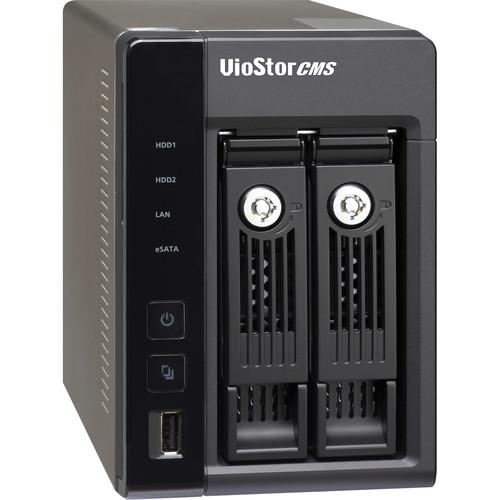 Contents of the user manual for the QNAP VioStor CMS VSM-2000 Server
- Product category: NAS Enclosures QNAP
- Brand: QNAP
- Description and content of package
- Technical information and basic settings
- Frequently asked questions – FAQ
- Troubleshooting (does not switch on, does not respond, error message, what do I do if...)
- Authorized service for QNAP NAS Enclosures
|
User manual for the QNAP VioStor CMS VSM-2000 Server contain basic instructions
that need to be followed during installation and operation.
Before starting your appliance, the user manual should be read through carefully.
Follow all the safety instructions and warnings, and be guided by the given recommendations.
User manual is an integral part of any QNAP product,
and if it is sold or transferred, they should be handed over jointly with the product.
Following the instructions for use is an essential prerequisite for protecting
health and property during use, as well as recognition of liability on the part of the manufacturer
for possible defects should you make a warranty claim. Download an official QNAP user manual in which you will find instructions on how to install, use, maintain and service your product.
And do not forget – unsuitable use of a QNAP product will considerably shorten its lifespan!
|
Product description The VioStor CMS VSM-2000 Server from Qnap is a Linux-embedded turnkey solution to centrally monitor, manage, and configure distributed Network Video Recorders (NVRs), cameras, and events at multiple locations. A unified platform for projects of various sizes, it is designed to help those with the following roles to manage projects easily and efficiently:
Control center operators or managers can maintain overall control of areas for which they are responsible, receive event notifications, and respond in a timely manner when events occur Event examiners can retrieve video footage of events efficiently Project installers can configure the system quickly and intuitively, with less time for setup
The VSM-2000 is powered by an Intel Dual-Core processor, which will allow you to run multiple functions simultaneously. It has two hot-swappable hard drive bays that can support both 2.5" and 3.5" drives, with capacities up to 4TB per bay. In terms of licenses, it supports a base number of 64 user licenses, with a maximum of 1,024 user licenses. Network connectivity is achieved using the dual Gigabit Ethernet ports.
The VioStor CMS VSM-2000 Server operates on 110~240VAC and consumes 25W. Included with this server are 2 x Ethernet cables, 8 x 3.5" HDD flat head screws, 6 x 2.5" HDD flat head screws, a hard disk lock, a power cord, and an AC adapter. - Turnkey Solution
- QNAP CMS server is a Linux-embedded turnkey solution, with other needed services built-in, such as database SQL server. This makes the installation of the QNAP VioStor CMS user-friendly and intuitive - just run the CMS server Quick Configuration, install the CMS client software on a PC, and you're ready to log into CMS server from the CMS client
- Centralized Event Management
- At big sites, a large number of cameras, devices, recording servers, etc. are usually distributed widely at great intervals. This can be a challenge for control center operators to monitor the status of all devices, especially when an event occurs.
VioStor CMS helps overcome the challenge by providing several features such as E-map based event alert:
When an event occurs, there will be red indicators on the e-map to show the event location. By double-clicking the camera icon, live video of the event will pop out. The e-map layers are also unlimited and e-map links are multi-directional - Centralized Device Management
- One of the most challenging tasks in a large project is the configuration of numerous NVRs and cameras. VioStor CMS helps the project installer to monitor and configure the devices in the system easily from a central location. This helps to reduce set-up time and enhance efficiency
- Flexible Central Monitoring
- In a large-scale project, a great number of camera channels need to be displayed on several monitors. Control center operators need a flexible, customizable tool to help them monitor these many channels, and quickly focus on the specific channels.
VioStor CMS has a customizable monitoring layout, which allows the users to freely mix and match e-map and camera videos in different slots of a view. Each slot can include multiple camera videos to form a sequence. By doing so, the non-critical channels can all be displayed in sequential mode, while keep the critical channels always displayed - Online License Scalability
- VioStor CMS is compatible with QNAP NVRs with firmware version 4.1.0 or above. The number of channel licenses can be increased online as the project grows. This provides more flexibility to the project designers and installers
UPC: 885022004799 In the Box QNAP VioStor CMS VSM-2000 Server Power Cord Table of Contents
|
Upload User Manual
Have you got an user manual for the QNAP VioStor CMS VSM-2000 Server in electronic form? Please send it to us and help us expand our library of instruction manuals.
Thank you, too, on behalf of other users.
To upload the product manual, we first need to check and make sure you are not a robot. After that, your "Submit Link" or "Upload File" will appear.
Technical parametersQNAP VSM-2000 Specs | | | Model Name | VSM-2000 | | Number of Licenses | Base: 64
Maximum: 1,024 | | HDD | Maximum 4TB per HDD
2 x Hot-swappable HDD and lockable tray (2.5" or 3.5") | | CPU | Intel Dual Core | | Operating System | Linux Embedded | | Ethernet Ports | 2 x Gigabit RJ-45 Ethernet ports | | Voltage | 110 ~ 240 V AC | | Power Consumption | 25 W | | Operating Temperature | 32 to 104°F / 0 to 40°C | | Operating Humidity | Relative Humidity: 5 ~ 95% non-condensing
Wet Bulb: 81°F / 27°C | | Languages | Czech / Danish / Dutch / English / French / Finnish / German / Hungarian / Italian / Japanese / Korean / Norwegian / Polish / Portuguese / Russian / Spanish / Swedish / Simplified Chinese / Traditional Chinese | | Dimensions | 5.91 x 4.02 x 8.50" / 150.11 x 102.11 x 215.90 mm | | Weight | Net weight: 3.84 lb / 1.74 kg
Gross weight: 6.44 lb / 2.92 kg | | | | Operating System | Linux embedded | | Interface | Web browser: IE, Google Chrome, Firefox | | | | General Settings | System Administration Set the CMS Server Name and System Port Enable Secure Connection (SSL): when SSL is enabled, the users can only connect to the CMS via the https connection
Date and Time Setup Time Zone, Date Format Time Setting: Manual Setting, Synchronize with an Internet Time Server (NTP) automatically, Set the server time the same as the computer time
Daylight Savings Time Adjust system clock automatically for daylight savings time Enable customized daylight saving time table | | Network | TCP/IP Use static IP address Obtain IP address automatically from DHCP server Enable CMS server as the DHCP server
DDNS Select the DDNS server Enter the username/password/domain name to register with the DDNS provider | | Power Management | Restart, Shutdown Power-on the CMS server automatically after the AC power resumption, or to remain power-off after the power resumption | | Backup / Restore / Reset Settings | Support | | System Logs | System event logs, System connection logs, On-line users | | Firmware Updates | Support | | | | RAID Management | VSM-2000 (2 bays): RAID 0, 1 Online RAID Level Migration without turning off the CMS server RAID Recovery without turning off the CMS server | | HDD Smart | Bad Block Scan & Hard Drive S.M.A.R.T. | | | | System Information | Check the Server Name, Firmware Version, System Up Time, Serial Number | | Resource Monitor | Check the CPU Usage, Memory Usage, Disk Usage, Bandwidth Transfer, Process | | | | Operating System | Windows 7 (64 bits preferred) | | Interface | QNAP CMS client software | | Dashboard | Alarm: alarm input, motion alarm
User account: login error, never login
Hardware status: NVR disconnection, camera disconnection, HDD failure, fan failure | | License | Activate license online
Activate license offline | | Server | Centrally configure up to 128 NVRs. Available configurations made on NVRs:
Shutdown, Reboot, Update firmware, Synchronize settings with NVR Edit IP: assign static IP manually Edit system time: manually set the time zone, automatically synchronize with an Internet time server Edit alert notification: E-mail, SMS settings
The above configurations can be synchronized by grouping devices of the same NVR model | | Camera | Centrally configure up to 1,024 cameras. Available configurations made on cameras:
Edit recording parameters (codec, resolution, FPS), quality Enable audio recording, manual recording Set recording schedule
The above configurations can be synchronized by grouping devices of the same camera model | | Event Management | Centrally receive events from multiple NVRs Event from camera: motion detection, camera I/O Event from hardware: NVR disconnection, camera disconnection, fan failure, HDD failure | | View | Centrally configure the view from multiple NVRs. View layout:
1, 2X2, 3X3, 4X4, 5X5, 6X6, 7X7, 8X8, 1+1+4, 1+5, 1+7, 2+8, 1+11, 1+12, 12+1
View can be managed by creating video group for security guard's easier monitoring
Sequential mode:
Each slot can be composed of multiple camera channels to form a sequential mode The interval between each camera video's display is adjustable | | E-Map | Centrally setup E-maps for multiple NVRs Available E-map format: JPEG, PNG, BMP Device indicators on E-map: NVR, camera, link to other E-maps Unlimited E-map layers Flexible and easy editing of E-map links for multi-directional E-map management | | User Management | Users can be created and assigned to different user group. Each user group can have different permission of:
Feature access: Administrator: System operation, User Management, View Management, E-map Management, Log Out Client Live View: Information, Camera control, Bookmark, Snapshot, Event log Client Playback: Export, Bookmark, Snapshot
Device access: NVR, camera View access E-map access | | Server Log | Sever, System event, NVR event, On-line users | | CMS Server Configuration | Configure SMTP server, SMS server | | | | Quad-Monitor Mode | Primary monitor:
Control Live View, E-map, Playback, and Configuration | | Central Monitor | Connect up to 1,024 camera channels from up to 128 NVRs Display up to 64 camera channels per monitor Display up to 256 camera channels per CMS client PC (depending on PC specification) | | View Layout | 1, 2X2, 3X34, 4X, 5X5, 6X6, 7X7, 8X8, 1+1+4, 1+5, 1+7, 2+8, 1+11, 1+12, 12+1 | | Content List | View, E-map, NVR (camera)
The content list window can be auto hidden, leaving more room to display the camera video | | View Content | Flexible view content of mixed camera videos and E-maps | | Camera Control | Connect to the camera webpage
Snapshot
Enable manual recording
Enable digital zoom
Zoom in
Zoom out
Enable audio input
Enable audio output
Focus near
Focus far
Fit image to window
Keep aspect ratio
PTZ panel
The camera control panel can be auto hidden, leaving more room to display the camera video | | E-Map | When an event occurs, the camera icon will turn to a red indicator to show the event location When you double-click the camera icon, the live view video will pop up to show the instant status Unlimited E-map layers Multi-directional E-map links | | Alarm Mode | When an event happens, the alarm indicator will flash and can be clicked to enter alarm mode.
When enabling alarm mode:
1) The snapshot of the alarm will be shown on the Alarm List. Maximum number of snap shots kept on the Alarm List: 15
2) The log of the alarm will be shown on the Event Log. Maximum number of logs shown on the Event Log: 150
Based on each alarm snapshot and the alarm log, the operators have 4 types of event instant handling options:
1) Open live view
2) Open event playback (30 seconds before and after the event)
3) Go to live view layout
4) Go to e-map layer | | Bookmark | For easier event tracking:
Click Quick Bookmark to place a thin vertical bar on video footage
Click Detailed Bookmark to place a thin vertical bar on video footage and text details accordingly | | Sequential Mode | Each slot can be composed of multiple camera channels to form a sequential mode. Sequential mode can take place only in the selected slots and the interval between each camera video's display is adjustable. Sequential mode can be easily enabled or paused on live view page. | | Shortcut | Up to 5 of the most used view layouts or E-maps can be dragged onto the top of the window for quicker access | | | | Central Playback | Up to 16 channels from 16 NVRs | | View Layout | 1, 2X2, 3X3, 4X4 | | Video Time Frame | Maximum time length is 24 hours and can be cross the other day | | Content List | NVR (camera)
The content list window can be auto hidden, leaving more room to display the camera video | | Video Operation | Play, Pause, Stop, Play rewind, Speed up, Speed down, Play the next frame, Play the previous frame, Enable audio output, Place quick bookmark, Place detailed bookmark, Export video (AVI format), Enable digital PTZ, Zoom in, Zoom out, Fit image to window, Keep aspect ratio, Sync playback, Non-sync playback
Sync playback:
All channels are displayed based on the identical timeslot
Non-sync playback:
Each channel can be assigned to display different timeslot | | | | Number of CMS Client Installations | Unlimited | | Supporting QNAP | NVR Hardware platform: VS-x1xx | | VioStor NVR | NVR Firmware version: v. 4.1.0 |
Rating80% users recommend this product to others. And what about you?

This product has already been rated by 27 owners. Add your rating and experience with the product.
Discussion
 Ask our technicians if you have a problem with your settings,
or if anything is unclear in the user manual you have downloaded.
You can make use of our moderated discussion.
The discussion is public and helps other users of our website who may be encountering similar problems.
Ask our technicians if you have a problem with your settings,
or if anything is unclear in the user manual you have downloaded.
You can make use of our moderated discussion.
The discussion is public and helps other users of our website who may be encountering similar problems.
The discussion is empty - enter the first post
Post a new topic / query / comment:
|
|


