User Manual for QNAP VS-6112 Pro 12-Channel VioStor Tower NVR Click to enlarge the picture
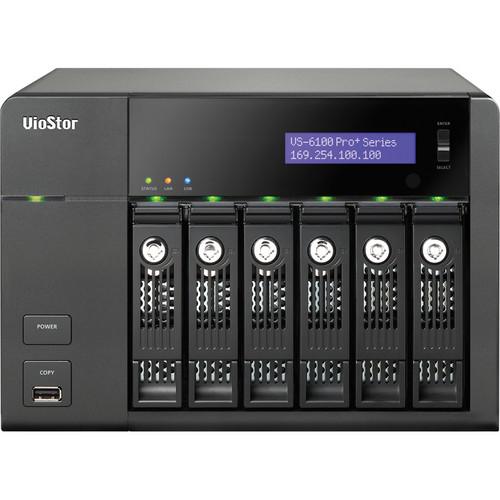 Contents of the user manual for the QNAP VS-6112 Pro 12-Channel VioStor Tower
- Product category: Network Video Recorders (NVRs) QNAP
- Brand: QNAP
- Description and content of package
- Technical information and basic settings
- Frequently asked questions – FAQ
- Troubleshooting (does not switch on, does not respond, error message, what do I do if...)
- Authorized service for QNAP Network Video Recorders (NVRs)
|
User manual for the QNAP VS-6112 Pro 12-Channel VioStor Tower contain basic instructions
that need to be followed during installation and operation.
Before starting your appliance, the user manual should be read through carefully.
Follow all the safety instructions and warnings, and be guided by the given recommendations.
User manual is an integral part of any QNAP product,
and if it is sold or transferred, they should be handed over jointly with the product.
Following the instructions for use is an essential prerequisite for protecting
health and property during use, as well as recognition of liability on the part of the manufacturer
for possible defects should you make a warranty claim. Download an official QNAP user manual in which you will find instructions on how to install, use, maintain and service your product.
And do not forget – unsuitable use of a QNAP product will considerably shorten its lifespan!
|
Product description Powered by the Intel dual-core processor and 4GB of memory, the QNAP Systems Inc. VS-6112 Pro+ 12-Channel VioStor Tower NVR delivers high performance at a throughput rate of 330 Mbps to ensure stable recording and smooth playback of multiple megapixel cameras. The 6-bay, VS-6112 Pro+ is designed for the SMB segment with the features of robust performance, solid reliability, and high-definition local display. The VS-6112 Pro+ has a storage capacity of up to 24TB, with 4TB on each hard drive respectively, to accommodate high-quality H.264, MPEG-4, M-JPEG, and MxPEG recording videos. The server-grade mainboard, Sanyo Denki system fan, and heat pipe with fanless design assure solid reliability for maximized system uptime. Moreover, the VS-6112 Pro+ supports local display via an HDMI cable, with up to 180 fps Full HD 1080p local display by hardware decoding. - All-In-One Recording Functions
- Supports H.264, MPEG-4, M-JPEG, and MxPEG recordings
Continuous, manual, and scheduled recording
Alarm recording (by multiple events), alarm recording schedule
Pre-alarm and post-alarm recording
Audio recording
Auto snapshot 1 Please Note: Different recording schedules for the IP cameras close - Megapixel Recordings
- Supports megapixel recordings (up to 10 Mp) from various IP cameras
- Real-Time Digital Watermarking
- Protects the videos and snapshots from unauthorized modifications
Watermark proof utility is provided to verify whether or not the videos and snapshots are original - Network Surveillance
- Supports different video modes like 1, 4, 6, 8, 9, 10, 12, or 16-channel, dual-display, and sequential display modes
Provides an HDMI port which can be connected to an HDMI monitor or a TV for monitoring in the full HD (1920 x 1080) resolution
Convenient control of PTZ & speed dome cameras allows you to adjust the PTZ cameras as well as view preset positions of the IP cameras on the local display interface
Digital zoom allows you to zoom in and out of the video image, allowing for flexible monitoring and playback
On-screen event alert icons are immediately displayed on the local monitoring page in case any event occurs
Video search by date and time is allowed on the local playback interface
Supports direct local video playback on HDMI monitors or TVs
Features a quick system setup on the local display interface
Cross-platform support lets you view live content and playback recording files on your Windows- or Mac-based PC by using the QNAP Surveillance Client software
With cross-browser compatibility on the Windows PC, you can also use Google Chrome, Microsoft Internet Explorer, or Mozilla Firefox for surveillance
Can be connected to monitor up to 128 channels from other VioStor NVR servers over the LAN or WAN via an IE browser
The PTZ (pan/tilt/zoom) cameras can be directly adjusted by the web user interface of the device
Preset position control and auto-cruising allow you to configure PTZ cameras to cruise according to the preset positions along the time interval for each preset position
When the alarm recording is enabled and an event occurs, an alarm icon will be shown instantly on the monitoring page. The alert details can be viewed by clicking the icon
The E-map function lets you upload digital maps and indicate the locations of the IP cameras of a monitoring location or region
Mobile Surveillance by VMobile enables you to remotely view live content and playback recordings on your portable mobile devices over Wi-Fi, 3G, or 4G
The fisheye dewarping function, available on the web and local display interface for specific fisheye cameras and specific cameras with panomorph lens, assists in doing practical surveillance management, allowing administrators to view the monitored area clearly 2 Please Note: The feature is supported by Google Chrome, Microsoft Internet Explorer, and Mozilla Firefox close - Remote Video Playback
- Using multi-view playback, you can divide a video into multiple sessions equally for playback in a multi-view window and play videos of multiple IP cameras in the multi-view window simultaneously
Quick data search can be performed by date & time, timeline, event, and intelligent video analytics (IVA) such as motion detection, missing object, foreign object, out of focus, camera occlusion, etc - Advanced Event Management
- Allows you to mange several events like motion detection, alarm input, connection failure, recording failure, and other user-defined events
Enables you to handle several actions like video recording, email alert, SMS alert, buzzer, PTZ camera control, alarm output, and other user-defined actions
Real-time SMS and email alert are provided in case of system error or emergencies to the administrator immediately - Backup Solution
- The Scheduled Remote Replication feature enables you to copy the recording data of the local VioStor to a remote QNAP NAS (Network Attached Storage) on the local network
Using the One-Touch Auto-video Backup solution, you can immediately copy the recording data to a compatible USB device - Hardware Design
- Powered by an Intel CPU and DDRIII memory card, the NVR delivers high performance for surveillance applications
Built-in Japanese Sanyo Denki System Fan
The CPU thermal solution uses a fanless design to provide good performance, quiet operation, and enhanced reliability
Linux-based NVR is less vulnerable to virus attacks
Using the Touch-N-Go PC-less installation feature, you can complete the first-time system installation, including hard disk initialization and RAID configuration of the NVR via the LCD panel without using any PC
Supports up to 24TB of physical storage capacity (6 x 4TB hard drives) for recording a large amount of video data over a long period of time - Security Control
- The Authority Management feature lets you create different user groups, i.e., an administrator, a system manager, and a user who can be assigned different rights for having access to monitoring, playback, PTZ control, and audio monitoring
The Auto Log-Off feature allows you to set the timeout period to log off the users when the idling time is over
With Host Access Control, you can specify the host or IP connections that are to be allowed and denied to access the NVR
An online user list allows you to view the record of users currently logged on and those who had previously logged on to the NVR
Detailed event logs offer logs of system warning, hard disk error, network disconnection, UPS status, users' networking services, and recordings access record - High Reliability and Smart Features
- Advanced RAID with hot-swap design offers single disk, RAID 0, RAID 1, RAID 5, RAID 5+hot spare, and JBOD disk configurations due to which a failed drive of a disk volume (RAID 1 or above) can be replaced through hot swapping without turning off the server
Online RAID capacity expansion and online RAID level migration allow you to upgrade the disk configuration to a higher RAID level, retaining the existing data and without turning off the server
S.M.A.R.T. (Self-Monitoring Analysis and Reporting Technology) is used to monitor hard disk status
Supports Advanced HHS (HDD Health Scanning) for disk checking and bad blocks scanning
Includes automatic system startup after a power recovery
DOM Architecture with Embedded Fail-Safe Dual OS for enhanced reliability ensures that 2 operating systems are installed on the DOM, so as to boot the system alternatively
Supports APC, CyberPower, MGE, and YEC UPS devices to provide continuous services 24/7 against unexpected power outages
Video server support - Network Services
- The built-in DDNS support allows you to create a unique registered domain name from a DDNS service provider for use with the NVR
The built-in NTP server uses the NTP (Network Time Protocol) to synchronize the date and time of the network cameras with that of the NVR
You can conveniently access the recording data on the NVR through the Network Neighborhood (SMB / CIFS), Web File Management (HTTP), or FTP server - Easy Configuration and Management
- Can be set up in 6 simple steps via the local display or web-based interface (Internet Explorer)
All the system configurations, monitoring, and playback features can be managed by the web-based interface
With the intelligent software utility finder, you can quickly search IP cameras and configure system settings on the local network UPC: 885022003846 In the Box QNAP VS-6112 Pro+ 12-Channel VioStor Tower NVR Limited 2-Year Warranty Table of Contents
|
Upload User Manual
Have you got an user manual for the QNAP VS-6112 Pro 12-Channel VioStor Tower NVR in electronic form? Please send it to us and help us expand our library of instruction manuals.
Thank you, too, on behalf of other users.
To upload the product manual, we first need to check and make sure you are not a robot. After that, your "Submit Link" or "Upload File" will appear.
Technical parametersQNAP VS-6112 Pro+ Specs | Operating System | Linux-embedded | | Supported IP Cameras | Maximum Number of Supported IP Cameras/Channels(recording) : 12 | | Memory | 4 GB RAM | | HDD Storage Capacity | 6 x 3.5" SATA 6 Gb/s, SATA 3 Gb/s hard drive | | HDD Tray | 6 x hot-swappable and lockable tray | | Recording Mode | Continuous/ manual/ schedule recording
Alarm recording/ multiple alarm recording schedules | | Buffer Storage for Alarm Images | Pre-recording: Up to 300 sec
Post-recording: Up to 300 sec | | Recording Performance | Up to 30 fps at 1080p,720p,VGA for each channel Real performance may vary in different environments | | Megapixel Recording | Supports megapixel cameras (up to 10 megapixel) | | Network Throughput | 330 Mbps | | File Format | AVI (QNAP codec is required for playback) | | Recording Enhancements | Real-time digital watermarking, auto snapshot | | Display Mode | 12 display mode, sequential display mode | | Hardware | Decode: Full HD 1080p 180 fps | | LAN Port | 2 x Gigabit RJ-45 Ethernet port | | Buttons | Power button, one-touch-auto-video-backup button, Reset button | | LCD Panel | Mono LCD display with backlight
Enter button, Select button for configuration | | Alarm Buzzer | System warning | | Audio | Audio In/Out (reserved) | | Form Factor | Tower | | Operating Temperature | 32 to 104˚F (0 to 40˚C) | | Operating Humidity | 0 to 95% R.H. | | Power Supply | Input: 100 to 240 VAC, 50/60 Hz, Output: 250 W | | Power Consumption | In Operation: 91 W (with 6 x 2 TB HDD installed) | | Multi-server Monitoring | Up to 128 channels | | Video Output | 1 x HDMI
Suggested video output resolution: 1920 x 1080 (Full HD) | | Video Compression Format | IP camera: H.264, MPEG-4, M-JPEG, & MxPEG | | Network Throughput | Maximum Tested
330 Mbps Based on QNAP's laboratory tests. Actual performance may vary depending on the network environment. | | Megapixel Recording | Up to 10 Mp | | Playback | 16-multi-view | | Intelligent Video Analytics | Motion detection, missing object, foreign object, out of focus, and camera occlusion | | Hard Drive Support | 6 x 3.5" SATA, 2.5" SATA, and SSD The standard system is shipped without hard disk drives. | | Raw | Maximum Capacity
24 TB (6 x 4 TB hard drives) | | RAID | RAID 0, 1, 5, 5+hot spare, 6, 6+hot spare | | Processor | Dual-core Intel CPU | | Number of Ports | 2 Gigabit LAN ports | | USB Ports | 2 x USB 3.0 port (Back: 2)
5 x USB 2.0 port (Front: 1; Back: 4)
Support pen drive, USB mouse, USB keyboard, USB sound card, and USB UPS etc. | | Local Monitoring Enhancement | Full screen display, event notification, PTZ control, digital zoom | | Local Playback | Single view playback from local NVR server | | Playback Control | For Local Display & QNAP Surveillance Client for Mac: Play, pause, stop, reverse play, next/ previous video file, different speed control | | Playback Enhancement | For Local Display & QNAP Surveillance Client for Mac: Full screen display, digital zoom | | Export | Convert multiple recording files to Mac device instantly | | Search Modes | For Local Playback: By date & time
For Remote Playback (Windows): By date & time, timeline, event, and intelligent video analytics (IVA)
For QNAP Surveillance Client for Mac: By date & time | | Export | Convert multiple recording files to the external USB device instantly | | System Administration | Quick configuration, administration password, network settings, time settings, disk volume configuration, camera settings | | Display Mode | 1, 4, 6, 8, 9, 10, 12, 16, 20, 25, 36,42 or 64-channel display, sequential mode, multi-display mode | | Video Compression | H.264/ MPEG-4/ M-JPEG/ MxPEG (depending on the camera models) | | Video Setting | Resolution, quality, frame rate | | Multi-server Monitoring | Up to 128-channel monitoring from multiple VioStor NVR servers (browser-based) | | Monitoring Enhancement | Full screen display, video snapshot, manual recording, event notification, PTZ control, digital zoom | | E-Map | Uploading the digital maps and indicating the locations of the IP cameras and GPI devices of a monitoring location or region | | Event | Motion detection, alarm input, connection failure, recording failure, and user-defined event | | Action Type | Video recording, email alert, SMS alert, buzzer, PTZ camera control, alarm output, and user-defined action | | Schedule | Remote Replication: Schedule video data backup to a NAS on the local network | | Management | For Authority: Different user groups and rights can be assigned to different users | | Access Control | Specify the connections to be allowed and denied to access the VioStor NVR | | Event Log | Detailed event logs | | Users | On-line Users List: Record of the users currently logged on and previously logged on to the VioStor NVR | | Digital Watermarking | Verify whether or not the videos and snapshots are original | | Disk Management | Single disk, RAID 0, RAID 1, RAID 5, RAID
5+ hot spare, RAID 6, RAID 6+ hot spare, and JBOD/Linear
Online RAID Capacity Expansion, Online RAID Level Migration
HDD S.M.A.R.T., bad blocks scan | | UPS | APC/ CyberPower/ MGE/ YEC (USB UPS) | | Support | HTTP, TCP/IP, SMTP, DHCP, Static IP, DNS, DDNS, FTP, NTP, UPnP, failover, load-balancing, multi-IP setting | | Dual Gigabit LAN | Failover/ load-balancing/ multi-IP setting | | Services | Web File Manager, FTP, SMB/CIFS | | Language Support | Czech, Danish, Dutch, English, French, Finnish, German, Hungarian, Italian, Japanese, Korean, Norwegian, Polish, Portuguese, Russian, Spanish, Swedish, Simplified Chinese, Traditional Chinese, Turkish | | Client PC Operating System | Google Chrome, Internet Explorer, Mozilla Firefox
QNAP Surveillance Client for Windows | | Mac | QNAP Surveillance Client for Mac | | CPU | M-JPEG format (up to 20 channels): Dual core CPU 2.6 GHz or above MPEG-4/ H.264/MxPEG format (up to 20 channels): Quad core CPU 2.6 GHz or above For higher surveillance performance, please select more advanced PC models. | | Client PC Requirement | Memory 2 GB or above Operation System Microsoft Windows Vista/ 7/ 8 or Mac OS X 10.7.x, 10.8.x
Web Browser: Microsoft Internet Explorer 8/9/10 (Windows PC, desktop mode, 32-bit)
Google Chrome 23.0.1271.64 m (Windows PC)
Mozilla Firefox: 17.0.1 (Windows PC)
Network Interface: 10/100/1000 Mbps
Display Resolution: 1280 x 720p or above | | QNAP Finder | The client application to discovery and quick setup of the VioStor NVR | | Utility Software | QNAP Surveillance Client For Windows: The client application used to remotely access QNAP NVR servers for performing video monitoring and playback functions on client PC.
QNAP Surveillance Client For Mac: The client application used to remotely access QNAP NVR servers for performing video monitoring and playback functions on Mac.
QNAP Codec: The video codec to play the recording files on Windows Media Player.
VMobile: The Mobile App to monitor the network cameras on the VioStor NVR by the Android phone, Android tablet, iPhone, iPad, iPod touch, and Windows mobile (6.1, 6.5) device. | | Fan | 2 x quiet cooling fan (92 mm, 12 VDC) | | Secure Design | K-Lock security slot for theft prevention | | Dimensions (H x W x D) | 6.89 x 10.12 x 9.25" (175.00 x 257.00 x 235.00 mm) | | Weight | 15.34 lb (6.96 kg) | | | | Package Weight | 15.6 lb | | Box Dimensions (LxWxH) | 13.5 x 10.5 x 10.0" |
Rating80% users recommend this product to others. And what about you?

This product has already been rated by 72 owners. Add your rating and experience with the product.
Discussion
 Ask our technicians if you have a problem with your settings,
or if anything is unclear in the user manual you have downloaded.
You can make use of our moderated discussion.
The discussion is public and helps other users of our website who may be encountering similar problems.
Ask our technicians if you have a problem with your settings,
or if anything is unclear in the user manual you have downloaded.
You can make use of our moderated discussion.
The discussion is public and helps other users of our website who may be encountering similar problems.
The discussion is empty - enter the first post
Post a new topic / query / comment:
|
|


