|
User Manual for Radial Engineering Komit Compressor Limiter Click to enlarge the picture
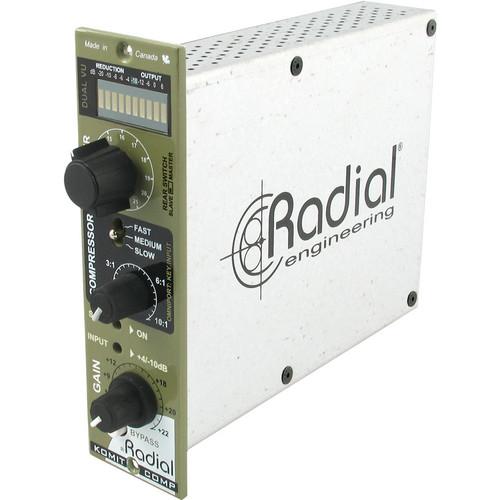 Contents of the user manual for the Radial Engineering Komit Compressor Limiter
- Product category: Dynamics Processors Radial Engineering
- Brand: Radial Engineering
- Description and content of package
- Technical information and basic settings
- Frequently asked questions – FAQ
- Troubleshooting (does not switch on, does not respond, error message, what do I do if...)
- Authorized service for Radial Engineering Dynamics Processors
 |
User manual for the Radial Engineering Komit Compressor Limiter contain basic instructions
that need to be followed during installation and operation.
Before starting your appliance, the user manual should be read through carefully.
Follow all the safety instructions and warnings, and be guided by the given recommendations.
User manual is an integral part of any Radial Engineering product,
and if it is sold or transferred, they should be handed over jointly with the product.
Following the instructions for use is an essential prerequisite for protecting
health and property during use, as well as recognition of liability on the part of the manufacturer
for possible defects should you make a warranty claim. Download an official Radial Engineering user manual in which you will find instructions on how to install, use, maintain and service your product.
And do not forget – unsuitable use of a Radial Engineering product will considerably shorten its lifespan!
|
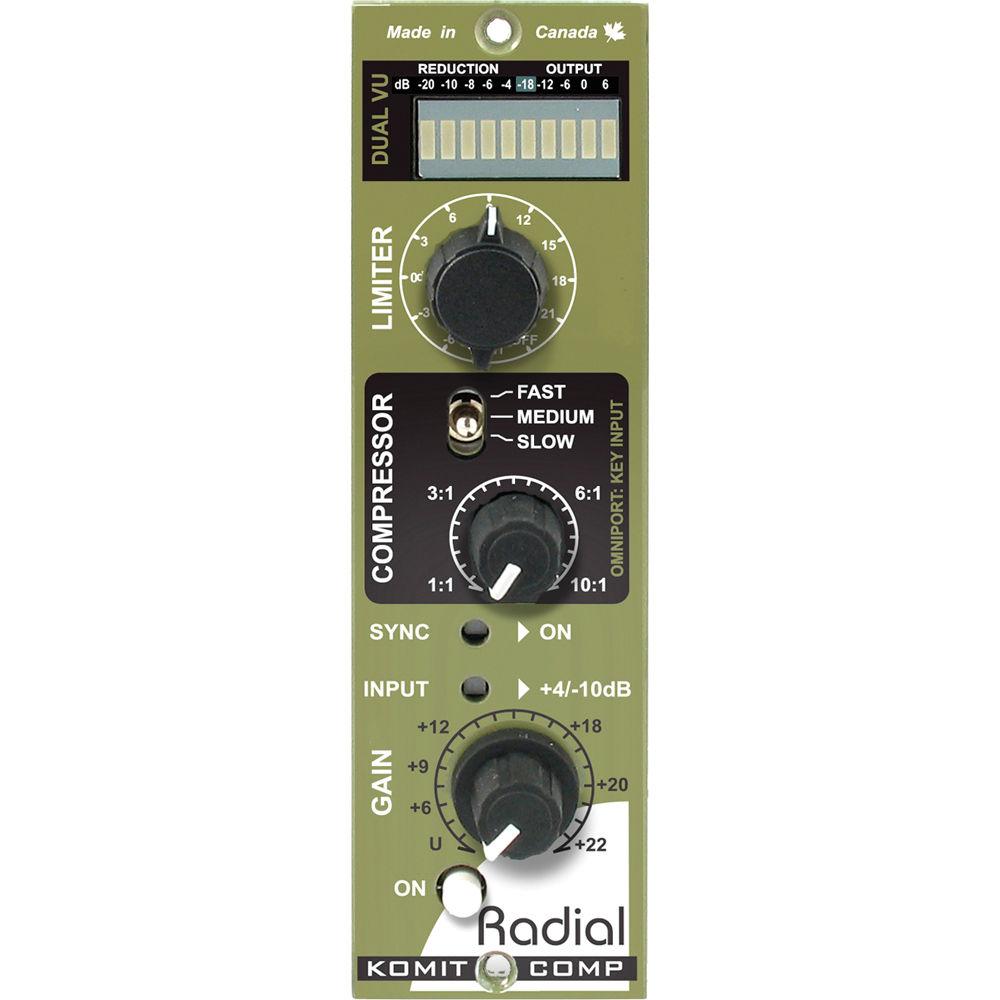
Product description The Radial Engineering Komit Compressor Limiter simplifies the process of dynamic manipulation while expanding upon creative tone shaping. At one end is a super-clean compressor that delivers amazing results with a single knob control. At the other, an old-school diode bridge clipping limiter goes from vintage to nasty. The Komit provides high flexibility by integrating a series of automatic functions that are both musical and intuitive.The design begins with an auto-detecting, feed-forward VCA that reads the incoming program material and reacts in real-time to the time constant. Set the 3-position attack-decay switch to slow for vocals, medium for instruments, and fast for percussion. As you increase the ratio, the Komit FlexKnee compression dynamically adjusts the pivot point, seamlessly transitioning from soft to hard knee for more natural results.The Komit Clipper is designed to introduce personality to your recordings. The Clipper simulates the sound created by old-school diode bridge circuits from the early days of radio. These clip the input signal when they exceed the headroom. Ten settings are graduated from mild harmonic overload to extreme nasty.To ensure absolute signal integrity, full-size discrete electronics are employed throughout, while the vintage-style Hammond broadcast transformers add extra warmth to the signal path. A variable level control provides gain make-up or can be used to drive the Clipper for added distortion. Dual ballistic VU metering makes it easy to simultaneously view compression and output while making adjustments. Designed for use with all 500 series racks, the Komit Compressor Limiter can be linked for full stereo operation. When used with the Radial Workhorse, the Omniport is assigned as a key input for frequency dependent compression, de-essing, ducking, or any number of dynamic manipulation effects. The Komit Compressor Limiter transcends the complex world of dynamic manipulation with the simplicity of a single dial control. - Limiter
- A 12-position dial lets you engage a brick-wall limiter, bypass, and the Clipper, an old-school diode-bridge clipping circuit with 10 graduated settings that range from slight clipping to over-the-top distortion.
- Compressor
- FlexKnee compression circuit transforms from soft to hard knee as it follows the compression ratio setting. Variable with up to 10:1 compression.
- Sync
- Sets up master-slave configuration, sharing the same time constant for optimal stereo coupling while maintaining independent channel compression.
- Gain
- Variable with up to +22 dB, provides gain make-up when signals are compressed. It also used to drive the diode-bridge Clipper for added character.
- Dual Ballistic VU
- 10-segment LED ladder is divided into two meters. The left side indicates compression while the right side indicates output level. Easy to read, it provides instant visual feedback of signal status.
- Brick Wall
- This setting changes compression ratio control from 10:1 to a 25:1 brick wall limiter. Suitable for set-and-forget digital recording where you want to keep signals out of the red.
- Link
- When used with the Workhouse, the stereo link switch lets you combine 2 Komits together following the same time constant. It is also active on standard 500 series racks using the 6-pin card edge terminal.
- 3-Speed VCA
- Three settings with feed-forward auto-detection make it easy to set the time constants. Slow for vocals, medium for instruments, and fast for percussion.
- Input
- Lets you toggle the threshold between +4 and -10 dB to optimize the input range for all types of program material.
- Omniport
- It is designated as a key input to allow external control over the compressor side chain. Available when used with Radial Workhorse rack.
- On
- Bypass switch lets you quickly compare the original pre-compressed signal to the settings you have selected on the Komit.
- 100% Discrete Active Circuitry
- Full size through-hole discrete electronics for optimal signal transfer. Parts are selected and mounted by hand.
- Military Grade
- A 12-position Grayhill switch features gold contacts and a steel shaft for years of trouble-free performance.
- Double-Layer Front Panel
- Steel construction adds rigidity to reduce stress on the PC board.
- Dual Potentiometers
- Doubled up solder points for ensuring durability. Steel casing with steel shaft and retention nut will not bend when under stress.
- Mil-Spec Circuit Board
- Features double-sided PCB and full ground plane to assure lowest possible noise and durability for years of trouble-free performance.
- Gold-Plated 15-Pin Card Edge
- Double-sided to ensure positive connection to the receptacle for improved mating.
- Hammond Input Transformer
- Delivers that warmth of true analog circuitry to produce a vintage tone sans the noise.
- Hammond Output Transformer
- Provides isolation while adding sonic character of old-school broadcast circuitry.
- Applications
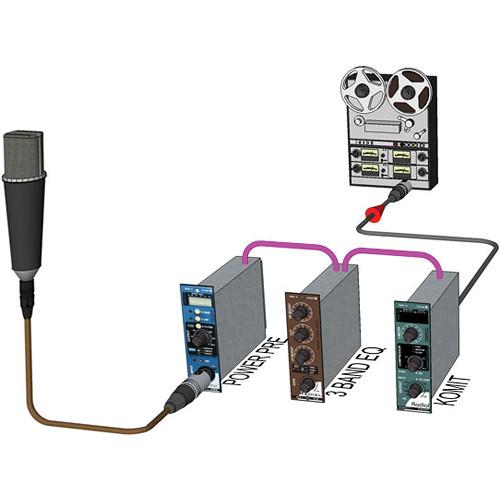
- Channel Strip
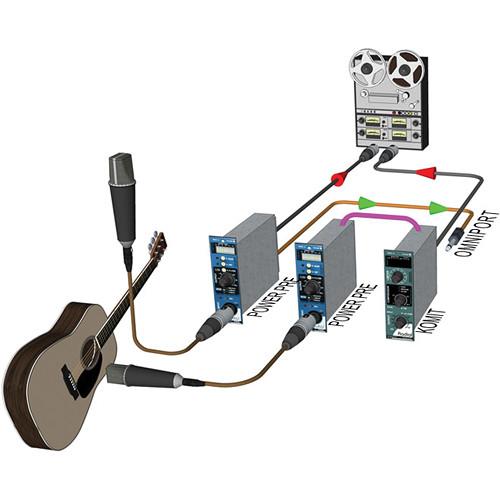
The Komit is a compressor that compliments a gold channel strip. Feed the microphone into a PowerPre, an EQ and the Komit can keep dynamics under control for more professional results.
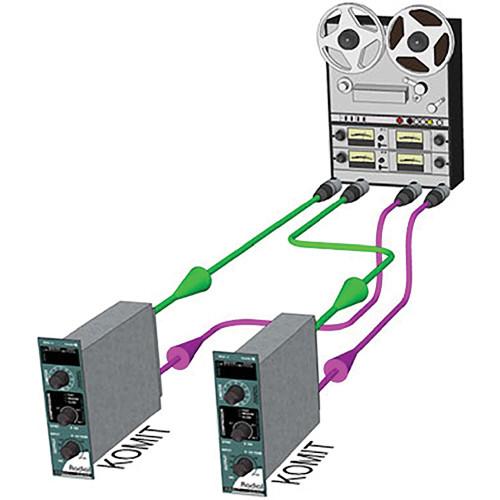
Stereo Program
By linking 2 Komit Compressor Limiters together you can set it to stereo mode. And even though the 2 units will share the same time constant, independent compression retains the full stereo image.
Ducking
Use the key input (via the Omniport on the Workhorse) to automatically duck a guitar track (lower the level) when the vocalist begins to sing. Simply connect the TRS output from the PowerPre into the Omniport key input. UPC: 676101040230 In the Box Radial Engineering Komit Compressor Limiter Limited 3-Year Warranty on Parts & Labor Table of Contents
|
Upload User Manual
Have you got an user manual for the Radial Engineering Komit Compressor Limiter in electronic form? Please send it to us and help us expand our library of instruction manuals.
Thank you, too, on behalf of other users.
To upload the product manual, we first need to check and make sure you are not a robot. After that, your "Submit Link" or "Upload File" will appear.
Technical parametersRadial Engineering R700 0150 Specs | Circuit Type | Feed forward with true RMS sidechain | | Power Requirement | 72 mA, ± 16 VDC | | Compression Ratio | Normal: 1:1 to 10:1
Brickwall: 1:1 to 25:1 | | Limiter | Range: 4 to 21 dBu | | Frequency Response | 20 Hz to 20 kHz, -2 dB at 20 Hz | | Maximum Output | 22 dBu | | Maximum Gain | Make-Up: 20 dB | | THD + N | 0.025% at 1 kHz | | Intermodulation Distortion | <0.1% at 80 Hz / 3 kHz | | Input Impedance | 9.6 kΩ | | Output Impedance | 140 Ω | | Threshold | -10 dBu or +4 dBu | | Maximum Gain | Key input to detector | | Compliance | WHOS-Doc (Radial Workhorse 500 Rack)
API (VPR Alliance) | | Size | Standard 500 series format | | Weight | 1.5 lb (0.7 kg) | | | | Package Weight | 1.85 lb | | Box Dimensions (LxWxH) | 9.0 x 6.7 x 2.0" |
Rating100% users recommend this product to others. And what about you?

This product has already been rated by 94 owners. Add your rating and experience with the product.
Discussion
 Ask our technicians if you have a problem with your settings,
or if anything is unclear in the user manual you have downloaded.
You can make use of our moderated discussion.
The discussion is public and helps other users of our website who may be encountering similar problems.
Ask our technicians if you have a problem with your settings,
or if anything is unclear in the user manual you have downloaded.
You can make use of our moderated discussion.
The discussion is public and helps other users of our website who may be encountering similar problems.
The discussion is empty - enter the first post
Post a new topic / query / comment:
|
|
|
| Request for user manual |
You can’t find the operation manual you are looking for? Let us know and we will try to add the missing manual:
I’m looking for a manual / Request for manual
Current requests for instruction manuals:
Call Of Duty World War Two For Xbox...
controller stratus XL...
stratus XL...
smart whatch serie S11 42mm...
Allen & Heath SQ-6 manual...
|
| Discussion |
Latest contributions to the discussion:
AEW R 4100
Name: MAURICIO ANGARITA
Audio-Technica AEW-R4100 UHF Diversity Receiver for
AEW R 4100 has the mute function blocked and does not allow audio to pass. I tried several times to turn off the mute from the transmitter but it does nothing, the mute stays on. Solution?
Thank you...
Instructions for assembling the 2015 Forecast Image Master Consoles GC3-A
Name: mike elam
Forecast Consoles GC3-A ImageMaster Editing Console
Looking for instructions for assembling this console. ...
EMPTY TONER ERROR MESSAGE AFTER REPLACING TONER
Name: LINDA BAD YELLOW EYES
Brother TN223BK Standard-Yield Toner
I HAD TO CHANGE OUT ALL THREE TONERS DUE TO LEAKS IN THE YELLOW AND CYAN. AFTER I REPLACED THEM, THE MACHINE KEEPS GIVING ME AN EMPTY TONER ERROR MESSAGE. HELP!!...
PS480D 20/24 pin Switching 480W Power Supply
Name: swkargo
Logisys 480W Power Supply
This item states in can run -5vdc .It is NOT listed on the board or I beleive is r4 is missing the resitior. Any body have thid issue. Shawn
...
Help needed
Name: Ann Carter
SanDisk 1TB Extreme Portable USB 3.1
When I click the link to download the user manual for my Sandisk Extreme external hard drive, it gives me the manual for the LG Cricket. Can you please change the link so I can download the Sandisk manual and begin using this drive? Thank you....
|
|


