|
User Manual for Radial Engineering PowerPre Microphone Preamplifier Click to enlarge the picture
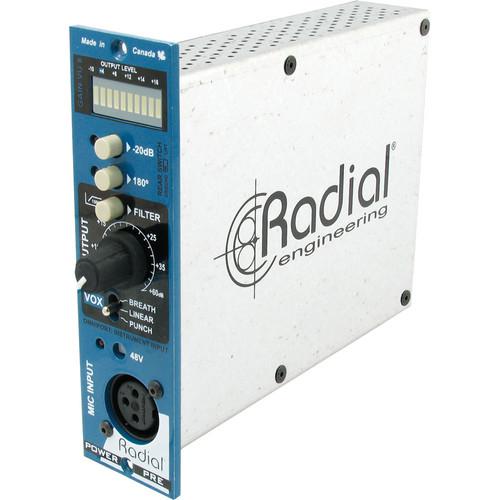 Contents of the user manual for the Radial Engineering PowerPre Microphone Preamplifier
- Product category: Microphone Preamps Radial Engineering
- Brand: Radial Engineering
- Description and content of package
- Technical information and basic settings
- Frequently asked questions – FAQ
- Troubleshooting (does not switch on, does not respond, error message, what do I do if...)
- Authorized service for Radial Engineering Microphone Preamps
 |
User manual for the Radial Engineering PowerPre Microphone Preamplifier contain basic instructions
that need to be followed during installation and operation.
Before starting your appliance, the user manual should be read through carefully.
Follow all the safety instructions and warnings, and be guided by the given recommendations.
User manual is an integral part of any Radial Engineering product,
and if it is sold or transferred, they should be handed over jointly with the product.
Following the instructions for use is an essential prerequisite for protecting
health and property during use, as well as recognition of liability on the part of the manufacturer
for possible defects should you make a warranty claim. Download an official Radial Engineering user manual in which you will find instructions on how to install, use, maintain and service your product.
And do not forget – unsuitable use of a Radial Engineering product will considerably shorten its lifespan!
|
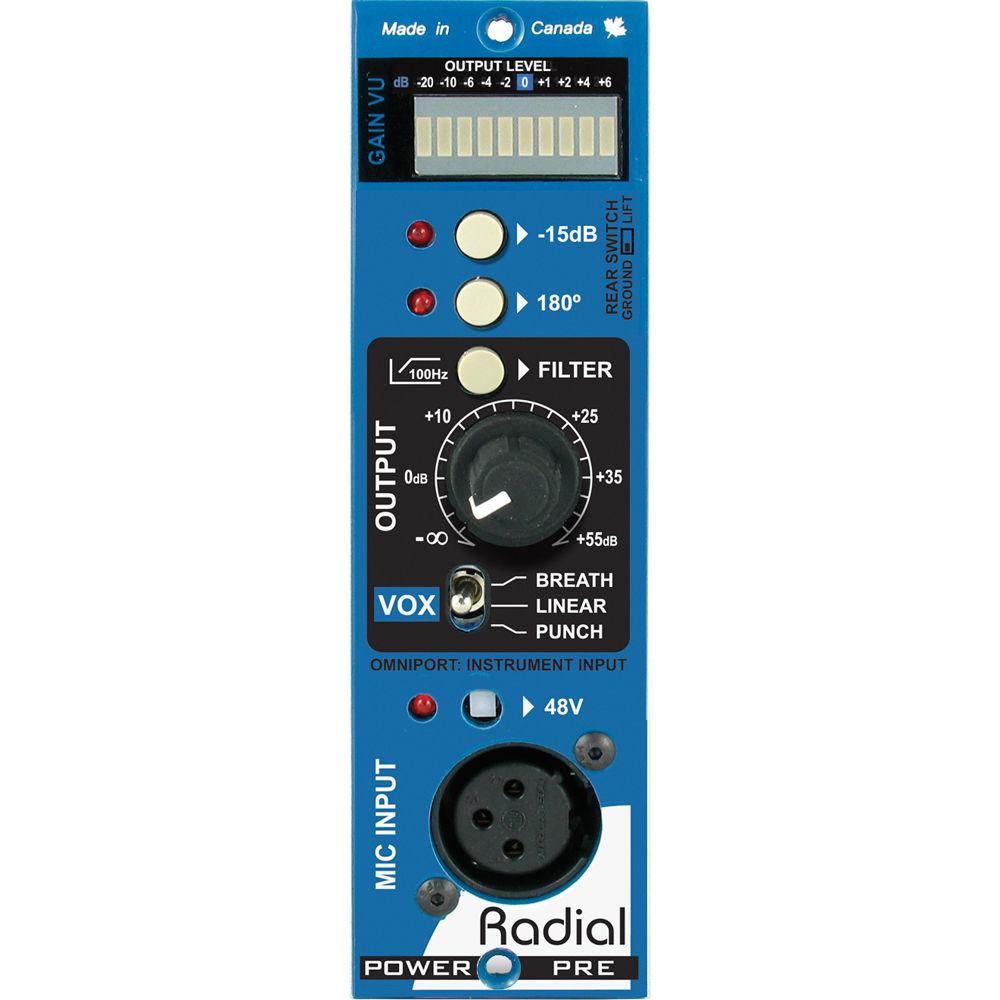
Product description The Radial Engineering PowerPre Microphone Preamplifier is designed to be used with the Radial Workhorse and other 500 series modular racks. It features 100% discrete components for optimal signal transfer and employs a vintage Hammond broadcast output transformer for warmth and a smooth tone.The design begins with a front-mounted XLR for instant connectivity plus a recessed 48V phantom power switch for safety. Unlike most microphone preamps that require careful gain adjustment to avoid troublesome noise, the PowerPre Microphone Preamplifier is equipped with the AccuState input stage that automatically optimizes signal-to-noise at all levels with up to 55 dB of gain. This is supported with a full 10-segment LED meter for precise signal monitoring.To add extra character, a 3-position Vox control lets you set the PowerPre Microphone Preamplifier to breath for added high-frequency air such as while accentuating a vocal track or adding harmonic content to an acoustic guitar. The punch setting adds body while recording electric guitar or can be used to fatten a voice. When set to linear, the PowerPre Microphone Preamplifier delivers a truly natural rendering for orchestral recording that suits demanding purists. This is augmented with a gentle, high-pass filter that helps control low-end resonance while layering acoustic instruments. - 10-Segment LED
- Provides visual signal status as it monitors average RMS peaks to deliver a clean, distortion-free signal to the mix buss and recording system.
- -15 dB Pad
- Input pad expands the PowerPre's capabilities by allowing ultra-hot signals from devices such as keyboards to be interfaced without distortion.
- 180° Polarity Reverse
- It is used to phase-align 2 signals for greater accuracy or as a creative element during the recording process.
- Filter
- The 100 Hz high-pass filter removes low frequencies to help eliminate excessive bass and is particularly useful when layering acoustic tracks.
- Output
- Fully adjustable gain control features dual-taper AccuState drive circuit that keeps noise down. Features 55 dB of gain for all types of microphones.
- Vox
- The 3-position switch lets you change the tonal character of the preamp. Breath adds air and clarity to help vocals cut through; punch adds warmth to the bottom end to fatten up a track.
- 48V
- Phantom power for condensers is equipped with power-on LED and is recessed to prevent accidental use that could damage ribbon mics.
- Mic Input
- XLR female connector is conveniently located on the front panel and placed at the bottom to keep the cable out of the way of controls.
- XLR Output
- It is equipped with Hammond broadcast transformer for smooth, warm response while being able to handle extreme transients without choking.
- Omniport
- Rear-mounted 1/4" instrument input, allows guitar and bass to be recorded direct. Available when used with Radial Workhorse racks.
- Full Enclosure
- The 100% encased-steel casing reduces magnetic interference from other nearby modules that may cause pollution.
- 100% Discrete Electronics
- Employs full-size through-hole discrete electronics for optimal signal transfer. Parts are selected by hand.
- Radial Push Switches
- Radial switches feature a durable metal outer casing and are rated at over 20,000 cycles for added durability.
- Double-Layer Front Panel
- Steel construction adds rigidity to reduce stress on the PC board.
- Dual Potentiometer
- Doubled-up solder points for durability. Steel casing with steel shaft and retention nut will not bend when under stress.
- Heavy-Duty XLR
- Glass-filled nylon connector with ultra-heavy nickel-silver solder lugs for optimal signal transfer and long term reliability.
- Mini Slider Switch
- It lifts pin-1 ground on front-panel XLR that helps eliminate the hum and buzz caused by ground loops.
- Hammond Transformer
- Old-school broadcast transformer delivers added warmth while being able to gracefully handle extreme transients.
- Gold-Plated 15-Pin Card Edge
- Double sided to ensure positive connection to the receptacle for improved mating.
- Mil-Spec Circuit Board
- Features double-sided PCB and full ground plane to assure lowest possible noise and durability for years of trouble-free performance.
- Gold-Sealed Relay
- It is rated at over 50,000 cycles; used to auto-switch from the XLR to the 1/4" input when connected.
- Applications
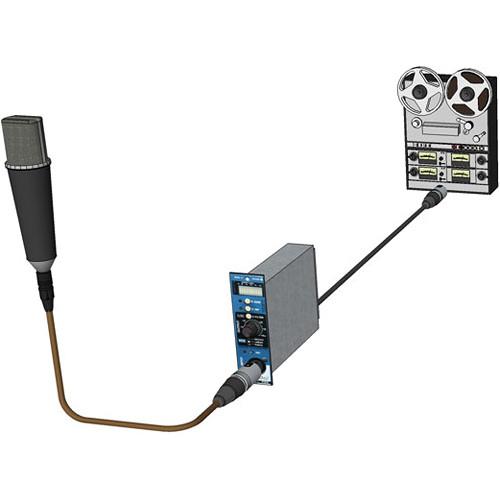
- The Basic Setup
The PowerPre Microphone Preamplifier fits any 500 series rack. In its most basic setup, you connect a microphone to the PowerPre Microphone Preamplifier and send the XLR out to the recording system. Single dial control makes recording easy and efficient.
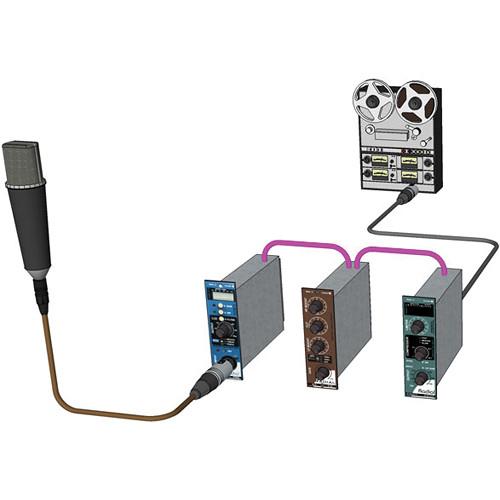
The Microphone Channel
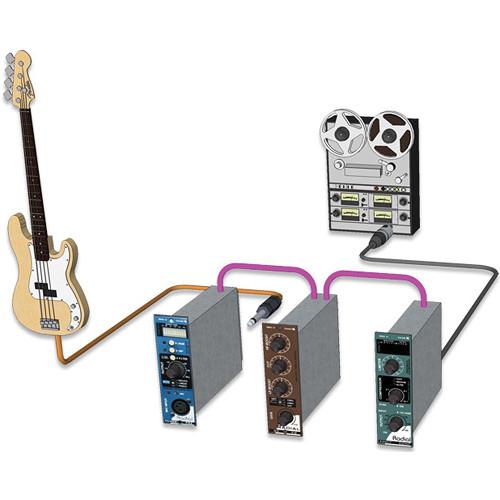
Use the PowerPre Microphone Preamplifier as the front end to drive an EQ and compressor to create a functional channel strip. Simply cascade one module into the next and send the final output to your recorder.
Tracking Instruments
The PowerPre Microphone Preamplifier is not just for microphones. If you have a Workhorse, you can also use it as the front end while recording instruments or tracking a bass direct. Simply plug into the Omniport and you are set to go. UPC: 676101040179 In the Box Radial Engineering PowerPre Microphone Preamplifier Limited 3-Year Warranty on Parts & Labor Table of Contents
|
Upload User Manual
Have you got an user manual for the Radial Engineering PowerPre Microphone Preamplifier in electronic form? Please send it to us and help us expand our library of instruction manuals.
Thank you, too, on behalf of other users.
To upload the product manual, we first need to check and make sure you are not a robot. After that, your "Submit Link" or "Upload File" will appear.
Technical parametersRadial Engineering R700 0110 Specs | | | Circuit Type | 100% discrete, transformer-coupled output | | Microphone Input | AccuState input fully variable gain control | | Current Draw | 130 mA (maximum draw) | | Frequency Response | 20 Hz to 20 kHz +0/-1 dB | | Input Impedance | 2.2 kΩ (1.5 kΩ with pad) | | Gain | Mic Preamp Gain: 55 dB | | Maximum Gain | 70 dB when used with Workhorse | | Maximum Output | 22 dBu | | Output Impedance | 750 at 1 kHz | | Output Type | Transformer isolated | | Common Mode Rejection | >75 dB | | Equivalent Input Noise | -122 dBu at maximum gain | | Dynamic Range | >97 dB | | Total Harmonic Distortion | 0.03% at mid gain with 10 dBu output | | Intermodulation Distortion | 0.012% at 50 dB gain with 10 dBu output | | | | Input Impedance | 150 kΩ, unbalanced, when used with Workhorse | | Gain | Instrument Preamp Gain: 55 dB, unbalanced, when used with Workhorse | | Equivalent Input Noise | -95 dBu, unbalanced, when used with Workhorse | | Total Harmonic Distortion | 0.05% at mid gain with 10 dB output | | | | Meter | 10-segment peak indicator with hold | | Pad | -15 dB | | Polarity | Inverts pins 2 and 3 at XLR input, when used with Workhorse | | | | High-Pass Filter | 150 Hz cut off, -3 dB at 100 Hz | | VOX | Control: 3-position preset EQ | | Phantom Power | 48 VDC: 10 mA (as supplied by 500 frame) | | Configuration | XLR: AES spec: pin-1 ground, pin-2 (+), pin-3 (-) | | Lift | Ground Lift (Rear Panel): Lifts ground on front panel XLR input only | | | | Compliance | API & WHOS-Doc | | Weight | 1.5 lb (0.7 kg) | | | | Package Weight | 1.75 lb | | Box Dimensions (LxWxH) | 8.9 x 6.7 x 1.4" |
Rating80% users recommend this product to others. And what about you?

This product has already been rated by 27 owners. Add your rating and experience with the product.
Discussion
 Ask our technicians if you have a problem with your settings,
or if anything is unclear in the user manual you have downloaded.
You can make use of our moderated discussion.
The discussion is public and helps other users of our website who may be encountering similar problems.
Ask our technicians if you have a problem with your settings,
or if anything is unclear in the user manual you have downloaded.
You can make use of our moderated discussion.
The discussion is public and helps other users of our website who may be encountering similar problems.
The discussion is empty - enter the first post
Post a new topic / query / comment:
|
|
|
| Request for user manual |
You can’t find the operation manual you are looking for? Let us know and we will try to add the missing manual:
I’m looking for a manual / Request for manual
Current requests for instruction manuals:
Call Of Duty World War Two For Xbox...
controller stratus XL...
stratus XL...
smart whatch serie S11 42mm...
Allen & Heath SQ-6 manual...
|
| Discussion |
Latest contributions to the discussion:
AEW R 4100
Name: MAURICIO ANGARITA
Audio-Technica AEW-R4100 UHF Diversity Receiver for
AEW R 4100 has the mute function blocked and does not allow audio to pass. I tried several times to turn off the mute from the transmitter but it does nothing, the mute stays on. Solution?
Thank you...
Instructions for assembling the 2015 Forecast Image Master Consoles GC3-A
Name: mike elam
Forecast Consoles GC3-A ImageMaster Editing Console
Looking for instructions for assembling this console. ...
EMPTY TONER ERROR MESSAGE AFTER REPLACING TONER
Name: LINDA BAD YELLOW EYES
Brother TN223BK Standard-Yield Toner
I HAD TO CHANGE OUT ALL THREE TONERS DUE TO LEAKS IN THE YELLOW AND CYAN. AFTER I REPLACED THEM, THE MACHINE KEEPS GIVING ME AN EMPTY TONER ERROR MESSAGE. HELP!!...
PS480D 20/24 pin Switching 480W Power Supply
Name: swkargo
Logisys 480W Power Supply
This item states in can run -5vdc .It is NOT listed on the board or I beleive is r4 is missing the resitior. Any body have thid issue. Shawn
...
Help needed
Name: Ann Carter
SanDisk 1TB Extreme Portable USB 3.1
When I click the link to download the user manual for my Sandisk Extreme external hard drive, it gives me the manual for the LG Cricket. Can you please change the link so I can download the Sandisk manual and begin using this drive? Thank you....
|
|


