User Manual for Rane Commercial HAL3s Multiprocessor Click to enlarge the picture
 Contents of the user manual for the Rane Commercial HAL3s Multiprocessor
- Product category: System Processors Rane Commercial
- Brand: Rane Commercial
- Description and content of package
- Technical information and basic settings
- Frequently asked questions – FAQ
- Troubleshooting (does not switch on, does not respond, error message, what do I do if...)
- Authorized service for Rane Commercial System Processors
|
User manual for the Rane Commercial HAL3s Multiprocessor contain basic instructions
that need to be followed during installation and operation.
Before starting your appliance, the user manual should be read through carefully.
Follow all the safety instructions and warnings, and be guided by the given recommendations.
User manual is an integral part of any Rane Commercial product,
and if it is sold or transferred, they should be handed over jointly with the product.
Following the instructions for use is an essential prerequisite for protecting
health and property during use, as well as recognition of liability on the part of the manufacturer
for possible defects should you make a warranty claim. Download an official Rane Commercial user manual in which you will find instructions on how to install, use, maintain and service your product.
And do not forget – unsuitable use of a Rane Commercial product will considerably shorten its lifespan!
|
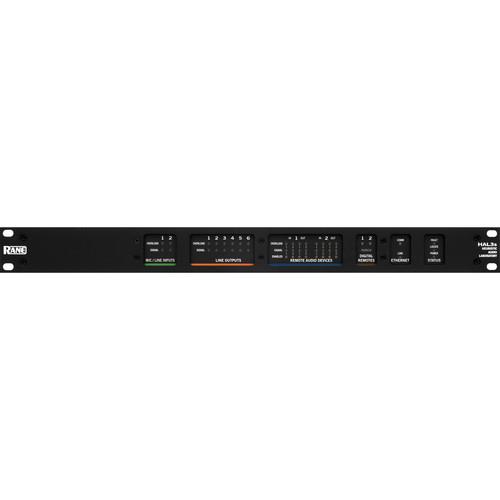
Product description The HAL3s from Rane is a Multiprocessor which supports 6 input by 10 output audio with 2 input x 6 output balanced analog connections, and another 4 input x 4 outputs digitally through RADs (remote digital devices). The two analog inputs are Line/Line-Plus/Mic/Mic + 48V phantom power. In addition to supporting balanced line and microphone inputs, this configuration allows a stereo pair connection to an input, converting to a single L+R mono signal.
Two DR (digital remote) ports provide support for preset recall, level control and select functions using a DR1, DR2, or DR3. If more logic inputs and outputs are needed for ports, switches or external indicators (DR4 or DR5) may be added. DRs can be operated from a RAD port, so up to four DRs can plug into a HAL3s when RADs aren't needed. - DSP contains 2400 MIPS of processing power
- Ethernet 1000BASE-T with Zeroconf service discovery protocol for easy set up
- 2 analog Mic / Line-Plus Inputs on Euroblock connectors
- 6 analog balanced line outputs on Euroblock connectors
- Front panel signal and overload indicators for all inputs and outputs
- Two RAD Ports, each Port 2 in x 2 out plus control channel
- Four Digital Remote Ports [DR can connect to RAD port]
- Four Logic Inputs on Mini-Euroblock 6-pin connectors
UPC: 687499177019 In the Box Rane Commercial HAL3s Multiprocessor Limited 2-Year Warranty Limited 3-Year Warranty with Product Registration Table of Contents
|
Upload User Manual
Have you got an user manual for the Rane Commercial HAL3s Multiprocessor in electronic form? Please send it to us and help us expand our library of instruction manuals.
Thank you, too, on behalf of other users.
To upload the product manual, we first need to check and make sure you are not a robot. After that, your "Submit Link" or "Upload File" will appear.
Technical parametersRane Commercial HAL3S Specs | Analog I/O | 2 x mic / line / line-plus inputs
6 x line outputs | | Connectors | 4 x 6-pin, 5 mm pitch, Euroblock | | Codec | 24 bit, 48 kHz | | Input Impedance | 2.9 kΩ, 1% each leg to ground | | Isolation Between Channels | > 100 dB typical 20 - 20k Hz, unity gain, channel-to-channel | | CMRR | 55 dB, minimum 1 kHz | | Microphone Inputs | Dynamic Microphone Mode:
Gain: +30 dB to +50 dB
THD + N: < 0.005%, typical 20 - 20 kHz, +4 dBu out, 0 dB digital gain
Equivalent Input Noise: -120 dBu, typical 20 - 20 kHz, 150 Ω source, 30 dB gain
Maximum Input: -18 dBV (125 mVrms), typ 1 kHz, < 0.01% THD+N
Frequency Response: 20 - 20 kHz, +0.0 / -0.3 dB +4 dBu out, 100k Ω load, Microphone Input to Output
Condenser Microphone Mode:
Gain: +18 dB to +38 dB
Phantom Power: +48 VDC 10 mA max per input
THD + N: < 0.005%, typical 20 - 20 kHz, +4 dBu out, 0 dB digital gain
Equivalent Input Noise: -110 dBu, typ 20 - 20 kHz, 150 Ω source, 18 dB gain
Maximum Input: -6 dBV (500 mVrms), typ 1 kHz, < 0.01% THD+N
Frequency Response: 20 - 20 kHz, +0.0 / -0.3 dB +4 dBu out, 100k Ω load, Mic Input to Output | | Line Inputs | Line + Mode:
Gain: 0 dB to +20 dB
THD + N: < 0.007 % typical 20 - 20 kHz, +4 dBu out, 0 dB digital gain
Maximum Input: +14 dBu typical 1 kHz, < 0.01% THD+N, each leg
Frequency Response: 20 - 20 kHz, +0.0 / -0.3 dB, +4 dBu out, 100k Ω load, Line-plus Input to Output
Dynamic Range (In to Out): 108 dB, maximum re +20 dBu, 20 kHz BW, A weighted, Rs = 50 Ω
Line Mode:
Gain: 0 d
THD + N: < 0.005 % typical 20 - 20 kHz, +4 dBu out, 0 dB digital gain
Maximum Input: +14 dBu typical 1 kHz, < 0.01% THD+N
Frequency Response: 20 - 20 kHz, +0.0 / -0.3 dB, +4 dBu out, 100k Ω load, Line Input to Output
Dynamic Range (In to Out): 108 dB, maximum re +20 dBu, 20 kHz BW, A weighted, Rs = 50 Ω | | Outputs | Impedance: 200 Ω, 1% each leg
Maximum Output: +20.0 / +15.5 dBu typ 1 kHz, 100 kΩ / 600 Ω load | | Indicators | Signal: -50 dBFS, green LED, peak-reading
Overload: -0.5 dBFS, red LED, peak-reading | | Propagation Delay | RAD In to RAD Out: 1.71 ms
RAD In to Analog Out: 1.85 ms
Analog In to RAD Out: 2.25 ms
Analog In to Analog Out: 2.39 ms | | DSP | Processing Power: 2400 MIPS, maximum 1 DSP @ 300 MHz with up to 8 instructions / cycle
Word Length: 32 / 64-bit Floating Point
Delay Memory: 20 seconds maximum | | Computer Interface | Type: Ethernet 1000 base-T
Cable: Shielded CAT 5e or better
Length: 300' (100 m) maximum | | Ports | RAD Port:
Audio Channels: 2 in x 2 out, control channel, 24-bit, 48 kHz
Power: 24 VDC @ 100 mA per port
Length: 500' (152 m)
DR Ports:
Power: 24 VDC @ 50 mA per port
Length: 1000' (300 m) | | Logic Input | Connector: Mini Euroblock, 6-pin, 3.81 mm pitch, black
Internal Pull-Up: 51.1 kΩ, 5.0 V, protected to +24 V, reverse polarity protected
Vin High: > 2.2 V
Vin Low: < 0.7 V | | Wiring | Class 2 | | Power Requirements | 100 to 240 VAC, 50 / 60 Hz, 20 W max | | Ambient Temperature | 104° F (40° C) | | Approvals and Compliance | CE, FCC, CCSAUS | | Dimensions (H x W x D) | 1.7 x 19.0" x 8.25" (4.4 x 48.3 x 20.9 cm) | | Weight | 4.75 lb (2.2 kg) | | | | Package Weight | 8.75 lb | | Box Dimensions (LxWxH) | 20.2 x 13.7 x 4.3" |
Rating70% users recommend this product to others. And what about you?

This product has already been rated by 11 owners. Add your rating and experience with the product.
Discussion
 Ask our technicians if you have a problem with your settings,
or if anything is unclear in the user manual you have downloaded.
You can make use of our moderated discussion.
The discussion is public and helps other users of our website who may be encountering similar problems.
Ask our technicians if you have a problem with your settings,
or if anything is unclear in the user manual you have downloaded.
You can make use of our moderated discussion.
The discussion is public and helps other users of our website who may be encountering similar problems.
The discussion is empty - enter the first post
Post a new topic / query / comment:
|
|


