|
User Manual for RDL HR-MCP2 - Dual Microphone Compressor Click to enlarge the picture
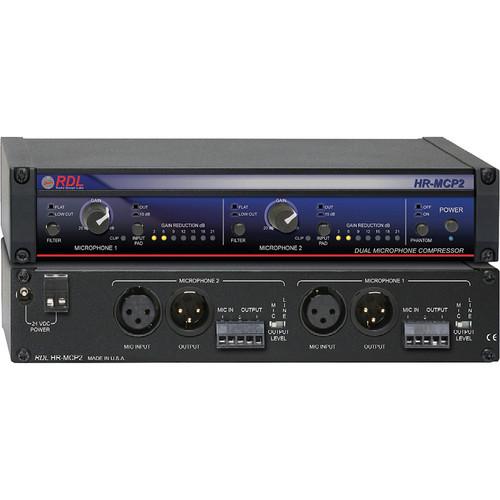 Contents of the user manual for the RDL HR-MCP2 - Dual Microphone Compressor
- Product category: Dynamics Processors RDL
- Brand: RDL
- Description and content of package
- Technical information and basic settings
- Frequently asked questions – FAQ
- Troubleshooting (does not switch on, does not respond, error message, what do I do if...)
- Authorized service for RDL Dynamics Processors
|
User manual for the RDL HR-MCP2 - Dual Microphone Compressor contain basic instructions
that need to be followed during installation and operation.
Before starting your appliance, the user manual should be read through carefully.
Follow all the safety instructions and warnings, and be guided by the given recommendations.
User manual is an integral part of any RDL product,
and if it is sold or transferred, they should be handed over jointly with the product.
Following the instructions for use is an essential prerequisite for protecting
health and property during use, as well as recognition of liability on the part of the manufacturer
for possible defects should you make a warranty claim. Download an official RDL user manual in which you will find instructions on how to install, use, maintain and service your product.
And do not forget – unsuitable use of a RDL product will considerably shorten its lifespan!
|
Product description RDL's HR-MCP2 Dual Microphone Compressor provides excellent input headroom and a transparent frequency response while keeping crosstalk and distortion well below the noise floor. Rear-panel switches allow you to choose whether each channel will operate as a mic-pre or as a studio quality compressor. Also included is a 48 Vdc phantom power option which ensures that the HR-MCP2 is compatible with both condenser and dynamic microphones. The compressor utilizes gain reduction and automatic time release features to smooth the audio and prevent clipping throughout a wide dynamic range. It achieves its goal subtly and maintains the original sound quality with studio quality results and low noise performance. Each of the two available mic-pre channels are equipped with a 6 dB/octave low-cut filter with a -3 dB cutoff at 80 Hz, an input pad which attenuates the input by 15 dB, and an output gain control which can correct the gain between 20 dB and 60 dB (for line level). All of these features can be toggled on and off via switches on the front face or a knob next to each channel. A 7-stage LED meter string can also be found on the front face which indicates the amount of gain reduction being applied to the audio signal. If the signal gets within 1 dB of clipping, the LED will flash red to indicate that the signal is too hot. The rear of the HR-MCP2 features 2 balanced XLR ins and outs plus 2 balanced detachable terminal blocks ins and outs. Any of these connectors can also be rewired for unbalanced applications. The unit is compact in size and only takes up a half rack space, although to mount in a rack you must purchase the mounting kit separatly. The body is constructed of shielded metal and out of the box is designed to be a free-standing unit. Overall, if you are a looking for a reliable, transparent, versatile, and compact mic pre/compressor, the HR-MCP2 is an ideal choice. - Dual Microphone Compression Channels
- The HR-MCP2 features two independent input channels with compression. It is designed to smooth the audio output signal without altering the integrity of the source audio. The compressors both feature gain reduction, automatic release time, and are designed to carry out their tasks with studio-quality sound and low-noise performance. The HR-MCP2 is flexible enough to be installed between your microphone and mixer, or an amplifier microphone input.
- Features Dual Channel Microphone Preamp Capabilities
- With line-level outputs, the HR-MCP2 can be operated as a stereo mic preamplifier, or as two separate mono preamplifiers. The rear-panel allows you to switch each output from line level to mic and the front panel features selectable 48v phantom power. RDL's unique circuit design preserves full studio quality, low-noise performance at any gain setting.
- Controls Clipping and Distortion from the Input Signal
- The preamp and compressor design allows the HR-MCP2 to instantaneously reduce the input gain to prevent clipping and distortion. The automatic release time adjustments allow the compression to be applied subtly over the entire dynamic gain reduction range. All these qualities together produce consistent audio levels and intelligibly prevents overloads and clipping.
- User Control Over I/O Signal Level
- Both available channels feature a 6 dB/octave low-cut filter with a -3 dB cut at 80 Hz and a switchable input pad which attenuates the input signal by 15 dB prior to the input stage. This allows the HR-MCP2 to have up to a +20 dBu input level without clipping. The outputs feature a continuous gain control capable of a 20 dB and 60 dB (line level) level of adjustment to ensure there is a wide range of gain correction on the input signal.
- Flexible I/O Routing Options
- The HR-MCP2 offers 2 balanced terminal blocks and XLR ins and outs, which may also be wired as unbalanced. These connections ensure the HR-MCP2 can support multiple audio environments including recording studios, broadcast studios, and commercial sound systems. The rear of the unit also houses the input jack for the 24 Vdc power supply.
- LED Metering
- The 7 LED clip meter will flash if an audio signal is within 1 dB of clipping, along with displaying continuous gain reduction data in 3 dB increments. This feature ensures you always have a visual representation of how much gain reduction is being applied and when your signals are getting too hot.
- 48V Phantom Power
- The HR-MCP2 includes a 48V phantom power source which can be activated via a switch on the front panel and is available on either of the two microphone channels. This feature is necessary when using most condenser microphones and it ensures the HR-MCP2 will be compatible with almost any microphone on the market.
- Multiple Professional Applications
- RDL designed the HR-MCP2 to be at home in multiple different audio environments. The combination of stereo mic pres, stereo compression, phantom power, flexible ins and outs, and a compact case make the HR-MCP2 a valuable piece of gear for broadcast studios, voice-over studios, public address systems, meeting rooms, and commercial sound systems.
- Can Be Rack Mounted or Operated Freestanding
- The HR-MCP2 is designed to be operated as a free-standing unit, but with the purchase of a conversion kit, can also be mounted in any industry standard half-rack space. These two options make the unit flexible when finding it a home in your crowded studio or when portability is a must.
UPC: 813721013422 In the Box RDL HR-MCP2 - Dual Microphone Compressor Quick Setup Guide Manual Rubber Feet x4 Table of Contents
|
Upload User Manual
Have you got an user manual for the RDL HR-MCP2 - Dual Microphone Compressor in electronic form? Please send it to us and help us expand our library of instruction manuals.
Thank you, too, on behalf of other users.
To upload the product manual, we first need to check and make sure you are not a robot. After that, your "Submit Link" or "Upload File" will appear.
Technical parametersRDL HR-MCP2 Specs | Inputs | XLR (2, 3 pin, rear panel,1=GND, 2+, 3-)
detachable terminal block (2) | | Input Level | -60 to -20 dBu (without input pad)
-45 to -5 dBu (with input pad) | | Maximum Input Level | > +5 dBu (input pad disabled)
+22 dBu (input pad enabled) | | Input Impedance | > 1.5 kΩ balanced | | Phantom Power | Selectable 48 V phantom | | Input Pad Switch | 15 dB nominal (1 per input channel) | | Outputs | XLR (2, 3 pin, rear panel,1=GND, 2+, 3-)
detachable terminal block (2) | | Output Level | Mic: -45 dBu (nominal, into 600 Ohms)
Line: +4 dBu balanced (nominal, dynamic audio source), +1 dBu balanced (nominal, sine-wave producing 3 dB compression) | | Output Impedance | 150 Ω balanced | | Channels | 2 (1 and 2; may be used for stereo or as two separate mono channels) | | Gain Range | 20 to 60 dB (line-level output; front panel adjustable; one for each channel) | | Frequency Response | 10 Hz to 25 kHz (+/- 0.5 dB, flat)
-3 dB @ 80 Hz (lowcut filter enabled) | | THD | Below noise floor (3 dB compression) | | CMRR | > 70 dB (50 Hz to 5 kHz) | | Residual Noise | < -85 dB (20 to 20 kHz, 40 dB gain, without compression, 150Ω source)
< -70 dB (20 to 20 kHz, 60 dB gain, without compression, 150Ω source) | | Crosstalk | Below noise floor | | Indicators | Power LED (blue)
Gain Reduction(7 per channel, yellow, 3, 6, 9, 12, 15, 18, 21 dB)
Clip (2, red) | | Power Requirement | 24 Vdc @ 200 mA (230 mA with phantom), Ground-referenced | | Mounting | Rack-mount using optional rack adapters such as HR-RA2; or operate free-standing (feet included) | | Dimensions | 1.7 x 8.6 x 4.59" / 4.3 x 20.6 x 11.66cm | | | | Package Weight | 2.65 lb | | Box Dimensions (LxWxH) | 10.3 x 7.3 x 2.4" |
Rating90% users recommend this product to others. And what about you?

This product has already been rated by 86 owners. Add your rating and experience with the product.
Discussion
 Ask our technicians if you have a problem with your settings,
or if anything is unclear in the user manual you have downloaded.
You can make use of our moderated discussion.
The discussion is public and helps other users of our website who may be encountering similar problems.
Ask our technicians if you have a problem with your settings,
or if anything is unclear in the user manual you have downloaded.
You can make use of our moderated discussion.
The discussion is public and helps other users of our website who may be encountering similar problems.
The discussion is empty - enter the first post
Post a new topic / query / comment:
|
|
|
| Request for user manual |
You can’t find the operation manual you are looking for? Let us know and we will try to add the missing manual:
I’m looking for a manual / Request for manual
Current requests for instruction manuals:
Call Of Duty World War Two For Xbox...
controller stratus XL...
stratus XL...
smart whatch serie S11 42mm...
Allen & Heath SQ-6 manual...
|
| Discussion |
Latest contributions to the discussion:
AEW R 4100
Name: MAURICIO ANGARITA
Audio-Technica AEW-R4100 UHF Diversity Receiver for
AEW R 4100 has the mute function blocked and does not allow audio to pass. I tried several times to turn off the mute from the transmitter but it does nothing, the mute stays on. Solution?
Thank you...
Instructions for assembling the 2015 Forecast Image Master Consoles GC3-A
Name: mike elam
Forecast Consoles GC3-A ImageMaster Editing Console
Looking for instructions for assembling this console. ...
EMPTY TONER ERROR MESSAGE AFTER REPLACING TONER
Name: LINDA BAD YELLOW EYES
Brother TN223BK Standard-Yield Toner
I HAD TO CHANGE OUT ALL THREE TONERS DUE TO LEAKS IN THE YELLOW AND CYAN. AFTER I REPLACED THEM, THE MACHINE KEEPS GIVING ME AN EMPTY TONER ERROR MESSAGE. HELP!!...
PS480D 20/24 pin Switching 480W Power Supply
Name: swkargo
Logisys 480W Power Supply
This item states in can run -5vdc .It is NOT listed on the board or I beleive is r4 is missing the resitior. Any body have thid issue. Shawn
...
Help needed
Name: Ann Carter
SanDisk 1TB Extreme Portable USB 3.1
When I click the link to download the user manual for my Sandisk Extreme external hard drive, it gives me the manual for the LG Cricket. Can you please change the link so I can download the Sandisk manual and begin using this drive? Thank you....
|
|


