|
User Manual for RED DIGITAL CINEMA DSMC2 Handheld Accessory Package Click to enlarge the picture
 Contents of the user manual for the RED DIGITAL CINEMA DSMC2 Handheld Accessory
- Product category: Camcorder Accessories RED DIGITAL CINEMA
- Brand: RED DIGITAL CINEMA
- Description and content of package
- Technical information and basic settings
- Frequently asked questions – FAQ
- Troubleshooting (does not switch on, does not respond, error message, what do I do if...)
- Authorized service for RED DIGITAL CINEMA Camcorder Accessories


 |
User manual for the RED DIGITAL CINEMA DSMC2 Handheld Accessory contain basic instructions
that need to be followed during installation and operation.
Before starting your appliance, the user manual should be read through carefully.
Follow all the safety instructions and warnings, and be guided by the given recommendations.
User manual is an integral part of any RED DIGITAL CINEMA product,
and if it is sold or transferred, they should be handed over jointly with the product.
Following the instructions for use is an essential prerequisite for protecting
health and property during use, as well as recognition of liability on the part of the manufacturer
for possible defects should you make a warranty claim. Download an official RED DIGITAL CINEMA user manual in which you will find instructions on how to install, use, maintain and service your product.
And do not forget – unsuitable use of a RED DIGITAL CINEMA product will considerably shorten its lifespan!
|
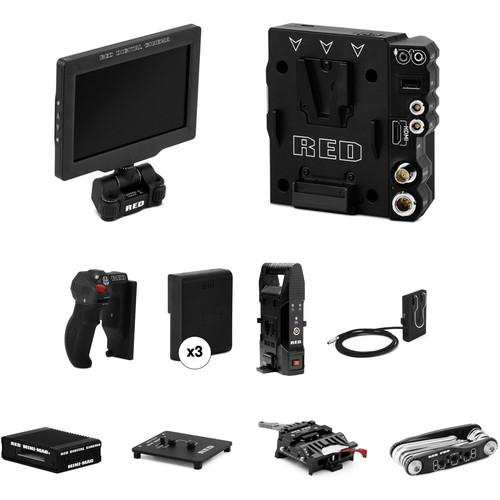
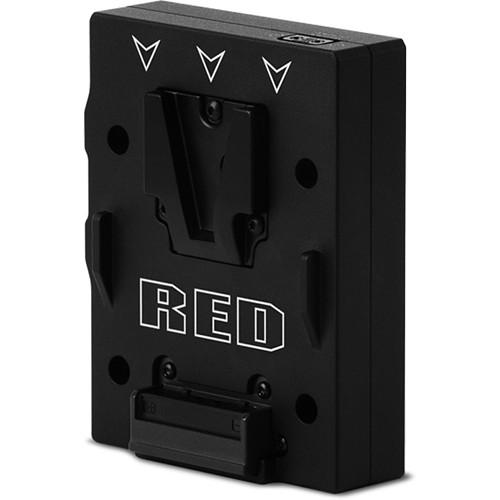
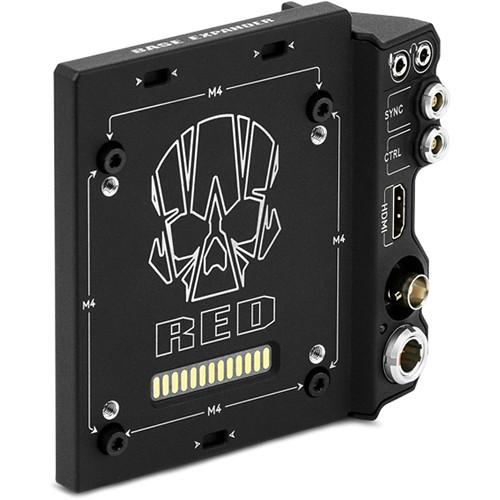
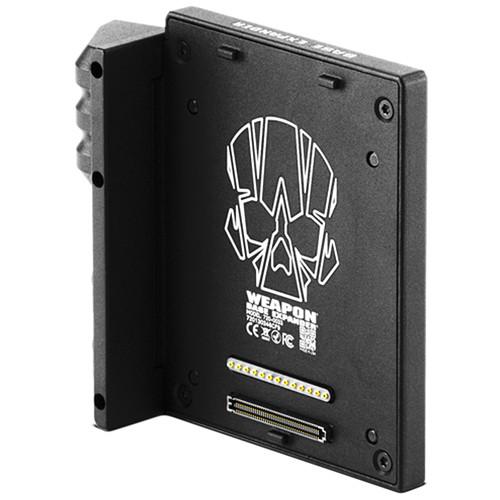
Product description Take your DSMC2 brain handheld by building it up with this RED DIGITAL CINEMA DSMC2 Handheld Accessory Package. The DSMC2 Base Expander attaches to the back of the camera brain and has essential I/O connections such as HDMI, SDI, power, and timecode. Both the V-Mount Battery Module and the Battery Belt Clip can accept the included RED BRICK V-mount batteries can provide plenty of power away from AC mains power. For monitoring video the RED Touch 7" LCD panel is included. Also included is a RED STATION MINI-MAG Reader for quick transfer of video recordings, a QUICK RELEASE PLATFORM for securing the camera to a tripod or other grip gear, a SIDEWINDER Multi-Tool for assembling your DSMC2 kit, and a Work Mat surface to keep your components organized and in good condition during assembly. See below for more details on the individual items included in this kit. - RED DIGITAL CINEMA DSMC2 V-LOCK I/O Expander More than just a way to power your camera, the RED DSMC2 V-LOCK I/O Expander provides a variety of input/output connections in addition to a V-Lock mount for your DSMC2 camera. The Expander is made from magnesium, so it is lightweight yet strong. It enables powering your camera from a V-Mount battery or by an alternate DC source via cable, and you can set it to automatically boot your camera up once power is connected. It provides both 3G-SDI and HDMI outputs, as well as control and sync outputs.
Built-in USB and auxiliary power outputs enable powering accessories and limiting the number of power splitter and converter boxes hanging from your camera. Audio is not forgotten by RED, and the Expander features both an analog stereo input and a stereo headphone jack. It is compatible with the WEAPON 8K S35, WEAPON 6K, as well as the EPIC/SCARLET-W, and the RAVEN. - Auto Boot-Up on Power-On
- The Expander features a physical switch that allows you to enable the camera to automatically boot up when power is applied. This is a useful feature for when the camera is in a difficult-to-access position.
- Firmware
- Since the V-Lock I/O Expander communicates with your camera, and allows electronic signals and video output, it requires that your DSMC2 camera has firmware v6.2.17 or later installed.
- The Expander simplifies your power and output situation when shooting, and can be removed if you want your camera to have a smaller profile for stash-cam, gimbal, or drone shooting.
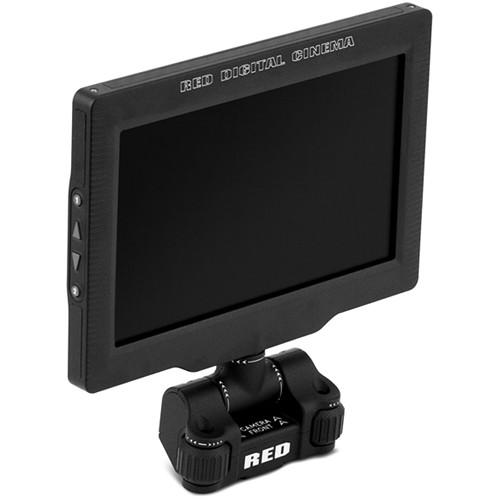
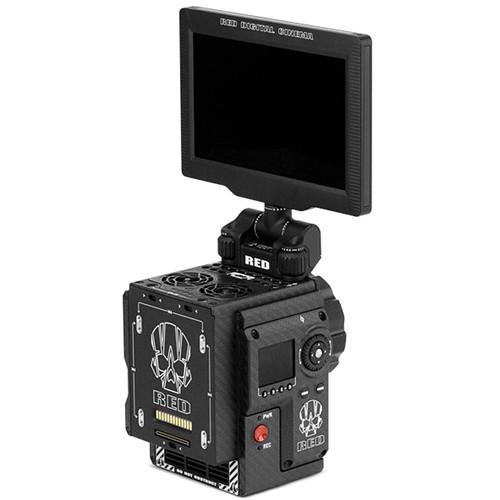
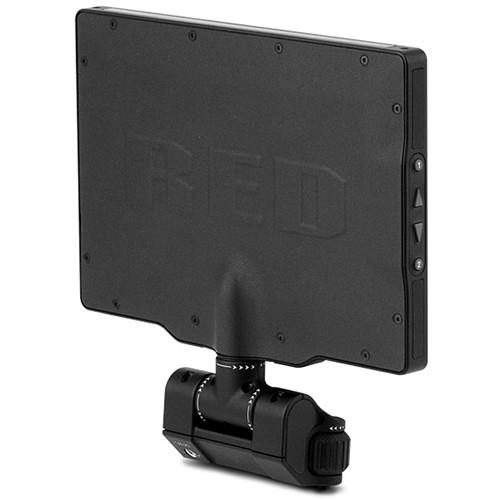
- RED DIGITAL CINEMA Touch 7.0" LCD for Select DSMC2 RED Cameras (Aluminum) Designed for cable-free mounting to select DSMC2 RED cameras, the RED DIGITAL CINEMA Touch 7.0" LCD (Aluminum) features 1920 x 1136 resolution. The design of the LCD provides good off-axis viewing up to 170°, with 85° left, right, up, or down so you don't have to be directly aligned with the viewfinder to see an optimal image. The LCD features multi-touch control, with hard navigation buttons on the side.
With a brightness level of 350 cd/m² and contrast ration of 1000:1 providing a clear image, the RED Touch LCD mounts directly to your camera without any cables needed between the LCD and your camera. It can mount directly onto DSMC2 cameras including the WEAPON 8K S35, WEAPON 6K, EPIC/SCARLET-W, EPIC/SCARLET M-X, EPIC/SCARLET DRAGON, and the RED RAVEN. A built-in mirror and image flip allow for monitoring while upside down for special applications. - The LCD is designed to mount directly to select cameras for cable-free operation.
- Used in conjunction with the optional DSMC2 LEMO Adapter Collection, you can mount your DSMC2 display away from the camera body.
- The built-in hinge provides up to 180° of tilt—90° forward and 90° back—which allows the LCD to fold flat on your camera. The hinge also enables rotating the display 180°.
- You can use an optional DSMC2 LEMO Adapter B to mount the LCD to RED EPIC or RED SCARLET cameras.
- RED DIGITAL CINEMA DSMC2 Side Handle This DSMC2 Side Handle from RED Digital Cinema works with the WEAPON 8K S35, WEAPON 6K, EPIC-W, SCARLET-W, and RED RAVEN, attaching directly to the side of your camera's DSMC2 BRAIN. It features a molded rubber grip and puts the camera's primary controls literally at your fingertips. It incorporates both focus and iris control wheels, which can be assigned by the user to control other camera functions.
A built-in rotary wheel and D-Pad provide control over menu selections without having to move your hand. It incorporates four assignable buttons to recall often-used function controls such as exposure, white balance, magnification toggle, and autofocus. The built-in record start/stop incorporates a Mark Frame button that allows you to tag frames as you record, so you can more easily find them in post. -
- Navigation wheel, D-Pad (directional pad), and Enter button
- Menu button
- Four user-defined buttons: A, B, C, D
- Mark Frame button
- Focus control wheel
- Iris control wheel (user-assignable to iris or other camera control functions)
- Record start/stop button
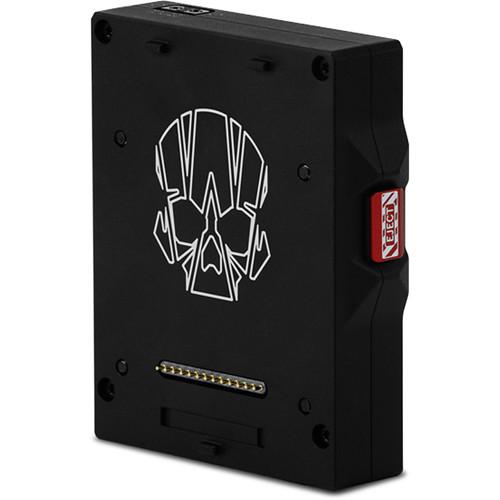
UPC: 856672007089 - 3 x RED DIGITAL CINEMA REDVOLT-V This RED DIGITAL CINEMA REDVOLT-V battery has a capacity of 43Wh and can power a RED camera, while displaying the full amount of available info in the viewfinder of both DSMC and DSMC2 cameras. With a 43Wh capacity, the small size and low weight of this battery make it suitable for use when shooting handheld or on gimbal. It incorporates a push-button activated 3-LED power gauge that indicates roughly the amount of power remaining in the battery. Incorporating a V-mount battery mount it is compatible with select DSMC modules. To use the REDVOLT-V battery on your RED camera, the camera must have a V-mount, or use a V-mount expander module.
-
- Weighs less than one pound
- Compatible with any RED V-Lock battery expander or module (V-Lock Battery Module, V-Lock I/O Expander)
- RED DIGITAL CINEMA RED BRICK CHARGER The RED DIGITAL CINEMA RED BRICK CHARGER enables charging two RED BRICK batteries (not included) simultaneously. It plugs into any standard AC power outlet. This charger can also be used to power any DSMC or DSMC2 camera using an optional 2B to 1B power cable (not included). For those with a RED ONE camera, an optional RED ONE POWER CABLE allows you to use this charger as a power supply for your camera.
- RED DIGITAL CINEMA DSMC Battery Belt Clip Especially useful when shooting in lightweight handheld configurations, the RED Digital Cinema DSMC Battery Belt Clip enables you to power your camera from approximately 5.5' away. This allows you to mount the battery to your belt so you are not carrying the weight of the battery directly on your camera. Designed for RED Digital Cinema brick batteries, it features a V-Mount connector and supports V-Mount batteries.
The power cable terminates in a 6-pin LEMO 1B connector. The battery belt clip incorporates a D-Tap connector for powering accessories from a single battery. Please note there is a 70W limit on the power draw through the D-Tap connector. - The attached 1B power cable allows you to plug directly into a DSMC or DSMC2 camera without the use of a 2B-TO-1B power adapter cable
- the built-in D-Tap connector supports power draws up to 70W
UPC: 856672007195 - RED DIGITAL CINEMA RED STATION RED MINI-MAG (USB 3.1) Designed with the sole purpose of offloading data from your RED MINI-MAG SSD media, the RED STATION RED MINI-MAG supports USB 3.1 protocols and allows you to transfer files to your computer at up to 10 Gbps. Sleek, compact, and durable, the unit takes up little desktop room and its small size provides more possibilities for fitting it into cases. It includes one each of a USB Type-C, and a USB Type-C to Type-A cable.
- RED DIGITAL CINEMA DSMC Mounting Plate This RED DSMC Mounting Plate is for your RED DSMC or DSMC2 camera. The mounting plate attaches to your camera and makes it compatible with any of RED's quick release mounting platforms. The plate has four small feet which provide a solid support to help prevent your camera from tipping over when placed on a flat surface.
- RED DIGITAL CINEMA RED SIDEWINDER Multi-Tool The RED SIDEWINDER Multi-Tool from RED DIGITAL CINEMA is a great workbench companion for your DSMC and DSMC2 gear. The 11 different drivers can be opened to adjust the screws found throughout the modular DSMC and DSMC2 camera systems. Threaded holes on the sides of the multi-tool can hold non-captive screws safely, so they don't get lost while you make adjustments to your camera or add/remove camera modules. To ensure a long life, the nickel-plated, high-carbon steel alloy driver keys are secured to a heat-resistant polymer composite that should survive many a production. UPC: 856672007065
- RED DIGITAL CINEMA RED WORK MAT (18 x 24") The RED Digital Cinema RED WORK MAT is a portable flexible non-slip surface for building your camera or for use on a DIT cart. It provides a clean surface to work on and at 18 x 24", it is large enough for you to place your camera's components on during set up or break down. When you are done, the mat is flexible enough that you can just roll it up for storage.
In the Box - DSMC2 V-LOCK I/O Expander wdsqrvzsrdazxewxye
- Limited 1-Year Warranty
- Touch 7.0" LCD for Select DSMC2 RED Cameras (Aluminum)
- RED STATION RED MINI-MAG (USB 3.1)
- QUICK RELEASE PLATFORM (Dovetail)
- RED SIDEWINDER Multi-Tool
Table of Contents
|
Upload User Manual
Have you got an user manual for the RED DIGITAL CINEMA DSMC2 Handheld Accessory Package in electronic form? Please send it to us and help us expand our library of instruction manuals.
Thank you, too, on behalf of other users.
To upload the product manual, we first need to check and make sure you are not a robot. After that, your "Submit Link" or "Upload File" will appear.
Technical parameters - RED DIGITAL CINEMA DSMC2 V-LOCK I/O Expander
| Material of Construction | Magnesium | | Mounting | BRAIN: 4 x M4 mounting Screws | | Interface | Expander-to-BRAIN
Power delivery via rear pogo connector (13-pin)
Communication via rear I/O connector (4x40-pin)
Expander
DC In: 1 x 6-pin 1B LEMO socket
3G-SDI Output: 1 x 75 Ohm BNC, 60 Hz max frame rate
HDMI 1.2 Output: 1 x USB Type-A socket, 60 Hz max frame rate
Sync: 1 x 4-pin 00B LEMO socket (genlock in/timecode in/sync in)
Control: 1 x 4-pin 00B LEMO socket (tally out/RS-232 RX and TX)
USB Power Output: 1 x USB Type-A socket, 1.5 A
D-Tap Aux Power Output: 3.0 A
Microphone Input: 1 x 3.5 mm stereo jack
Headphone Output: 1 x 3.5 mm jack | | Audio | 24-bit, 48 kHz
Uncompressed
Unbalanced mic level | | Environmental | Operating
Temperature: 32 to 104°F / 0 to 40°C
Humidity: 0% to 85%, non-condensing
Storage
Temperature: -4 to 122°F / -20 to 50°C
Humidity: 0% to 85%, non-condensing | | Firmware | v6.2.17 or later. | | Dimension | 4.57 x 4.94 x 2.25" / 11.61 x 12.55 x 5.72 cm | | Weight | 1.0 lb / 0.5 kg | | | | Box Dimensions (LxWxH) | 7.9 x 7.45 x 3.8" | - RED DIGITAL CINEMA Touch 7.0" LCD for Select DSMC2 RED Cameras (Aluminum)
| Material of Construction | Aluminum | | Type | Touchscreen LCD | | Resolution | 1920 x 1136 | | Contrast Ratio | 1000:1 | | Brightness | 350 cd/m² | | Pixel Density | 323 PPI | | Color Depth | 8-bit RGB, 4:4:4 progressive scan (16.7 million colors) | | Colors | 70% NTSC | | Viewing Angle | ±85° U/D/L/R | | Touch | Projected capacitive (PCAP), multi-touch | | Range of Motion | Tilt: +90 to -90°
Rotation: +180 to -180°
1/4"-20 threaded hole | | Connector | DSMC2 LCD/EVF pogo connector (26-pin) | | Mounting | 2 x M4 captive screws | | Hood | Mounting: M3x0.5 x 5 mm (max depth) | | Power Consumption | 5.5 W | | Operating Conditions | Temperature: 32 to 104°F / 0 to 40°C
Humidity: 0 to 85% non-condensing | | Storage Conditions | Temperature: -4 to 122°F / -20 to 50°C
Humidity: 0 to 85% non-condensing | | Dimensions | 7.15 x 7.28 x 0.51" / 181.5 x 185 x 13 mm (with hinge) | | Weight | 19.4 oz / 549.0 g | | | | Box Dimensions (LxWxH) | 9.85 x 9.25 x 2.65" | - RED DIGITAL CINEMA DSMC2 Side Handle
| Material of Construction | Aluminum alloy and rubber | | Mounting | BRAIN
3 x M4 captive mounting screws
1 x Thumb knob | | Connections | BRAIN
Power & Communication: DSMC2 right-side I/O connector | | Environmental | Operating
Temperature: 32 to 104°F / 0 to 40°C
Humidity: 0 to 85%, non-condensing
Storage
-4 to 122°F / -20 to 50°C
Humidity: 0 to 85%, non-condensing | | Dimensions | 5.52 x 3.68 x 3.24" / 14.02 x 9.35 x 8.23 cm | | Weight | 14.8 oz / 420 g | | | | Box Dimensions (LxWxH) | 7.8 x 7.5 x 3.85" | - 3 x RED DIGITAL CINEMA REDVOLT-V
| Mount / Series Type | V-Mount | | Chemistry | Lithium-Ion | | Capacity (Wh) | 43 Wh | | Amp-Hours | 3 Ah | | Output Voltage | 14.4 VDC | | Operating Temperature | 32 to 104°F / 0 to 40°C | | Storage Temperature | -4 to 122°F / -20 to 50°C | | Charging Temperature | 32 to 113°F / 0 to 45°C | | Dimensions (W x H x D) | 4.3 x 3.5 x 1.2" / 109.0 x 90.0 x 30.0 mm | | Weight | 0.8 lb / 367 g | | | | Box Dimensions (LxWxH) | 6.9 x 5.7 x 1.8" | - RED DIGITAL CINEMA RED BRICK CHARGER
| Compatibility | Red Brick batteries
DSMC/DSMC2 Cameras (requires RED 2B to 1B LEMO Cable)
RED ONE (requires RED ONE DC power cable) | | Battery Mount | 2 x V-mount | | Auxiliary Output | 13.8 VDC, 100 W (max) | | Output Connector | 6-pin 2B LEMO | | Environmental | Operating Temperature: 32 to 104°F / 0 to 40°C
Storage Temperature: -4 to 122°F / -20 to 50°C | | Dimensions | 10.25 x 3.20 x 5.25" / 26.04 x 8.13 x 13.34 cm | | Weight | 2.56 lb / 1.16 kg (approximately) | | | | Box Dimensions (LxWxH) | 12.8 x 7.7 x 3.7" | - RED DIGITAL CINEMA DSMC Battery Belt Clip
| Cable Length | 5.50' / 1.68 m (approximately) | | Connectors | Battery: V-Mount
Camera: 6-pin 1B LEMO | | | | Box Dimensions (LxWxH) | 8.9 x 5.4 x 2.3" | - RED DIGITAL CINEMA RED STATION RED MINI-MAG (USB 3.1)
| Connections | 1 x USB 3.1 port
1 x RED MINI-MAG slot | | | | Box Dimensions (LxWxH) | 9.55 x 5.85 x 2.65" | - RED DIGITAL CINEMA DSMC Mounting Plate
| | | Box Dimensions (LxWxH) | 4.4 x 3.7 x 0.6" | - RED DIGITAL CINEMA QUICK RELEASE PLATFORM (Dovetail)
| | | Accessory Type | Quick release base | | | | Intended For | Camcorder, quick release plate | | | | Box Dimensions (LxWxH) | 5.1 x 4.0 x 1.6" | - RED DIGITAL CINEMA RED SIDEWINDER Multi-Tool
| Keys | Imperial Allen/Hex: 1/8", 5/32", 3/16"
Metric Allen/Hex: M2.5, M3
Torx: T6, T8, T10, T20
Screwdriver: Flat (slotted), Phillips #1 | | Threaded Holes | 6 x 1/4"-20
8 x M4
4 x M3
4 x M2.5 | | | | Box Dimensions (LxWxH) | 3.5 x 2.6 x 0.8" | - RED DIGITAL CINEMA RED WORK MAT (18 x 24")
| Size | 18 x 24" / 45.72 x 60.96 cm | | | | Box Dimensions (LxWxH) | 12.55 x 10.2 x 3.05" |
Rating90% users recommend this product to others. And what about you?

This product has already been rated by 93 owners. Add your rating and experience with the product.
Discussion
 Ask our technicians if you have a problem with your settings,
or if anything is unclear in the user manual you have downloaded.
You can make use of our moderated discussion.
The discussion is public and helps other users of our website who may be encountering similar problems.
Ask our technicians if you have a problem with your settings,
or if anything is unclear in the user manual you have downloaded.
You can make use of our moderated discussion.
The discussion is public and helps other users of our website who may be encountering similar problems.
The discussion is empty - enter the first post
Post a new topic / query / comment:
|
|
|
| Request for user manual |
You can’t find the operation manual you are looking for? Let us know and we will try to add the missing manual:
I’m looking for a manual / Request for manual
Current requests for instruction manuals:
Call Of Duty World War Two For Xbox...
controller stratus XL...
stratus XL...
smart whatch serie S11 42mm...
Allen & Heath SQ-6 manual...
|
| Discussion |
Latest contributions to the discussion:
AEW R 4100
Name: MAURICIO ANGARITA
Audio-Technica AEW-R4100 UHF Diversity Receiver for
AEW R 4100 has the mute function blocked and does not allow audio to pass. I tried several times to turn off the mute from the transmitter but it does nothing, the mute stays on. Solution?
Thank you...
Instructions for assembling the 2015 Forecast Image Master Consoles GC3-A
Name: mike elam
Forecast Consoles GC3-A ImageMaster Editing Console
Looking for instructions for assembling this console. ...
EMPTY TONER ERROR MESSAGE AFTER REPLACING TONER
Name: LINDA BAD YELLOW EYES
Brother TN223BK Standard-Yield Toner
I HAD TO CHANGE OUT ALL THREE TONERS DUE TO LEAKS IN THE YELLOW AND CYAN. AFTER I REPLACED THEM, THE MACHINE KEEPS GIVING ME AN EMPTY TONER ERROR MESSAGE. HELP!!...
PS480D 20/24 pin Switching 480W Power Supply
Name: swkargo
Logisys 480W Power Supply
This item states in can run -5vdc .It is NOT listed on the board or I beleive is r4 is missing the resitior. Any body have thid issue. Shawn
...
Help needed
Name: Ann Carter
SanDisk 1TB Extreme Portable USB 3.1
When I click the link to download the user manual for my Sandisk Extreme external hard drive, it gives me the manual for the LG Cricket. Can you please change the link so I can download the Sandisk manual and begin using this drive? Thank you....
|
|


