|
User Manual for Redrock Micro microRemote Tandem Deluxe Bundle Click to enlarge the picture
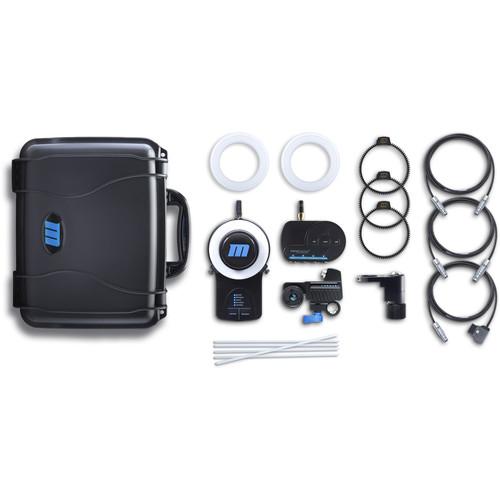 Contents of the user manual for the Redrock Micro microRemote Tandem Deluxe Bundle
- Product category: Wireless Lens Control Systems Redrock Micro
- Brand: Redrock Micro
- Description and content of package
- Technical information and basic settings
- Frequently asked questions – FAQ
- Troubleshooting (does not switch on, does not respond, error message, what do I do if...)
- Authorized service for Redrock Micro Wireless Lens Control Systems
|
User manual for the Redrock Micro microRemote Tandem Deluxe Bundle contain basic instructions
that need to be followed during installation and operation.
Before starting your appliance, the user manual should be read through carefully.
Follow all the safety instructions and warnings, and be guided by the given recommendations.
User manual is an integral part of any Redrock Micro product,
and if it is sold or transferred, they should be handed over jointly with the product.
Following the instructions for use is an essential prerequisite for protecting
health and property during use, as well as recognition of liability on the part of the manufacturer
for possible defects should you make a warranty claim. Download an official Redrock Micro user manual in which you will find instructions on how to install, use, maintain and service your product.
And do not forget – unsuitable use of a Redrock Micro product will considerably shorten its lifespan!
|
Product description This bundle from Redrock Micro includes a handheld wireless focus controller, a fingerwheel controller, and a torque motor, which combine to allow the camera operator or focus puller to manage the focusing duties. You can leave both focus controllers attached and select between them with a flip of a switch. This allows your operator to use the fingerwheel controller or your focus puller to use the wireless handwheel. It is worth noting that the wireless handwheel has a range of up to 1 mile.
The bundle enables mapping of any lens to a full 270°, even if the lens has a longer or shorter focus throw. The handwheel features a novel illumination feature, where you activate the included flare and then insert it into the handwheel for up to eight hours of illumination that requires no battery power. Three included removable gears enable you to work with lenses that do not incorporate lens gears. All the components, including lightweight flex cables, pack securely into a hard case with custom-cut foam. - microRemote Handheld Wireless Focus Controller
- Redrock microRemote Overview
The microRemote Handheld Wireless Focus Controller from Redrock Micro is designed to help control your camera focus while using stabilizers such as Steadicams, Jib Arms, and Gimbal Stabilizers. By controlling focus wirelessly you remove the need to directly touch the camera during a shot, but still control focus to direct your viewer's attention.
In situations where wireless may not be possible, the optional tethering cable wires the microRemote for direct, interference-free operation up to 20 feet away. - Camera Run/Stop
- This Handheld Controller features the ability to trigger the Run/Stop of supported cameras (cable required). This allows for control of the camera remotely for when it may be inaccessible. The microRemote Handheld Unit also has a built in Run/Stop light that indicates when the camera is recording or not, so the camera does not need to be within your line of sight.
- Lens Mapping
- All lenses are mapped to the full 270° rotation of the microRemote. This is especially helpful for DSLR lenses that have very short throws, but also very helpful for some Cinema Lenses that have long throws. The expanded mapping on DSLR Lenses is designed to allow refined and precise focus pulls. The mapping process makes all lenses feel similar, allowing for a consistent feel throughout all lenses.
- Wireless control of microRemote system up to 1 mile (1600m) line of sight
- Left/Right hand operation
- 3D Marking discs compatible with Flares for use in the dark
- A dual adjustable hard stop for precision pulls
- Powered by 2 AA batteries
- Camera Run/Stop triggering
- Lanyard loop for resting around neck
- 1/4"-20 thread for building into a rig
Note:The microRemote Handheld Controller is an add-on for existing microRemote owners and is not a standalone system - microRemote Handheld Bundle With the microRemote Handheld Bundle you can control focus on your lens without taking your hand off your rig. This kit consists of the Basestation, a Digital Torque Motor, and a Fingerwheel controller. All required connection and power cables are available separately. When fully assembled, this kit provides immediate focus control without weighing down your handheld rig. The system can also be used in situations where direct contact with the lens is not possible, like when the camera is mounted on a motorized gimbal stabilizer.The Basestation is the center of the microRemote system. It coordinates the Fingerwheel and calibrates the motors to the lenses. Power is also distributed through the Basestation. The Digital Torque Motor can drive photo or cinema lenses, while its small size keep it unobtrusive, and its light weight won't unbalance your rig. The motor will attach to 15mm rods and can be adjusted to fit the diameter of your lens. The included fingerwheel is designed to be mounted on a separately available microHandGrip and will be ideally positioned for index finger operation.
- Works with virtually all cameras and lenses
- Precision-movement fingerwheel
- Can be alternately used to control zoom or iris (or multiple units can be combined to simultaneously control more than one lens setting)
- Automatic lens calibration (with manual calibration option)
- Powerful Redrock Torque motor works with cinema and still lenses
- Air Lens Gear (3-Pack) The pack of three Air Lens Gear from Redrock Micro adds lightweight precision gearing for accurate and repeatable focusing when using a follow focus or wireless remote (sold separately). The gears are small enough to leave on even when shooting stills. It is designed with lubricated nylon that wraps around your lens' focus ring. It features industry standard 0.8 gearing that works with any focus system, including the Redrock microFollowFocus, microRemote, and Eclipse.
- Adapts still lenses for video and cinema accessories
- Works with virtually any lens and can also be used on many iris and zoom rings
- microRemote Illuminated Marking Disk The Redrock Micro microRemote Illuminated Marking Disk is a replacement or extra marking disk for use with the microRemote or microRemote Blue wireless lens control. The marking disk features a locator pin hole to ensure consistent alignment. This marking disk can be used with optional flares (sold separately), which will make the disk glow, aiding visibility in dimly lit environments.
- D-Tap to 2-Pin LEMO flexCable for microRemote (24") This 24" long Redrock Micro D-Tap to 2-Pin LEMO flexCable for microRemote is for powering an optional microRemote from a D-Tap power source.
Designed to be 200% more flexible than standard cables, which means easier cable wrangling and less drag when using accessories between the camera and gimbal frame, such as when using a Fingerwheel controller or for power connections. - The D-Tap connector is also known as a P-Tap connector.
- 7-Pin LEMO to 7-Pin LEMO flexCable for microRemote Torque Motor (24") This 24" long Redrock Micro 7-Pin LEMO to 7-Pin LEMO flexCable for microRemote Torque Motor connects to the 7-pin connector on an optional microRemote Basestation to an optional microRemote Torque motor, delivering both power and control from the basestation to the motor.
Designed to be 200% more flexible than standard cables, which means easier cable wrangling and less drag when using accessories between the camera and gimbal frame, such as when using a Fingerwheel controller or for power connections. - flexCable for microRemote Fingerwheel (24") The Redrock Micro flexCable for the microRemote Fingerwheel lets you connect the microRemote Fingerwheel to the microRemote Basestation. This 24" version is designed to allow the camera operator to pull focus from the Fingerwheel. It features a 3-pin connector on one end and 5-pin on the other.
- Lighter Design
- flexCables are 35% lighter than most standard cables thanks in large part to the cable sheathing that's ultra-lightweight (yet still provides the required protection).
- Increased Flexibility
- flexCables have a 200% greater flexibility than most standard cables, allowing for less drag and easier cable wrangling. These cables can be wrapped, twisted, and bent to keep your rig tight without damaging or crimping the cable.
- Thin Construction
- flexCables are 20% thinner than most standard cables. You can more easily install them where you need to and secure them with less effort.
- microRemote Carrying Case The Redrock Micro microRemote Carrying Case provides safe transport and storage for the microRemote lens control system. The case is made of impact resistant polypropylene and designed to be waterproof, rustproof, crushproof, and airtight. The custom-fit foam cutouts are specifically tailored to the microRemote handheld wireless controller, the microRemote basestation, and the Redrock Torque motor with additional space for cables, a fingerwheel, and other accessories.
-
- Impact resistant polypropylene
- Waterproof to a depth of 30'
- Dustproof (IP standards 67)
- Airtight with pressure purge valve
- Custom fit foam cutouts
- Space for accessories
- Lifetime warranty
In the Box Bundle Items microRemote Handheld Wireless Focus Controller zsrqwayvzzwueqeftydsuwetarvf - Limited 1-Year Warranty with Registration
microRemote Handheld Bundle zsrqwayvzzwueqeftydsuwetarvf - microRemote fingerwheel controller
- microRemote basestation, wireless ready
Air Lens Gear (3-Pack) microRemote Illuminated Marking Disk - Limited Lifetime Warranty with Registration
D-Tap to 2-Pin LEMO flexCable for microRemote (24") 7-Pin LEMO to 7-Pin LEMO flexCable for microRemote Torque Motor (24") flexCable for microRemote Fingerwheel (24") microRemote Carrying Case - Lifetime Warranty (for Shell)
Also Includes - 5 x Marking Disk Illumination Flare
Table of Contents
|
Upload User Manual
Have you got an user manual for the Redrock Micro microRemote Tandem Deluxe Bundle in electronic form? Please send it to us and help us expand our library of instruction manuals.
Thank you, too, on behalf of other users.
To upload the product manual, we first need to check and make sure you are not a robot. After that, your "Submit Link" or "Upload File" will appear.
Technical parameters - microRemote Handheld Wireless Focus Controller
| Thread | 1/4" - 20 | | Lens Throw | 270° | | Cable Length | 20' (6.1 m) | | | | Box Dimensions (LxWxH) | 9.213 x 6.221 x 5.906" | - microRemote Handheld Bundle
| Power Requirement | 12 to 18 VDC: D-Tap Battery, Auxiliary Camera Power, or 110/220 VAC Adapter | | Weight | Fingerwheel Controller: 3 oz / 85 g | | | | Box Dimensions (LxWxH) | 9.2 x 5.9 x 5.0" | - Air Lens Gear (3-Pack)
| Length | Fits lenses with up to 12.5" (318 mm) focus ring diameter | | Width | 0.39" (10 mm) | | Weight | 0.4 oz (12 g) | | | | Box Dimensions (LxWxH) | 4.0 x 3.9 x 0.8" | - microRemote Illuminated Marking Disk
| | | Box Dimensions (LxWxH) | 6.4 x 3.6 x 2.1" | - D-Tap to 2-Pin LEMO flexCable for microRemote (24")
| Length | 24" / 61 cm | | Connector 1 | D-Tap | | Connector 2 | 2-pin LEMO | | Weight | 2 oz / 57 g | | | | Box Dimensions (LxWxH) | 7.6 x 2.5 x 0.7" | - 7-Pin LEMO to 7-Pin LEMO flexCable for microRemote Torque Motor (24")
| Length | 24" / 61 cm | | Connector 1 | 7-pin LEMO | | Connector 2 | 7-pin LEMO | | Weight | 2 oz / 57 g | | | | Box Dimensions (LxWxH) | 5.6 x 0.6 x 0.3" | - flexCable for microRemote Fingerwheel (24")
| Length | 24" (61 cm) | | Connector 1 | 3-pin | | Connector 2 | 5-pin | | | | Box Dimensions (LxWxH) | 1.6 x 0.6 x 0.25" | - microRemote Carrying Case
| Construction | Waterproof: to a depth of 30' (9.14 m)
Crushproof: up to 400 lb (181.44 kg)
IP Standards 67 and MIL-PERF 28800 | | Dimensions | 15 x 12 x 7" (38.1 x 30.48 x 17.78 cm) | | Weight | 5.31 (2.4 kg) | | | | Box Dimensions (LxWxH) | 15.55 x 13.2 x 7.55" |
Rating84% users recommend this product to others. And what about you?

This product has already been rated by 29 owners. Add your rating and experience with the product.
Discussion
 Ask our technicians if you have a problem with your settings,
or if anything is unclear in the user manual you have downloaded.
You can make use of our moderated discussion.
The discussion is public and helps other users of our website who may be encountering similar problems.
Ask our technicians if you have a problem with your settings,
or if anything is unclear in the user manual you have downloaded.
You can make use of our moderated discussion.
The discussion is public and helps other users of our website who may be encountering similar problems.
The discussion is empty - enter the first post
Post a new topic / query / comment:
|
|
|
| Request for user manual |
You can’t find the operation manual you are looking for? Let us know and we will try to add the missing manual:
I’m looking for a manual / Request for manual
Current requests for instruction manuals:
Call Of Duty World War Two For Xbox...
controller stratus XL...
stratus XL...
smart whatch serie S11 42mm...
Allen & Heath SQ-6 manual...
|
| Discussion |
Latest contributions to the discussion:
AEW R 4100
Name: MAURICIO ANGARITA
Audio-Technica AEW-R4100 UHF Diversity Receiver for
AEW R 4100 has the mute function blocked and does not allow audio to pass. I tried several times to turn off the mute from the transmitter but it does nothing, the mute stays on. Solution?
Thank you...
Instructions for assembling the 2015 Forecast Image Master Consoles GC3-A
Name: mike elam
Forecast Consoles GC3-A ImageMaster Editing Console
Looking for instructions for assembling this console. ...
EMPTY TONER ERROR MESSAGE AFTER REPLACING TONER
Name: LINDA BAD YELLOW EYES
Brother TN223BK Standard-Yield Toner
I HAD TO CHANGE OUT ALL THREE TONERS DUE TO LEAKS IN THE YELLOW AND CYAN. AFTER I REPLACED THEM, THE MACHINE KEEPS GIVING ME AN EMPTY TONER ERROR MESSAGE. HELP!!...
PS480D 20/24 pin Switching 480W Power Supply
Name: swkargo
Logisys 480W Power Supply
This item states in can run -5vdc .It is NOT listed on the board or I beleive is r4 is missing the resitior. Any body have thid issue. Shawn
...
Help needed
Name: Ann Carter
SanDisk 1TB Extreme Portable USB 3.1
When I click the link to download the user manual for my Sandisk Extreme external hard drive, it gives me the manual for the LG Cricket. Can you please change the link so I can download the Sandisk manual and begin using this drive? Thank you....
|
|


