|
User Manual for Reflecmedia RM 7225DS 8.0 x 8.0' Deskshoot All In One Bundle with Small Dual LiteRing Click to enlarge the picture
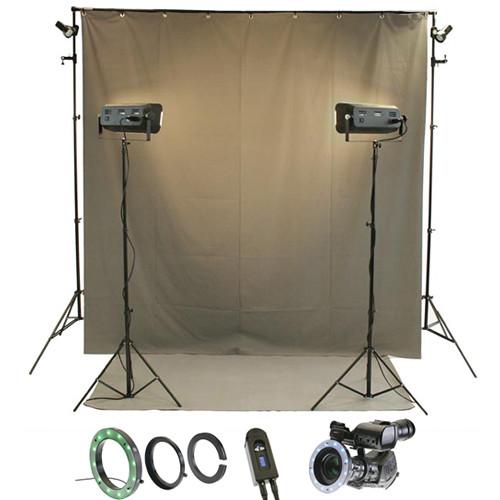 Contents of the user manual for the Reflecmedia RM 7225DS 8.0 x 8.0'
- Product category: LED Lights Reflecmedia
- Brand: Reflecmedia
- Description and content of package
- Technical information and basic settings
- Frequently asked questions – FAQ
- Troubleshooting (does not switch on, does not respond, error message, what do I do if...)
- Authorized service for Reflecmedia LED Lights
|
User manual for the Reflecmedia RM 7225DS 8.0 x 8.0' contain basic instructions
that need to be followed during installation and operation.
Before starting your appliance, the user manual should be read through carefully.
Follow all the safety instructions and warnings, and be guided by the given recommendations.
User manual is an integral part of any Reflecmedia product,
and if it is sold or transferred, they should be handed over jointly with the product.
Following the instructions for use is an essential prerequisite for protecting
health and property during use, as well as recognition of liability on the part of the manufacturer
for possible defects should you make a warranty claim. Download an official Reflecmedia user manual in which you will find instructions on how to install, use, maintain and service your product.
And do not forget – unsuitable use of a Reflecmedia product will considerably shorten its lifespan!
|
Product description Reflecmedia's 8.0 x 8.0' Deskshoot Chromatte background is expressly designed to work in conjunction with a LiteRing. The LiteRing features Light Emitting Diodes (LEDs) that are arranged in a circular casing that is positioned in front of the camera lens. This provides all the light required to illuminate the background for chroma key production. The RM 7225DS Deskshoot All In One Bundle with Small Dual LiteRing builds upon the remarkable success of the original and combines features that make it more versatile than ever! The included controller allows you to change the color from green to blue (and back) with the flick of a switch and offers 256 increments of 0-100% dimming. It's powered by 12VDC from the included universal power supply or optional camera or external batteries. The LiteRing itself also features a diffusion filter over the LED lights. The LiteRing fits lenses with a diameter of 72 mm and under. Specially designed optional adapter rings simply screw into the filter thread on the front of the lens and then the LiteRing is placed on to the adapter and locked with a single screw, significantly reducing the set-up time associated with conventional chroma key. The rest of the kit is rounded out by just about everything you'll need to do advanced chroma key work. An 8.0 x 8.0' Deskshoot Chromatte Backdrop and a support stand are included with a 4.0 x 6.0' BaseMatte Tile, as well as 2 Iztac front lights with stands and 2 clip-on backlights. Note: An optional adapter ring is available for your lens and is required for use of this product - RM 3251S Small Dual LiteRing Reflecmedia's Chromatte fabric is designed to work in conjunction with a LiteRing. The LiteRing features Light Emitting Diodes (LEDs) that are arranged in a circular casing that is positioned in front of the camera lens. This provides all the light required to illuminate the Chromatte background for chroma key production. The Reflecmedia RM 3251S Small Dual LiteRing builds upon the remarkable success of the original and combines features that make it more versatile than ever! The enhanced optional controller allows you to change the color from green to blue (and back) with the flick of a switch. The LiteRing itself also features a diffusion filter over the LED lights. Note: This listing is for the LiteRing only. Brightness is regulated by the optional LiteRing Controller, which is powered by 12VDC from an optional universal power supply or camera battery. A single Controller and Power Supply are required to power each LiteRing. A LiteRing adapter for your lens or lenses is also required for use.
- The Reflecmedia Dual LiteRing is designed to fit snugly around the camera lens to provide perfect illumination of the Reflecmedia Chromatte background for chroma key production.
- The Dual LiteRing features high performance surface mounted Light Emitting Diodes (LEDs) arranged in a robust circular casing with a tuned diffusion to create extremely even illumination without causing discomfort to the subject.
- The LiteRing is powered by the Reflecmedia Dual LiteRing Controller that allows the user to switch between blue or green output. 256 steps of dimming control are available with last setting memory for fast setup and instant switch over between colors.
- Dual LiteRing Controller The Reflecmedia Dual LiteRing Controller is designed specifically and exclusively to power the Dual LiteRing. The Controller features 0-100% dimming regulation in 256 steps, as well as selection of blue or green LEDs. Power options include optional external batteries, Sony NP-F batteries and a universal 90-240VAC power supply via a 4 Pin XLR input. UPC: 639713580631
- Lite-Ring World Power Supply 90-240V AC to 12V DC When you want to bring your Reflecmedia Lite-Ring from out of the studio and onto the road, the Reflecmedia 12V World Power Supply will convert AC voltages from 90V to 240V to a nominal 12V DC. It is provided with interchangeable USA, UK and European plug adapters.
- The output is 12V DC on a female 4 pin XLR connector.
Total power consumption is approximately 600 mA. UPC: 719821266198 - BaseMatte Tile The 6.6 x 4.6' (2 x 1.4 m) Reflecmedia BaseMatte™ Tile has a Chromatte special "beaded" surface with a rubberized backing. It is ideal for floor application with your Reflecmedia system. The backing forms easily to most carpets and solid floors and provides a flat chromatte panel with no creases. When used with a ChromaFlex or Chromatte curtain it will enable the camera operator to frame full body shots.
- BaseMatte™ tiles can easily be replaced, unlike an entire studio floor.
- Chromatte tape can be used to cover and mask microphone cables and other unwanted studio equipment (See "Accessories" Tab for #RM1212).
- Non-slip, pressure resistant
UPC: 719821271376 In the Box Bundle Items RM 3251S Small Dual LiteRing wcsuextuxtdrxtcexf Dual LiteRing Controller - 1 Year Manufacturer's Warranty
Lite-Ring World Power Supply 90-240V AC to 12V DC - XLR plug to USA AC power supply
BaseMatte Tile
Also Includes - 8.0 x 8.0' Deskshoot Chromatte Backdrop
- 2 x Backlight with Power Cord
- 2 x Iztac Key Light with Power Cord
- 2 x Light Stands
- Background Holder Set (2 Stands, 1 Crossbar)
- Limited 1-Year Warranty
Guides & Manuals Table of Contents
|
Upload User Manual
Have you got an user manual for the Reflecmedia RM 7225DS 8.0 x 8.0' Deskshoot All In One Bundle with Small Dual LiteRing in electronic form? Please send it to us and help us expand our library of instruction manuals.
Thank you, too, on behalf of other users.
To upload the product manual, we first need to check and make sure you are not a robot. After that, your "Submit Link" or "Upload File" will appear.
Download User ManualThe user manual for the Reflecmedia RM 7225DS 8.0 x 8.0' Deskshoot All In One Bundle with Small Dual LiteRing can be downloaded in PDF format at the link stated below.
Technical parameters - RM 3251S Small Dual LiteRing
| | | Cooling System | None | | Display | None | | | | Power Input Connector | 3-Pin XLR | | | | Fixture Mount | None | | Accessory Mount | None | | | | AC Input Power | 90 to 240 VAC, 50 / 60 Hz | | DC Input Power | 22.1 VDC at 0.5 A | | Power Source | AC Adapter, External Battery | | Max Power Consumption | 12 W | | | | IP Rating | IP40 | | Operating Temperature | 122°F / 50°C | | Protection Class | III | | | | Box Dimensions (LxWxH) | 7.2 x 5.8 x 1.6" | - Dual LiteRing Controller
| Intended Application | Powering Dual LiteRing
Photographic/film studios and similar locations | | Input | 7.5 - 12VDC
4 Pin XLR power input, Pin 1 0V, Pin 4 +V
7.5VDC via SONY NP-F built-in MDV battery mount | | Output | 3 pin XLR. Pin 1 +V (common) Pin 2 0V(1) Pin 3 0V(2) LiteRing output Max. 0.45A, 22.1VDC | | Dimming | 0 - 100% in 256 discreet steps (values of 0 - 255) | | Control | Dimming, selection of blue or green LEDs | | Power Source | Optional external batteries
Optional Sony NP-F camera batteries
Optional universal power adapter (90-240VAC) | | Power Consumption | 12W maximum | | Ratings | IP30 (dry locations)
Electric insulation class: III | | Operating Conditions | Maximum ambient temperature: 122°F (50°C)
Maximum surface temperature: 176°F (80°C) | | | | Box Dimensions (LxWxH) | 7.7 x 4.2 x 3.2" | - Lite-Ring World Power Supply 90-240V AC to 12V DC
| Output Voltage | 12V DC | | Output Current | 600 mAh | | Power Source | 90-240V AC | | Connector | 4 Pin XLR power connection | | | | Box Dimensions (LxWxH) | 5.1 x 4.6 x 3.4" | - BaseMatte Tile
| | | Box Dimensions (LxWxH) | 60.0 x 10.0 x 10.0" |
Rating90% users recommend this product to others. And what about you?

This product has already been rated by 13 owners. Add your rating and experience with the product.
Discussion
 Ask our technicians if you have a problem with your settings,
or if anything is unclear in the user manual you have downloaded.
You can make use of our moderated discussion.
The discussion is public and helps other users of our website who may be encountering similar problems.
Ask our technicians if you have a problem with your settings,
or if anything is unclear in the user manual you have downloaded.
You can make use of our moderated discussion.
The discussion is public and helps other users of our website who may be encountering similar problems.
The discussion is empty - enter the first post
Post a new topic / query / comment:
|
|
|
| Request for user manual |
You can’t find the operation manual you are looking for? Let us know and we will try to add the missing manual:
I’m looking for a manual / Request for manual
Current requests for instruction manuals:
Call Of Duty World War Two For Xbox...
controller stratus XL...
stratus XL...
smart whatch serie S11 42mm...
Allen & Heath SQ-6 manual...
|
| Discussion |
Latest contributions to the discussion:
AEW R 4100
Name: MAURICIO ANGARITA
Audio-Technica AEW-R4100 UHF Diversity Receiver for
AEW R 4100 has the mute function blocked and does not allow audio to pass. I tried several times to turn off the mute from the transmitter but it does nothing, the mute stays on. Solution?
Thank you...
Instructions for assembling the 2015 Forecast Image Master Consoles GC3-A
Name: mike elam
Forecast Consoles GC3-A ImageMaster Editing Console
Looking for instructions for assembling this console. ...
EMPTY TONER ERROR MESSAGE AFTER REPLACING TONER
Name: LINDA BAD YELLOW EYES
Brother TN223BK Standard-Yield Toner
I HAD TO CHANGE OUT ALL THREE TONERS DUE TO LEAKS IN THE YELLOW AND CYAN. AFTER I REPLACED THEM, THE MACHINE KEEPS GIVING ME AN EMPTY TONER ERROR MESSAGE. HELP!!...
PS480D 20/24 pin Switching 480W Power Supply
Name: swkargo
Logisys 480W Power Supply
This item states in can run -5vdc .It is NOT listed on the board or I beleive is r4 is missing the resitior. Any body have thid issue. Shawn
...
Help needed
Name: Ann Carter
SanDisk 1TB Extreme Portable USB 3.1
When I click the link to download the user manual for my Sandisk Extreme external hard drive, it gives me the manual for the LG Cricket. Can you please change the link so I can download the Sandisk manual and begin using this drive? Thank you....
|
|



