User Manual for Revolabs FLX UC 1500 IP & USB Conference Phone with Extension Microphones Click to enlarge the picture
 Contents of the user manual for the Revolabs FLX UC 1500 IP &
- Product category: Telephones Revolabs
- Brand: Revolabs
- Description and content of package
- Technical information and basic settings
- Frequently asked questions – FAQ
- Troubleshooting (does not switch on, does not respond, error message, what do I do if...)
- Authorized service for Revolabs Telephones
|
User manual for the Revolabs FLX UC 1500 IP & contain basic instructions
that need to be followed during installation and operation.
Before starting your appliance, the user manual should be read through carefully.
Follow all the safety instructions and warnings, and be guided by the given recommendations.
User manual is an integral part of any Revolabs product,
and if it is sold or transferred, they should be handed over jointly with the product.
Following the instructions for use is an essential prerequisite for protecting
health and property during use, as well as recognition of liability on the part of the manufacturer
for possible defects should you make a warranty claim. Download an official Revolabs user manual in which you will find instructions on how to install, use, maintain and service your product.
And do not forget – unsuitable use of a Revolabs product will considerably shorten its lifespan!
|
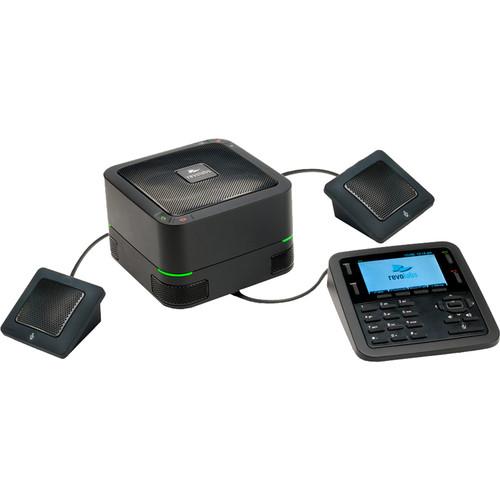
Product description The FLX UC 1500 from Revolabs is an IP and USB speakerphone with two extension microphones, designed to accommodate a wide variety of conferencing applications for business. Doubling as a high-performance IP conference phone and a USB audio device, the FLX UC 1500's design enables unified communications by supporting both USB audio for PC communication tools and SIP telephony for IP PBXs. It provides the ability to bridge IP and USB phone calls, allowing parties to communicate even when using different mediums. Furthermore, it is an idea solution for larger conference rooms, offering two additional directional microphones for added coverage. - Expanded Room Coverage
- Four internal microphones on the base plus two directional extension mics allows meeting participants to be clearly picked up and transmitted to the far end due, offering extended 360° coverage
- Full Duplex Audio
- Participants can communicate naturally as if they are in the same room; the technology in the FLX UC 1500 supports simultaneous audio play back and audio capture, ensuring every word is heard
- Integrated Echo Cancellation
- Built-in digital signal processing separates out the speech of the meeting participant, room noise, and audio from the speaker of the device to ensure only the correct audio is transmitted
UPC: 040232209550 In the Box Revolabs FLX UC 1500 IP & USB Conference Phone with Extension Microphones Base Unit Dialer Unit 2 x Extension Microphones 6.56" (2.0m) USB Cable 25' (7.62m) Ethernet Cable Limited 1-Year Warranty Brochure PDF 363.6kbydadxwswwycbecfztvty Table of Contents
|
Upload User Manual
Have you got an user manual for the Revolabs FLX UC 1500 IP & USB Conference Phone with Extension Microphones in electronic form? Please send it to us and help us expand our library of instruction manuals.
Thank you, too, on behalf of other users.
To upload the product manual, we first need to check and make sure you are not a robot. After that, your "Submit Link" or "Upload File" will appear.
Technical parametersRevolabs 10-FLXUC1500 Specs | SIP | Call Handling: Make, Answer, Hold, Resume, Transfer (Blind and Supervised), Forwarding, Do not disturb, Redial, Call Timer, Call ID, Speed Dial, Missed Call Notifications, Voice Mail Notifications (switch configured)
Call Bridging: Supports Bridging SIP and USB Calls. Join, Split, Hold, Resume, 3+1 Lines: Up to 2 SIP calls, 1 USB call, plus the user
Codecs: G.711 (A-law and u-law), G.722, G.726, G.729
DTMF Support: RTP event, SIP in-band, SIP info package support
Security: SRTP/SRTCP Support (RFC 1889), IETF SIP support (RFC 3261 and companion RFCs), SSIP, Password protected configuration files, Password protected login, HTTPS Secure Provisioning
Network & Provisioning: DHCP or Static IP, Server Based Central Provisioning, Web Portal for Individual Unit Configuration | | Features | Base Unit: Capacitive Touch Buttons for On-Hook, Off-Hook, Volume Up/Down, Mute
Dialer Keypad: 12-key telephone keypad, 4 context-dependent soft keys, 5 Navigational buttons with select key, On-Hook, Off-Hook, Volume Up/Down, Mute, Redial, Menu
Dialer Display: 3.5" diagonal color graphics display, 480 x 320 pixels
User Interface: Date & Time Display, User configurable Local Contact List, Call History (Missed Calls, Placed Calls, Received Calls), User-Selectable Ring Tones, Unicode UTF-16 Character Support, Multilingual User Interface
Extension Mics: Capacitive Touch Button for Mute and Status indicator | | Audio | Speaker Elements: Tweeter, mid-woofer
Speaker Frequency Response: 160 - 20,000 Hz
Max SPL: 91 dB at 1 m
Microphones: 4 embedded directional, 2 directional extension microphones
Microphone Coverage: 360° audio pick-up
Microphone Frequency Response: 160 - 12,000 Hz
Echo Cancellation: Individual AEC per microphone
Full Duplex: Yes | | Interfaces | Power: Power over Ethernet (PoE)
USB: Mini USB 2.0 connector | | Environmental | Operating Temperature: 32 - 104°F (0 - 40°C)
Storage Temperature: -22 - 131°F (-30 - 55°C)
Relative Humidity: 20%-85% (non-condensing) | | Compliance | Safety: CE Mark: EN 60950, IEC 60950, UL 60950, CSE C22.2, No. 60950, AS/NZS 60950
EMC: ICES-003 Class B, FCC (47 CRF Part 15) Class B, EN55022 Class B, CISPR22 Class B, AS/NZS CISPR22 Class B, VCCI Class B, EN55024
Environmental: RoHS | | Power | IEEE 802.3af Power over Ethernet (PoE) | | Dimensions | 4.84 x 5.9 x 5.9" (123 x 150 x 150 mm), base unit
1.6 x 5.2 x 5.3" (41 x 133 x 136 mm), dialer unit | | Weight | 3 lb (1.3 kg) | | | | Package Weight | 5.55 lb | | Box Dimensions (LxWxH) | 11.5 x 8.6 x 8.5" |
Rating70% users recommend this product to others. And what about you?

This product has already been rated by 98 owners. Add your rating and experience with the product.
Discussion
 Ask our technicians if you have a problem with your settings,
or if anything is unclear in the user manual you have downloaded.
You can make use of our moderated discussion.
The discussion is public and helps other users of our website who may be encountering similar problems.
Ask our technicians if you have a problem with your settings,
or if anything is unclear in the user manual you have downloaded.
You can make use of our moderated discussion.
The discussion is public and helps other users of our website who may be encountering similar problems.
The discussion is empty - enter the first post
Post a new topic / query / comment:
|
|


