|
User Manual for Ricoh G900 Digital Camera Click to enlarge the picture
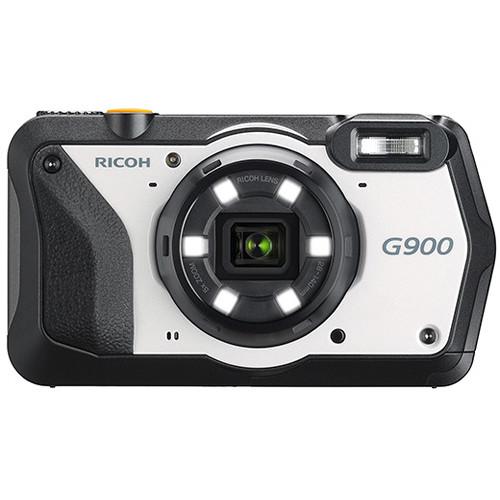 Contents of the user manual for the Ricoh G900 Digital Camera
- Product category: Point & Shoot Cameras Ricoh
- Brand: Ricoh
- Description and content of package
- Technical information and basic settings
- Frequently asked questions – FAQ
- Troubleshooting (does not switch on, does not respond, error message, what do I do if...)
- Authorized service for Ricoh Point & Shoot Cameras
|
User manual for the Ricoh G900 Digital Camera contain basic instructions
that need to be followed during installation and operation.
Before starting your appliance, the user manual should be read through carefully.
Follow all the safety instructions and warnings, and be guided by the given recommendations.
User manual is an integral part of any Ricoh product,
and if it is sold or transferred, they should be handed over jointly with the product.
Following the instructions for use is an essential prerequisite for protecting
health and property during use, as well as recognition of liability on the part of the manufacturer
for possible defects should you make a warranty claim. Download an official Ricoh user manual in which you will find instructions on how to install, use, maintain and service your product.
And do not forget – unsuitable use of a Ricoh product will considerably shorten its lifespan!
|
Product description Ricoh Announces GR III, WG-6, and G900 Digital Cameras Read More Optimized for use on worksites, the Ricoh G900 pairs a truly rugged physical design with versatile imaging capabilities and an immense feature set to complement its use at civil engineering, construction, disaster relief, manufacturing, and indoor industrial sites. Featuring a 20MP BSI CMOS sensor, high-resolution stills shooting and UHD 4K30 video recording are possible, and an ISO 125-25600 sensitivity range benefits working in various lighting conditions. A 5x optical zoom lens also contributes to the camera's flexibility, and covers a wide-angle to telephoto 28-140mm equivalent focal length range, which is benefitted by a series of digital Shake Reduction modes to produce sharper handheld images.
The G900's distinguishing features, though, lie in its tough physical design, which renders it waterproof to depths of 65.6', shockproof from heights of 6.6' as well as freezeproof, crushproof, dustproof, and resistant to chemical disinfection. Also complementing its use on worksites is the incorporation of an enhanced Camera Memo function, for attaching text or audio messages to files, and an advanced password protection Camera Lock function to restrict use of the camera. Surrounding the camera's lens is an LED ring light that, besides illuminating close-up subjects, works in conjunction with a Barcode Scanning mode. A high-accuracy GPS module is also incorporated into the camera's design, and permits embedding location information within your image files. - Durable Design
- The G900 is designed to withstand a wide variety of conditions for dependable use in harsh climates and on demanding worksites:
- Waterproof-rated for use underwater to depths of 65.6' / 20m for up to two hours of continuous operation (IPX8/JIS Class 8-equivalent)
- Freezeproof to temperatures as low as 14°F / -10°C
- Shockproof to falls from 6.6' / 2m high
- Crushproof to withstand up to 220 lbf / 100 kgf of pressure
- Dustproof to protect the internal components of the camera (IPX6/JIS Class 6-equivalent)
- Chemical-resistant for using ethanol disinfection, bleach disinfection, and liquid chlorine dioxide, to suit business, industrial, and construction site use
- 20MP CMOS Sensor
- Featuring a 20MP BSI CMOS sensor, the G900 is capable of recording high-resolution stills and UHD 4K30 video. The sensor's back-illuminated design offers improved clarity, reduced noise, and a sensitivity range from ISO 1250-25600 to suit working in a variety of lighting conditions.
- Ricoh 5x Zoom Lens and LED Ring Light
- Spanning wide-angle to telephoto focal lengths, the 5x optical zoom lens covers a 28-140mm equivalent range to suit photographing a wide array of subject types. Surrounding the lens is an LED ring light, which incorporates six individual LEDs, to produce bright and even lighting when photographing close-up subjects. Ten brightness levels are available to adjust the light output, the lighting pattern can be configured and an enhanced Digital Microscope mode enables close focusing to 0.4".
- UHD 4K Video and Movie SR+
- UHD 4K30 video recording is supported for high-resolution playback and is benefitted by a Movie SR+ (Shake Reduction) setting, which offers "electronic gimbal" functionality to steady footage taken while moving. Conventional Movie SR can also be used for a more natural, less distorted look, and actively clips the frame to promote steadier shots.
- Body Design
- The rugged exterior of the camera has been designed for easy operation in harsh conditions, even when wearing gloves. An assignable ADJ button offers instant access to oft-used camera functions and a top dial permits quick switching between shooting modes. The four-way controller also sports a more ergonomic, raised design with easier-to-press buttons and the rear 3.0" 1.04m-dot LCD has a bright design and AR coating for clear viewing in various lighting conditions. Additionally, date and copyright stamping on files is possible.
- Camera Memo Function
- Integrated Camera Memo function allows you to attach text items to images (100 text items maximum, with up to 128 characters per item) or audio files (up to 30 seconds) that have previously been created on the camera or a computer. This function also lets you browse compatible reference images, such as plans or blueprints on the camera after selecting a desired subject from a list of up to 999 memo contents. The camera's built-in barcode scanning function can also be used in conjunction with the memo function, and scanned barcode information can be attached to images as embedded camera memo data. Additionally, the included EX2 application software allows for integrating image categorizations and file names into camera memo data in order to reduce the time for post-shooting file organization.
- Password-Protected Camera Lock Function
- The G900's operation can be restricted entirely or partially by locking camera functions using a password. Lockable functions include camera access, menu access, internal memory viewing, and USB connection, and the camera can be unlocked by either inputting a password using the onscreen keyboard or by scanning a barcode. Up to two passwords can be created—one for a user, one for an administrator—and password protection further carries over to encrypting used SD memory cards to prevent disclosing images if a card is lost or stolen.
- Worksite Features
-
- The integrated LED ring light also facilitates the ability to scan barcodes in a dedicated Barcode Scanning mode.
- Helping to maintain consistent compositions and for assessing progress at a construction site, Transparency Guide allows you to recall a previously captured image on the LCD monitor and use it as a template for capturing a new image with the same composition. The transparency level can be adjusted between 20% to 80% and you can recall two separate images for at-a-glance comparisons.
- Image Clipping function permits checking two related images, such as an image or a worksite and an image of survey data, on a computer screen.
- A range of highly legible Ricoh RT fonts can be used for adding text overlays onto images.
- Besides one SD memory card slot, 6.5GB of internal memory is also available for storing images.
- Electronic Level guide can be used to maintain consistently straight horizons and verticals.
- GPS System
- Enhanced for greater accuracy, the integrated GPS module corresponds to the latest satellite navigation augmentation system, SBAS. QZSS, GLONASS, and U.S. GPS satellites are also supported for quick activation—approximately 1 minute from shut-down, 20 seconds from sleep mode, or 3 seconds from standby—and a dedicated GPS button is featured within the four-way controller for recording location information to images by the GPS memory function. The compass also affords access to an electronic compass, which covers 360° in 16 directions.
UPC: 026649621024 In the Box Ricoh G900 Digital Camera DB-110 Rechargeable Lithium-Ion Battery (3.6V, 1350mAh) BJ-11 Battery Charger Power Adapter Power Plug I-USB173 USB Cable Neck Strap O-MS3 Macro Stand Limited 1-Year Warranty Table of Contents
|
Upload User Manual
Have you got an user manual for the Ricoh G900 Digital Camera in electronic form? Please send it to us and help us expand our library of instruction manuals.
Thank you, too, on behalf of other users.
To upload the product manual, we first need to check and make sure you are not a robot. After that, your "Submit Link" or "Upload File" will appear.
Technical parametersRicoh G900 Specs | | | Pixels | 20 Megapixel | | Sensor | 1/2.3" CMOS | | File Formats | Still Images: JPEG
Movies: AVC/H.264 | | Aspect Ratio | 1:1, 3:2, 4:3 | | Image Stabilization | Digital | | | | Lens | 11 Elements in 9 Groups
5 Aspherical
Effective Focal Length: 5 to 25mm (35 mm Equivalent: 28 to 140mm)
Aperture: f/3.5 (W) to f/5.5 (T) | | Zoom | Optical: 5x
Digital: 8.1x
Intelligent Zoom: 7x
Intelligent Zoom: 40.5x | | Focus Range | Normal: 1.64' to Infinity / 50 cm to Infinity
Macro: 3.94" to 1.97' / 10 cm to 60 cm
Super-Macro: 0.39" to 11.81" / 1 cm to 30 cm | | | | ISO Sensitivity | Auto, 125 to 25600 | | Shutter | Type: Electronic & Mechanical
Speed: 1/4 to 1/4000 Second | | Exposure Metering | Center-Weighted, Multi, Spot | | Exposure Modes | Modes: Program
Compensation: -2 EV to +2 EV (in 1/3 EV Steps) | | White Balance | Auto, Cloudy, Daylight, Fluorescent (Day White), Fluorescent (Daylight), Fluorescent (White), Manual, Ring Light, Shade, Tungsten | | Interval Recording | Yes | | Remote Control | O-RC1 (Optional) | | | | Flash Modes | Flash On
Off
Red-Eye Reduction | | Built-In Flash | Yes | | Effective Flash Range | Wide:0.66 to 18.04' / 0.2 to 5.5 m
Telephoto:0.66 to 11.48' / 0.2 to 3.5 m | | | | Built-In Memory | 6.5 GB | | Memory Card Type | SD
SDHC
SDXC | | | | Video Recording | Yes, NTSC | | Resolution | 3840 x 2160p: 30 fps
1920 x 1080p: 30 fps
1280 x 720p: 30 fps | | | | Video Clip Length | Up to 25 Minute | | Audio Recording | Built-In Mic: With Still Images & Video + Voice Memo | | | | Screen | 3.0" LCD Rear Screen (1,040,000 Pixels) | | Screen Coverage | 100% | | | | Connectivity | HDMI D (Micro), USB 3.0, USB Type-C | | GPS | Yes | | | | Operating Temperature | 14 to 104°F / -10 to 40°C | | Waterproofing | 65.6' / 20.0 m | | | | Battery | 1 x DB-110 Rechargeable Lithium-Ion Battery Pack, 3.6 VDC, 1350 mAh | | AC Power Adapter | K-AC166U (Not Included) | | | | Dimensions (W x H x D) | 4.7 x 2.6 x 1.3" / 118.2 x 65.5 x 33.1 mm | | Weight | 8.71 oz / 247 g with battery and memory card |
Rating100% users recommend this product to others. And what about you?

This product has already been rated by 85 owners. Add your rating and experience with the product.
Discussion
 Ask our technicians if you have a problem with your settings,
or if anything is unclear in the user manual you have downloaded.
You can make use of our moderated discussion.
The discussion is public and helps other users of our website who may be encountering similar problems.
Ask our technicians if you have a problem with your settings,
or if anything is unclear in the user manual you have downloaded.
You can make use of our moderated discussion.
The discussion is public and helps other users of our website who may be encountering similar problems.
The discussion is empty - enter the first post
Post a new topic / query / comment:
|
|
|
| Request for user manual |
You can’t find the operation manual you are looking for? Let us know and we will try to add the missing manual:
I’m looking for a manual / Request for manual
Current requests for instruction manuals:
Call Of Duty World War Two For Xbox...
controller stratus XL...
stratus XL...
smart whatch serie S11 42mm...
Allen & Heath SQ-6 manual...
|
| Discussion |
Latest contributions to the discussion:
AEW R 4100
Name: MAURICIO ANGARITA
Audio-Technica AEW-R4100 UHF Diversity Receiver for
AEW R 4100 has the mute function blocked and does not allow audio to pass. I tried several times to turn off the mute from the transmitter but it does nothing, the mute stays on. Solution?
Thank you...
Instructions for assembling the 2015 Forecast Image Master Consoles GC3-A
Name: mike elam
Forecast Consoles GC3-A ImageMaster Editing Console
Looking for instructions for assembling this console. ...
EMPTY TONER ERROR MESSAGE AFTER REPLACING TONER
Name: LINDA BAD YELLOW EYES
Brother TN223BK Standard-Yield Toner
I HAD TO CHANGE OUT ALL THREE TONERS DUE TO LEAKS IN THE YELLOW AND CYAN. AFTER I REPLACED THEM, THE MACHINE KEEPS GIVING ME AN EMPTY TONER ERROR MESSAGE. HELP!!...
PS480D 20/24 pin Switching 480W Power Supply
Name: swkargo
Logisys 480W Power Supply
This item states in can run -5vdc .It is NOT listed on the board or I beleive is r4 is missing the resitior. Any body have thid issue. Shawn
...
Help needed
Name: Ann Carter
SanDisk 1TB Extreme Portable USB 3.1
When I click the link to download the user manual for my Sandisk Extreme external hard drive, it gives me the manual for the LG Cricket. Can you please change the link so I can download the Sandisk manual and begin using this drive? Thank you....
|
|


