User Manual for Ricoh MP 601SPF All-in-One Monochrome Laser Printer Click to enlarge the picture
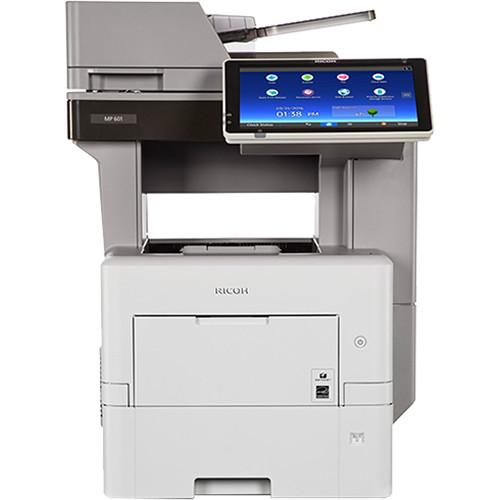 Contents of the user manual for the Ricoh MP 601SPF All-in-One Monochrome Laser
- Product category: Laser Printers Ricoh
- Brand: Ricoh
- Description and content of package
- Technical information and basic settings
- Frequently asked questions – FAQ
- Troubleshooting (does not switch on, does not respond, error message, what do I do if...)
- Authorized service for Ricoh Laser Printers
|
User manual for the Ricoh MP 601SPF All-in-One Monochrome Laser contain basic instructions
that need to be followed during installation and operation.
Before starting your appliance, the user manual should be read through carefully.
Follow all the safety instructions and warnings, and be guided by the given recommendations.
User manual is an integral part of any Ricoh product,
and if it is sold or transferred, they should be handed over jointly with the product.
Following the instructions for use is an essential prerequisite for protecting
health and property during use, as well as recognition of liability on the part of the manufacturer
for possible defects should you make a warranty claim. Download an official Ricoh user manual in which you will find instructions on how to install, use, maintain and service your product.
And do not forget – unsuitable use of a Ricoh product will considerably shorten its lifespan!
|
Product description Become a more productive office with the addition of the MP 601SPF All-in-One Monochrome Laser Printer from Ricoh to your workspace. This multifunction model delivers outstanding performance for printing, scanning, copying, and faxing. Beginning with printing, users will have the ability to produce up to 62 prints each minute. Also, with a print resolution of 1200 x 1200 dpi documents and text will be sharp and detailed. Operators can print a wide variety of document sizes up to 8.5 x 14" and can set the unit for duplex printing to save on media.
Scanning is possible through either an 8.5 x 14" flatbed or a 75-sheet reversing ADF. It is blazing fast with a rated black & white speed of 62 ipm in simplex and 27 ipm in duplex as well as color speeds of 42 ipm in simplex and 18 ipm in duplex. A scan resolution of 600 dpi ensures images recorded will offer fine detail. Copying benefits from this technology as well, featuring a resolution of 600 x 600 dpi and the ability to create duplexed copies.
For general media handling, the MP 601SPF has both a 100-sheet bypass tray and a 500-sheet standard input tray. Making operation simple and intuitive is a large 10.1" color touchscreen control panel on the front of the machine. Users will also find easy-access USB ports and SD card slots for direct printing and scanning. Additionally, it has a standard USB 2.0 and Ethernet connectivity with the Ethernet providing a networking option that enables mobile device printing. - Document server can hold a maximum of 3,000 documents with a maximum of 1,000 pages each. Up to 200 of these folders can be password protected.
UPC: 026649078125 In the Box Ricoh MP 601SPF All-in-One Monochrome Laser Printer Starter Print Cartridge (10,000 Pages) Power Cord Limited 1-Year Warranty Table of Contents
|
Upload User Manual
Have you got an user manual for the Ricoh MP 601SPF All-in-One Monochrome Laser Printer in electronic form? Please send it to us and help us expand our library of instruction manuals.
Thank you, too, on behalf of other users.
To upload the product manual, we first need to check and make sure you are not a robot. After that, your "Submit Link" or "Upload File" will appear.
Technical parametersRicoh MP 601SPF Specs | Functions | Print, scan, copy, fax | | | | Printing Technology | Laser | | Print Color | Black | | Maximum Resolution | 1200 x 1200 dpi | | Print Speed | 62 ppm | | First Print Out Speed | 6 seconds | | Duplex Printing | Yes | | Printer Duty Cycle | Monthly: 275,000 pages
Monthly Volume: 16,600 pages | | Print Features | Eco-friendly indicator, PDF direct print, mail to print, classification code, Bonjour support, Windows Active Directory support, DDNS support, PCL resident font adoption, tray parameter change from web image monitor, 1200 dpi support, universal driver, XPS support, WS printer, wireless LAN interface option, media direct print (print from USB/SD), banner page print, auto job promotion, poster print, WPS support, sample/locked/hold/scheduled/stored print/store and print | | | | Scanner Type | Flatbed
ADF | | Scan Resolution | 600 dpi | | Scan Speed | Black & White, Simplex: 62 ipm
Black & White, Duplex: 27 ipm
Color, Simplex: 42 ipm
Color, Duplex: 18 ipm | | Maximum Scan Area | ADF: 8.5 x 14.0" / 21.6 x 35.6 cm
Flatbed: 8.5 x 14.0" / 21.6 x 35.6 cm | | Duplex Scanning | Yes | | File Formats | TIFF, PDF, PDF/A, JPEG | | Scanner Features | Scan-to-USB/SD, WS scanner, scan-to-email/SMB/FTP/URL, LDAP support, preview, PDF encryption, drop out color send, TWAIN scan, universal send (simultaneous fax and scan), scan-to digitally signed PDF, searchable PDF and PDF/A, distributed scan management, 25 user programs, divide & send, image rotation, SADF/batch mode, mixed size originals, resend | | | | Maximum Resolution | 600 x 600 dpi | | Copy Speed | 62 ppm | | First Copy-Out Time | 6 seconds | | Number of Copies | Up to 999 | | Maximum Copy Size | 8.5 x 14.0" / 21.6 x 35.6 cm | | Duplex Copying | Yes | | Reduction / Enlargement | 25-400% in 1% increments | | Copy Features | Auto paper selection, auto start, auto tray switch, combine copy, directional magnification, duplex, electronic sort, ID card copy, image density adjustment, image quality mode, interrupt copy, memory copy, series copy, user program, import/export of preference settings, centralized address book management | | | | Modem Speed | 33.6 kbps | | Transmission Speed | 3 seconds per page (MMR compression)
2 seconds per page (JBIG compression) | | Compression | MH, MR, MMR, JBIG | | Fax Resolution | 200 x 200/100 dpi | | Fax Memory | 4 MB (320 pages) | | Group Dials | 100 (500 numbers per group) | | Fax Features | 2,000 auto dials, one hour backup, detection of misplaced document, double-check destination address, IP fax (T.38), internet fax (T.37), forward to email/folder, paperless fax, LAN fax, LDAP support, universal send (simultaneous fax and scan), remote fax, fax output timer | | | | Paper Handling | Input tray
Bypass tray
Reversing automatic document feeder
Output tray | | Paper Types | Plain, thin, middle, thick, recycled, colored, special, letterhead, pre-printed, bond, OHP (transparency), label, envelopes | | Paper Sizes | Input Tray: 4.1 x 5.8" to 8.5 x 14.0" / 10.5 x 14.8 cm to 21.6 x 35.6 cm
Bypass Tray: 2.8 x 5.8" to 8.5 x 14.0" / 7.0 x 14.8 cm to 21.6 x 35.6 cm
ADF: Up to 8.5 x 14" / 21.6 x 35.6 cm | | Media Weight | Input Tray: 17-32 lb bond & 66 lb index / 60-120 gsm
Bypass Tray: 16-59 lb bond & 122 lb index / 60-220 gsm
ADF: 13-20 lb bond & 44 lb index / 50-80 gsm | | Paper Capacity | Input Tray: 500 sheets
Bypass Tray: 100 sheets
ADF: 75 sheets
Output Tray: 500 sheets | | | | Interfaces | USB 2.0
Ethernet | | Direct Print Capable | USB port
SD card slots | | Mobile Printing Features | Ricoh Smart Device Connector, Ricoh App for Google Cloud Print, Apple AirPrint | | OS Compatibility | Windows 10, 8, 8.1, 7, Vista, Server 2012 R2, Server 2012, Server 2008 R2, Server 2008, Server 2003 R2, Server 2003 (CPS/XenApp PCL/PS only)
Mac OS X 10.7 or later (PS only)
UNIX Sun Solaris 9, 10
HP-UX 11.x, 11i v2, 11i v3
Red Hat Linux Enterprise V4, V5, V6
SCO OpenServer 5.0.7, 6.0
IBM AIX V5L, V5.3, V6.1, V7.1
SAP R/3 | | Processor | 1.46 GHz | | Memory | 2 GB RAM | | Hard Drive Capacity | 320 GB | | Fonts | PCL: 45 fonts, 6 bitmapped fonts, 13 international fonts
PostScript 3: 136 fonts | | Printer Language | PCL 5e
PCL6
Adobe PostScript 3
Adobe PDF Direct Print | | Network Protocol Support | TCP/IP (IPv4, IPv6), SMTP (sending email), SMB/FTP (scan-to-folder), Web Services on devices for scanning | | Network Security | Address book encryption, authentication, password encryption, HDD data encryption & overwrite, IP address filtering, IP sec communications, kerberos support, locked print, network protocol ON/OFF, quota setting/account limit, scan-to-web mail (SMTP over SSL), Secure Socket Layer (SSL), Secure Shell Encryption (SSH), S/MIME, Transport Layer Security (TSL), user authentication (Windows, LDAP, basic, user code, 802.1x wired), unauthorized copy prevention (Print), wireless LAN WEP/WPA | | | | Control Panel | 10.1" / 25.7 cm smart operation panel | | Power Requirements | 120 VAC, 60 Hz, 15 A | | Power Consumption | Operating: 774 W
Sleep Mode: 1.1 W | | Typical Power Consumption | 3.8 kWh/week | | Warm-Up Time | 25.4 seconds | | Certifications | ENERGY STAR
EPEAT Silver | | Dimensions | 18.7 x 19.8 x 25.4" / 47.5 x 50.4 x 64.5 cm | | Weight | 61.6 lb / 28.0 kg | | | | Package Weight | 89.0 lb | | Box Dimensions (LxWxH) | 30.0 x 26.5 x 23.3" |
Rating50% users recommend this product to others. And what about you?

This product has already been rated by 00 owners. Add your rating and experience with the product.
Discussion
 Ask our technicians if you have a problem with your settings,
or if anything is unclear in the user manual you have downloaded.
You can make use of our moderated discussion.
The discussion is public and helps other users of our website who may be encountering similar problems.
Ask our technicians if you have a problem with your settings,
or if anything is unclear in the user manual you have downloaded.
You can make use of our moderated discussion.
The discussion is public and helps other users of our website who may be encountering similar problems.
The discussion is empty - enter the first post
Post a new topic / query / comment:
|
|


