User Manual for Ricoh SP 4510DN Monochrome LED Printer Click to enlarge the picture
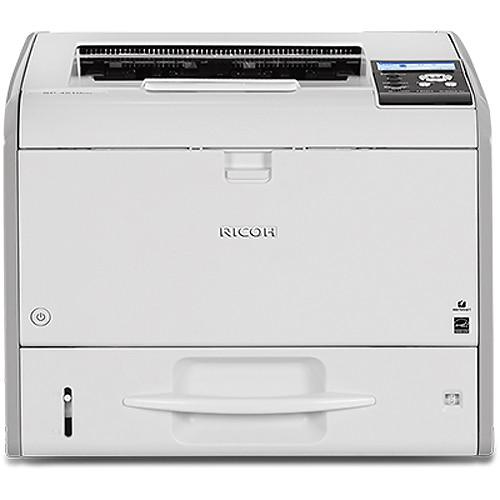 Contents of the user manual for the Ricoh SP 4510DN Monochrome LED Printer
- Product category: Laser Printers Ricoh
- Brand: Ricoh
- Description and content of package
- Technical information and basic settings
- Frequently asked questions – FAQ
- Troubleshooting (does not switch on, does not respond, error message, what do I do if...)
- Authorized service for Ricoh Laser Printers
|
User manual for the Ricoh SP 4510DN Monochrome LED Printer contain basic instructions
that need to be followed during installation and operation.
Before starting your appliance, the user manual should be read through carefully.
Follow all the safety instructions and warnings, and be guided by the given recommendations.
User manual is an integral part of any Ricoh product,
and if it is sold or transferred, they should be handed over jointly with the product.
Following the instructions for use is an essential prerequisite for protecting
health and property during use, as well as recognition of liability on the part of the manufacturer
for possible defects should you make a warranty claim. Download an official Ricoh user manual in which you will find instructions on how to install, use, maintain and service your product.
And do not forget – unsuitable use of a Ricoh product will considerably shorten its lifespan!
|
Product description Rapidly produce quality black-and-white documents with the SP 4510DN Monochrome LED Printer from Ricoh. Capable of 42 ppm at 1200 x 1200 dpi, this unit will easily handle the demanding printing needs of a medium-sized office. Also, it has both a standard 500-sheet input tray and a 100-sheet bypass tray that enables working with documents from 2.4 x 5.0" up to 8.5 x 35.4" as well as automatic duplexing. Users will be able to get started quickly with a first print out speed of just 5 seconds and not worry too much about the unit breaking down with a monthly duty cycle of 150,000 pages.
Operation is quite simple with buttons on the front panel along with a four-line LCD display that will show current status and settings. Also, it has a USB host port for direct printing from a USB thumb drive. Additionally, connectivity via USB 2.0 and Ethernet provides many more options, including networking. This enables printing from a variety of computers and mobile devices in your workgroup. - 533 MHZ controller and 512MB of RAM are built-in for working with multiple jobs and large files without delay.
- Optional Wi-Fi connectivity and hard drive accessories.
- Advanced security features and encryption.
- Ricoh's Web Image Monitor allows users to check system status, change settings, manage job queues and expedite maintenance from a computer. It also allows for the assigning of up to 1,000 user codes to track volumes and trends by individual users, and leverage the information to improve print behavior.
- ECO-Night sensor shuts the printer down with the lights are turned off.
UPC: 026649073113 In the Box Ricoh SP 4510DN Monochrome LED Printer Starter Toner Cartridge (~6,000 Pages) Limited 1-Year Warranty Brochure PDF 1mb Table of Contents
|
Upload User Manual
Have you got an user manual for the Ricoh SP 4510DN Monochrome LED Printer in electronic form? Please send it to us and help us expand our library of instruction manuals.
Thank you, too, on behalf of other users.
To upload the product manual, we first need to check and make sure you are not a robot. After that, your "Submit Link" or "Upload File" will appear.
Technical parametersRicoh SP 4510DN Specs | | | Printing Technology | LED with electro-photographic printing technology | | Maximum Resolution | 1200 x 1200 dpi | | Print Speed | 42 ppm (letter) | | Toner Cartridge Compatibility | SP 4500HA Print Cartridge (~12,000 pages)
SP 4500A Print Cartridge (~6,000 pages)
SP 4500LA Print Cartridge (~3,000 pages) | | First Print Out Speed | 5 seconds | | Print Color | Black & white | | Duplex Printing | Automatic | | Printer Duty Cycle | Monthly Duty Cycle: 150,000 prints
Monthly Volume: 10,000 prints | | Print Features | Scheduled print, auto continue, classification code, PDF direct print, sample/hold/stored and locked print, unauthorized copy prevention, poster print, collate, toner saving mode | | | | Paper Handling | Paper tray
Bypass tray
Output tray | | Paper Capacity | Input Tray: 500 sheets
Bypass Tray: 100 sheets
Output Tray: 250 sheets | | Paper Types | Plain, recycled, thick, OHP (transparency), letterhead, preprinted, and envelopes | | Paper Sizes | Paper Tray: 3.94 x 5.82" (10.0 x 14.8 cm) to 8.5 x 14.0" (21.6 x 35.6 cm)
Bypass Tray: 2.37 x 5.00" (6.0 x 12.7 cm) to 8.50 x 35.43" (21.6 x 90.0 cm) | | Media Weight | 14-43 lb bond (52-162 gsm)
90 lb index | | | | Interface | USB 2.0
Ethernet (1000/100/10BASE-T) | | Direct Print Capable | USB 2.0 host port | | Mobile Printing Features | Smart Device Print & Scan App | | OS Compatibility | Windows XP, Vista, 7, 8, 8.1, Server 2003, Server 2008, Server 2008 R2, Server 2012, Server 2012 R2
Mac OS X 10.5 or later PS only
UNIX filters for Sun Solaris
HP-UX
Red Hat Linux
SCO OpenServer
IBM AIX
SAP R/3, Citrix Presentation Server 4.5, Citrix XenApp 5.0, 6.0, 6.5 | | Memory | Standard: 512 MB RAM
Maximum: 1 GB RAM | | Processor | 533 MHz | | Fonts | PCL6: 45 fonts
PCL5: 45 fonts + 13 international fonts
PostScript3: 136 fonts
IPDS: 108 fonts (optional) | | Printer Language | Standard: PCL6/5e, Adobe PostScript 3, PDF Direct Optional: XPS, IPDS | | Hard Drive Capacity | 320 GB (optional) | | Network Protocol Support | TCP/IP (IPv4, IPv6) | | Network Security | Administrator and user authentication, user lockout, auto logout, menu protect, data encryption (address book/user authentication information/job logs/temporary stored document/network interface settings/system settings), network security via TCP/IP access control, encrypted communications using SSL/TLS, IPsec, or IEEE 802.1X, SMNPv3, IPP authentication, Kerberos authentication encryption, Wireless LAN security (WEP, WPA2/WPA2-PSK), protect document data with locked and stored print, unauthorized copy prevention, compulsory security stamp, HDD data overwrite and encryption | | Wireless Configuration | Optional: IEEE 1284, IEEE 802.11a/b/g/n | | Account and System Management | @Remote, SmartDeviceMonitor, Device Manager NX, Web SmartDeviceMonitor, Web Image Monitor | | | | Warm-Up Time | 17 seconds
Recovery from Sleep Mode: 9.9 seconds | | Power Requirements | 120 VAC, 60 Hz, 10 A | | Power Consumption | Operating: 561.7 W
Sleep: <1 W | | Typical Power Consumption | 1.752 kWh/week | | Certifications | ENERGY STAR certified
EPEAT Silver | | Dimensions | 14.6 x 15.4 x 12.0" (37.0 x 39.2 x 30.6 cm) | | Weight | 34.2 lb (15.5 kg) | | | | Package Weight | 41.0 lb | | Box Dimensions (LxWxH) | 20.0 x 19.0 x 18.0" |
Rating100% users recommend this product to others. And what about you?

This product has already been rated by 55 owners. Add your rating and experience with the product.
Discussion
 Ask our technicians if you have a problem with your settings,
or if anything is unclear in the user manual you have downloaded.
You can make use of our moderated discussion.
The discussion is public and helps other users of our website who may be encountering similar problems.
Ask our technicians if you have a problem with your settings,
or if anything is unclear in the user manual you have downloaded.
You can make use of our moderated discussion.
The discussion is public and helps other users of our website who may be encountering similar problems.
The discussion is empty - enter the first post
Post a new topic / query / comment:
|
|


