|
User Manual for Ricoh Theta V Kit with TW-1 Underwater Housing Click to enlarge the picture
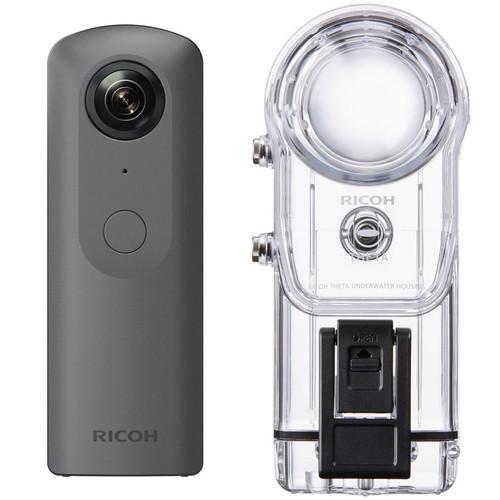 Contents of the user manual for the Ricoh Theta V Kit with TW-1
- Product category: All 360 Video Cameras Ricoh
- Brand: Ricoh
- Description and content of package
- Technical information and basic settings
- Frequently asked questions – FAQ
- Troubleshooting (does not switch on, does not respond, error message, what do I do if...)
- Authorized service for Ricoh All 360 Video Cameras
|
User manual for the Ricoh Theta V Kit with TW-1 contain basic instructions
that need to be followed during installation and operation.
Before starting your appliance, the user manual should be read through carefully.
Follow all the safety instructions and warnings, and be guided by the given recommendations.
User manual is an integral part of any Ricoh product,
and if it is sold or transferred, they should be handed over jointly with the product.
Following the instructions for use is an essential prerequisite for protecting
health and property during use, as well as recognition of liability on the part of the manufacturer
for possible defects should you make a warranty claim. Download an official Ricoh user manual in which you will find instructions on how to install, use, maintain and service your product.
And do not forget – unsuitable use of a Ricoh product will considerably shorten its lifespan!
|
Product description In the Field: The Ricoh THETA V Spherical Camera Read More With the Ricoh Theta V Kit with TW-1 Underwater Housing from B&H, you can capture your underwater adventures with full 360° spherical coverage. The Theta V can record 4K video or take 12MP photos that can be easily viewed and shared using your smartphone. The included housing lets you take the Theta V to 98' depths underwater, or into high-impact situations to protect against debris and dust ingress. See below for more information on the individual items included in this kit. - Ricoh THETA V 360 4K Spherical VR Camera
- RICOH THETA V - 4K & 360° Spatial Audio Sample (Tennis)
Building on the success of previous THETA models, the Ricoh THETA V is designed to provide you with an immersive 360° video and audio experience in a small form factor. Record with the camera pointing in one direction, and in the end, see and hear from all directions.
The THETA V features two 12MP sensors and a twin-lens optical system that captures two wide-angle images and automatically stitches them into one complete spherical image. It allows you to capture comprehensive 360° 4K videos and 12MP photos, as well as live stream 360° footage in 4K. Additionally, a built-in 4-channel microphone captures high-quality audio from four directions and with seamless transitions between the channels. Moreover, an optional designated 3D microphone (TA-1) is supported that allows you to add 3D 360° spatial audio to your 360° video content.
The THETA V records to approximately 19GB of internal memory. Once you've recorded your video, simply pull up the included THETA iOS/Android app on your smartphone or tablet, and with the swipe of your finger rotate the 360° image in any direction to see it from different angles. See what you missed while you were there. The THETA app also lets you preview your shots before you shoot, live stream to platforms such as YouTube Live, and perform a variety of other functions.
The THETA V is designed to provide the combined 360° image with minimal stitching artifacts so that your images look more professional. The camera is very compact and can be kept in pretty much any pocket. An optional waterproof housing (TW-1) is also available that will let you take your THETA V up to 100 ft underwater, opening up another world of 360 possibilities. - Key Features
-
- Capture 360° 4K videos and 12MP photos, and live stream 360° 4K footage
- Built-in 4-channel microphone with high-quality and seamless transition recording
- 19GB of internal memory
- Includes THETA app for iOS/Android
- Designed to combine dual images with minimal stitching artifacts
- Optional 3D 360° spatial microphone and underwater housing supported
- Video Resolution
-
- 3840 x 1920 at 29.97 fps / 56 Mbps in H.264
- 1920 x 960 at 29.97 fps / 16 Mbps in H.264
- Live Streaming Resolution
-
- 3840 x 1920 at 29.97 fps / 120 Mbps in H.264
- 1920 x 960 at 29.97 fps / 42 Mbps in H.264
- Twin-Lens Folded Optical System
-
- Two wide-angle lenses, each with 7 elements in 6 groups
- f/2.0 aperture
- Recording Capacity
-
- Approximately 4800 photos
- Total Video Recording Time: 40 minutes in 4K, 130 minutes in 2K
- Battery Life
-
- Approximately 300 photos
- 80 minutes of video
- Capture Modes
-
- Photo: Auto, Shutter Priority, ISO Priority, Manual
- Video: Auto
- Live Streaming: Auto
- Exposure Control Modes
-
- Program AE
- Shutter Speed Priority AE
- ISO Sensitivity AE
- Manual Exposure
- Wireless LAN Transfer Speeds
-
- 2.4 GHz (20 Mbps)
- 5 GHz (50 Mbps)
UPC: 026649107252 - Ricoh TW-1 Underwater Housing for Theta V, S, or SC
- RICOH THETA V - 4K & 360° Spatial Audio Sample (Tennis)
Capture brilliant UHD 4K or Full HD 1080p video and beautiful stills of parrot fish and coral reefs with your Ricoh Theta V, S, or SC digital camera in the TW-1 Underwater Housing. A silicone frame is included for use with the Theta S, while the others will fit snugly as they are. The enclosure has a depth rating of 98' and meets JIS Class 8 specifications, meaning it will remain sealed to prevent liquid ingress during continuous immersion in water. Its mechanical push-button control affords easy access to the camera's shutter release/video recording function.
Built to last, the housing is made from a hard plastic, which is clear to allow you to monitor the O-ring seal and maintain a full view of the camera. The surface features a hard coating for extra durability and an anti-reflection coating to reduce glare for improved visibility. The built-in dome port covers the lens and corrects for the underwater size distortion that makes everything appear 25% larger and closer, thereby helping to restore the camera's original angle of view to give you greater coverage. Additionally, a convenient carrying case and strap are included with the housing. UPC: 026649107535 In the Box - THETA V 360 4K Spherical VR Camera ssrxtbsvvwrczrtszvbd
- Limited 1-Year Warranty
- TW-1 Underwater Housing for Theta V, S, or SC
Table of Contents
|
Upload User Manual
Have you got an user manual for the Ricoh Theta V Kit with TW-1 Underwater Housing in electronic form? Please send it to us and help us expand our library of instruction manuals.
Thank you, too, on behalf of other users.
To upload the product manual, we first need to check and make sure you are not a robot. After that, your "Submit Link" or "Upload File" will appear.
Technical parameters - Ricoh THETA V 360 4K Spherical VR Camera
| | | Stitching Resolution | 4K | | Internal/External Stitching | Internal Stitching | | 360 Stitched Video Format | Internal:
3840 x 1920 at 29.97 fps (56 Mb/s MP4 via H.264)
1920 x 960 at 29.97 fps (16 Mb/s MP4 via H.264) | | Still Image Resolution | JPEG: 14 Megapixel, 5376 x 2688 (2:1) | | Number of Lenses | 2 | | | | Sensor | 1-Chip 1/2.3" CMOS | | | | Maximum Aperture | f/2 | | Lens Elements | 7 | | Minimum Focusing Distance | 4.0" / 10.2 cm | | | | Recording Media | x Internal Flash Memory | | Built-In Mic | Yes | | Channels | 4.0-Channel Surround | | Audio Format | AAC-LC | | | | Shutter Speed | 1/25000 - 1/8 Second (Photo)
1/25000 - 60 Seconds (Photo)
1/25000 - 1/30 Second (Video)
1/25000 - 1/30 Second (Streaming) | | Photo ISO Range | 100 - 1600 (Auto)
64 - 3200 (Manual) | | Video ISO Range | 64 - 6400 (Auto) | | | | Outputs | 1 x USB Micro-B | | Microphone Input | Yes | | | | Battery | Rechargeable Lithium-Ion Battery Pack | | Charging Method | USB | | | | Box Dimensions (LxWxH) | 7.1 x 4.0 x 2.8" | - Ricoh TW-1 Underwater Housing for Theta V, S, or SC
| Depth Rating | 98' / 30 m | | Control Type | Mechanical push-button | | Material of Construction | Durable plastic with hard and anti-reflection coatings
Silicone frame for Theta S | | Lens Port | Built-in dome | | | | Box Dimensions (LxWxH) | 8.2 x 3.4 x 3.2" |
Rating100% users recommend this product to others. And what about you?

This product has already been rated by 73 owners. Add your rating and experience with the product.
Discussion
 Ask our technicians if you have a problem with your settings,
or if anything is unclear in the user manual you have downloaded.
You can make use of our moderated discussion.
The discussion is public and helps other users of our website who may be encountering similar problems.
Ask our technicians if you have a problem with your settings,
or if anything is unclear in the user manual you have downloaded.
You can make use of our moderated discussion.
The discussion is public and helps other users of our website who may be encountering similar problems.
The discussion is empty - enter the first post
Post a new topic / query / comment:
|
|
|
| Request for user manual |
You can’t find the operation manual you are looking for? Let us know and we will try to add the missing manual:
I’m looking for a manual / Request for manual
Current requests for instruction manuals:
Call Of Duty World War Two For Xbox...
controller stratus XL...
stratus XL...
smart whatch serie S11 42mm...
Allen & Heath SQ-6 manual...
|
| Discussion |
Latest contributions to the discussion:
AEW R 4100
Name: MAURICIO ANGARITA
Audio-Technica AEW-R4100 UHF Diversity Receiver for
AEW R 4100 has the mute function blocked and does not allow audio to pass. I tried several times to turn off the mute from the transmitter but it does nothing, the mute stays on. Solution?
Thank you...
Instructions for assembling the 2015 Forecast Image Master Consoles GC3-A
Name: mike elam
Forecast Consoles GC3-A ImageMaster Editing Console
Looking for instructions for assembling this console. ...
EMPTY TONER ERROR MESSAGE AFTER REPLACING TONER
Name: LINDA BAD YELLOW EYES
Brother TN223BK Standard-Yield Toner
I HAD TO CHANGE OUT ALL THREE TONERS DUE TO LEAKS IN THE YELLOW AND CYAN. AFTER I REPLACED THEM, THE MACHINE KEEPS GIVING ME AN EMPTY TONER ERROR MESSAGE. HELP!!...
PS480D 20/24 pin Switching 480W Power Supply
Name: swkargo
Logisys 480W Power Supply
This item states in can run -5vdc .It is NOT listed on the board or I beleive is r4 is missing the resitior. Any body have thid issue. Shawn
...
Help needed
Name: Ann Carter
SanDisk 1TB Extreme Portable USB 3.1
When I click the link to download the user manual for my Sandisk Extreme external hard drive, it gives me the manual for the LG Cricket. Can you please change the link so I can download the Sandisk manual and begin using this drive? Thank you....
|
|


