|
User Manual for RME HDSPe MADI FX - 390 Channel PCIe Audio Card Click to enlarge the picture
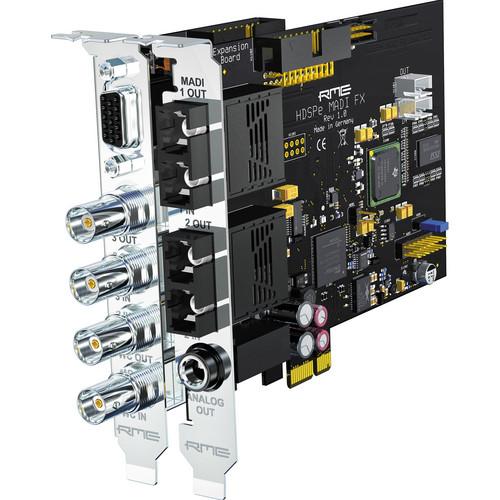 Contents of the user manual for the RME HDSPe MADI FX - 390
- Product category: Audio Interfaces & Systems RME
- Brand: RME
- Description and content of package
- Technical information and basic settings
- Frequently asked questions – FAQ
- Troubleshooting (does not switch on, does not respond, error message, what do I do if...)
- Authorized service for RME Audio Interfaces & Systems
|
User manual for the RME HDSPe MADI FX - 390 contain basic instructions
that need to be followed during installation and operation.
Before starting your appliance, the user manual should be read through carefully.
Follow all the safety instructions and warnings, and be guided by the given recommendations.
User manual is an integral part of any RME product,
and if it is sold or transferred, they should be handed over jointly with the product.
Following the instructions for use is an essential prerequisite for protecting
health and property during use, as well as recognition of liability on the part of the manufacturer
for possible defects should you make a warranty claim. Download an official RME user manual in which you will find instructions on how to install, use, maintain and service your product.
And do not forget – unsuitable use of a RME product will considerably shorten its lifespan!
|
Product description The HDSPe MADI FX from RME is a two-card, compact PCIe solution for transmitting a huge number of audio channels using the MADI protocol. Utilizing two optical and one coaxial set of inputs and outputs, the cards are capable of delivering 194 input and 196 output channels when used in conjunction with the two-channel AES/EBU I/O and the analog monitor output. Wordclock connection and four MIDI I/Os are also available, and only a single PCIe slot is required on the motherboard, plus one free slot opening on the case.
Not only does the system provide an impressive input and output count, but the included TotalMix FX software features a 4,096-channel mixer with a 192 kHz effects engine that allows latency-free monitoring with numerous effects like EQs, compressors, reverb, and echo, rendered directly on the hardware of the card and independent of the DAW software being used. MIDI is integrated and provides comprehensive remote control, while Wordclock I/O includes switchable termination. Additionally, a complete set of diagnostic and monitoring software is available. - Overview
-
- Two-card PCIe solution for transmitting a huge number of audio channels using the MADI protocol
- 194 input and 196 output channels when used in conjunction with the two-channel AES/EBU I/O and the analog monitor output
- Wordclock connection and four MIDI I/Os
- Only a single PCIe slot is required on the motherboard, plus one free slot opening on the case
- Efficiency technology automatically deactivates currently unused channels, so that they require no processing power or bandwidth
- Special version of TotalMix FX allows using the enormous channel count in an efficient and practical manner and ensures that the 4,096-channel mixer of the MADI FX responds just as smoothly as its 1,800-channel counterpart in the Fireface UFX
- Faster DSP allows for a greater number of EQs and compressors
- To enable ergonomic handling of the enormous number of channels, an option makes it possible to visually hide unused channels
- Complete "Hide setups" can be saved at any time, and switched with a simple mouse click
- The 192 kHz RME effects engine allows latency-free monitoring with numerous effects like EQs, compressors, reverb, and echo, rendered directly on the hardware of the card and independent of the DAW software being used
- TotalMix matrix allows for using the card as powerful MADI router, with the ability to route each channel individually, even with separate level settings for each routing
- Seamless Redundancy Operation utilizes the three MADI receivers to provide state-of-the-art fail safe operation with seamless switching in the event of failure
- Includes SteadyClock active jitter suppression, and DIGICheck meter and analysis toolbox (including EBU R128 metering)
- Nearly identical operation of the card under Windows and Mac OS
- Inputs and Outputs
-
3 x MADI I/O- Two optical and one coaxial MADI I/O (SC industry standard optical connectors, coaxial configured as 75Ω BNC)
- 192 inputs and 192 outputs simultaneously available at 44.1 and 48 kHz, 96 inputs and 96 outputs at 96 kHz, and 48 inputs and 48 outputs at 192 kHz
- In general, two optical MADI-I/Os are adequate to implement a major studio or live setup with long cable lengths, whereas the additional coaxial MADI I/O provides maximum flexibility and provides in-the-box conversion between both formats
Analog Monitoring Output- Low-latency, reference quality analog stereo output, ideally suited to high- and low-impedance headphones
- Using the monitoring features of TotalMix, any input channel, recorded tracks, or complex sub-mixes can be selected for listening
- Cue function allows each of the 98 possible stereo sub-mixes to be monitored with a single mouse click
AES/EBU I/O- Digital input/output in the professional AES/EBU format for those who work with additional AES/EBU devices and would like to easily connect them to their DAW
- Allows the connection of a simple AD/DA converter (e.g. RME's ADI-2 for example) to get a second monitoring output, or to create a talkback setup
- Easily connect an external digital effects unit
- The AES/EBU I/O can also be used for synchronization, e.g. with Steinberg's synchronizer and clock device, the Nuendo Sync Station
- MIDI Integration and Remote Control
- Four MIDI I/Os - one via the external breakout cable, the other three internal as virtual MIDI ports, one for each MADI I/O
- Each MADI I/O owns a virtual MIDI I/O in the operating system that can be addressed by any MIDI program
- MIDI signals are transmitted through the same lines and distances as the MADI data, with the MIDI signals able to be played back from RME MADI devices via a standard MIDI DIN port
- Allows remote control of all RME MADI devices, including monitoring and configuring a device's complete status
- All units can be programmed with their own ID, allowing independent remote control of multiple devices via a single MIDI channel
- Makes MADI transmission across large distances practical, such as when host computers and devices are far from each other, as for example FOH and stage
- RME provides free Windows and Mac software to control all RME MADI devices - this "MIDI Remote" can use any existing MIDI port within the system to remotely control and monitor all connected devices
- The software provides both a front-panel like operation and an extended Matrix display
Wordclock I/O- Wordclock I/O with switchable termination
- The MADI FX card uses SteadyClock to extract the reference clock directly from the MADI signal, while reducing possible jitter to a minimum, making long-distance connections even more convenient
- Wordclock input processes signals automatically in single, double or quad speed
- TotalMix FX
-
Digital Zero Latency Effects - DSP-based hardware mixer with 46-bit internal resolution
- Provides the same 192 kHz effects engine as the Fireface UFX and UCX but with improved DSP efficiency, ensuring that the 4,096-channel mixer reacts just as smoothly as those on other RME interfaces that feature significantly fewer channels
- Every input and output channel comes with a feature set comparable to a full-scale digital console
- Effects per channel include 3-band parametric EQ, adjustable Low Cut, Auto Level, Compressor, Expander, MS Processing and phase reversal
- Reverb and Echo effects unit is available for all channels by way of a stereo send and return bus
- TotalMix can easily replace any external mixer, for example to create different latency-free monitoring mixes with EQ and Reverb for the main studio monitors and the headphone of the vocalist(s) in the recording room
- The FX-DSP uses automatic overload surveillance - as soon as no effect can be added to the fully loaded DSP, the TotalMix surface will clearly signal this condition
- When changing to higher sample rates all effects that exceed the DSP's performance are automatically deactivated - this also prevents any possible damage to loudspeakers due to distortion
- The DSP hardware calculates RMS and Peak levels for all level meters, so there is zero CPU load on the host
Flexible Routing with Professional Matrix View - All 194 inputs and 196 playback channels can be freely routed and mixed to 196 physical outputs
- This creates a powerful router/mixer and allows for much more than usage as simple computer I/O unit
- Examples include a MADI optical patchbay and router, MADI coaxial/optical (or vice versa) converter and splitter, or a MADI redistributor, patchbay and router
- Enables lightning-quick changes and the creation of routings and setups with just a few mouse clicks
Monitoring Controller - Provides a complete complement of all the functions needed to control the monitoring of modern in-the-box studio or live mixing sessions
- Includes dim, source selection, monitor switching, integrated talkback, a flexible cue setup, mute and mute FX, mono, speaker B switching, and much more
TotalMix Remote Control - Main functions can be remotely controlled via MIDI with any Mackie Control compatible controller
- Can be also be remotely controlled by Apple's iPad via Mackie Control emulator apps, standard MIDI commands, and OSC (TouchOSC, Lemur) realizing comfortable wireless remote control of TotalMix key parameters
- Additional Features
-
SteadyClock - RME's jitter suppression technology guarantees perfect sound quality throughout, making the device completely independent of the quality of external clock signals
- The D/A converters operate independently from the quality of the external clock signal, as if they are working with internal clock all the time
- A clean signal with minimal jitter is available on all digital outputs
- SteadyClock allows the MADI FX to freely control the sample rate on its own
- Settings dialog includes a choice of the most often used video and audio sample rates
- All settings changeable in real-time
- Automatic and intelligent master/slave clock control
Intelligent Clock Control (ICC) - Displays status of every clock
- Retains the last valid input sample rate in case of failure of the external source
- SyncCheck offer a quick detection of clock problems
DIGICheck - Software tool box for metering, testing, measuring and analyzing digital audio streams
- Under Mac OS X the software provides unique functions and features of the spectral analysis of the data calculated in the hardware level right through to the sophisticated multi-channel level meter
- On Windows an additional multi-track recorder and the display of playback data from any audio software is also available
UPC: 874792002319 In the Box RME HDSPe MADI FX - 390 Channel PCIe Audio Card AES and MIDI Breakout Cable Driver CD ROM Two (2) Year Limited Warranty User Manual PDF 1.2mbwcsuextuxtdrxtcexf Table of Contents
|
Upload User Manual
Have you got an user manual for the RME HDSPe MADI FX - 390 Channel PCIe Audio Card in electronic form? Please send it to us and help us expand our library of instruction manuals.
Thank you, too, on behalf of other users.
To upload the product manual, we first need to check and make sure you are not a robot. After that, your "Submit Link" or "Upload File" will appear.
Technical parametersRME HDSPe MADI FX Specs | Card | Type
1-Lane PCI Express Endpoint device (no PCI Express to PCI Bridge), revision 1.1
Line Speed
2.5 Gbps
Communication
Packet-based full-duplex (up to 500 MB/s transfer rate) | | Sync Source | MADI coaxial
MADI optical
AES/EBU
Wordclock
Internal | | Vari Pitch Control | Input signal or Wordclock | | Sample Rates | Internal: 44.1, 48, 88.2, 96, 176.4 and 192 kHz, variable (Sync/Wordclock)
Lock range MADI: 32 to 96 kHz
Lock range WC: 27 to 200 kHz | | Jitter | Performance
<1 ns, internal and all inputs
Sensitivity
PLL operates even at 100 ns Jitter without problems | | Wordclock | Input
Signal Adaptation Circuit (functional from 1.2 Vpp input signal), switchable termination
Output
BNC, low-impedance driver stage, 4 Vpp into 75Ω, short-circuit-proof | | MIDI | 2 x 5-pin DIN input, output (on breakout cable) | | Headphone Output |
Channel Separation: > 100 dB
Output Impedance: 75Ω
Output Level: +13 dBu @ 0 dBFS
Connector: 1 x 1/4" TRS | | Drivers | Mac OS X Intel (Core Audio), 10.6 or up
Windows XP SP2, Vista, Windows 7 (32- and 64-bit) | | | | Package Weight | 2.0 lb | | Box Dimensions (LxWxH) | 11.7 x 6.8 x 3.9" |
Rating90% users recommend this product to others. And what about you?

This product has already been rated by 33 owners. Add your rating and experience with the product.
Discussion
 Ask our technicians if you have a problem with your settings,
or if anything is unclear in the user manual you have downloaded.
You can make use of our moderated discussion.
The discussion is public and helps other users of our website who may be encountering similar problems.
Ask our technicians if you have a problem with your settings,
or if anything is unclear in the user manual you have downloaded.
You can make use of our moderated discussion.
The discussion is public and helps other users of our website who may be encountering similar problems.
The discussion is empty - enter the first post
Post a new topic / query / comment:
|
|
|
| Request for user manual |
You can’t find the operation manual you are looking for? Let us know and we will try to add the missing manual:
I’m looking for a manual / Request for manual
Current requests for instruction manuals:
Call Of Duty World War Two For Xbox...
controller stratus XL...
stratus XL...
smart whatch serie S11 42mm...
Allen & Heath SQ-6 manual...
|
| Discussion |
Latest contributions to the discussion:
AEW R 4100
Name: MAURICIO ANGARITA
Audio-Technica AEW-R4100 UHF Diversity Receiver for
AEW R 4100 has the mute function blocked and does not allow audio to pass. I tried several times to turn off the mute from the transmitter but it does nothing, the mute stays on. Solution?
Thank you...
Instructions for assembling the 2015 Forecast Image Master Consoles GC3-A
Name: mike elam
Forecast Consoles GC3-A ImageMaster Editing Console
Looking for instructions for assembling this console. ...
EMPTY TONER ERROR MESSAGE AFTER REPLACING TONER
Name: LINDA BAD YELLOW EYES
Brother TN223BK Standard-Yield Toner
I HAD TO CHANGE OUT ALL THREE TONERS DUE TO LEAKS IN THE YELLOW AND CYAN. AFTER I REPLACED THEM, THE MACHINE KEEPS GIVING ME AN EMPTY TONER ERROR MESSAGE. HELP!!...
PS480D 20/24 pin Switching 480W Power Supply
Name: swkargo
Logisys 480W Power Supply
This item states in can run -5vdc .It is NOT listed on the board or I beleive is r4 is missing the resitior. Any body have thid issue. Shawn
...
Help needed
Name: Ann Carter
SanDisk 1TB Extreme Portable USB 3.1
When I click the link to download the user manual for my Sandisk Extreme external hard drive, it gives me the manual for the LG Cricket. Can you please change the link so I can download the Sandisk manual and begin using this drive? Thank you....
|
|


