User Manual for Rob Papen Go2 Virtual Synthesizer Click to enlarge the picture
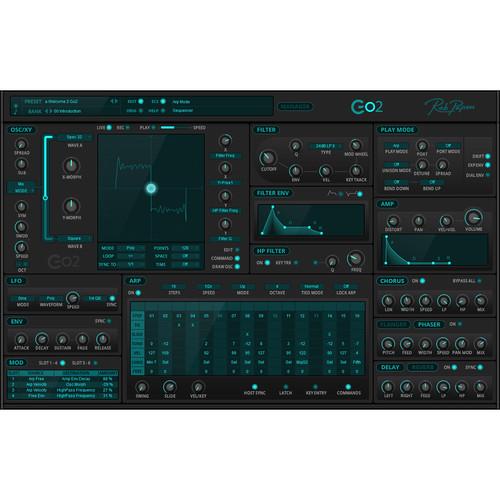 Contents of the user manual for the Rob Papen Go2 Virtual Synthesizer
- Product category: Virtual Instruments Rob Papen
- Brand: Rob Papen
- Description and content of package
- Technical information and basic settings
- Frequently asked questions – FAQ
- Troubleshooting (does not switch on, does not respond, error message, what do I do if...)
- Authorized service for Rob Papen Virtual Instruments
|
User manual for the Rob Papen Go2 Virtual Synthesizer contain basic instructions
that need to be followed during installation and operation.
Before starting your appliance, the user manual should be read through carefully.
Follow all the safety instructions and warnings, and be guided by the given recommendations.
User manual is an integral part of any Rob Papen product,
and if it is sold or transferred, they should be handed over jointly with the product.
Following the instructions for use is an essential prerequisite for protecting
health and property during use, as well as recognition of liability on the part of the manufacturer
for possible defects should you make a warranty claim. Download an official Rob Papen user manual in which you will find instructions on how to install, use, maintain and service your product.
And do not forget – unsuitable use of a Rob Papen product will considerably shorten its lifespan!
|
Product description The Rob Papen Go2 is a virtual synthesizer designed for ease of use by sound designers, producers, and musicians. The Go2 makes all controls visually available at the same time from a single window interface. The instrument offers a powerful, yet simple structure that allows for quick and easy creative exploration. The single oscillator features two morphable waveforms and a sub oscillator, while the Spread function creates a stacked two-oscillator sound. Additional symmetry controls allow for advanced sonic manipulation, especially when working with the XY pad section, which works as a live, interactive, and programmable modulation source with tempo sync and time quantization.
The analog-modeled filter offers several filter types including 12 dB LP, 12 dB BP, 12 dB Notch, 24 dB LP I, 24 dB LP II, 24 dB BP, 24 dB Notch, and Comb. The filter also includes its own dedicated ADSR envelope. A separate high-pass filter is available after the main filter for additional sound shaping. The amplifier section also includes its own ADSR envelope and features a distortion circuit and volume control.
Additional features include a play mode for setting voice allocation, portamento, unison, pitch bend, and analog drift. An arpeggiator section offers classic patterns with unusual features like sequencer mode and unison/chord control per step. The 8-way modulation matrix allows you to dynamically alter parameters by using both internal modules such as envelopes and LFOs, and external MIDI Controllers such as pitch bend, aftertouch, and other control messages defined in the MIDI-standard. Additionally, there are three effects including chorus, flanger/phaser, and stereo delay/reverb. The bank manager allows for quick navigation and selection of over 750 preset sounds, which are organized into banks and searchable by name or category. -
- Presets / Folder and Global Section:
- Over 750 presets sorted into bank folders
- Bank Manager: Quick Browser, Favorties, and Star system
- With ECS (external MIDI control), Go2 can modify its sound parameters dynamically in response to MIDI messages received from an external controller
- Oscillator Section
- The heart of Go2 is the morph oscillator. This oscillator allows you to morph (using Go2's various morph modes) between two different waveforms.
- First and seconds waveforms (Wave-A and Wave-B)
- Oscillator Morph Modes: Mix, Morph, Ring, FM, Inter, and Range
- Oct setting
- Spread (creates a stacked 2-oscillator sound)
- Sub: Sub-oscillator knob lets you select two different waveforms being sine or square
- XY Section
- The XY pad is combination of a live, interactive control and an automated programmable modulation source.
- Modes: Poly, Free, or Mono
- Loop Modes: off, loop or bidirectional loop
- Sync To: tempo sync the XY movement
- Points: From 2 to 128 points
- Space Quantize: restricts the points in the current path to a set of grid lines
- Time Quantize: sets the update frequency of the XY position
- Draw Osc: XY screen also shows the current oscillator output
- Filter Section
- Analog Modeled Filter:
- Cutoff Frequency
- Q: Resonance
- Filter Types: 12 dB LP, 12 dB BP, 12 db Notch, 24 dB LPI, 24 dB LPII, 24 dB BP, 24 dB Notch, and Comb
- Cutoff Frequency Modulation: Velocity (Vel), Key Track, Modulation Wheel, Envelope (Env)
- Filter Envelope: Attack, Decay, Sustain, Release (ADSR) and reverse control
- High Pass Filter
- Additional filter behind the main filter
- On/off function
- Keyboard tracking on/off,
- Q: Resonance on/off and amount control
- Cutoff frequency
- Amplifier Section
- The final volume control in Go2 with distortion on voice level
- Distortion
- Volume control
- Velocity (Vel > Vol)
- Pan
- Volume Envelope: Attack, Decay, Sustain and Release (ADSR)
-
- Play Mode Section
- Play modes: Poly (16 voices), Mono, Legato, and Arpeggiator
- Portamento: Speed control, Rate, or Time Mode; Held Rate or Held Time mode
- Port amount
- Unison and chords
- In Unison mode, Go2 plays up to 4 unison voices for each note played. This works at an oscillator / filter level, so you can still play up to 16 voices in poly mode
- Unison modes and chords:
- Unison 2-4
- 2-octave
- 3-octave
- 2 SP
- Major to diminished 7th chord (3 and 4 voice)
- Unison detune amount
- Unison stereo spread
- Arpeggiator Section
- 16-step arpeggiator
- Per-step values:
- Step on/off
- Tie (ties notes)
- Slide
- Tune
- Vel
- Unison
- Free
- Steps (number of steps 1-16)
- Speed (for example 2 x tempo or ¼ x tempo)
- Arp Modes: Up, Down, Up/Down, Random, Ordered, Rev. Ordered, Ordered Up/Down, Ordered Down/Up, Chord, Sequencer, Sequencer Reset
- Octave
- Tie Modes: Normal, Special, Toggle 1, Toggle 2
- Free LFO Section
- Go2 has a free LFO that generates modulation signals that can be used as sources in a modulation path
- Waveform Types: The available waveforms are sine, triangle, saw up, saw down, square, and S&H
- Speed
- Sync (tempo sync option)
- Modes: Poly, Free, Mono
- Modulation Matrix Section
- The 8-way modulation matrix allows you to dynamically alter parameters, using both internal modules such as envelopes and LFOs and external MIDI controllers such as pitch bend, aftertouch, and other control messages defined in the MIDI standard
- FX Section
- Three effects units:
- Chorus
- Flanger or phaser
- Stereo delay or reverb
- Bypass all
Table of Contents
|
Upload User Manual
Have you got an user manual for the Rob Papen Go2 Virtual Synthesizer in electronic form? Please send it to us and help us expand our library of instruction manuals.
Thank you, too, on behalf of other users.
To upload the product manual, we first need to check and make sure you are not a robot. After that, your "Submit Link" or "Upload File" will appear.
Technical parametersRob Papen Go2 Specs | Mac Requirements | OSX 10.8 to OSX 10.13.6 (High Sierra)
64-bit AU, VST, and AAX | | System Requirements (Windows) | Windows Vista, 7, 8, or 10
32- / 64-bit VST and AAX (AAX for Pro Tools 12 and later) | | Additional Information | Compatible with NI NKS system
Serial/license system
2nd serial for a secondary computer/laptop is available upon registering original product's serial number or license |
Rating70% users recommend this product to others. And what about you?

This product has already been rated by 11 owners. Add your rating and experience with the product.
Discussion
 Ask our technicians if you have a problem with your settings,
or if anything is unclear in the user manual you have downloaded.
You can make use of our moderated discussion.
The discussion is public and helps other users of our website who may be encountering similar problems.
Ask our technicians if you have a problem with your settings,
or if anything is unclear in the user manual you have downloaded.
You can make use of our moderated discussion.
The discussion is public and helps other users of our website who may be encountering similar problems.
The discussion is empty - enter the first post
Post a new topic / query / comment:
|
|


