User Manual for Rob Papen Punch - Software Instrument Click to enlarge the picture
 Contents of the user manual for the Rob Papen Punch - Software Instrument
- Product category: Virtual Instruments Rob Papen
- Brand: Rob Papen
- Description and content of package
- Technical information and basic settings
- Frequently asked questions – FAQ
- Troubleshooting (does not switch on, does not respond, error message, what do I do if...)
- Authorized service for Rob Papen Virtual Instruments
|
User manual for the Rob Papen Punch - Software Instrument contain basic instructions
that need to be followed during installation and operation.
Before starting your appliance, the user manual should be read through carefully.
Follow all the safety instructions and warnings, and be guided by the given recommendations.
User manual is an integral part of any Rob Papen product,
and if it is sold or transferred, they should be handed over jointly with the product.
Following the instructions for use is an essential prerequisite for protecting
health and property during use, as well as recognition of liability on the part of the manufacturer
for possible defects should you make a warranty claim. Download an official Rob Papen user manual in which you will find instructions on how to install, use, maintain and service your product.
And do not forget – unsuitable use of a Rob Papen product will considerably shorten its lifespan!
|
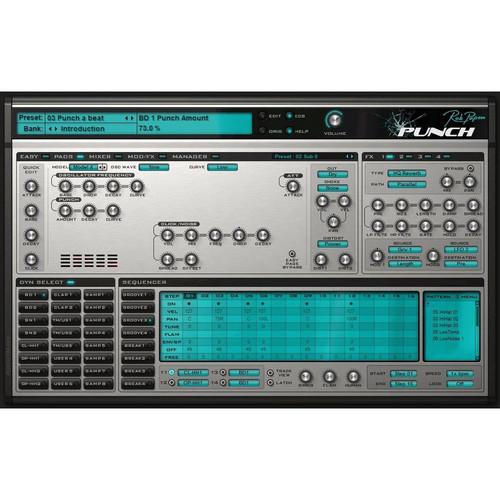
Product description Punch from Rob Papen is a synthesized drums software instrument especially designed for the contemporary producer who wants "body rattling" sounds. Use synthesis and the built-in samples to construct your own unique sounding drum-kit, or load your own custom samples. The sounds can then be crafted using the comprehensive feature set.
Punch has built in sequencers, allowing you to have multiple patterns at your finger tips. These grooves can be triggered in a live environment to build a song, but are also useful for improvising and jamming. Also featured are a growing number of drum-kits built by third party designers and well know DJs. - Drums
-
- "Classic Samples" taken from several classic analog drum machines
- "Punch Samples" are RP library samples
- Pre-installed RP sample collection for the 8 sample pads
- Two bass drums with 4 different models, 4 classic samples, and 20 punch samples
- Two snare drums with 2 different models, 4 classic samples and 61 punch samples
- Two open hi-hats and two closed hi-hats, with 3 models, 4 classic samples and 7 punch samples
- Three tom/user with 2 tom models, 3 classic samples and 8 punch samples
- Two claps with 3 models, 3 classic samples and 12 punch samples
- Three user drum with 9 models, 22 classic samples, 106 punch (included percussion) samples.
- Eight dual sample slots, each with amplifier/pitch envelopes and filter with filter envelope
- Each drum features "easy controls", distortion (20 models) , output destination (dry or any 4 FX channels) and choke groups
- Each drum can be previewed and selected by clicking in the Drum Preview Pad
- Sequencers Patterns
-
- Internal sequencer can play 8 different patterns, each consisting of up to 16 steps
- 4 grooves and 4 break patterns
- C3 to G3 keyboard range
- Each pattern is composed of 4 tracks, each track having its own drum output, and each step in each track can have different velocity, panning, pitch, envelope speed, flaming, time offset and a free row
- Each pattern also has a free row for modulation step values which can be used to modulate controls
- Swing amount, flaming time and humanization controls
- Modulators
-
- 2 envelopes, 2 LFOs and 8 modulation slots allow for a wide variety of modulation sources to modulate Punch's controls
- Mixer
-
- Full screen mixer displays the volume and panning of all the controls, plus the FX mix and panning allows for easy mixing of drum sounds
- Easy Screen
-
- Easy to use sliders allow for altering the main controls on the fly
- All sliders are available for MIDI latching
- Effects Section
-
- Four effects slots, each with 26 different types
- Mono Delay, Stereo Delay, Comb Filter, Reverb, HQ Reverb, Chorus, Chorus/Delay, Flanger, Phaser, WahWah Delay, Distort, Low Fi, Amp Sim, Waveshaper, Widener, AutoPan, Gator, Ring-Mod, Filter, Equalizer, Compressor, Noise-Gate, Ensemble, Cabinet, Multi Distort, AutoWah
- Effects can be arranged in 5 different routings
- In the multi-channel version the effects are output to the different output channels
- Manager Screen
-
- Large manager screen displays all the presets, banks and presets, allows you to load, save, copy and paste them, and includes a powerful find function
Table of Contents
|
Upload User Manual
Have you got an user manual for the Rob Papen Punch - Software Instrument in electronic form? Please send it to us and help us expand our library of instruction manuals.
Thank you, too, on behalf of other users.
To upload the product manual, we first need to check and make sure you are not a robot. After that, your "Submit Link" or "Upload File" will appear.
Technical parametersRob Papen RPBUP10 Specs | System Requirements | Mac
OS X 10.4 (32-bit), OS X 10.5 and higher (32- and 64-bit)
Host software that supports Audio Units, RTAS or VST plug-in formats
Windows
Windows XP, Vista , or Windows 7 (32- and 64-bit)
Host software that supports RTAS or VST plug-in formats |
Rating70% users recommend this product to others. And what about you?

This product has already been rated by 31 owners. Add your rating and experience with the product.
Discussion
 Ask our technicians if you have a problem with your settings,
or if anything is unclear in the user manual you have downloaded.
You can make use of our moderated discussion.
The discussion is public and helps other users of our website who may be encountering similar problems.
Ask our technicians if you have a problem with your settings,
or if anything is unclear in the user manual you have downloaded.
You can make use of our moderated discussion.
The discussion is public and helps other users of our website who may be encountering similar problems.
The discussion is empty - enter the first post
Post a new topic / query / comment:
|
|


