User Manual for Rob Papen RG Virtual Rhythm Guitar Plug-in Instrument Click to enlarge the picture
 Contents of the user manual for the Rob Papen RG Virtual Rhythm Guitar
- Product category: Virtual Instruments Rob Papen
- Brand: Rob Papen
- Description and content of package
- Technical information and basic settings
- Frequently asked questions – FAQ
- Troubleshooting (does not switch on, does not respond, error message, what do I do if...)
- Authorized service for Rob Papen Virtual Instruments
|
User manual for the Rob Papen RG Virtual Rhythm Guitar contain basic instructions
that need to be followed during installation and operation.
Before starting your appliance, the user manual should be read through carefully.
Follow all the safety instructions and warnings, and be guided by the given recommendations.
User manual is an integral part of any Rob Papen product,
and if it is sold or transferred, they should be handed over jointly with the product.
Following the instructions for use is an essential prerequisite for protecting
health and property during use, as well as recognition of liability on the part of the manufacturer
for possible defects should you make a warranty claim. Download an official Rob Papen user manual in which you will find instructions on how to install, use, maintain and service your product.
And do not forget – unsuitable use of a Rob Papen product will considerably shorten its lifespan!
|
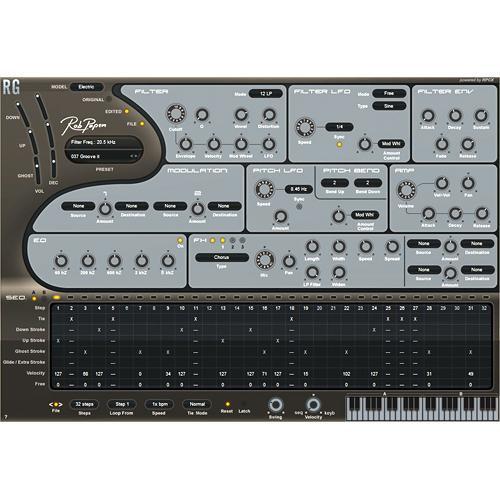
Product description The Rob Papen RG Virtual Rhythm Guitar Plug-in Instrument allows you to create custom guitar rhythms, grooves and effects using the plug-in's unique synthesizer and effects features. Easily create classic rhythm guitar sequences, or edgy grooves by simply playing the desired chords on a MIDI keyboard controller. RG features models of the Fender Stratocaster, 8th & 16th note groove type steel string acoustic guitars, and a Power Chord groove type distorted guitar. Rhythm Guitar Models - Electric guitar type Fender Stratocaster® Offering in the RG sequencer: Down Stroke, Up Stroke, Ghost Stroke and Glide stroke. Available chords are: Major and Minor7 in "classic" Rhythm guitar setting.
- Steel 8TH type for Steelstrings 8th note grooves Offering in the RG sequencer: Down Stroke, Up Stroke and Extra Stroke (hand mute on strings) Available chords are: Major and Minor.
- Steel 16TH type for Steelstrings 16th note grooves. Offering in the RG sequencer: Down Stroke, Up Stroke and Ghost Stroke. Available chords are: Major and Minor.
- Distorted type for distorted Powerchord grooves. Offering in the RG sequencer: Down Stroke, Up Stroke, Ghost Stroke and Extra Stroke available chords are: 5th Chord for both Major and Minor keyboard range.
Sequencer Section - Controls the guitar strokes and RG synthesizer parts.
- Each step has on/off, Tie, Stroke (Down, Up, Ghost or Glide/Extra), Velocity and Free/Release row.
- Release row on/off option to control the 'Release" times of the Filter and Amp Envelope
- Sequencer A and B each with fully independent settings
- Sequence A is played by using keyboard range C1 - B3
- Sequence B is played by using keyboard range C3 - B4
- Each sequence keyboard range is divided into Major chords and Minor chords
- Start Loop setting, Sequencer can loop from any step of the sequence
- Speed setting of 1/4, 1/3, 1/2, 2/3, 1, 3/2, 2, 3 and 4x BPM. Independent for each sequence
- Velocity control knob which mixes between keyboard (MIDI) velocity input and the steps velocity settings
- Tie modes normal or special which allows 'velocity' and 'free' settings inside a step if that step is set to Tie
- Sequencer Latch which can be controlled by the MIDI sustain pedal as well
- Reset Mode on/off. When it is set to 'on' the sequencer resets each time you press a new key
- File button function with: load, save, copy, paste, swap and clear for sequencer A or B
- File < and > to scroll through sequences stored on hard disk
Keyboard Layout RG - Sequence A is played by playing notes in the keyboard range C1 - B3
- Sequence B is played by playing notes in the keyboard range C3 - B4
- Sequence A keyboard range is divided into Major chords and Minor chords
- Major chords are from C1- B1 range and Minor are from C2 - B2 range
- Sequence B keyboard range is divided into Major chords and Minor chords
- Major chords are from C3- B3 range and Minor are from C3 - B4 range
- Build in keyboard to demo grooves
Overall Pitch Modulation Section - Tempo sync-able global Pitch LFO
- Pitch bend with separate settings for up and down pitch-bends
Filter Section - Main filter is an analogue modeled stereo Multimode Filter, offering 6 dB LowPass and HighPass, 12 dB, 18 dB and 24 dB LowPass and HighPass, 12 dB and 24 dB BandPass, 12 dB and 24 dB Notch, Comb and Vowel Filter
- Easy Filter control by pre-defined Cutoff Frequency modulation controllers: Envelope, Velocity, Modulation Wheel and LFO
- Built-in Filter Envelope with Attack, Decay, Sustain, Fade and Release
- Build in Filter LFO with various waveforms, modulation amount control and tempo sync option with speed settings between 16/1 and 1/32t
- LFO free or mono mode options
Amp Section - Built-in Amp/Volume Envelope with Attack, Decay and Release
Modulation Section - 2 free modulation routings
- 33 modulation sources, included the stroke types of the RG sequencer
- 22 modulation destinations
FX Section - 3 HQ effects blocks in serial mode
- Available effects: Mono Delay, Stereo Delay, Comb Filter, Reverb, Chorus, Chorus/Delay, Flanger, Phaser, Ensemble, FX Filter, WahWah/Delay, AutoWah, Amp Simulator (5 models), Cabinet Simulator (5 models), Distortion, Low Fi, Waveshaper, Multi-distort (11 types), Stereo Widener, Autopan, Gator and Compressor
- MIDI tempo based settings in most effects
- Overall bypass for FX or bypass per FX
- Right mouse menu options with: FX copy, paste, swap, clear, undo, save, load and option to un-sync the effects
- 2 FX modulation matrix for connecting RG sequencer, MIDI or synth controls to FX parameters.
EQ Section - Equalizer with 5 bands at 60 Hz, 200 Hz, 600 Hz, 2000 Hz and 8000 Hz frequencies
Overall - Parameter read-out field above the preset box.
- Back panel with extra global function: External controller settings can be saved to disk Computer keyboard up/down for scrolling presets can be turned on/off. Syncing on/off. Depending on host it can be turned on/off
Preset Section - Uses sound banks composed of 128 presets
- Preset handling with copy, paste, clear and compare function 'Quick Browse', 'Recently Browsed' and 'Favorite' functions.
- Banks with Electric RG grooves, Steelstring RG grooves, Disto RG grooves, Electric, Steelstring, Disto basic grooves
Table of Contents
|
Upload User Manual
Have you got an user manual for the Rob Papen RG Virtual Rhythm Guitar Plug-in Instrument in electronic form? Please send it to us and help us expand our library of instruction manuals.
Thank you, too, on behalf of other users.
To upload the product manual, we first need to check and make sure you are not a robot. After that, your "Submit Link" or "Upload File" will appear.
Technical parametersRob Papen RPRG04 Specs | System Requirements | VST2.4, AU and RTAS plug-in synthesizer for PC (Xp/Vista 32/Vista 64/Windows 7) and Mac OS-X 10.5 > (IntelMac+ppc) Internet connection needed to activate the software! In case of no Internet connection, e-license dongle required! Two activations allowed. 2nd activation after registering product |
Rating60% users recommend this product to others. And what about you?

This product has already been rated by 99 owners. Add your rating and experience with the product.
Discussion
 Ask our technicians if you have a problem with your settings,
or if anything is unclear in the user manual you have downloaded.
You can make use of our moderated discussion.
The discussion is public and helps other users of our website who may be encountering similar problems.
Ask our technicians if you have a problem with your settings,
or if anything is unclear in the user manual you have downloaded.
You can make use of our moderated discussion.
The discussion is public and helps other users of our website who may be encountering similar problems.
The discussion is empty - enter the first post
Post a new topic / query / comment:
|
|


