|
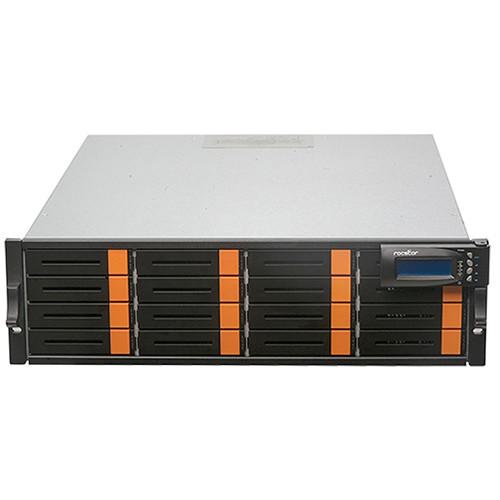
User Manual for Rocstor 64TB Enteroc N1832 16-Bay NAS Server Click to enlarge the picture
 Contents of the user manual for the Rocstor 64TB Enteroc N1832 16-Bay NAS
- Product category: Network Attached Storage Drives Rocstor
- Brand: Rocstor
- Description and content of package
- Technical information and basic settings
- Frequently asked questions – FAQ
- Troubleshooting (does not switch on, does not respond, error message, what do I do if...)
- Authorized service for Rocstor Network Attached Storage Drives
|
User manual for the Rocstor 64TB Enteroc N1832 16-Bay NAS contain basic instructions
that need to be followed during installation and operation.
Before starting your appliance, the user manual should be read through carefully.
Follow all the safety instructions and warnings, and be guided by the given recommendations.
User manual is an integral part of any Rocstor product,
and if it is sold or transferred, they should be handed over jointly with the product.
Following the instructions for use is an essential prerequisite for protecting
health and property during use, as well as recognition of liability on the part of the manufacturer
for possible defects should you make a warranty claim. Download an official Rocstor user manual in which you will find instructions on how to install, use, maintain and service your product.
And do not forget – unsuitable use of a Rocstor product will considerably shorten its lifespan!
|
Product description Designed with business storage needs in mind, the 64TB Enteroc N1832 NAS Server from Rocstor features 16 drive bays complete with 12 Gb/s SAS/SATA disk architecture for enhanced data throughput. In addition to enhanced data throughput, the N1832 NAS Server comes equipped with dual Gigabit Ethernet ports, one USB 2.0 port, and one USB 3.0 port for improved network connectivity and expandability. On the inside of the Enteroc N1832 you will find a 2.0 GHz quad-core Intel Celeron CPU along with 8 GB DDR3 SDRAM cache memory to ensure the NAS operates smoothly even under demanding conditions.
Once configured, Enteroc N1832 supports RAID 0, 1, 5, 6, 10, 50, 60 and Linear (JBOD) settings to suit a variety of storage needs. Additionally, users benefit from a variety of backup and data protection features including Volume Clone, iSCSI replication, Amazon S3 backup, and more.
Rocstor has included their intuitive management utility ProNAS OS and Disk Manager giving users a wealth of tools to full manage this NAS server. From automatic IP address configuration to web browser-based management, central management, and more you do not have to be an IT expert to manage your storage. Rocstor even offers a dedicated app avaliable for both iOS and Android further simplifying the process of managing this NAS server. - Intel Xeon Quad Core CPU
- The Enteroc N1832 is powered by Intel Xeon Quad Core 3.1 GHz processor CPU and 8 GB DDR3 SDRAM memory module expandable to 32 GB. This rackmount NAS storage is a powerful server designed for SMB complex storage needs.
- Built-in Backup and Data Protection
- The Enteroc N1832 includes a fully-featured backup solution including manual or scheduled backup for file, folder, and shared files. It can backup and restore from multiple local or remote devices. The N1832 features volume clone, snapshot, remote replication, and data copy options which are all designed to ensure and enhance your valuable data.
• Volume Clone (EXT3/EXT4/XFS/NTFS/VMFS/ZFS)
• Symantec BackupExec Agent (by additional installation)
• Scheduling multi-snapshot (Support iSCSI snapshot)
• Replication (Remote realtime data mirroring)
• Scheduling Rsync Replication
• Support NetVault backup client (by additional installation)
• Support CA ARCserve (by additional installation)
• Data copy (copy files to other share/attached storage)
• Scheduling backup
• Differential/incremental backup
• iSCSI Replication
• Amazon S3 backup
• backup/restore from attached storage (USB/eSATA/iSCSI/RDX/USM)
• Support Apple Time Machine - Logical Volume AES-256 Encryption
- For your extensive data protection, the Entroc N1832 includes an AES-256 logical volume encryption option. If shared folders have not been created in the logical volume setup, the volume can be encrypted by configuring data "Encrypt" option in the setup. After an encrypted volume is created, system will download the key file automatically. The key is a part of the encryption validation and the volume cannot be accessed without key file.
- SSD Cache Technology
- The Entroc N1832 features SSD Caching that enables an SSD drive to be used in conjunction with a high-capacity hard drive (HDD). SSD Caching feature recognizes and automatically stores your most frequently used applications and data into the SSD, while giving you full access to the large storage capacity of an HDD. You can create, work, and access your data faster than ever before without paying more for a larger SSD to store our entire data.
- Rocstor Enteroc NAS Ssytems
- Rocstor Enteroc N1832 is full featured and supports Windows LDAP, Android/iOS mobile APP for monitoring, Backup/Restore from attached storage (USB/eSATA/iSCSI/RDX/USM), Backup/Restore from remote share (CIFS/NFS), Backup to Cloud (Amazon S3), VMware ESXi 5 iSCSI/FC/NFS VAAI support, Microsoft Windows 98/ME/NT/2000/XP/2003/Vista/2008 /Win7/Windows 2012/Win 8 Unix/Win 10, Linux, Mac OS, iSCSI Target manager which support LUN Mapping/Initiator Filter/Thin Provisioning, Support NIC/Trunking/Load Balance/Fail Over/802.3ad, and many more for a true enterprise solution with one of the lowest Total Cost of Ownership storage solutions.
- Compression and Deduplication
- The Entroc N1832 features a Data Deduplication option which is a method of reducing storage needs by eliminating redundant data. Only one unique instance of the data is retained on storage media. Data Compression is also a feature of N1832 which provides a reduction in storage hardware, data transmission time and communication bandwidth, hence resulting in data storage cost savings.
- Rocstor ProNAS OS and Disk Manager
- Rocstor ProNAS OS and Disk Manger is a powerful and full featured enterprise NAS operating system which provides configuring and managing your NAS data infrastructure easy. ProNAS delivers business featured options that are easy-to-use thru its GUI interface. Simplifying setup and management. ProNAS is built specifically for Enteroc range of NAS storage and delivers optimal performance, reliability and efficiency.
• Automatic IP address configuration
• Web browser-based management
• SNMP management and notification
• Fail-free online firmware upgrade
• Unicode support
• Multi-node management GUI
• System configuration backup/restore
• Central management
• Quick wizard
• APP for Android/iOS monitoring - Built for Virtualization
- The Rocstor Enteroc N1832 is a perfect storage system for virtualization environments, including VMware, Citrix, and Microsoft Hyper-V. With VMware vSphere and VAAI integration support. The N1832 also supports iSCSI Target and Thin Provisioning block storage.
- Unified Storage System
- Consolidating file data with a Rocstor Enteroc N1832 Network Attached Storage (NAS) solution can easily help you to address your changing file serving needs and reduce cost of ownership - enabling simplified management, better resource utilization, and centralized growth and data protection. The Enteroc N1832 allows you to share files across Windows, Mac, and Linux platforms efficiently and seamlessly. The N1832 supports Backup/Restore from remote share (CIFS/NFS) along with TCP/IP, SMB/CIFS, NFS, SNMP, FTP/SFTP/FXP, HTTP, HTTPS, Telnet, SSH, AFP, WebDAV, Bonjour and TFTP protocols.
Table of Contents
|
Upload User Manual
Have you got an user manual for the Rocstor 64TB Enteroc N1832 16-Bay NAS Server in electronic form? Please send it to us and help us expand our library of instruction manuals.
Thank you, too, on behalf of other users.
To upload the product manual, we first need to check and make sure you are not a robot. After that, your "Submit Link" or "Upload File" will appear.
Technical parametersRocstor N1832 Specs | | | CPU | 2.0 GHz Intel Celeron Quad-Core | | Total Installed Memory | 8 GB DDR3 | | | | Number of Bays | 4 x 2.5"/3.5" | | Connections | 1 x USB Type-A (USB 3.1 Gen 1 (5 Gb/s))
1 x eSATA
2 x USB Type-A (USB 2.0 (480 Mb/s))
2 x RJ45 (Gigabit Ethernet) | | Compatible Drive Interface | SATA III | | RAID Modes | RAID 0, 1, 10, 5, 6, JBOD | | Hot-Swap Support | Yes | | | | Supported Protocols | AFP
Bonjour
CIFS/SMB
FTP
FXP
HTTP
HTTPS
NFS
SFTP
SNMP
SSH
TFTP
Telnet
WebDAV | | | | Supported File Systems | EXT3, EXT4, NTFS, VMFS, XFS, ZFS | | | | AC Input Power | 100 to 240 VAC, 50 / 60 Hz at 3 to 6 A | | PSU Wattage | 1 x 220 W | | | | Operating Temperature | 50 to 104°F / 10 to 40°C | | Operating Humidity | 10 to 85% | | | | Status Monitoring | LED Indicator | | Audible Alarm | Yes | | Dimensions | 1.7 x 17.6 x 19.7" / 44.0 x 446.4 x 500.0 mm | | Weight | 17.2 lb / 7.8 kg without Drives |
Rating80% users recommend this product to others. And what about you?

This product has already been rated by 87 owners. Add your rating and experience with the product.
Discussion
 Ask our technicians if you have a problem with your settings,
or if anything is unclear in the user manual you have downloaded.
You can make use of our moderated discussion.
The discussion is public and helps other users of our website who may be encountering similar problems.
Ask our technicians if you have a problem with your settings,
or if anything is unclear in the user manual you have downloaded.
You can make use of our moderated discussion.
The discussion is public and helps other users of our website who may be encountering similar problems.
The discussion is empty - enter the first post
Post a new topic / query / comment:
|
|
|
| Request for user manual |
You can’t find the operation manual you are looking for? Let us know and we will try to add the missing manual:
I’m looking for a manual / Request for manual
Current requests for instruction manuals:
Call Of Duty World War Two For Xbox...
controller stratus XL...
stratus XL...
smart whatch serie S11 42mm...
Allen & Heath SQ-6 manual...
|
| Discussion |
Latest contributions to the discussion:
AEW R 4100
Name: MAURICIO ANGARITA
Audio-Technica AEW-R4100 UHF Diversity Receiver for
AEW R 4100 has the mute function blocked and does not allow audio to pass. I tried several times to turn off the mute from the transmitter but it does nothing, the mute stays on. Solution?
Thank you...
Instructions for assembling the 2015 Forecast Image Master Consoles GC3-A
Name: mike elam
Forecast Consoles GC3-A ImageMaster Editing Console
Looking for instructions for assembling this console. ...
EMPTY TONER ERROR MESSAGE AFTER REPLACING TONER
Name: LINDA BAD YELLOW EYES
Brother TN223BK Standard-Yield Toner
I HAD TO CHANGE OUT ALL THREE TONERS DUE TO LEAKS IN THE YELLOW AND CYAN. AFTER I REPLACED THEM, THE MACHINE KEEPS GIVING ME AN EMPTY TONER ERROR MESSAGE. HELP!!...
PS480D 20/24 pin Switching 480W Power Supply
Name: swkargo
Logisys 480W Power Supply
This item states in can run -5vdc .It is NOT listed on the board or I beleive is r4 is missing the resitior. Any body have thid issue. Shawn
...
Help needed
Name: Ann Carter
SanDisk 1TB Extreme Portable USB 3.1
When I click the link to download the user manual for my Sandisk Extreme external hard drive, it gives me the manual for the LG Cricket. Can you please change the link so I can download the Sandisk manual and begin using this drive? Thank you....
|
|


