|
User Manual for Roland HandSonic HPD-20 Digital Hand Percussion Instrument Stage Kit Click to enlarge the picture
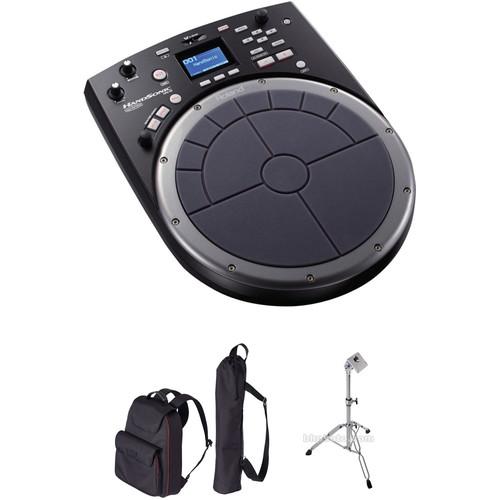 Contents of the user manual for the Roland HandSonic HPD-20 Digital Hand Percussion
- Product category: Electronic Drums Roland
- Brand: Roland
- Description and content of package
- Technical information and basic settings
- Frequently asked questions – FAQ
- Troubleshooting (does not switch on, does not respond, error message, what do I do if...)
- Authorized service for Roland Electronic Drums
|
User manual for the Roland HandSonic HPD-20 Digital Hand Percussion contain basic instructions
that need to be followed during installation and operation.
Before starting your appliance, the user manual should be read through carefully.
Follow all the safety instructions and warnings, and be guided by the given recommendations.
User manual is an integral part of any Roland product,
and if it is sold or transferred, they should be handed over jointly with the product.
Following the instructions for use is an essential prerequisite for protecting
health and property during use, as well as recognition of liability on the part of the manufacturer
for possible defects should you make a warranty claim. Download an official Roland user manual in which you will find instructions on how to install, use, maintain and service your product.
And do not forget – unsuitable use of a Roland product will considerably shorten its lifespan!
|
Product description This B&H Kit includes the Roland HandSonic HPD-20 Digital Hand Percussion Instrument with a tripod pad stand, a carry case for the HandSonic HPD-20, and a carry case for the pad stand. Designed to deliver versatile sounds and expressive playability for drummers and percussionists onstage, in the studio, or at home, the kit enables easy setup and transport along with vast tonal and control options. Utilize the built-in 850 dynamic sounds, extensive effects, and 3-band EQ, or import your own sounds via a USB flash drive and assign them to the 13 pressure-sensitive pad sections. Recording your real-time performance to the internal memory then export it as a WAV file to a USB flash drive. You can even output audio and MIDI to your favorite DAW for expanded power and convenience. - Roland HandSonic HPD-20 Digital Hand Percussion Instrument The HandSonic HPD-20 Digital Hand Percussion Instrument from Roland is a velocity sensitive percussive digital instrument with a 10" pad divided into 13 sections. It can be used to trigger a variety of sounds, including the 850 sounds built in, as well as up to 500 of your own WAV files. Each of the sounds can be edited, allowing you to tweak such parameters as volume, pitch, and decay. In addition the HPD-20 has 25 effects for further shaping and warping sounds. Further control is provided with the unit's D-BEAM, roll button, and modify knob.
The HPD-20 can also be used to provide MIDI control over third party virtual instruments or DAW software thanks to its USB port. Its TRIG IN jack allows you to integrate other Roland drum pads to use your V-Drums to trigger sounds on the HPD-20. - Packed with Sounds
- The HPD-20 comes with 850 onboard sounds that are instantly accessible and ready to play. At your command is a library of ethnic percussion instruments from around the world, as well as melodic and orchestra percussion. Traditional drum kit sounds are also on tap, plus a large selection of electronic tones for current music. All the sounds offer a range of dynamic expression, thanks to the combination of Roland's SuperNATURAL sound engine and the sensitive response and unique functionality of the HandSonic pad interface. The HPD-20 provides 200 total kits, including 100 kits filled with ready-to-go setups, and you can freely modify any kit just how you like for any style or playing situation
- Import Your Own Sounds
- In addition to its built-in sounds, the HPD-20 gives you the ability to import up to 500 of your own WAV sounds and play them from the pads. Just load up a USB flash drive with your favorite sounds from your computer, then connect it to the HPD-20 to import them, assign them to pads, and create your own kits. The types of sounds you can use are not limited to short percussion strikes. With up to 12 minutes of time available, you're able customize your HandSonic with audio phrases, sound effects, backing music, and more. Once your sounds are in the HPD-20, you're free to use them just like the onboard sounds, with complete editing and effects capabilities at your disposal. This includes the ability to continuously loop beats and other rhythmic sounds and start/stop playback with the pads
- Editing and Dynamic Multi-Effects
- Inside the HPD-20 is a full set of tools for creating sounds. When building user kits, it's possible to edit every instrument individually by modifying its volume, pitch, decay, and more. You can also layer two sounds together and assign parameters to blend or switch them dynamically based on your playing velocity. Three independent multi-effects engines, each equipped with 25 different effects, provide sound-shaping options from standard chorus and echo to intense effects such as distortion, filter, and bit crush that are ideal for dance music and electronica. The Realtime Modify knob allows you to tweak pitch and effects as you perform for expressive sound shaping on the fly, and ambience effects and EQ can be applied to an entire kit for final sweetening
- Quick Rec and USB
- With the Quick Rec function, capturing a performance or idea is just a button press away. Play along with the built-in metronome for steady time as you record, or go without to capture playing without being constrained by a set tempo. Saving your recordings to a connected USB flash drive can be done by hitting the Export function button, adjust level and other parameters as desired, and save! You can back up your HPD-20 user kits and other settings to USB memory as well. The HPD-20's USB Computer port allows you to connect to a Mac or Windows computer and use the HandSonic pad interface to play virtual instruments and record beats in your DAW
- Trigger Inputs and MIDI
- The HPD-20 functions as a standalone percussion instrument, but you can extend its capabilities even further with external devices. Via the TRIG IN jack, you can connect a wide range of Roland pad types for stick playing, or a kick pad for banging out beats from the floor. Add a Roland hi-hat controller to the dedicated jack and you've got a versatile and super-compact percussion kit! MIDI I/O provides even more possibilities, allowing you to trigger HPD-20 sounds from V-Drums, SPD-series pads, keyboards, and more, or play sounds on other instruments from the HandSonic
UPC: 761294503423 - Roland CB-HPD Carrying Case for the HandSonic HPD-20 and SPD-SX Sampling Pad The CB-HPD Carrying Case for the HandSonic HPD-20 and SPD-SX Sampling Pad from Roland is designed to be used to protect and transport your HandSonic HPD-20 drum pad and SPD-SX sampling pad. It has inner and outer pockets for storing a variety of accessories such as AC adapters, drum sticks, and sheet music. The bag has a padded design and securing straps for keeping its contents safe. It can be carried with the two adjustable shoulder straps. A second bag for the PDS-10 pad stand is included. UPC: 761294503812
- Roland PDS-10 - Pad Stand for HPD and SPD Series The PDS-10 from Roland is a double-braced tripod pad stand for use with the HPD and SPD series instruments. It features an angle-adjustment clamp with 200 degrees of tilt and a two-section center pipe for easy height adjustments.
- Support stand for HPD and SPD series instruments
- Double-braced tripod with an adjustable two-section pipe for use while standing or sitting
- Adjustable head provides 200 degrees of tilt
UPC: 761294089880 In the Box - HandSonic HPD-20 Digital Hand Percussion Instrument ydebtqauvutfrbadsecyauztaadeyttdwt
- AC Adapter
- Limited 1-Year Warranty
- CB-HPD Carrying Case for the HandSonic HPD-20 and SPD-SX Sampling Pad
- PDS-10 - Pad Stand for HPD and SPD Series
Table of Contents
|
Upload User Manual
Have you got an user manual for the Roland HandSonic HPD-20 Digital Hand Percussion Instrument Stage Kit in electronic form? Please send it to us and help us expand our library of instruction manuals.
Thank you, too, on behalf of other users.
To upload the product manual, we first need to check and make sure you are not a robot. After that, your "Submit Link" or "Upload File" will appear.
Technical parameters - Roland HandSonic HPD-20 Digital Hand Percussion Instrument
| Pad | 10" (254 mm)
13 sections, Pressure-Sensitive
An external trigger input is provided, allowing you to connect an optional pad | | Kits | 200
Kit Chains: 15 (50 steps per chain) | | Instruments | 850
User Instrument: 500 (maximum), including factory preloaded user instruments,
Sound Length: 12 minutes (mono), 6 minutes (stereo); 44.1 kHz/16-bit WAVs | | Effects | Multi-Effects: 3 systems, 25 types
Ambience: 10 types
3-band Kit EQ | | Quick Rec | Resolution: 480 ticks per quarter note
Recording Method: Real time
Maximum Note Storage: 30,000 notes (approximate)
Export File Format: WAV (44.1 kHz, 16 bits) | | Controllers | D-BEAM
Real time modify knob | | Display | Graphic LCD 64 x 128 dots | | Connectors | Output (L/Mono, R) Jacks: 1/4-inch phone type
Phones Jack: Stereo 1/4-inch phone type
Mix In Jack: Stereo 1/4-inch phone type
Trig In Jack: 1/4-inch TRS phone type
HH Ctrl Jack: 1/4-inch TRS phone type
Foot Switch Jack: 1/4-inch TRS phone type
MIDI (IN, OUT) connectors
USB Computer Port: USB Type B (Audio, MIDI)
USB Memory Port: USB Type A
DC IN jack | | Interface | Hi-Speed USB (USB Audio, USB MIDI, USB Flash Memory) | | Power Supply | AC Adapter | | Current Draw | 700 mA | | Dimensions (WxDxH) | 12.25 x 15.90 x 4.06" (311 x 404 x 102 mm) | | Weight | 5.31 lb (2.40 kg) | | | | Box Dimensions (LxWxH) | 17.7 x 14.8 x 6.8" | - Roland CB-HPD Carrying Case for the HandSonic HPD-20 and SPD-SX Sampling Pad
| Compatibility | HandSonic HPD-20
SPD-SX | | Dimensions (W x D x H) | 15.75 x 16.56 x 5.56" (400 x 420 x 140 mm) | | Weight | 2.25 lb (1 kg) | | | | Box Dimensions (LxWxH) | 18.8 x 15.8 x 3.4" | - Roland PDS-10 - Pad Stand for HPD and SPD Series
| | | Box Dimensions (LxWxH) | 27.0 x 5.8 x 4.5" |
Rating50% users recommend this product to others. And what about you?

This product has already been rated by 00 owners. Add your rating and experience with the product.
Discussion
 Ask our technicians if you have a problem with your settings,
or if anything is unclear in the user manual you have downloaded.
You can make use of our moderated discussion.
The discussion is public and helps other users of our website who may be encountering similar problems.
Ask our technicians if you have a problem with your settings,
or if anything is unclear in the user manual you have downloaded.
You can make use of our moderated discussion.
The discussion is public and helps other users of our website who may be encountering similar problems.
The discussion is empty - enter the first post
Post a new topic / query / comment:
|
|
|
| Request for user manual |
You can’t find the operation manual you are looking for? Let us know and we will try to add the missing manual:
I’m looking for a manual / Request for manual
Current requests for instruction manuals:
Call Of Duty World War Two For Xbox...
controller stratus XL...
stratus XL...
smart whatch serie S11 42mm...
Allen & Heath SQ-6 manual...
|
| Discussion |
Latest contributions to the discussion:
AEW R 4100
Name: MAURICIO ANGARITA
Audio-Technica AEW-R4100 UHF Diversity Receiver for
AEW R 4100 has the mute function blocked and does not allow audio to pass. I tried several times to turn off the mute from the transmitter but it does nothing, the mute stays on. Solution?
Thank you...
Instructions for assembling the 2015 Forecast Image Master Consoles GC3-A
Name: mike elam
Forecast Consoles GC3-A ImageMaster Editing Console
Looking for instructions for assembling this console. ...
EMPTY TONER ERROR MESSAGE AFTER REPLACING TONER
Name: LINDA BAD YELLOW EYES
Brother TN223BK Standard-Yield Toner
I HAD TO CHANGE OUT ALL THREE TONERS DUE TO LEAKS IN THE YELLOW AND CYAN. AFTER I REPLACED THEM, THE MACHINE KEEPS GIVING ME AN EMPTY TONER ERROR MESSAGE. HELP!!...
PS480D 20/24 pin Switching 480W Power Supply
Name: swkargo
Logisys 480W Power Supply
This item states in can run -5vdc .It is NOT listed on the board or I beleive is r4 is missing the resitior. Any body have thid issue. Shawn
...
Help needed
Name: Ann Carter
SanDisk 1TB Extreme Portable USB 3.1
When I click the link to download the user manual for my Sandisk Extreme external hard drive, it gives me the manual for the LG Cricket. Can you please change the link so I can download the Sandisk manual and begin using this drive? Thank you....
|
|


