User Manual for Roland JD-XA Analog Digital Synthesizer Click to enlarge the picture
 Contents of the user manual for the Roland JD-XA Analog Digital Synthesizer
- Product category: Synthesizer Keyboards Roland
- Brand: Roland
- Description and content of package
- Technical information and basic settings
- Frequently asked questions – FAQ
- Troubleshooting (does not switch on, does not respond, error message, what do I do if...)
- Authorized service for Roland Synthesizer Keyboards
 |
User manual for the Roland JD-XA Analog Digital Synthesizer contain basic instructions
that need to be followed during installation and operation.
Before starting your appliance, the user manual should be read through carefully.
Follow all the safety instructions and warnings, and be guided by the given recommendations.
User manual is an integral part of any Roland product,
and if it is sold or transferred, they should be handed over jointly with the product.
Following the instructions for use is an essential prerequisite for protecting
health and property during use, as well as recognition of liability on the part of the manufacturer
for possible defects should you make a warranty claim. Download an official Roland user manual in which you will find instructions on how to install, use, maintain and service your product.
And do not forget – unsuitable use of a Roland product will considerably shorten its lifespan!
|
Product description Quick Listen: Roland JD-XA Read More - Roland JD-XA: Quick Listen
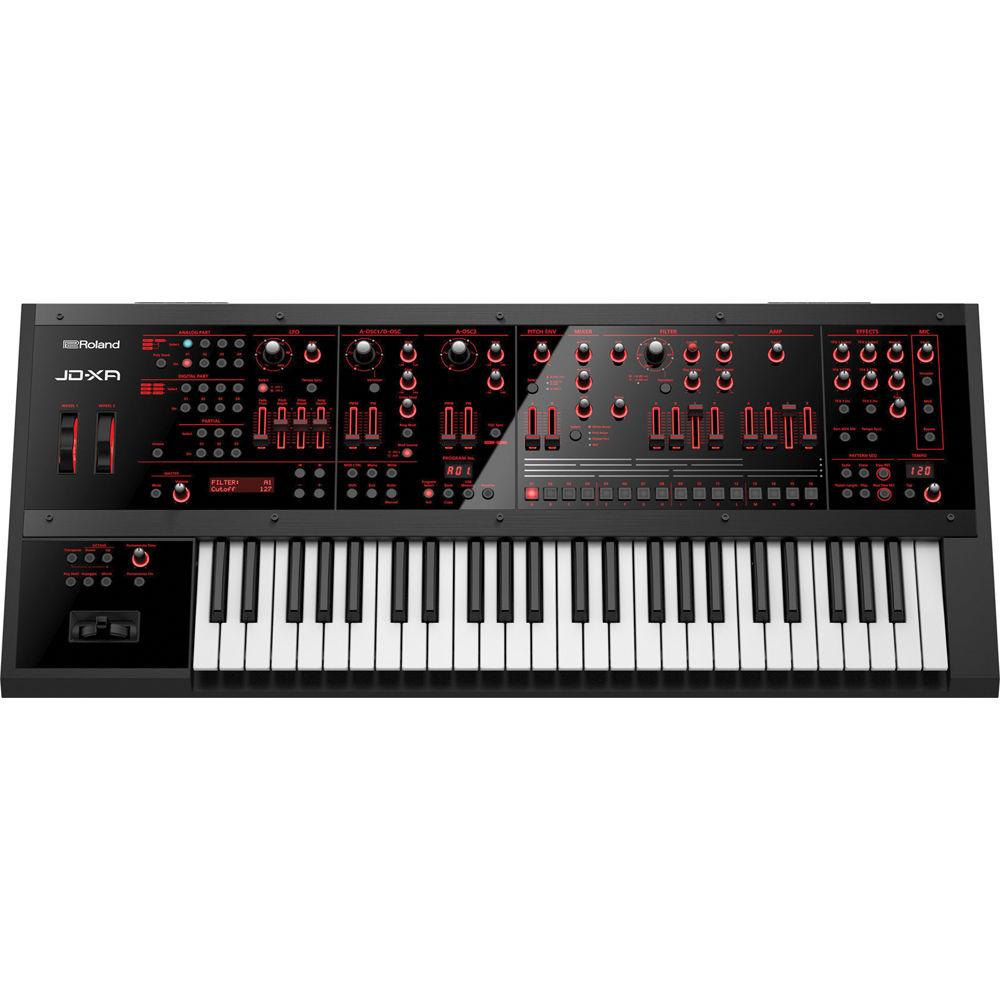
The JD-XA from Roland is an analog/digital crossover synthesizer that combines analog warmth and digital versatility in one keyboard. Featuring a four-part analog synth engine, a four-part digital synth engine, comprehensive effects, an analog filter section, and 49 velocity sensitive keys with aftertouch, the JD-XA is a powerful and versatile instrument that offers a world of sonic possibility.
Each of the four all-analog synth engine parts feature two oscillators along with a dedicated filter, amp envelope, two pitch envelopes, and two LFOs per voice. Featuring a maximum polyphony of 4 voices, the analog section can be used on it's own, or stacked with the digital engine, which is based on Roland's SuperNATURAL technology and features a maximum of 64 simultaneous voices.
Each analog and digital part is equipped with a powerful and expansive MFX processor that offers 67 effect types plus five master effects including reverb, delay, EQ and more. The 16-track pattern sequencer (8 tracks for internal parts, 8 tracks for external parts) can be used for fast creation of songs and loops, and the XLR/1/4" mic input allows you to modulate synth sounds with your voice or use the on-board vocoder.
All of this, plus USB, MIDI, CV/GATE connectivity, and flexible MIDI control functionality make the JD-XA an ideal centerpiece for your music production setup or for live performance. - Features:
-
- Hybrid synthesizer with independent analog and digital sound engines
- Discrete analog synth engine (four parts) with 2 x OSC, Filter, Amp, 4 x Env (2 x Pitch, Filter, Amp), and 2 x LFO per voice plus Analog Dry Out for raw signal output
- Analog filter section features 4-Pole, transistor-ladder, and multi-mode (LPF/HPF/BPF) filters with supremely smooth, natural response to knob movements
- OSC section includes Cross Mod, Ring Mod, and OSC Sync, all of which can be used simultaneously
- LFO rate covers a wide range from ultra-slow to ultra-fast
- Fast attack envelope time
- Separate digital section built around SuperNATURAL synth engine (four parts, 64 voices) that’s compatible with INTEGRA-7 sound libraries from Roland’s online Axial sound portal
- Digital parts can be routed through the analog filter section for warm, organic results
- Comprehensive effects with MFX for all parts plus five system effects (Reverb, TFX1, TFX2, Delay, and Master EQ)
- Flexible routing options for creative sound design
- Intuitive 16-track pattern sequencer (8 tracks for internal parts, 8 tracks for external parts) for fast creation of songs and loops
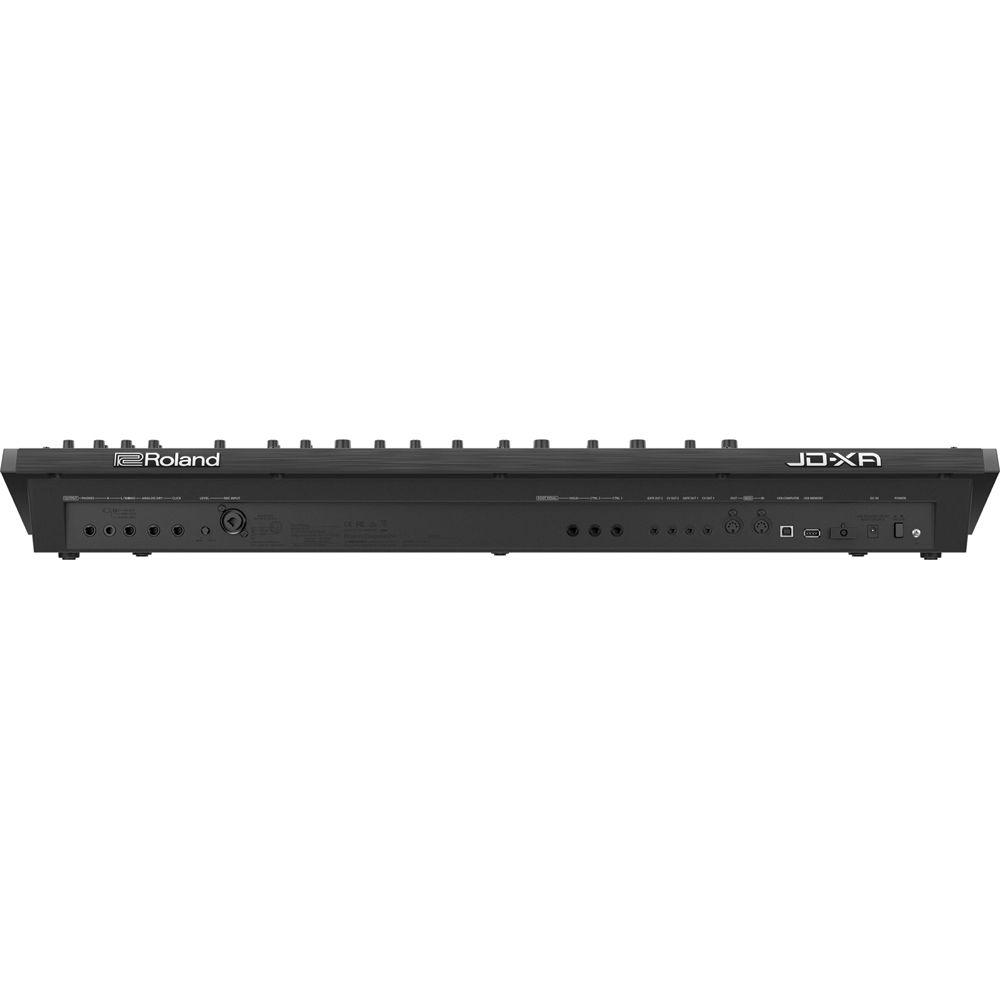
- Onboard USB, MIDI, and CV/GATE interfaces plus flexible MIDI control functionality make the JD-XA the ideal centerpiece for live performance and music production
- Mic input allows you to modulate synth sounds with your voice and explore classic Vocoder functionality
- Plenty of backlit knobs, sliders, and controllers for hands-on sound shaping
UPC: 761294506226 In the Box Roland JD-XA Analog/Digital Synthesizer AC Adaptor Power Cord 1-Year Parts, 90-Days Labor Limited Warranty Table of Contents
|
Upload User Manual
Have you got an user manual for the Roland JD-XA Analog Digital Synthesizer in electronic form? Please send it to us and help us expand our library of instruction manuals.
Thank you, too, on behalf of other users.
To upload the product manual, we first need to check and make sure you are not a robot. After that, your "Submit Link" or "Upload File" will appear.
Technical parametersRoland JD-XA Specs | Keyboard | 49 keys (with velocity and channel aftertouch) | | Polyphony | Analog Part: 4 voices
Digital Part: 64 voices (varies according to the sound generator load) | | Structure | Analog/Digital Crossover Synthesizer:
Analog Part: 4 parts (2 OSCs + AUX, 1 Filter, 1 AMP, 2 Pitch ENV, 1 Filter ENV, 1 AMP ENV, 2 LFOs and 1 MOD LFO)
Digital Part: 4 parts, 3 partial (3 OSCs, 3 Filters, 3 AMPs, Envelopes for each section and LFOs), Digital Part uses SuperNATURAL Synth tones that is compatible with the Integra-7 | | User Memory | Internal: 256 programs
USB Flash Memory: 256 programs
The patterns of Arpeggio and Sequence are saved as programs | | Oscillators | Analog-OSC Section:
Oscillator Waveforms: Saw, Square, Pulse/PWM, Triangle, Sine
Knobs/Sliders: Pitch, Fine, Cross Mod, Pulse Width, Pulse Width Modulation
Pitch Envelopes: Attack, Decay, Envelope Depth
Modulation: Cross Modulation, Ring Modulation, Oscillator Sync (A-OSC2 is applied as modulation to A-OSC1)
Digital-OSC Section:
Oscillator Waveforms: Saw, Square, Pulse/PWM, Triangle, Sine, Variation
Knobs/Sliders: Pitch, Fine, Pulse Width, Pulse Width Modulation
Pitch Envelopes: Attack, Decay, Envelope Depth
Modulation: Ring Modulation (Partial 2-OSC is applied as modulation to Partial 1-OSC) | | Filters | Analog-FILTER Section:
Filter Type: LPF1, LPF2, LPF3, HPF, BPF, Bypass
Knobs: Cutoff, Resonance, Key Follow, Envelope Depth, HPF, Drive
Envelope: Attack, Decay, Sustain, Release
Digital-FILTER Section:
Filter Type: LPF1, LPF2, LPF3, HPF, BPF, Variation, Bypass
Knobs: Cutoff, Resonance, Key Follow, Envelope Depth, HPF
Envelope: Attack, Decay, Sustain, Release | | Amps | Analog-AMP Section:
Knobs: Level
Envelope: Attack, Decay, Sustain, Release
Digital-AMP Section:
Knobs: Level
Envelope: Attack, Decay, Sustain, Release | | LFO | LFO Waveform: Triangle, Sine, Saw, Square, Sample & Hold, Random
Knobs/Sliders: Rate, Fade Time, Pitch Depth, Filter Depth, Amp Depth
Tempo Sync | | Mixer Section | Level: A-OSC 1, A-OSC 2, AUX (for Analog Part) | | Vocoder | Vocoder and MIC Modulation via mic input | | Effects | MFX: 8 systems, 67 types (each part has a MFX)
Part EQ: 8 systems (each part has a Part EQ)
TFX: 2 systems, 29 types
DELAY
REVERB: 6 types
Master EQ
Mic Input Reverb: 8 types | | Sequencer | Tracks: 16
Patterns are saved as a program
SMF import supported | | Arpeggiator | Preset pattern: 64
Patterns are saved as a program | | Controllers | Pitch bend and modulation lever, pitch and modulation wheels | | Display | 16 characters, 2 line LCD | | External Storage | USB Flash memory | | Connectors | PHONES Jack: Stereo 1/4-inch phone type
MAIN OUTPUT Jacks (L/MONO, R): 1/4-inch TRS phone type
ANALOG DRY OUTPUT Jack: 1/4-inch phone type
CLICK OUTPUT Jack: Stereo 1/4-inch phone type
MIC Jack: Combo type (XLR, 1/4-inch TRS phone), balanced
FOOT PEDAL Jacks: CTRL 1, CTRL 2, HOLD
CV/GATE OUTPUT Jacks (2 systems): Miniature phone type (CV: jacks support OCT/V, Hz/V is not supported, GATE: +5 V output)
MIDI connectors (IN, OUT)
USB COMPUTER port (USB Hi-Speed AUDIO/MIDI): USB B type (Use USB cable and computer with a USB port that supports USB 2.0 Hi-Speed)
USB MEMORY Port: USB A type
DC IN jack | | Power Supply | AC adaptor | | Current Draw | 3,000 mA | | Dimensions | 35.4 x 15.3 x 4.4" (899 x 388 x 111 mm) | | Weight | 14.3 lb (6.5 kg) | | | | Package Weight | 21.0 lb | | Box Dimensions (LxWxH) | 43.25 x 19.6 x 7.7" |
Rating50% users recommend this product to others. And what about you?

This product has already been rated by 70 owners. Add your rating and experience with the product.
Discussion
 Ask our technicians if you have a problem with your settings,
or if anything is unclear in the user manual you have downloaded.
You can make use of our moderated discussion.
The discussion is public and helps other users of our website who may be encountering similar problems.
Ask our technicians if you have a problem with your settings,
or if anything is unclear in the user manual you have downloaded.
You can make use of our moderated discussion.
The discussion is public and helps other users of our website who may be encountering similar problems.
The discussion is empty - enter the first post
Post a new topic / query / comment:
|
|


