User Manual for Roland SH-2 Plug-Out Software Synthesizer for SYSTEM-1 Click to enlarge the picture
 Contents of the user manual for the Roland SH-2 Plug-Out Software Synthesizer for
- Product category: Virtual Instruments Roland
- Brand: Roland
- Description and content of package
- Technical information and basic settings
- Frequently asked questions – FAQ
- Troubleshooting (does not switch on, does not respond, error message, what do I do if...)
- Authorized service for Roland Virtual Instruments
|
User manual for the Roland SH-2 Plug-Out Software Synthesizer for contain basic instructions
that need to be followed during installation and operation.
Before starting your appliance, the user manual should be read through carefully.
Follow all the safety instructions and warnings, and be guided by the given recommendations.
User manual is an integral part of any Roland product,
and if it is sold or transferred, they should be handed over jointly with the product.
Following the instructions for use is an essential prerequisite for protecting
health and property during use, as well as recognition of liability on the part of the manufacturer
for possible defects should you make a warranty claim. Download an official Roland user manual in which you will find instructions on how to install, use, maintain and service your product.
And do not forget – unsuitable use of a Roland product will considerably shorten its lifespan!
|
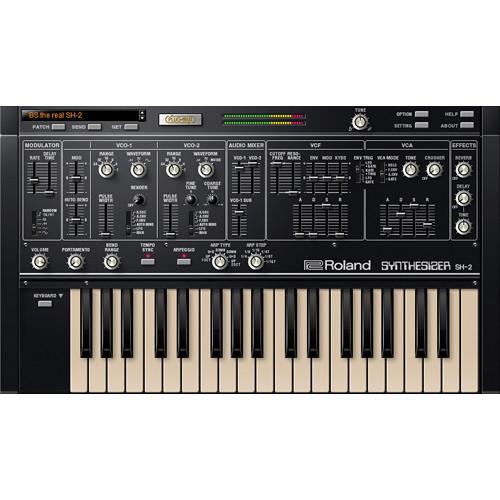
Product description Designed for SYSTEM-1, this electronic download of the SH-2 Plug-Out from Roland is a software synthesizer recreating the sounds of the classic 1979 SH-2 synthesizer, renowned for its raw vintage tone. Harnessing the Analog Circuit Behavior (ACB) technology, Roland is able to authentically capture the warm, rich sound of the original synth, right down to the behavior and interaction of the individual analog circuits.
System 1 owners can not only utilize multiple instances of the SH-2 plug-in, but also use the SYSTEM-1 as a dedicated controller, which only lights the appropriate knobs and sliders pertinent to the SH-2. Sounds can be transferred back and forth between your DAW and the SYSTEM-1. Additionally, the Plug-Out can be transferred to the SYSTEM-1 to create a stand-alone, hardware SH-2, without the need for a computer. - Synth Overview
- Maximum Polyphony
- LFO Rate
- Delay Time
- Waveform (SIN, TRI, SAW, SQR, RANDOM(S/H))
VCO- Auto Bend Depth
- Modulation Depth
- Range (64, 32, 16, 8, 4, 2)
- Waveform (SAW, SQR, SIN)
- Pulse Width
- PWM Mode switch (MANUAL, LFO, AUTO BEND, VCF ENV, VCA ENV, VCO-1 SUB)
- Bender Depth
- Range (64, 32, 16, 8, 4, 2)
- Waveform (SAW, SQR, NOISE)
- Pulse Width
- PWM Mode switch (MANUAL, LFO, AUTO BEND, VCF ENV, VCA ENV, VCO-1 SUB)
- Fine Tune
- Coarse Tune
Audio MixerVCF- Cutoff Frequency
- Resonance
- ENV Depth
- Modulation Depth
- Keyboard Follow
VCF ENV- Attack Time
- Decay Time
- Sustain Level
- Release Time
- VCA Mode (GATE, A.ENV, F.ENV, HOLD)
- Tone
- Crusher Depth
- Attack Time
- Decay Time
- Sustain Level
- Release Time
- Gate-Trigger switch (GATE, LFO, GATE+TRIG, LFO+GATE)
- Reverb Level
- Delay Level
- Delay Time
- Volume
- Portamento
- Bend Range
- Tempo Sync switch
- Arpeggio Switch
- Arpeggio Type (1 Oct Up, 1 Oct U+D, 1 Oct Down, 2 Oct Down, 2 Oct U+D, 2 Oct Down)
- Arpeggio Step (1/4, 1/8, 1/16, 1/4T, 1/8T, 1/16T)
Tune - 44.1, 88.2, 176.4, 48, 96, 192 kHz
- 64 patches
- * User can make new user banks.
- VSTi 3.6 (32 bits, 64 bits), AU
UPC: 761294507179 Table of Contents
|
Upload User Manual
Have you got an user manual for the Roland SH-2 Plug-Out Software Synthesizer for SYSTEM-1 in electronic form? Please send it to us and help us expand our library of instruction manuals.
Thank you, too, on behalf of other users.
To upload the product manual, we first need to check and make sure you are not a robot. After that, your "Submit Link" or "Upload File" will appear.
Technical parametersRoland PG-SH2-S Specs | | | Operating System | Mac OS X 10.8.5 or later
Mac OS X 10.9 supported | | Host Application | VST Instruments (VSTi) Version: VST 3.6 compatible
Audio Units (AU) Version: V2 Audio Units compatible | | CPU | Intel Core 2 Duo or better | | RAM | 4 GB or more | | Hard Disk | 100 MB or more | | Display Resolution | 1280 x 800 dots or higher, 16.7 million colors or more | | Other | Internet connection to activate this software
Installation of the SYSTEM-1 driver to plug-out this software to the SYSTEM-1 | | | | Operating System | Microsoft Windows 7 SP1
Microsoft Windows 8/8.1
* This does not work with the Windows RT
* This does not work with the Windows Phone
* This does not work on the virtual machines such as Hyper-V, Virtual PC, or Boot Camp | | Host Application | VST Instruments (VSTi) Version: VST 3.6 compatible | | CPU | Intel Core 2 Duo or better | | RAM | 2 GB or more | | Hard Disk | 100 MB or more | | Display Resolution | 1280 x 800 dots or higher, 24-bits Full Color or more | | Other | Internet connection to activate this software
Adobe Reader (available free of charge) in order to read the online help
Installation of the SYSTEM-1 driver to plug-out this software to the SYSTEM-1 |
Rating80% users recommend this product to others. And what about you?

This product has already been rated by 57 owners. Add your rating and experience with the product.
Discussion
 Ask our technicians if you have a problem with your settings,
or if anything is unclear in the user manual you have downloaded.
You can make use of our moderated discussion.
The discussion is public and helps other users of our website who may be encountering similar problems.
Ask our technicians if you have a problem with your settings,
or if anything is unclear in the user manual you have downloaded.
You can make use of our moderated discussion.
The discussion is public and helps other users of our website who may be encountering similar problems.
The discussion is empty - enter the first post
Post a new topic / query / comment:
|
|


