|
User Manual for Roland V-1SDI-W Web Streaming Bundle Click to enlarge the picture
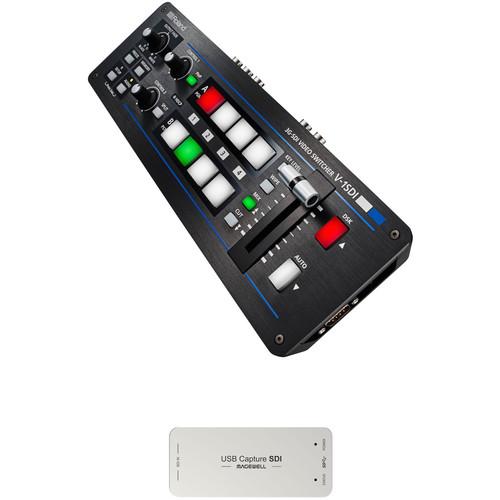 Contents of the user manual for the Roland V-1SDI-W Web Streaming Bundle
- Product category: Production Switchers Roland
- Brand: Roland
- Description and content of package
- Technical information and basic settings
- Frequently asked questions – FAQ
- Troubleshooting (does not switch on, does not respond, error message, what do I do if...)
- Authorized service for Roland Production Switchers
|
User manual for the Roland V-1SDI-W Web Streaming Bundle contain basic instructions
that need to be followed during installation and operation.
Before starting your appliance, the user manual should be read through carefully.
Follow all the safety instructions and warnings, and be guided by the given recommendations.
User manual is an integral part of any Roland product,
and if it is sold or transferred, they should be handed over jointly with the product.
Following the instructions for use is an essential prerequisite for protecting
health and property during use, as well as recognition of liability on the part of the manufacturer
for possible defects should you make a warranty claim. Download an official Roland user manual in which you will find instructions on how to install, use, maintain and service your product.
And do not forget – unsuitable use of a Roland product will considerably shorten its lifespan!
|
Product description The Roland V-1SDI-W Web Streaming Bundle is a B&H Kit assembled to provide you with a portable HD mixer and SDI-to-USB converter for live streaming over your computer. The Roland switcher features four independent inputs, each with its own fame buffer, allowing you to mix video sources without dropping frames. A built-in 12-channel audio mixer and manual fader T-bar are familiar tools found in full-sized mixing boards.
The included Magewell USB Capture SDI Gen 2 supports resolutions up to 2048 x 1080 at 60p via its SDI input. It supports up- and down-conversion, frame rate conversion, ands deinterlacing, all accomplished internally and in real time. Supporting USB 3.0 and backward compatible with USB 2.0, it is a plug-and-play device with most computers, allowing you to input or stream your HDMI output from the Roland mixer using your computer as the streaming platform. - Roland V-1SDI 4-Channel HD Video Switcher
- Roland V-1SDI 3G-SDI Video Switcher
Roland's V-1SDI 4-Channel HD Video Switcher supports HD-only video signals over three of its inputs, and can support SD, HD, and computer video formats up to 1920 x 1200 (WUXGA) at 60 Hz on its fourth. It supports progressive and interlaced material, internally converting the interlaced footage to progressive for processing. Featuring a preview, program, and multiview output, you can easily monitor all your inputs at once on the multiview while isolating your preview and program screens.
The HDMI inputs and multiview output are HDCP compliant, while the SDI inputs and SDI preview and program outputs support SMPTE 424M (SMPTE 425M-AB), 292M, and 259M-C. You can control the unit via the built-in RS-232 port, or via a PC using the USB connection. Eight memory functions enable you to recall specific setups, which makes it easier to get up and running when the switcher is shared among different productions. Built-in features include image freeze and output fades. - Video Input
- The switcher handles four video inputs, up to three SDI and up to two HDMI. Inputs 1 to 3 are SDI, with input 3 shared between SDI and HDMI with support for HD video formats. Input 4 is HDMI-only and, in addition to supporting HD video, also supports SD and computer formats.
- Audio Input
- The switcher supports analog audio on as well as mic input with or without plug-in power.
- Video Effects
-
- Transition: Cut, Mix (Dissolve/Fam/Nam/Mosaic), Wipe (30 types)
- Composition: PiP, Split, Quad, DSK (Luminance key, Chroma key)
- Audio Effects
- EQ, Delay, Compressor, HPF, Gate, Reverb, Mastering effect
- Multiviewer
- This output can display all active inputs on the same screen via the HDMI output.
- Functions
-
- The built-in memory function allows the memorization and convenient recall of panel settings, such as effect assignment to each button. The memory stores up to eight configurations and keeps stored settings, even with the power off
- Freeze video input
- Fade audio output
- Fade video to white or black
- HDCP
- The V-1SDI HDMI inputs and outputs are HDCP compliant.
UPC: 761294509357 - Magewell USB Capture SDI Gen 2
- Roland V-1SDI 3G-SDI Video Switcher
The Magewell USB Capture SDI Gen 2 is a slim and compact dongle that lets you easily import an SDI signal into your computer for recording or streaming. It provides a handy and efficient way of connecting cameras, decks, switchers, and other broadcast and surveillance equipment to your computer. Furthermore, it doesn't require any additional drivers to be installed, and thereby is compatible with various software and web-applications (see below) on Mac, Windows, Linux, and Chrome OS, and works by simple plug-and-play connection.
This Gen 2 version supports input/output resolutions up to 2048 x 1080 (2K) at 60 Hz. Using an included mini-coax to SDI adapter cable, connect any 3G/HD/SD-SDI source to the dongle, and output it to your computer with embedded audio over a USB 3.0 cable, which is also supplied. The USB port and USB cable are also backwards-compatible with USB 2.0.
If you want to stream or record at a lower resolution than what's being captured, you can pull up the "Filters Properties Dialog Window" in the software you use and adjust parameters to downscale (or upscale)/deinterlace the image, as well as adjust brightness and other image properties. The device is also designed to work continuously 24 hours a day, 7 days a week. - Key Features
-
- Capture and record/stream SDI signals up to 2048 x 1080 (2K) at 60 Hz
- Compatible with software/web-applications on Mac, Windows, Linux, and Chrome OS
- Plug-and-play connection
- UVC protocol compatible
- Up/down scaling
- Deinterlacing
- Image adjustment control
- Various output color spaces
- Firmware-upgradeable
- Capable of continuous 24/7 operation
- Multiple units can be connected to one host
- Supported Software
-
- VLC
- VirtualDub
- OBS
- XSplit
- vMix
- VidBlaster
- Wirecast
- Microsoft Media Encoder
- Adobe Flash Media Encoder
- Any other DirectShow, V4L2, QuickTime, or AV Foundation based encoding or streaming software
- SDI Supported Features
-
- Cable lengths up to 460 ft for 3G-SDI signals via integrated cable equalizer
- SD/HD/3Ga/3Gb/3Ga-DL/3Gb-DS standards
- 2K (2048 x 1080) signals
- RGB 4:4:4, YCbCr 4:4:4, and YCbCr 4:2:2 color sampling
- 10-/12-bit color depth
- Extraction of SMPTE 352 payload identifier
- Up to 2 (mono) audio channels at 48 KHz
- Extraction of audio formation information and channel status data
- 3Gb-DS: only the first stream can be captured
- Capture of First Link of Dual Link Interfaces
-
- YCbCr, 4:2:2, 10-bit 1080p 50/59.94/60: captured as 1080i 50/59.94/60
- YCbCr 4:4:4 10-bit: captured as 4:2:2
- RGB 4:4:4: R/B sub-sampled
- Video Capture Format Support
-
- Capture resolutions up to 2048 x 1080
- Capture frame rates up to 120 fps (Actual capture frame rate can be limited by the USB bandwidth and internal working frequency. Typical capture frame rates on the Intel USB 3.0 controller are: 1) 1920 x 1080 YUY2 at up to 70 fps, 2) 1920 x 1080 RGB24 at up to 60 fps
- YUY2 & UYVY 4:2:2 8-bit
- RGB24 & RGB32 4:4:4 8-bit
- The default capture format is YUY2; more capture formats can be set using a USB Capture Utility
- Video Processing Features
-
- Video processing pipelines with 160 megapixels processing bandwidth
- Video cropping
- Video scaling
- Video deinterlacing
- Video aspect ratio conversion
- Video color format conversion
- Video frame rate conversion
- Vertical flip and mirror
- Video Deinterlacing
-
- Weave
- Blend top and bottom field
- Top field only
- Bottom field only
- Video Aspect Ratio Conversion
-
- Auto or manual selection of input aspect ratio
- Auto or manual selection of capture aspect ratio
- Three aspect ratio conversion modes: Ignore (Anamorphic), Cropping, or Padding (Letterbox or Pillarbox)
- Video Color Format Conversion
-
- Auto or manual selection of input color format and quantization range
- Auto or manual selection of capture color format, quantization range and saturation range
- Support for RGB, YCbCr 601, and YCbCr 709 color formats
- Support for limited or full quantization range
- Support for limited, full, and extended gamut saturation range
In the Box - V-1SDI 4-Channel HD Video Switcher
- AC Adapter
- Power Cord
- Cord Hook
- Limited 1-Year Warranty
- Magewell - USB Capture SDI Gen 2
Table of Contents
|
Upload User Manual
Have you got an user manual for the Roland V-1SDI-W Web Streaming Bundle in electronic form? Please send it to us and help us expand our library of instruction manuals.
Thank you, too, on behalf of other users.
To upload the product manual, we first need to check and make sure you are not a robot. After that, your "Submit Link" or "Upload File" will appear.
Technical parameters - Roland V-1SDI 4-Channel HD Video Switcher
| | | Video Processing | 8-bit 4:2:2 (YPbPr) | | Audio Processing | 24-bit at 48 kHz | | | | SDI | Inputs 1 to 3
1080p: 59.94/50
1080i: 59.94/50
720p: 59.94/50
Conforms to SMPTE 424M (SMPTE 425M-AB), 292M, 259M-C | | HDMI | Input 3
1080p: 59.94/50
1080i: 59.94/50
720p: 59.94/50
HDCP supported
Input 4
1080p: 59.94/50
1080i: 59.94/50
720p: 59.94/50
480p: 59.94
576p: 50
480i: 59.94
576i: 50
WUXGA: 1920 x 1200 @ 60 Hz
UXGA: 1600 x 1200 @ 60 Hz
SXGA+: 1400 x 1050 @ 60 Hz
FWXGA: 1366 x 768 @ 60 Hz
SXGA: 1280 x 1024 @ 60 Hz
WXGA: 1280 x 768 @ 60 Hz
XGA: 1024 x 768 @ 60 Hz
SVGA: 800 x 600 @ 60 Hz
VGA: 640 x 480 @ 60 Hz
HDCP supported | | | | Program & Preview Output | SDI
1080p: 59.94/50
1080i: 59.94/50
720p: 59.94/50
Conforms to SMPTE 424M (SMPTE 425M-AB), 292M, 259M-C | | MultiView | HDMI
HDCP supported | | Input Level | Audio In: -10 dBu (Maximum: +8 dBu)
Mic: -41 to -13 dBu (Maximum: -1 dBu) | | Output Level | Audio Out: -10 dBu (Maximum: +8 dBu)
Phones: 92 mW + 92 mW (32 Ohms) | | | | Input | Video
3 x SDI, BNC
2 x HDMI Type-A
Audio
Analog: RCA phono
Mic: Stereo mini jack | | Output | Program
1 x SDI, BNC
Preview
1 x SDI, BNC
Multiview
1 x HDMI Type-A
Audio
Analog: RCA phono
Headphones: Stereo mini jack | | Remote | USB Type-B (for remote control from PC)
RS-232: DB-9 | | Audio Impedance | Input
Audio: 15 kOhms
Mic: 10 kOhms
Output
Audio: 1 kOhms
Phones: 10 Ohms | | | | Power Supply (AC) | AC adapter | | Current Draw | 2.1 A | | Power Consumption | 25 W | | Operating Temperature | 32 to 104°F / 0 to 40°C | | Dimensions (H x W x D) | 12.3 x 4.3 x 2.3" / 31.3 x 10.8 x 5.9 cm | | Weight | 2.6 lb / 1.2 kg (excluding AC adapter) | | | | Box Dimensions (LxWxH) | 16.2 x 9.8 x 5.3" | - Magewell USB Capture SDI Gen 2
| Supported OS | Windows 10, 8.1, 8, 7, 2012 (x86/x64), 2008 R2, 2008
Linux (Ubuntu 12.04-16.10, CentOS 7)
OS X 10.9-10.11
macOS 10.12
Chrome OS | | Supported APIs | Windows:
DirectShow
Wave API/DirectSound/WASAPI
Linux:
V4L2
ALSA
OS X/macOS:
QuickTime
AV Foundation | | Input | 1 x Mini Coax (MCX) port (supporting 3G/HD/SD-SDI signals via an included MCX to SDI cable) | | Output | USB 3.0 (compatible with USB 3.1 Gen 1, backwards-compatible with USB 2.0) | | USB Standard | Meets the standards of UVC (USB video class) and UAC(USB audio class) | | Supported Resolutions | Input/Output: Up to 2048 x 1080 (2K) at 60 Hz | | Power Consumption | 5 V max current: 0.5 A
Max power consumption: 2.5 W | | Operating Temperature | 32 to 122°F (0 to 50°C) | | Storage Temperature | 4- to 158°F (-20 to 70°C) | | Relative Humidity | 5 to 90% non-condensing | | Dimensions | 3.6 x 1.6 x 0.5" (9.2 x 4 x 1.2 cm) | | | | Box Dimensions (LxWxH) | 7.5 x 4.2 x 0.7" |
Rating80% users recommend this product to others. And what about you?

This product has already been rated by 62 owners. Add your rating and experience with the product.
Discussion
 Ask our technicians if you have a problem with your settings,
or if anything is unclear in the user manual you have downloaded.
You can make use of our moderated discussion.
The discussion is public and helps other users of our website who may be encountering similar problems.
Ask our technicians if you have a problem with your settings,
or if anything is unclear in the user manual you have downloaded.
You can make use of our moderated discussion.
The discussion is public and helps other users of our website who may be encountering similar problems.
The discussion is empty - enter the first post
Post a new topic / query / comment:
|
|
|
| Request for user manual |
You can’t find the operation manual you are looking for? Let us know and we will try to add the missing manual:
I’m looking for a manual / Request for manual
Current requests for instruction manuals:
Call Of Duty World War Two For Xbox...
controller stratus XL...
stratus XL...
smart whatch serie S11 42mm...
Allen & Heath SQ-6 manual...
|
| Discussion |
Latest contributions to the discussion:
AEW R 4100
Name: MAURICIO ANGARITA
Audio-Technica AEW-R4100 UHF Diversity Receiver for
AEW R 4100 has the mute function blocked and does not allow audio to pass. I tried several times to turn off the mute from the transmitter but it does nothing, the mute stays on. Solution?
Thank you...
Instructions for assembling the 2015 Forecast Image Master Consoles GC3-A
Name: mike elam
Forecast Consoles GC3-A ImageMaster Editing Console
Looking for instructions for assembling this console. ...
EMPTY TONER ERROR MESSAGE AFTER REPLACING TONER
Name: LINDA BAD YELLOW EYES
Brother TN223BK Standard-Yield Toner
I HAD TO CHANGE OUT ALL THREE TONERS DUE TO LEAKS IN THE YELLOW AND CYAN. AFTER I REPLACED THEM, THE MACHINE KEEPS GIVING ME AN EMPTY TONER ERROR MESSAGE. HELP!!...
PS480D 20/24 pin Switching 480W Power Supply
Name: swkargo
Logisys 480W Power Supply
This item states in can run -5vdc .It is NOT listed on the board or I beleive is r4 is missing the resitior. Any body have thid issue. Shawn
...
Help needed
Name: Ann Carter
SanDisk 1TB Extreme Portable USB 3.1
When I click the link to download the user manual for my Sandisk Extreme external hard drive, it gives me the manual for the LG Cricket. Can you please change the link so I can download the Sandisk manual and begin using this drive? Thank you....
|
|


