|
User Manual for Rupert Neve Designs Shelford Channel Transformer Gain Mic Pre-Amp, Inductor EQ & Diode Bridge Compressor Click to enlarge the picture
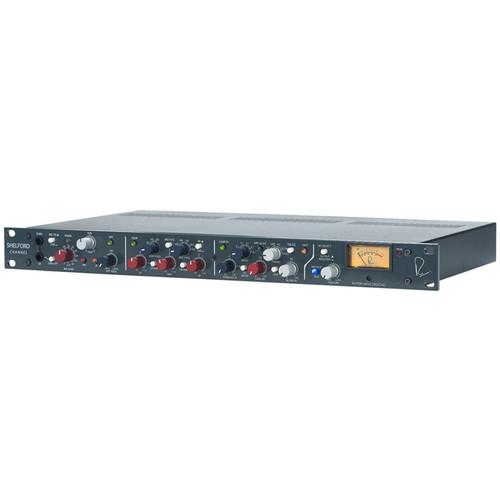 Contents of the user manual for the Rupert Neve Designs Shelford Channel Transformer
- Product category: Channel Strips Rupert Neve Designs
- Brand: Rupert Neve Designs
- Description and content of package
- Technical information and basic settings
- Frequently asked questions – FAQ
- Troubleshooting (does not switch on, does not respond, error message, what do I do if...)
- Authorized service for Rupert Neve Designs Channel Strips
|
User manual for the Rupert Neve Designs Shelford Channel Transformer contain basic instructions
that need to be followed during installation and operation.
Before starting your appliance, the user manual should be read through carefully.
Follow all the safety instructions and warnings, and be guided by the given recommendations.
User manual is an integral part of any Rupert Neve Designs product,
and if it is sold or transferred, they should be handed over jointly with the product.
Following the instructions for use is an essential prerequisite for protecting
health and property during use, as well as recognition of liability on the part of the manufacturer
for possible defects should you make a warranty claim. Download an official Rupert Neve Designs user manual in which you will find instructions on how to install, use, maintain and service your product.
And do not forget – unsuitable use of a Rupert Neve Designs product will considerably shorten its lifespan!
|
Product description The Shelford Channel Transformer Gain Mic Pre-Amp, Inductor EQ & Diode Bridge Compressor from Rupert Neve Designs is the evolution of the original technologies of his classic console modules like the 1073, 1064, 1081 & 2254. The Shelford Channel has been refined for the 21st century studio and can be used as a front-end channel for controlling audio signals in studio applications and more.Featuring a single XLR mic input with 48V phantom, a single XLR line input and XLR outputs, the Shelford Channel is built with a 1/4" line input and a thru connector. Side-chain send and returns, and two link connectors, are also provided. Outstanding features include the inductor EQ section, the tone-packed Diode bridge compressor, the analog power of variable Silk saturation, and a dual-tap transformer output stage with twice the operating voltage of vintage designs that allows the full driving of the Channel without clipping standard converters.With richly-colored tonal options for making bold statements with your music and precisely-engineered detented controls for recall, the vintage-inspired Shelford Channel maintains the soul of Rupert's Neve's classic designs with new levels of versatility. - Transformer Gain Mic Input
- The Shelford Channel's mic input uses direct transformer coupling with 15 dB of gain in the transformer itself; the resulting sonic performance allows the mic pre to capture the more forward mid's and slightly rounded off high and low frequencies of vintage designs like the 1073.
- Direct Input
- The Hi-Z front panel input uses the same discrete class-A FET with transformer topology as the Rupert Neve Designs RNDI, but it utilizes the new RN4012 input transformer into the microphone preamplifier for gain. It delivers clarity to high-Z sources with a low-end presence and smooth high frequencies. The DI also includes a passive thru output to feed a separate amplifier.
- Dual-Tap Output
- The dual-tap output for the Channel's RN2042 square-core output transformer creates both high- and low-headroom outputs without compromising the channel's performance. Designed to capture a pristine sound at high levels while avoiding coloration of the output stage, the high-headroom tap takes full advantage of the Shelford's higher voltage design. The low-headroom tap is optimized to allow an engineer to drive the full-voltage range of the Channel – adding dynamic tone without clipping.
- Silk & Texture
- The addition of the Silk & Texture circuitry allows control over the harmonic content and saturation of the output transformer. With Silk disengaged, the output is still modern and pristine, yet still retains the larger-than-life transformer sound. When engaged, the 2nd order and 3rd order harmonic content can be dialed up to several times beyond that found on a vintage 1073. It is further controlled with Silk Red and Blue Modes, which emphasizes harmonic content generated by the source's high frequencies.
- Mic/DI/Line
- Switches between microphone/direct injection input (button out) or line input (button in).
- Ground Lift
- This switch separates the direct connection from audio-signal ground to chassis earth.
- Dual-Function Signal LED
- When green, it indicates "Signal Presence" (a signal level of -20 dBu). When red, it indicates 2-3 dB below input-stage clipping of the Mic/Line stage (+23 dBu while the mic pre actually clips at +25 dBu).
- Mic Gain
- This 12-way precision rotary switch controls gain from 0 to 66 dB in 6-dB steps.
- Trim
- This rotary switch provides continuous gain adjustment over a range of +/- 6 dB.
- 48V Phantom
- Provides phantom power on the microphone input.
- Phase
- Switches the polarity of the signal path.
- HPF
- The HPF switch engages a 12 dB per octave high-pass filter. The HPF potentiometer is variable from 20 Hz to 250 Hz, and can be used to filter out unwanted low frequencies, or in conjunction with the EQ to help shape source material.
- HPF Frequency
- This control selects the frequency at which the filter begins (-3 dB) to roll off low-frequency signals. It is a 12 dB per octave Bessel filter designed to musically preserve important timing information while cutting low-frequency noise like air conditioning rumble.
- EQ In
- This switch engages all EQ frequency bands except the HPF.
- LF
- Adjusts up to 15 dB of boost or cut at the selected low frequencies. Cut can be used as a variable, as a gentle alternative to using the HPF. Remember to reduce the signal level at the source to minimize the potential for distortion when any of the 3 bands are boosted significantly.
- Low Frequency
- This rotary switch has 4 positions for selecting one of four corner or center frequencies for the low-band EQ section. The frequencies are 35 Hz, 60 Hz, 100 Hz, and 200 Hz. With the LF Peak button pressed the low-frequency band changes to peak mode with a bell shaped boost or cut curve. Between the LF Peak button and LF Freq rotary switch, an engineer has 8-tonal variations of EQ shapes to finesse the bottom end, plus the high-pass filter can be introduced for further tightening and manipulation.
- LF Peak
- When the button is out, the low frequency band operates in shelf mode, boosting or cutting below the corner frequency.
- Mid Hi Q
- The resonance or Q of the mid-band at maximum boost is typically 2 when the button is out. When the MID HI Q is pressed at maximum boost, the Q narrows to approximately 3.5. It widens nicely with less boos or cut as is typical for passive EQ circuits. The Q tends to be slightly wider when the frequency is set lower, and slightly higher for higher frequency selections. The Q is also narrower for cuts than it is for boosts and the mid band is non-symmetrical by design.
- Mid
- Adjusts up to 15 dB of boost or cut at the selected mid frequencies.
- Mid Frequency
- This rotary switch has 6 positions to select the center frequency of the mid-band EQ stage. It utilizes an inductor and capacitors to shape the EQ curve. The frequencies are 200 Hz, 400 Hz, 900 Hz, 1.8 kHz, 3.5 kHz, and 7.5 kHz.
- HF Peak
- When the button is out, the high-frequency band operates in shelf mode, boosting or cutting above the corner frequency at approximately 6 dB/octave. Below the corner frequency the amount of boost or cut gradually diminishes. With the Hi Peak button pressed, the high- frequency band changes to peak mode with a bell-shaped boost or cut curve.
- 8k/16K
- With the switch out, the center or corner frequency of the high band is 8 kHz. With the button pressed, the center or corner frequency changes to 16 kHz. Between this switch and the HI Peak switch, you have 4 different EQ curves to finesse the high-frequency content.
- HF
- Adjusts up to 15 dB of boost or cut at selected high frequencies.
- The Side-Chain Insert Jacks
- These pairs of jacks are only used to perform some fine tuning of the compressor operation. The audio that normally controls the compressor is available on the "Sidechain Send" jack. One can take this audio and pass it through an external equalizer then return it back to the "Sidechain Return" jack.
- Compressor In
- The compressor-limiter section is engaged with this button. It can be useful for control of the compressor and it is there for "confidence checks." In particular, exercise it in both the quietest and the loudest sections of the song.
- Threshold
- Sets level where the compressor begins to react from -25 dB to +20 dB. Minimal or no compression is with this control fully clockwise, and it gets more sensitive and tends to cause more gain reduction as the knob is rotated counter-clockwise.
- Ratio
- Sets the "slope" of the compression from 1.5:1 (minimal) to 8:1 (significant).
- SC Insert
- This control inserts an external device into the side-chain signal path via the rear panel side-chain insert jacks.
- HPF to S/C
- It routes the high-pass filter into the circuit that the compressor uses to determine level, commonly referred to as "the side-chain."
- Gain
- Often referred to as make-up gain, this is a level control.
- Timing
- This six-position control adjusts the attack/release speed of the compressor.
- Link
- Links the side-chain control of multiple units for ganged operation.
- Pre-EQ
- Pushing this button changes the order of where the compressor is in the circuit.
- Blend
- Adjusts the blend of the dry, uncompressed signal and the compressed signal.
- Fast
- When pressed, it alters the speed of both the attack and release of the selected time constant of the compressor.
- VU Meter
- The VU meter is calibrated to display both average (RMS) output level and compressor gain reduction.
UPC: 752423657360 In the Box Rupert Neve Designs Shelford Channel Transformer Gain Mic Pre-Amp, Inductor EQ & Diode Bridge Compressor Power Cable Limited 1-Year Warranty Table of Contents
|
Upload User Manual
Have you got an user manual for the Rupert Neve Designs Shelford Channel Transformer Gain Mic Pre-Amp, Inductor EQ & Diode Bridge Compressor in electronic form? Please send it to us and help us expand our library of instruction manuals.
Thank you, too, on behalf of other users.
To upload the product manual, we first need to check and make sure you are not a robot. After that, your "Submit Link" or "Upload File" will appear.
Technical parametersRupert Neve Designs Shelford Channel Specs | | | Input Impedance | 2200 Ohms | | Maximum Input | +21.5 dBu from 150 Hz to 22 kHz
+8 dBu 20 Hz to 22 kHz | | Gain Steps in dB | 12 settings, 0 to 66 dB in 6 dB steps | | Noise | Un-weighted, 22 Hz to 22 kHz, Source Impedance 150 Ohms Balanced
Main Out @ Unity Gain: -100.9 dBu
-6 dB Out @ Unity Gain: -106.6 dBu
+30 dB Gain (Main Out): -91.37 dBu
+66 dB Gain (Main Out): -64.1 dBu
Equivalent Input Noise: -121.37 dBu | | Frequency Response | +/-0.25 dB from 17 Hz to 45 kHz | | | | Maximum Input | 8 dBu @ 20 Hz to 120 kHz | | Noise | At Main Output: -100 dBu (22 Hz to 22 kHz) | | | | Maximum Input Level | +30.5 dBu (20 Hz to 30 kHz) | | Total Harmonic Distortion (THD) + N | @ 1 kHz, +20 dBu Output Level, No Load: Better than 0.002%
@ 20 Hz, +20 dBu Output Level, No Load: 0.05% typical (2nd and 3rd harmonic) | | Noise | At Main Output: -101.1 dBu
(Un-weighted, 22 Hz to 22 kHz, source impedance 40 Ohms balanced, no load) | | Frequency Response | +/- 0.25 dBu from less than 10 Hz to 110 kHz
-0.32 dB @ 120 kHz | | Maximum Output Level | +26 dBu @ 16 Hz to 20 kHz | | | | Red | Texture @ Min: @ 100 Hz, +20 dBu input level, no load 0.0131%, mostly 3rd harmonic (typical)
TEXTURE @ Max: @ 100 Hz, +20 dBu input level, no load 1.66%, mostly 2nd harmonic (typical) | | Blue | Texture @ Min: @ 100 Hz, +20 dBu input level, no load 0.0079%, mostly 3rd harmonic (typical)
Texture @ Max: @ 100 Hz, +20 dBu input level, no load 0.941%, mostly 2nd harmonic (typical) | | High-Pass Filter | Continuously variable swept frequency from 20 Hz to 250 Hz
Slope: 12 dB/octave | | | | Noise | Un-weighted, 22 Hz to 22 kHz: -92 dBu | | | | Signal | Illuminates green when input stage signal level reaches -20 dBu | | Overload | Illuminates red when input stage signal level reaches +23 dBu | | | | Noise | BW 22 Hz to 22 kHz:
0 dB Makeup Gain: -84.5 dBu +20 dB Makeup Gain: -64.2 dBu | | Time Constants | Measurements taken represent full range achievable between 1.5:1 ratio and 8:1ratio setting
0 dBu I/P 1 kHz burst tone used for all recorded measurements
Fast (TC1): Attack 180 µS - 1.8 ms, release 100 ms to 150 ms
MedFast (TC2): Attack 750 µS - 5.25 ms, release 160 ms to 250 ms
Med (TC3): 2.7 ms to 18 ms, release 350 ms to 525 ms
MedSlow (TC4): 4.6 ms to 38 ms, release 600 ms to 1 sec
Slow (TC5): 11 ms to 72.5 ms, release 800 ms to 1.25 sec
Auto (TC6): 5.75 ms to 35.5 ms, release T1 400 ms to 850 ms, T2 TBD
"Fast" Mode Multiplier: Modifies aforementioned TC's by 70% of original value | | Dimensions | Not specified by manufacturer | | Weight | Not specified by manufacturer | | | | Package Weight | 12.25 lb | | Box Dimensions (LxWxH) | 22.7 x 14.5 x 6.8" |
Rating90% users recommend this product to others. And what about you?

This product has already been rated by 13 owners. Add your rating and experience with the product.
Discussion
 Ask our technicians if you have a problem with your settings,
or if anything is unclear in the user manual you have downloaded.
You can make use of our moderated discussion.
The discussion is public and helps other users of our website who may be encountering similar problems.
Ask our technicians if you have a problem with your settings,
or if anything is unclear in the user manual you have downloaded.
You can make use of our moderated discussion.
The discussion is public and helps other users of our website who may be encountering similar problems.
The discussion is empty - enter the first post
Post a new topic / query / comment:
|
|
|
| Request for user manual |
You can’t find the operation manual you are looking for? Let us know and we will try to add the missing manual:
I’m looking for a manual / Request for manual
Current requests for instruction manuals:
Call Of Duty World War Two For Xbox...
controller stratus XL...
stratus XL...
smart whatch serie S11 42mm...
Allen & Heath SQ-6 manual...
|
| Discussion |
Latest contributions to the discussion:
AEW R 4100
Name: MAURICIO ANGARITA
Audio-Technica AEW-R4100 UHF Diversity Receiver for
AEW R 4100 has the mute function blocked and does not allow audio to pass. I tried several times to turn off the mute from the transmitter but it does nothing, the mute stays on. Solution?
Thank you...
Instructions for assembling the 2015 Forecast Image Master Consoles GC3-A
Name: mike elam
Forecast Consoles GC3-A ImageMaster Editing Console
Looking for instructions for assembling this console. ...
EMPTY TONER ERROR MESSAGE AFTER REPLACING TONER
Name: LINDA BAD YELLOW EYES
Brother TN223BK Standard-Yield Toner
I HAD TO CHANGE OUT ALL THREE TONERS DUE TO LEAKS IN THE YELLOW AND CYAN. AFTER I REPLACED THEM, THE MACHINE KEEPS GIVING ME AN EMPTY TONER ERROR MESSAGE. HELP!!...
PS480D 20/24 pin Switching 480W Power Supply
Name: swkargo
Logisys 480W Power Supply
This item states in can run -5vdc .It is NOT listed on the board or I beleive is r4 is missing the resitior. Any body have thid issue. Shawn
...
Help needed
Name: Ann Carter
SanDisk 1TB Extreme Portable USB 3.1
When I click the link to download the user manual for my Sandisk Extreme external hard drive, it gives me the manual for the LG Cricket. Can you please change the link so I can download the Sandisk manual and begin using this drive? Thank you....
|
|


