|
User Manual for Samsung 470 Series 28" HD Hospitality TV Click to enlarge the picture
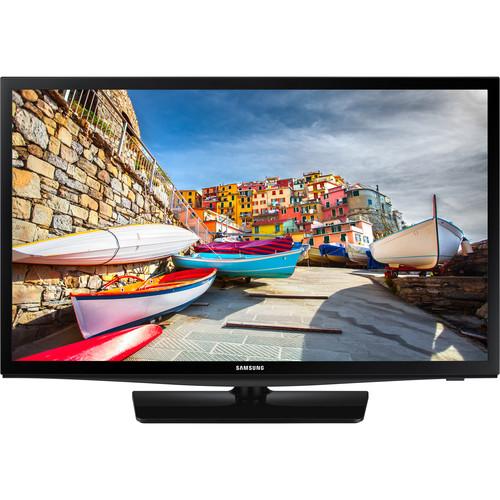 Contents of the user manual for the Samsung 470 Series 28" HD Hospitality
- Product category: Commercial Monitors Samsung
- Brand: Samsung
- Description and content of package
- Technical information and basic settings
- Frequently asked questions – FAQ
- Troubleshooting (does not switch on, does not respond, error message, what do I do if...)
- Authorized service for Samsung Commercial Monitors
|
User manual for the Samsung 470 Series 28" HD Hospitality contain basic instructions
that need to be followed during installation and operation.
Before starting your appliance, the user manual should be read through carefully.
Follow all the safety instructions and warnings, and be guided by the given recommendations.
User manual is an integral part of any Samsung product,
and if it is sold or transferred, they should be handed over jointly with the product.
Following the instructions for use is an essential prerequisite for protecting
health and property during use, as well as recognition of liability on the part of the manufacturer
for possible defects should you make a warranty claim. Download an official Samsung user manual in which you will find instructions on how to install, use, maintain and service your product.
And do not forget – unsuitable use of a Samsung product will considerably shorten its lifespan!
|
Product description The 28" black 470 Series HD Hospitality TV from Samsung features direct-lit LED technology that uses up to 50% less energy. Additionally, the TV features Samsung LYNK HD content decryption DRM and Samsung LYNK REACH 4.0 content management solution. Samsung's software-based DRM technology is integrated into the entire Samsung Hotel TV line. Samsung LYNK offers a robust solution to unlock premium HDTV content from content providers such as cable, satellite and VOD providers, with maximum efficiency and security. Samsung's LYNK REACH 4.0 fuses the benefits of its SINC and REACH hospitality technologies to offer a comprehensive content management solution. As a unified content management solution, LYNK REACH 4.0 accommodates LAN, Wi-Fi, and coaxial infrastructures to amplify hotel management, monitoring and guest service functions. Transferred by proprietary management server (PMS) and customized templates, hospitality users can create and deliver personalized service for a more memorable experience. This includes access to a range of IP channels and RF channels, applications and services mirroring. - Hospitality Features
-
- LYNK REACH 4.0 enables two-way communication between hotel management and guests
- Remote control capability for in-room display ensures quality service delivery in real-time without in-room labor and maintenance
- Auto-detect channel while in hotel mode
- Guest master channel listing of program content displays content in analog or HD
- RJ-12/IR pass-through lets you connect interactive STB set-top box or SBD back box (not included)
- USB cloning lets you quickly and easily copy the settings of one of the television to other televisions
- Display hotel logo bitmap files as a greeting startup display
- Hotelier can enable front panel and menu display lock-outs
- Power on status setting provides three power modes; stay on always, last option, or standby
- Multi-code remote eliminates interference when two or more TVs are used in close proximity
- Set TV turn-off time in 30-minute intervals up to 180 minutes
- Supports closed captioning that provides text display of all audio content, including spoken dialog and non-speech information such as the identity of the speakers and symbols for sound effects and music
- Picture-in-picture displays one program while another is being displayed on the full TV screen at the same time
- Clock on timer and alarm key allows the guest to program the TV to turn on as a wake-up alarm
- English, French, and Spanish OSD languages
- Battery door is secured, helping to always keep batteries in the remote controller
- Plug-and-play
- Picture Quality and Audio Features
-
- During initial product setup, auto volume limiter lets you lock the minimum and maximum volume levels to help minimize disturbance to other hotel guests
- When input is given via HDMI, PC, AV, or component, the Music mode allows audio feedback when picture is muted
- Music mode backlight on/off for toggling the background display
- Swivel stand includes integrated mounting plate and bolt down kit
- Samsung hospitality displays enable soundbar compatibility by supporting HDMI-CEC
- When you connect the soundbar to the Samsung hospitality display with an HDMI cable, the TV audio settings and menu lock feature are automatically applied
- With one single remote, guests can control both the TV and soundbar simultaneously
- Connections
-
- Samsung Anynet+ (HDMI – CEC) protocol allows the user to control other HDMI devices, such as DVD and soundbars, connected to the TV display
- ConnectShare (USB 2.0) lets you connect a thumb drive or digital camera quickly and easily
- ConnectShare's user-friendly interface allows access to videos, a music playlist, and pictures via the remote
- Remote Jack Panel (RJP) compatible
- Other Features
-
- Equipped with HyperReal picture engine and wide color enhancer (Plus)
- Integrated Home Menu 2015
- Supports film mode, Dolby Digital Plus, voice guiding, and Digital Clean View
- Supports EPG (Electronic Programme Guide) and game mode
- Supports mixed channel listing (ATSC, DVB-T/T2/C/S2, Analog)
- Clock backup power supply and software clock
- Smoovie compatible
- Supports Energy Saving mode (BLU Control) for reducing the power consumption
UPC: 887276159836 In the Box Samsung 470 Series 28" HD Hospitality TV (Black) Remote Control with Batteries VESA Wall Mount Support Power Cable Data Cable Stand Mount Kit with Security Screws Limited 2-Year Warranty More info from Samsung Table of Contents
|
Upload User Manual
Have you got an user manual for the Samsung 470 Series 28" HD Hospitality TV in electronic form? Please send it to us and help us expand our library of instruction manuals.
Thank you, too, on behalf of other users.
To upload the product manual, we first need to check and make sure you are not a robot. After that, your "Submit Link" or "Upload File" will appear.
Technical parametersSamsung HG28NE470AFXZA Specs | | | Screen Size (Diagonal) | 28" | | Native Resolution | 1366 x 768 | | Backlighting Technology | LED | | | | Input Ports | 1 x HDMI – Audio, Video (Side)
1 x HDMI – Audio, Video (Rear)
1 x RCA Composite – Audio, Video (Side)
1 x RF Antenna – Audio, Video (Rear) | | Output Ports | 2 x 1/8" / 3.5 mm – Audio (Rear) | | USB Ports | 1 x USB (Version Unspecified) Type-A (Side) | | Other I/O | 1 x RS-232C
1 x RJ12 (Rear)
1 x RJP (Rear) | | Wi-Fi | Wi-Fi Ready | | | | TV Tuner | Yes - ATSC, Clear QAM | | Display Orientation | Landscape | | | | Built-In Speakers | Yes, 2 x 5 W | | Speaker Configuration | 2-Channel | | Processing | Dolby Digital Plus, DTS | | External Speaker Output | 2 x 5 W | | | | AC Input Power | 110 VAC, 60 Hz | | | | Wall Mounting | 100 x 100mm | | Dimensions | 25.0 x 15.6 x 2.5" / 64.3 x 39.7 x 6.3 cm (without Stand)
25.0 x 17.1 x 6.4" / 64.3 x 43.5 x 16.3 cm (with Stand) | | Weight | 8.4 lb / 3.8 kg (without Stand)
9.3 lb / 4.2 kg (with Stand) | | | | Package Weight | 12.15 lb | | Box Dimensions (LxWxH) | 32.3 x 18.3 x 4.3" |
Rating100% users recommend this product to others. And what about you?

This product has already been rated by 74 owners. Add your rating and experience with the product.
Discussion
 Ask our technicians if you have a problem with your settings,
or if anything is unclear in the user manual you have downloaded.
You can make use of our moderated discussion.
The discussion is public and helps other users of our website who may be encountering similar problems.
Ask our technicians if you have a problem with your settings,
or if anything is unclear in the user manual you have downloaded.
You can make use of our moderated discussion.
The discussion is public and helps other users of our website who may be encountering similar problems.
The discussion is empty - enter the first post
Post a new topic / query / comment:
|
|
|
| Request for user manual |
You can’t find the operation manual you are looking for? Let us know and we will try to add the missing manual:
I’m looking for a manual / Request for manual
Current requests for instruction manuals:
Call Of Duty World War Two For Xbox...
controller stratus XL...
stratus XL...
smart whatch serie S11 42mm...
Allen & Heath SQ-6 manual...
|
| Discussion |
Latest contributions to the discussion:
AEW R 4100
Name: MAURICIO ANGARITA
Audio-Technica AEW-R4100 UHF Diversity Receiver for
AEW R 4100 has the mute function blocked and does not allow audio to pass. I tried several times to turn off the mute from the transmitter but it does nothing, the mute stays on. Solution?
Thank you...
Instructions for assembling the 2015 Forecast Image Master Consoles GC3-A
Name: mike elam
Forecast Consoles GC3-A ImageMaster Editing Console
Looking for instructions for assembling this console. ...
EMPTY TONER ERROR MESSAGE AFTER REPLACING TONER
Name: LINDA BAD YELLOW EYES
Brother TN223BK Standard-Yield Toner
I HAD TO CHANGE OUT ALL THREE TONERS DUE TO LEAKS IN THE YELLOW AND CYAN. AFTER I REPLACED THEM, THE MACHINE KEEPS GIVING ME AN EMPTY TONER ERROR MESSAGE. HELP!!...
PS480D 20/24 pin Switching 480W Power Supply
Name: swkargo
Logisys 480W Power Supply
This item states in can run -5vdc .It is NOT listed on the board or I beleive is r4 is missing the resitior. Any body have thid issue. Shawn
...
Help needed
Name: Ann Carter
SanDisk 1TB Extreme Portable USB 3.1
When I click the link to download the user manual for my Sandisk Extreme external hard drive, it gives me the manual for the LG Cricket. Can you please change the link so I can download the Sandisk manual and begin using this drive? Thank you....
|
|


