|
User Manual for Sapphire FirePro W9000 Workstation Graphics Card Click to enlarge the picture
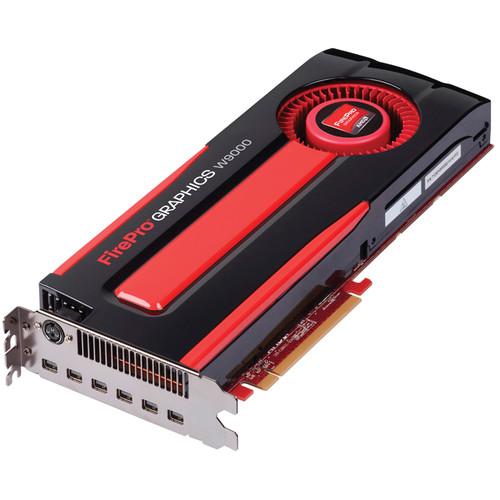 Contents of the user manual for the Sapphire FirePro W9000 Workstation Graphics Card
- Product category: Graphic Display Cards Sapphire
- Brand: Sapphire
- Description and content of package
- Technical information and basic settings
- Frequently asked questions – FAQ
- Troubleshooting (does not switch on, does not respond, error message, what do I do if...)
- Authorized service for Sapphire Graphic Display Cards
|
User manual for the Sapphire FirePro W9000 Workstation Graphics Card contain basic instructions
that need to be followed during installation and operation.
Before starting your appliance, the user manual should be read through carefully.
Follow all the safety instructions and warnings, and be guided by the given recommendations.
User manual is an integral part of any Sapphire product,
and if it is sold or transferred, they should be handed over jointly with the product.
Following the instructions for use is an essential prerequisite for protecting
health and property during use, as well as recognition of liability on the part of the manufacturer
for possible defects should you make a warranty claim. Download an official Sapphire user manual in which you will find instructions on how to install, use, maintain and service your product.
And do not forget – unsuitable use of a Sapphire product will considerably shorten its lifespan!
|
Product description The FirePro W9000 Workstation Graphics Card from Sapphire is designed for use in applications that demand high-performance dedicated graphics processing power. Although this can card can drive up to six displays at DCI 4K (4096 x 2160) resolution, it is capable of much more than just rendering display graphics. The parallel processing power locked up in the GPU can be leveraged for a wide range of computationally intensive tasks, including transcoding video, rendering 3D objects and environments for CAD, analysis of complex data sets, and more. The card features a 975 MHz GPU clock speed, and has 6GB of GDDR5 RAM over a 384-bit memory interface - providing a memory bandwidth of up to 264 GB/s.
Six mini DisplayPort outputs allow you to connect the card to a variety of display types, including computer monitors, HDTV TVs, digital signage displays, projectors, and many 4K and 3D devices. Two mini DisplayPort to DVI adapters are included. Additionally, the outputs can be adapted to standard DisplayPort and HDMI using separately available adapters or cables. Using DisplayPort 1.2-compliant displays the card supports a maximum resolution of 4096 x 2160 and with DisplayPort 1.1 displays, 2560 x 1600. There is a stereo connector to trigger left/right eye alterations in select active 3D systems. - Popular API Support
- DirectX 11, OpenCL 1.2, OpenGL 4.2 and Shader Model 5.0 support allows GPU-aware applications to benefit from the acceleration provided by a dedicated graphics card, taking much of the workload off the server's CPU
- 4.0 TFLOPS Performance
- This card is capable of processing up to 4.0 trillion single-precision floating point operations per second as well as 1.0 trillion double-precision floating point operations per second
- AMD Eyefinity Technology
- This card supports up to six displays connected concurrently. Eyefinity helps you manage multi-display setups, providing flexible configuration options beyond what the operating system offers for applications as diverse as video walls to immersive viewing
- GeometryBoost
- Allows the GPU to process geometry data at a rate of twice per clock cycle resulting in a doubling in the rate of primitive and vertex processing. Triangle rates increase two-fold relative to a GPU that does not possess GeometryBoost
- Partially Resident Textures (PRT)
- PRT can utilize texture files up to 32 terabytes large typically with minimal performance impact. PRT accomplishes this by streaming small bits of these massive textures into the GPU as needed, giving compatible applications a virtually endless supply of unique texture data
- AMD Power Tune
- Dynamically boosts the core clock speed up to 30% wherever possible to allow applications to maximize the processing power they have available while reducing it when not required to conserve energy
- Unified Driver
- A unified driver across the entire FirePro line simplifies IT maintenance and administration
- AMD Graphics Core Next (GCN) Architecture
- Features a 28nm core architecture designed to increase efficiency by putting more transistors in less space. In addition, the architecture is engineered to be capable of performing many of the processing tasks that previously could only be handled by a computer's CPU
- DirectGMA Support
- Enables low latency peer to peer data transfers between devices on the bus and AMD FirePro GPUs. Devices supporting DirectGMA can write directly into the local memory of the GPU and vice versa - the GPU can directly access the memory of a peer device
- D.O.P.P.
- By enabling application access to the frame buffer before content reaches the display engine, ISVs are granted the ability to create new GPU-based solutions
- AutoDetect Technology
- As a user moves between applications, or opens new ones, the graphics driver settings are automatically configured for maximum performance
- Full 30-Bit Display Pipeline
- When connected to 30-bit displays, enables four times more color values than 24-bit devices for more accurate color reproduction and superior visual fidelity
- HydraVision
- Use HydraVision to manage desktop displays and workspaces in multi-display environments:
- Explicitly set the behavior of pop-up windows and dialogs in different applications though Desktop Manager
- Provide multiple layers of the desktop workspace through Multi Desktop
- Restrict application window placement across multiple desktops through HydraGrid
- AMD ZeroCore
- Give the card the ability to power down when any attached displays are off - also known as the "long idle state"
- Framelock/Genlock
- Genlock facilitates synchronization to external sources, such as a common house clock in a broadcast studio. Meanwhile Framelock synchronizes 3D rendering across multiple GPUs installed in different machines
- Video Codec Engine (VCE)
- A multi-stream hardware H.264 HD encoder, for significantly faster H.264 encoding than is generally possible when relying on the CPU
- ECC Memory Support
- Designed to help ensure the accuracy of computations by correcting single or double bit errors caused by naturally occurring background radiation
- PCI Express 3.0 x16 Support
- Provides twice the bandwidth of PCI Express 2.0; for example, an x8 PCI Express 3.0 slot has the same bandwidth as a x16 PCI 2.0 slot. In addition, the card remains backward-compatible with motherboards using earlier generations of PCI Express
In the Box Sapphire FirePro W9000 Workstation Graphics Card - 2 x Active Mini DisplayPort to DVI Adapter
- AMD CrossFire Pro Connector
- Limited 3-Year Warranty
Brochure PDF 1.4mbyxvaaayyvx Table of Contents
|
Upload User Manual
Have you got an user manual for the Sapphire FirePro W9000 Workstation Graphics Card in electronic form? Please send it to us and help us expand our library of instruction manuals.
Thank you, too, on behalf of other users.
To upload the product manual, we first need to check and make sure you are not a robot. After that, your "Submit Link" or "Upload File" will appear.
Technical parametersSapphire W9000 Specs | | | GPU | FirePro W9000 | | GPU Clock | 975 MHz | | Memory | 6 GB | | Memory Type | GDDR5 | | Memory Interface | 384-bit | | Memory Bandwidth | 264 GB/s | | Error Correction (ECC) | Yes | | Compute Performance | Single Precision: 4 TFLOPS peak
Double Precision: 1 TFLOPS peak | | | | Outputs | 6 x Mini DisplayPort
1 x 3D stereo connector | | Maximum Resolution | DisplayPort 1.2: 4096 x 2160
DisplayPort 1.1: 2560 x 1600 | | Host Interface | PCI-E 3.0 x16 | | | | Hardware | 1 x Free PCI-E x16 expansion slot - use PCI-E 3.0 x16 for best performance
2 x PCI-E slots physical
1 x 8-pin PCI-E power connector
1 x 6-pin PCI-E power connector
2 GB or more system memory
Internet connection for driver installation | | Software | Windows (32- and 64-bit): 8, 7, Vista, XP
Linux (32- and 64-bit): Support varies depending on distribution | | | | Supported APIs | DirectX 11.1, OpenGL 4.3, OpenCL 1.2 | | Thermal Solution | Active fansink | | Power Consumption | Maximum 274 W | | Form Factor | Dual-slot; full height, full length | | Dimensions | Not specified by manufacturer | | Weight | Not specified by manufacturer |
Rating70% users recommend this product to others. And what about you?

This product has already been rated by 98 owners. Add your rating and experience with the product.
Discussion
 Ask our technicians if you have a problem with your settings,
or if anything is unclear in the user manual you have downloaded.
You can make use of our moderated discussion.
The discussion is public and helps other users of our website who may be encountering similar problems.
Ask our technicians if you have a problem with your settings,
or if anything is unclear in the user manual you have downloaded.
You can make use of our moderated discussion.
The discussion is public and helps other users of our website who may be encountering similar problems.
The discussion is empty - enter the first post
Post a new topic / query / comment:
|
|
|
| Request for user manual |
You can’t find the operation manual you are looking for? Let us know and we will try to add the missing manual:
I’m looking for a manual / Request for manual
Current requests for instruction manuals:
Call Of Duty World War Two For Xbox...
controller stratus XL...
stratus XL...
smart whatch serie S11 42mm...
Allen & Heath SQ-6 manual...
|
| Discussion |
Latest contributions to the discussion:
AEW R 4100
Name: MAURICIO ANGARITA
Audio-Technica AEW-R4100 UHF Diversity Receiver for
AEW R 4100 has the mute function blocked and does not allow audio to pass. I tried several times to turn off the mute from the transmitter but it does nothing, the mute stays on. Solution?
Thank you...
Instructions for assembling the 2015 Forecast Image Master Consoles GC3-A
Name: mike elam
Forecast Consoles GC3-A ImageMaster Editing Console
Looking for instructions for assembling this console. ...
EMPTY TONER ERROR MESSAGE AFTER REPLACING TONER
Name: LINDA BAD YELLOW EYES
Brother TN223BK Standard-Yield Toner
I HAD TO CHANGE OUT ALL THREE TONERS DUE TO LEAKS IN THE YELLOW AND CYAN. AFTER I REPLACED THEM, THE MACHINE KEEPS GIVING ME AN EMPTY TONER ERROR MESSAGE. HELP!!...
PS480D 20/24 pin Switching 480W Power Supply
Name: swkargo
Logisys 480W Power Supply
This item states in can run -5vdc .It is NOT listed on the board or I beleive is r4 is missing the resitior. Any body have thid issue. Shawn
...
Help needed
Name: Ann Carter
SanDisk 1TB Extreme Portable USB 3.1
When I click the link to download the user manual for my Sandisk Extreme external hard drive, it gives me the manual for the LG Cricket. Can you please change the link so I can download the Sandisk manual and begin using this drive? Thank you....
|
|


